
day06-Spring管理Bean-IOC-04
Spring管理Bean-IOC-04
3.基于注解配置bean
3.1基本使用
3.1.1说明
基本说明:基于注解的方式配置bean,主要是项目开发中的组件,比如Controller,Service和Dao
组件的注解形式有:
@Component表示当前注解标识的是一个组件@Controller表示当前注解标识的是一个控制器,通常用于Servlet@Service表示当前注解标识的是一个处理业务逻辑的类,通常用于Service类@Repository表示当前注解标识的是一个持久化层的类,通常用于Dao类
3.1.2快速入门
应用案例:使用注解的方式来配置Controller /Service/ Repository/ Component
代码实现:
1.使用注解方式,需要引入spring-aop.jar包,该jar包位于spring/lib下
2.创建 UserAction.java、UserService.java、UserDao.java、MyComponent.java
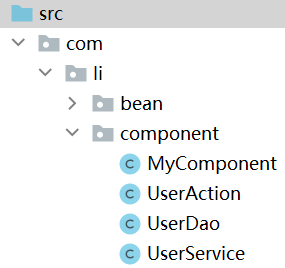
UserDao:
package com.li.component;

import org.springframework.stereotype.Repository;

/**

 * @author 李

 * @version 1.0

 * 使用 @Repository 表示该类是一个Repository,一个持久化层的类/对象

 */

@Repository

public class UserDao {

}
UserService:
package com.li.component;

import org.springframework.stereotype.Service;

/**

 * @author 李

 * @version 1.0

 * @Service 标识该类是一个Service类/对象

 */

@Service

public class UserService {

}
UserAction:
package com.li.component;

import org.springframework.stereotype.Controller;

/**

 * @author 李

 * @version 1.0

 * @Controller 标识该类是一个控制器Controller,通常该类是一个Servlet

 */

@Controller

public class UserAction {

}
MyComponent:
package com.li.component;

import org.springframework.stereotype.Component;

/**

 * @author 李

 * @version 1.0

 * @Component 用于标识该类是一个组件,是一个通用的注解

 */

@Component

public class MyComponent {

}
上面我们在类中添加了注解,但是还没有在配置文件中指定容器要扫描哪个包下的注解类
3.配置beans04.xml:
<!--配置容器要扫描的包:

    1.component-scan 表示对指定的包下的类进行扫描,并创建对象到容器

    2.base-package 指定要扫描的包

    3.下面整个配置的含义是:当spring容器创建/初始化时,会扫描 com.li.component 包下

      的所有含有四种注解(Controller/Service/Repository/Component)的类,

      并将其实例化,生成对象,放入到ioc容器

-->

<context:component-scan base-package="com.li.component"/>
注意引入context命名空间
4.测试
//通过注解来配置Bean

@Test

public void setBeanByAnnotation() {

    ApplicationContext ioc = new ClassPathXmlApplicationContext("beans04.xml");

    System.out.println("ok");

}
在 System.out.println("ok");旁打上断点,点击debug。
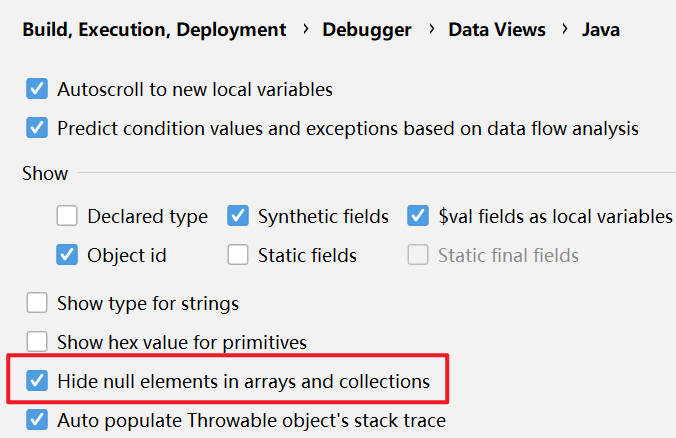
查看ioc对象-->beanFactory-->singletoObjects-->table的属性。因为table属性有很多null值,为了显示方便,这里配置了IDEA不显示null值
如下,spring容器中成功创建了四个对象,并且在默认情况下,按照注解方式进行扫描创建的对象,它对应的id就是它的类名(首字母小写)
其他的对象是系统自带的
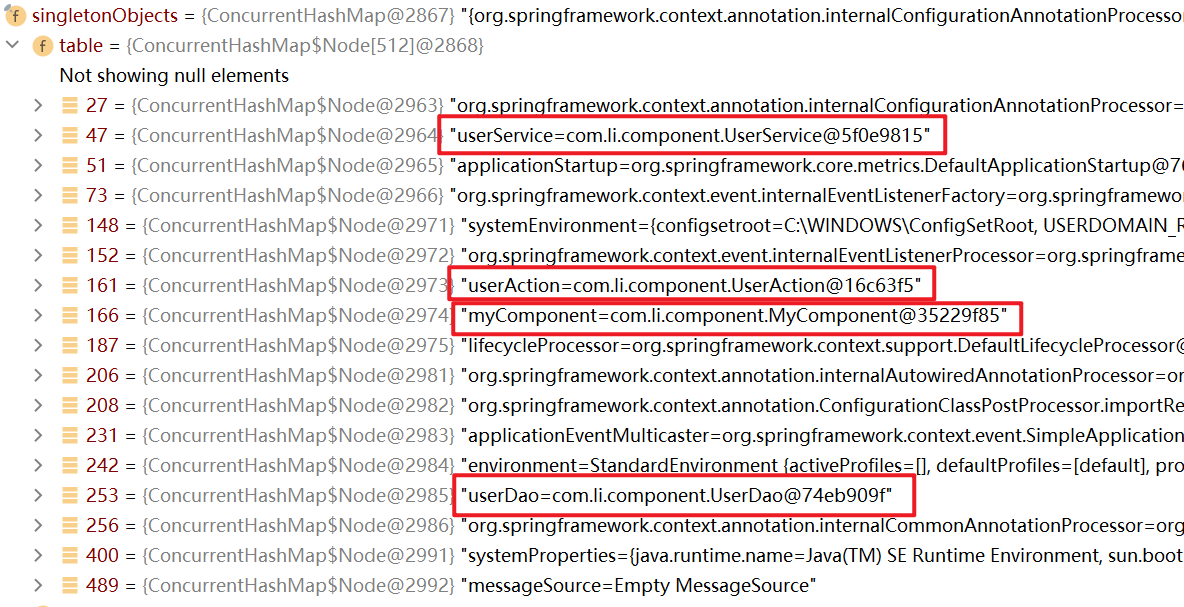
查看类型id(key)

因为配置的这四个对象是单例对象,因此可以直接通过类的类型来获取:
因为spring在创建时赋予了默认id,也可以通过id来获取
//通过注解来配置Bean

@Test

public void setBeanByAnnotation() {

    ApplicationContext ioc = new ClassPathXmlApplicationContext("beans04.xml");

    UserDao userDao = ioc.getBean(UserDao.class);

    UserService userService = ioc.getBean(UserService.class);

    UserAction userAction = ioc.getBean(UserAction.class);

    MyComponent myComponent = ioc.getBean(MyComponent.class);

    System.out.println("userDao=" + userDao);

    System.out.println("userService=" + userService);

    System.out.println("userAction=" + userAction);

    System.out.println("myComponent=" + myComponent);

    System.out.println("ok");

}
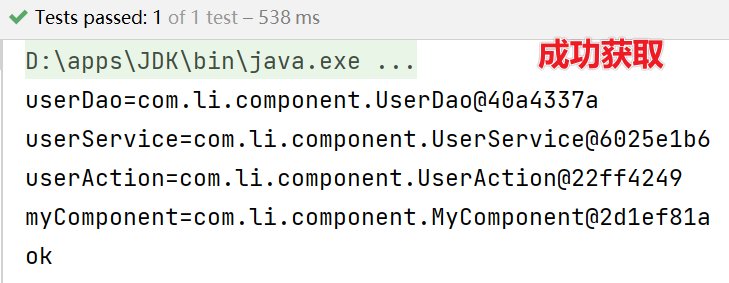
3.1.3注意事项和细节
基于注解配置bean,需要导入spring-aop.jar包
必须在Spring配置文件中指定“自动扫描的包”,IOC容器才能够检测到当前项目中哪些类被标识了注解
(1)在配置时注意导入context名称空间
(2)指定扫描的包时,可以使用通配符,如:
com.li.component.*表示扫描com.li.component包下的类, 包括com.li.component包下的子包(递归扫描)Spring的IOC容器不能检测一个使用了@Controller注解的类到底是不是一个真正的控制器。注解的名称只是用于程序员自己识别当前标识的是什么组件。其他的注解@Service、@Reposity 也是一样。
也就是说,Spring的容器只要检测到注解就会生成对象,但是这个注解的含义spring不会识别,只是给程序员方便区分的
如果你只在spring容器上用,@Controller、@Service、@Reposity基本是等价的;如果你用在springmvc上面,它们是有区别的:彻底弄懂@Controller 、@Service、@Component
配置只扫描满足要求的类:
如下面的resource-pattern="User*.class",表示扫描指定包下以User开头的类
<context:component-scan base-package="com.li.component"

                        resource-pattern="User*.class" />
一般来说,想要扫描某个类只需要写上注解,不想扫描的类就不会写注解,因此上面这种写法不常使用
配置排除扫描的类:
如果我们希望排除某个包/子包下的某种类型的注解,可以通过exclude-filter来指定
(1)context:exclude-filter 指定要排除哪些类
(2)type 指定排除方式(annotation 表示通过注解来排除)
(3)expression 指定要排除的注解的全路径
下面的配置表示,在扫描com.li.component包下注解的类时,排除以@Service注解的类
<context:component-scan base-package="com.li.component" >

<!-- 排除哪些类, 以 annotaion注解为例(通过注解来排除) -->

<context:exclude-filter type="annotation" expression="org.springframework.stereotype.Service"/>

</context>
自定义规则指定扫描哪些注解类:
<!--如果我们希望通过自己的规则,来扫描包/子包下的某些注解类,可以通过include-filter

    1. use-default-filters="false": 表示不使用默认的过滤/扫描机制

    2. context:include-filter: 表示只是扫描指定的注解的类

    3. type="annotation" 表示按照注解方式来扫描

    4. expression="org.springframework.stereotype.Controller" 指定要扫描的注解的全类路径

 -->

<context:component-scan base-package="com.li.component" use-default-filters="false">

    <context:include-filter type="annotation" expression="org.springframework.stereotype.Service"/>

    <context:include-filter type="annotation" expression="org.springframework.stereotype.Controller"/>

</context:component-scan>
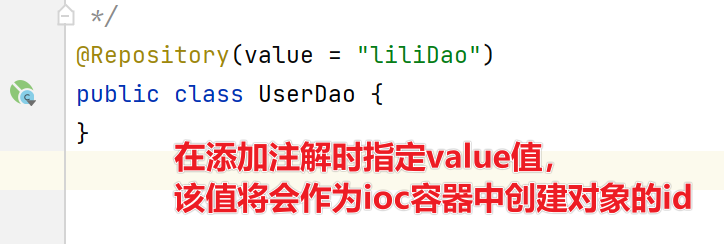
在默认情况下,注解标识的类创建对象后,在容器中它默认对应的id就是它的类名(首字母小写)
也可以使用注解的value属性指定 id 值,并且 value 可以省略:

3.2手动开发-简单的Spring基于注解配置的程序
3.2.1需求说明
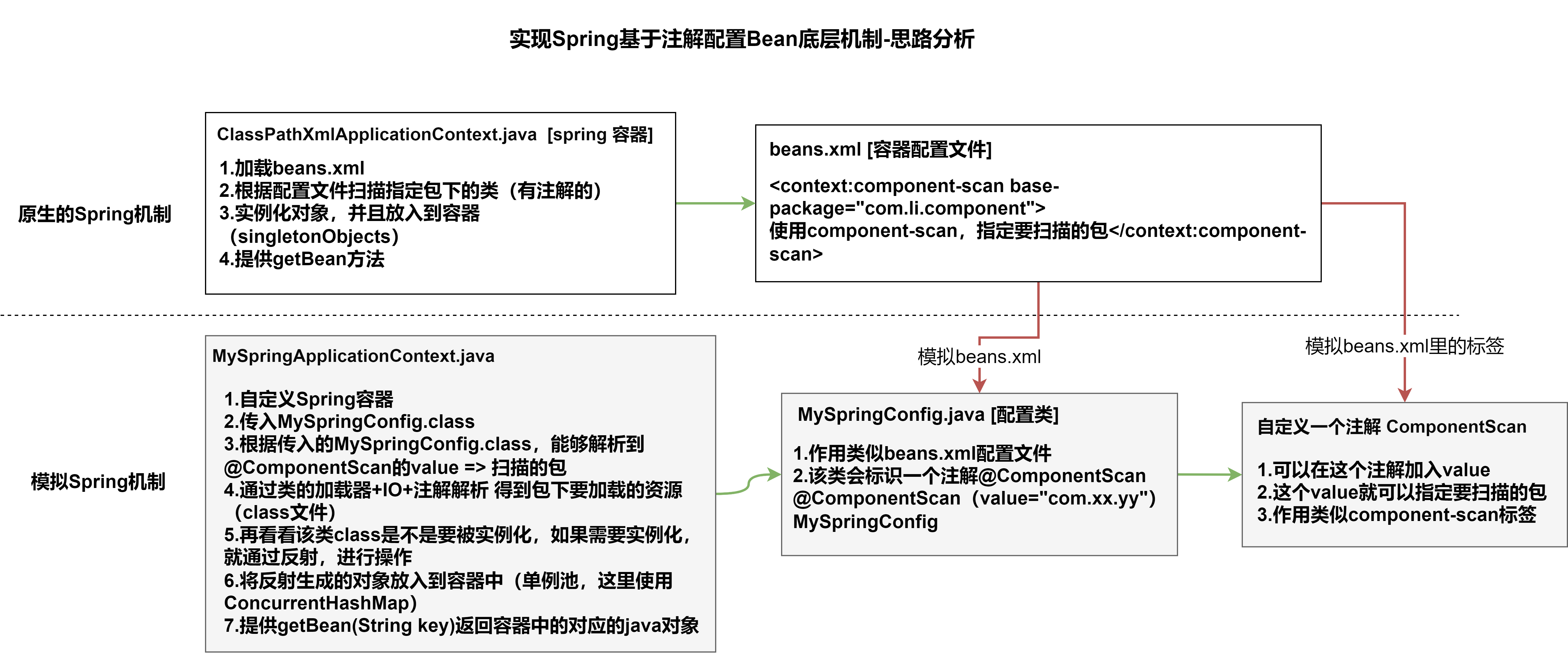
自己写一个简单的Spring容器,通过读取类的注解(@Component、@Controller、@Service、@Repository),将对象注入到IOC容器。即不使用Spring原生框架,我们自己使用IO+Annotation+反射+集合实现,加深对Spring注解方式开发的理解。
3.2.2思路分析
3.2.3代码实现
步骤一.搭建基本结构并获取扫描包
1.ComponentScan注解
package com.li.annotation;

import java.lang.annotation.ElementType;

import java.lang.annotation.Retention;

import java.lang.annotation.RetentionPolicy;

import java.lang.annotation.Target;

/**

 * @author 李

 * @version 1.0

 * 模仿spring原生注解,自定义一个注解

 * 1. @Target(ElementType.TYPE) 指定ComponentScan注解可以修饰TYPE元素

 * 2. @Retention(RetentionPolicy.RUNTIME) 指定ComponentScan注解 的保留范围

 * 3. String value() default "";  表示 ComponentScan 可以传入一个value值

 */

@Target(ElementType.TYPE)

@Retention(RetentionPolicy.RUNTIME)

public @interface ComponentScan {

    String value() default "";

}
2.MySpringConfig配置类
package com.li.annotation;

/**

 * @author 李

 * @version 1.0

 * 这是一个配置类,作用类似我们原生spring的容器配置文件beans.xml

 */

@ComponentScan(value = "com.li.component")

public class MySpringConfig {

}
未完。。。
day06-Spring管理Bean-IOC-04的更多相关文章
- (转)编码剖析Spring管理Bean的原理
http://blog.csdn.net/yerenyuan_pku/article/details/52832434 在Spring的第一个案例中,我们已经知道了怎么将bean交给Spring容器进 ...
- 采用Spring管理Bean和依赖注入
1. 实例化spring容器和从容器获取Bean对象 实例化Spring容器常用的两种方式: 方法一: 在类路径下寻找配置文件来实例化容器 [推荐使用] ApplicationContext ctx ...
- Spring管理bean的生命周期
1: bean的创建: 如果我们默认的scope配置为Singleton的话, bean的创建实在Spring容器创建的时候创建: 如果scope的配置为Prototype的话,bena的创建是在 ...
- Spring、编码剖析Spring管理Bean的原理
引入dom4j jar包 1.新建Person接口和PersonBean public interface PersonIService { public void helloSpring(); } ...
- Spring第三弹—–编码剖析Spring管理Bean的原理
先附一下编写的Spring容器的执行结果: 代码如下: 模拟的Spring容器类: 1 2 3 4 5 6 7 8 9 10 11 12 13 14 15 16 17 18 19 20 21 22 ...
- Spring——管理Bean的生命周期
我们可以自定义bean的初始化和销毁方法,这里所指的的初始化和bean的构造不同,初始化是在bean构造完成后,对bean内部的属性或一些逻辑进行初始化. 首先要弄清一些概念: 构造(对象创建) 单实 ...
- 编码剖析Spring管理bean的原理
project目录 MyClassPathXMLApplicationContext读取xml,以及实例化bean. 因为是一开始实例化配置文件所有bean,所以需要构造器完成这些工作. packag ...
- Spring管理Bean的三种创建方式
1.使用类构造器实例化 (90%以上都是使用这种) <bean id=“orderService" class="cn.itcast.OrderServiceBean&qu ...
- 简单模拟Spring管理Bean对象
1: 首先我们要利用dom4j进行xml的解析,将所有的bean的配置读取出来. 2:利用java的反射机制进行对象的实例化. 3: 直接获得对象 package cn.Junit.test; imp ...
- spring 管理bean
目录结构: Person.java package com.wss.entity; import com.wss.service.doHomeWork; public class Person { p ...
随机推荐
- LcdToos设置“自动播放”和“上电自动开机”的作用
"自动播放"功能,常用于屏演示或者老化功能,使能后,按开关点亮屏,PX01会自动按"画面定制"栏中进行自动顺序播放:开启方法如下: 打开相应的点屏工程,在&qu ...
- 7.Gitee导入其他远程托管中心仓库
的码云是开源中国推出的基于Git的代码托管服务中心 网址是https://gitee.com/,使用方式跟github一致,并且是一个中文网站 码云的使用配置方式与github一致,码云支持导入git ...
- 第一阶段:linux运维基础·2
1. 找到当前目录下所有的.txt文件,且将查询结果写入到allfile.txt中 find . -type f -name '*.txt' > allfile.txt 2. 解读如下语句 -r ...
- SpringBoot报错: No identifier specified for entity: XXX.XXX.XXX.XXX
今天练习的时候报错说是 : 没有为实体指定标识符 仔细看了实体类才发现忘记写了一些注解 用JPA写实体类时一些注解是必须的 @entity 标名本类是实体类 @table(name="表名 ...
- 《HelloGitHub》第 79 期
兴趣是最好的老师,HelloGitHub 让你对编程感兴趣! 简介 HelloGitHub 分享 GitHub 上有趣.入门级的开源项目. https://github.com/521xueweiha ...
- 如何在bat中进入虚拟环境
很多情况下我们希望在项目中建立一个build.bat用于项目的自动构建,避免每次构建时都需要手动在控制台中输入命令. 例如对于 pyinstall 的项目,只需要如下的实现: pyinstaller ...
- springboot的全局异常处理类
import lombok.extern.slf4j.Slf4j; import org.slf4j.Logger; import org.slf4j.LoggerFactory; import or ...
- Hashcat使用指南
Hashcat使用指南 免责声明: 0×01 Hashcat破解linux shadow的密码-首先了解shadow文件到底是什么? 0×02 hashcat的使用 参数补充: -m 参数 -a 参数 ...
- 图文并茂解释开源许可证GPL、BSD、MIT、Mozilla、Apache和LGPL的区别
世界上的开源许可证(Open Source License)大概有上百种,而我们常用的开源软件协议大致有GPL.BSD.MIT.Mozilla.Apache和LGPL. 从下图中可以看出几种开源软件协 ...
- i春秋Zone
打开网页是个简单的表单填写, 尝试注入....没用 查看源码,没找到什么有用的信息 只有抓包了 发现一个cookie的login值为0,改为1试试 没什么特别的回显,但这应该就是登录与否的判定了,所以 ...