
2023-03-10:YUV420P像素数据编码为JPEG图片,请用go语言实现。
2023-03-10:YUV420P像素数据编码为JPEG图片,请用go语言实现。
答案2023-03-10:
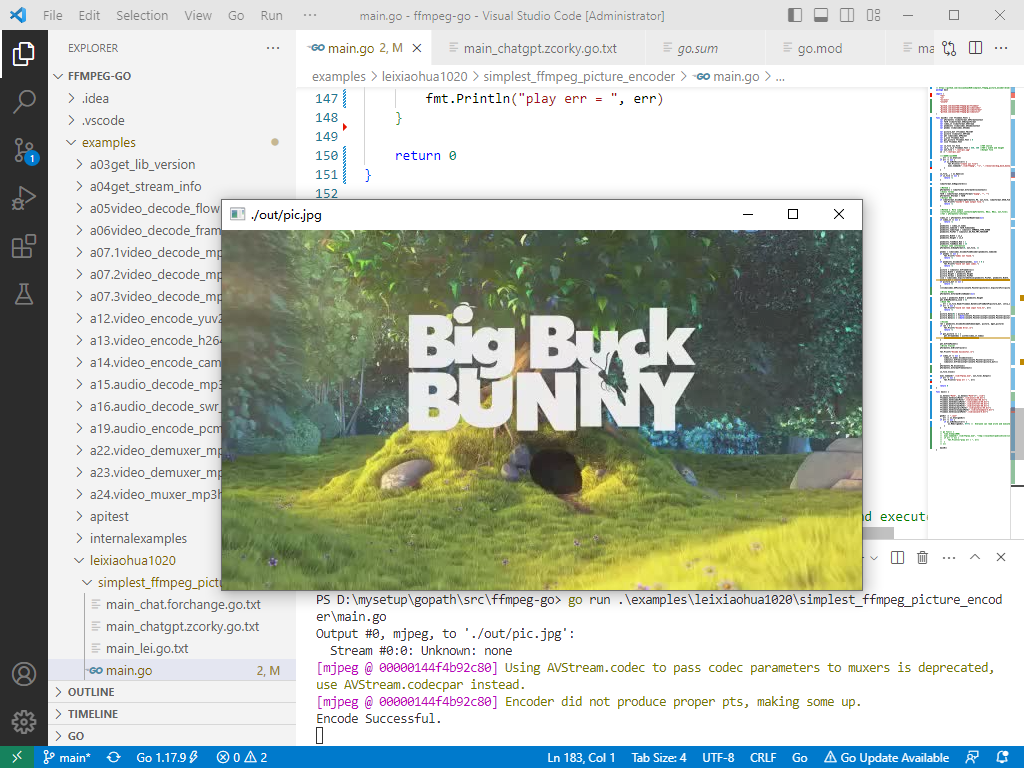
方法一、使用 github.com/moonfdd/ffmpeg-go 库,基于雷霄骅的代码修改。
方法二、使用golang官方库image/jpeg,yuv420p先转换成rgb,再转换成jpeg。代码是用山寨版的chatgpt生成。
go run ./examples/leixiaohua1020/simplest_ffmpeg_picture_encoder/main.go
方法一,参考了雷霄骅的图像编码器,代码用golang编写。代码如下:
// https://github.com/leixiaohua1020/simplest_ffmpeg_picture_encoder/blob/master/simplest_ffmpeg_picture_encoder/simplest_ffmpeg_picture_encoder.cpp

package main

import (

	"fmt"

	"os"

	"os/exec"

	"unsafe"

	"github.com/moonfdd/ffmpeg-go/ffcommon"

	"github.com/moonfdd/ffmpeg-go/libavcodec"

	"github.com/moonfdd/ffmpeg-go/libavformat"

	"github.com/moonfdd/ffmpeg-go/libavutil"

)

func main0() (ret ffcommon.FInt) {

	var pFormatCtx *libavformat.AVFormatContext

	var fmt0 *libavformat.AVOutputFormat

	var video_st *libavformat.AVStream

	var pCodecCtx *libavcodec.AVCodecContext

	var pCodec *libavcodec.AVCodec

	var picture_buf *ffcommon.FUint8T

	var picture *libavutil.AVFrame

	var pkt libavcodec.AVPacket

	var y_size ffcommon.FInt

	var got_picture ffcommon.FInt = 0

	var size ffcommon.FInt

	var in_file *os.File                    //YUV source

	var in_w, in_h ffcommon.FInt = 640, 360 //YUV's width and height

	var out_file = "./out/pic.jpg"          //Output file

	in := "./out/pic.yuv"

	//是否存在yuv文件

	_, err := os.Stat(in)

	if err != nil {

		if os.IsNotExist(err) {

			fmt.Println("create yuv file")

			exec.Command("./lib/ffmpeg", "-i", "./resources/big_buck_bunny.mp4", "-pix_fmt", "yuv420p", in, "-y").CombinedOutput()

		}

	}

	in_file, _ = os.Open(in)

	if in_file == nil {

		return -1

	}

	libavformat.AvRegisterAll()

	//Method 1

	pFormatCtx = libavformat.AvformatAllocContext()

	//Guess format

	fmt0 = libavformat.AvGuessFormat("mjpeg", "", "")

	pFormatCtx.Oformat = fmt0

	//Output URL

	if libavformat.AvioOpen(&pFormatCtx.Pb, out_file, libavformat.AVIO_FLAG_READ_WRITE) < 0 {

		fmt.Printf("Couldn't open output file.")

		return -1

	}

	//Method 2. More simple

	//avformat_alloc_output_context2(&pFormatCtx, NULL, NULL, out_file);

	//fmt = pFormatCtx->oformat;

	video_st = pFormatCtx.AvformatNewStream(nil)

	if video_st == nil {

		return -1

	}

	pCodecCtx = video_st.Codec

	pCodecCtx.CodecId = fmt0.VideoCodec

	pCodecCtx.CodecType = libavutil.AVMEDIA_TYPE_VIDEO

	pCodecCtx.PixFmt = libavutil.AV_PIX_FMT_YUVJ420P

	pCodecCtx.Width = in_w

	pCodecCtx.Height = in_h

	pCodecCtx.TimeBase.Num = 1

	pCodecCtx.TimeBase.Den = 25

	//Output some information

	pFormatCtx.AvDumpFormat(0, out_file, 1)

	pCodec = libavcodec.AvcodecFindEncoder(pCodecCtx.CodecId)

	if pCodec == nil {

		fmt.Printf("Codec not found.")

		return -1

	}

	if pCodecCtx.AvcodecOpen2(pCodec, nil) < 0 {

		fmt.Printf("Could not open codec.")

		return -1

	}

	picture = libavutil.AvFrameAlloc()

	picture.Width = pCodecCtx.Width

	picture.Height = pCodecCtx.Height

	picture.Format = pCodecCtx.PixFmt

	size = libavcodec.AvpictureGetSize(pCodecCtx.PixFmt, pCodecCtx.Width, pCodecCtx.Height)

	picture_buf = (*byte)(unsafe.Pointer(libavutil.AvMalloc(uint64(size))))

	if picture_buf == nil {

		return -1

	}

	((*libavcodec.AVPicture)(unsafe.Pointer(picture))).AvpictureFill(picture_buf, pCodecCtx.PixFmt, pCodecCtx.Width, pCodecCtx.Height)

	//Write Header

	pFormatCtx.AvformatWriteHeader(nil)

	y_size = pCodecCtx.Width * pCodecCtx.Height

	pkt.AvNewPacket(y_size * 3)

	//Read YUV

	_, err = in_file.Read(ffcommon.ByteSliceFromByteP(picture_buf, int(y_size*3/2)))

	if err != nil {

		fmt.Printf("Could not read input file.%s", err)

		return -1

	}

	picture.Data[0] = picture_buf                                                                         // Y

	picture.Data[1] = (*byte)(unsafe.Pointer(uintptr(unsafe.Pointer(picture_buf)) + uintptr(y_size)))     // U

	picture.Data[2] = (*byte)(unsafe.Pointer(uintptr(unsafe.Pointer(picture_buf)) + uintptr(y_size*5/4))) // V

	//Encode

	ret = pCodecCtx.AvcodecEncodeVideo2(&pkt, picture, &got_picture)

	if ret < 0 {

		fmt.Printf("Encode Error.\n")

		return -1

	}

	if got_picture == 1 {

		pkt.StreamIndex = uint32(video_st.Index)

		ret = pFormatCtx.AvWriteFrame(&pkt)

	}

	pkt.AvFreePacket()

	//Write Trailer

	pFormatCtx.AvWriteTrailer()

	fmt.Printf("Encode Successful.\n")

	if video_st != nil {

		video_st.Codec.AvcodecClose()

		libavutil.AvFree(uintptr(unsafe.Pointer(picture)))

		libavutil.AvFree(uintptr(unsafe.Pointer(picture_buf)))

	}

	pFormatCtx.Pb.AvioClose()

	pFormatCtx.AvformatFreeContext()

	in_file.Close()

	exec.Command("./lib/ffplay.exe", out_file).Output()

	if err != nil {

		fmt.Println("play err = ", err)

	}

	return 0

}

func main() {

	os.Setenv("Path", os.Getenv("Path")+";./lib")

	ffcommon.SetAvutilPath("./lib/avutil-56.dll")

	ffcommon.SetAvcodecPath("./lib/avcodec-58.dll")

	ffcommon.SetAvdevicePath("./lib/avdevice-58.dll")

	ffcommon.SetAvfilterPath("./lib/avfilter-56.dll")

	ffcommon.SetAvformatPath("./lib/avformat-58.dll")

	ffcommon.SetAvpostprocPath("./lib/postproc-55.dll")

	ffcommon.SetAvswresamplePath("./lib/swresample-3.dll")

	ffcommon.SetAvswscalePath("./lib/swscale-5.dll")

	genDir := "./out"

	_, err := os.Stat(genDir)

	if err != nil {

		if os.IsNotExist(err) {

			os.Mkdir(genDir, 0777) //  Everyone can read write and execute

		}

	}

	// go func() {

	// 	time.Sleep(1000)

	// 	exec.Command("./lib/ffplay.exe", "rtmp://localhost/publishlive/livestream").Output()

	// 	if err != nil {

	// 		fmt.Println("play err = ", err)

	// 	}

	// }()

	main0()

}
方法二,用第1个chatgpt生成golang代码:
// https://chat.forchange.cn/

// YUV420P像素数据编码为JPEG图片,请用go语言实现。

package main

import (

	"bufio"

	"fmt"

	"image"

	"image/color"

	"image/jpeg"

	"os"

)

func main() {

	// 将YUV420P像素数据读入内存

	yuvFile, err := os.Open("./out/pic.yuv")

	if err != nil {

		fmt.Println(err)

		return

	}

	defer yuvFile.Close()

	width := 640

	height := 360

	yuvData := make([]byte, width*height*3/2)

	yuvReader := bufio.NewReader(yuvFile)

	_, err = yuvReader.Read(yuvData)

	if err != nil {

		fmt.Println(err)

		return

	}

	// 将YUV420P像素数据转换为RGB格式的图像

	img := image.NewRGBA(image.Rect(0, 0, width, height))

	for y2 := 0; y2 < height; y2++ {

		for x := 0; x < width; x++ {

			// 从YUV420P像素数据中获取Y、U、V值

			yIndex := y2*width + x

			uIndex := width*height + (y2/2)*(width/2) + x/2

			vIndex := width*height*5/4 + (y2/2)*(width/2) + x/2

			y3 := float64(yuvData[yIndex])

			u := float64(yuvData[uIndex]) - 128.0

			v := float64(yuvData[vIndex]) - 128.0

			// 将YUV值转换为RGB值

			r := y3 + 1.402*v

			g := y3 - 0.344*u - 0.714*v

			b := y3 + 1.772*u

			// 将RGB值限制在0-255范围内

			r = limit(r, 0, 255)

			g = limit(g, 0, 255)

			b = limit(b, 0, 255)

			// 将RGB值保存到图像中

			img.Set(x, y2, color.RGBA{uint8(r), uint8(g), uint8(b), 255})

		}

	}

	// 将图像编码为JPEG图片并保存到文件中

	jpegFile, err := os.Create("./out/pic2.jpg")

	if err != nil {

		fmt.Println(err)

		return

	}

	defer jpegFile.Close()

	err = jpeg.Encode(jpegFile, img, nil)

	if err != nil {

		fmt.Println(err)

		return

	}

	fmt.Println("JPEG image saved to ./out/pic2.jpg")

}

// 将value限制在min和max之间

func limit(value, min, max float64) float64 {

	if value < min {

		return min

	}

	if value > max {

		return max

	}

	return value

}
方法二,用第2个chatgpt生成golang代码:
// https://chatgpt.zcorky.com/ 第一次失败,第二次成功

// YUV420P像素数据编码为JPEG图片,请用go语言实现。不要用第三方库

package main

import (

	"bufio"

	"bytes"

	"fmt"

	"image"

	"image/color"

	"image/jpeg"

	"os"

)

func main() {

	// 将YUV420P像素数据读入内存

	yuvFile, err := os.Open("./out/pic.yuv")

	if err != nil {

		fmt.Println(err)

		return

	}

	defer yuvFile.Close()

	width := 640

	height := 360

	yuvData := make([]byte, width*height*3/2)

	yuvReader := bufio.NewReader(yuvFile)

	_, err = yuvReader.Read(yuvData)

	if err != nil {

		fmt.Println(err)

		return

	}

	// 假设您已经读取了 YUV420P 格式的像素数据,并将其存储在 data 变量中

	var yuv []byte = yuvData // YUV420P 数据

	// 创建一个新的 RGBA 图像

	rgbaImg := image.NewRGBA(image.Rect(0, 0, width, height))

	// 将 YUV420P 数据转换为 RGBA 数据

	for i := 0; i < width*height; i++ {

		yi := int(yuv[i])

		ui := int(yuv[width*height+(i/4)])

		vi := int(yuv[width*height+(width*height/4)+(i/4)])

		r := float64(yi) + 1.4065*(float64(vi)-128)

		g := float64(yi) - 0.3455*(float64(ui)-128) - 0.7169*(float64(vi)-128)

		b := float64(yi) + 1.7790*(float64(ui)-128)

		if r < 0 {

			r = 0

		} else if r > 255 {

			r = 255

		}

		if g < 0 {

			g = 0

		} else if g > 255 {

			g = 255

		}

		if b < 0 {

			b = 0

		} else if b > 255 {

			b = 255

		}

		rgbaImg.SetRGBA(i%width, i/width, color.RGBA{

			R: uint8(r),

			G: uint8(g),

			B: uint8(b),

			A: 255,

		})

	}

	// 创建 JPEG 图像文件

	jpgFile, err := os.Create("./out/pic3.jpg")

	if err != nil {

		panic(err)

	}

	defer jpgFile.Close()

	// 使用 image/jpeg 包来编码 JPEG 图像

	buf := new(bytes.Buffer)

	if err := jpeg.Encode(buf, rgbaImg, &jpeg.Options{Quality: 80}); err != nil {

		panic(err)

	}

	_, err = jpgFile.Write(buf.Bytes())

	if err != nil {

		panic(err)

	}

}
2023-03-10:YUV420P像素数据编码为JPEG图片,请用go语言实现。的更多相关文章
- Android ImageView 不显示JPEG图片 及 Android Studio中怎样引用图片资源
Android ImageView 不显示JPEG图片 今天在写一个小实例,ImageView在xml里面设置的是INVISIBLE,在代码里须要设置成setVisibility(View.VISIB ...
- 纯CSS3写的10个不同的酷炫图片遮罩层效果【转】
这个是纯CSS3实现的的10个不同的酷炫图片遮罩层效果,可以欣赏一下 在线预览 下载地址 实例代码 1 2 3 4 5 6 7 8 9 10 11 12 13 14 15 16 17 18 19 20 ...
- 纯CSS3写的10个不同的酷炫图片遮罩层效果
这个是纯CSS3实现的的10个不同的酷炫图片遮罩层效果,可以欣赏一下 在线预览 下载地址 实例代码 <!DOCTYPE html PUBLIC "-//W3C//DTD XHTML 1 ...
- ijg库解码超大型jpeg图片
1. ijg库解码超大型jpeg图片(>100M)的时候,如何避免内存溢出. 采用边解码边压缩的策略,每次解码一行或者若干行图片数据,然后对于这些解码的数据,进行DQT(量化处理,过滤掉高频的数 ...
- 渐进式jpeg(progressive jpeg)图片及其相关 --图片的两种加载方式
渐进式jpeg(progressive jpeg)图片及其相关 一.基本JPEG(baseline jpeg)和渐进JPEG 网络上那些色色的照片都是.jpg格式的("色色"指 ...
- BMP图片转换为JPEG图片
原文:BMP图片转换为JPEG图片 昨天在家学习,发现很多人把BMP图片转换为其它图片格式,有些人写得简单,有些人写得复杂. Insus.NET在想,一直在做文件上传,下载,或是图片剪切,都有进行过文 ...
- Java处理JPEG图片时,需要导入com.sun.image.codec.jpeg.JPEGImageEn,报错处理
Java处理JPEG图片时,需要导入com.sun.image.codec.jpeg.JPEGImageEn,会报错,不能使用相应的方法. 原因:java访问限制级api的时候,默认的eclipse设 ...
- 【emWin】例程十八:jpeg图片显示
说明:1.将文件拷入SD卡内即可在指定位置绘制jpeg图片文件,不必加载到储存器. 由于jpeg格式文件显示时需要进行解压缩,耗用动态内存,iCore3所有模块受emwin缓存的限制,jpeg ...
- 10个超赞的jQuery图片滑块动画
在网站开发过程中,特别是前端开发这块,经常会使用到很多图片滑块动画,也就是一些基于jQuery和HTML5的焦点图插件.本文将为大家收集10个超赞的jQuery图片滑块动画,这些现成的jQuery插件 ...
- iText操作PDF读取JPEG图片ArrayIndexOutOfBoundsException异常
iText版本:itextpdf-5.5.1.jar 问题描述 读取本地JPEG图片文件的代码: com.itextpdf.text.Image image = com.itextpdf.text.I ...
随机推荐
- For循环用法-打印乘法表
for循环可以遍历某一对象(遍历:通俗点说,就是把这个循环中的第一个元素到最后一个元素依次访问一次).for循环的结构如下 具体例子打印乘法表: #打印乘法表: for i in range(1, ...
- 实验十 团队作业7:团队项目用户验收&Beta冲刺
项目 内容 课程班级博客链接 2018级卓越班 这个作业要求链接 实验十 团队名称 零基础619 团队成员分工描述 任务1:亚楠,桂婷任务2:团队合作任务3:团队合作任务4:荣娟,鑫 团队的课程学习目 ...
- nacos实现Java和.NetCore的服务注册和调用
用nacos作为服务注册中心,如何注册.NetCore服务,如何在Java中调用.NetCore服务呢?可以分为下面几个步骤: 0.运行nacos 1.开发.net core服务,然后调用nacos提 ...
- 详解低延时高音质:丢包、抖动与 last mile 优化那些事儿
本篇是「详解低延时高音质系列」的第三篇技术分享.我们这次要将视角放大,从整个音频引擎链路的角度,来讲讲在时变的网络下,针对不同的应用场景,如何权衡音质和互动的实时性. 当我们在讨论实时互动场景下的低延 ...
- java 面向对象 --static
java 面向对象 --static package charpter5.Demo09; //static public class Student { private static int age; ...
- Django笔记九之model查询filter、exclude、annotate、order_by
在接下来四五篇笔记中,将介绍 model 查询方法的各个细节,为我们的查询操作提供各种便利. 本篇笔记将介绍惰性查找.filter.exclude.annotate等方法,目录如下: 惰性查找 fil ...
- GitLab服务器傻瓜式搭建教程
开始前的准备 需要有一台Linux系统的服务器或虚拟机 QAQ 安装包下载地址:https://mirrors.tuna.tsinghua.edu.cn/gitlab-ce/ 注* 本教程无需下载安装 ...
- 在k8s安装CICD-devtron
在k8s安装CICD-devtron 先前条件 <kubernetes(k8s) 存储动态挂载>参考我之前的文档进行部署https://www.oiox.cn/index.php/arch ...
- k8s 1.24 1.25 集群使用docker作为容器
Kubernetes 1.24 1.25 集群使用docker作为容器 背景 在新版本Kubernetes环境(1.24以及以上版本)下官方不在支持docker作为容器运行时了,若要继续使用docke ...
- pythonz之time库常用方法
ime.time() 获取当前时间戳.time.ctime() 当前时间的字符串形式.time.localtime() 当前时间的 struct_time 形式.time.strftime() 用来获 ...