
CMU15445 之 Project#0 - C++ Primer 详解
前言
这个实验主要用来测试大家对现代 C++ 的掌握程度,实验要求如下:
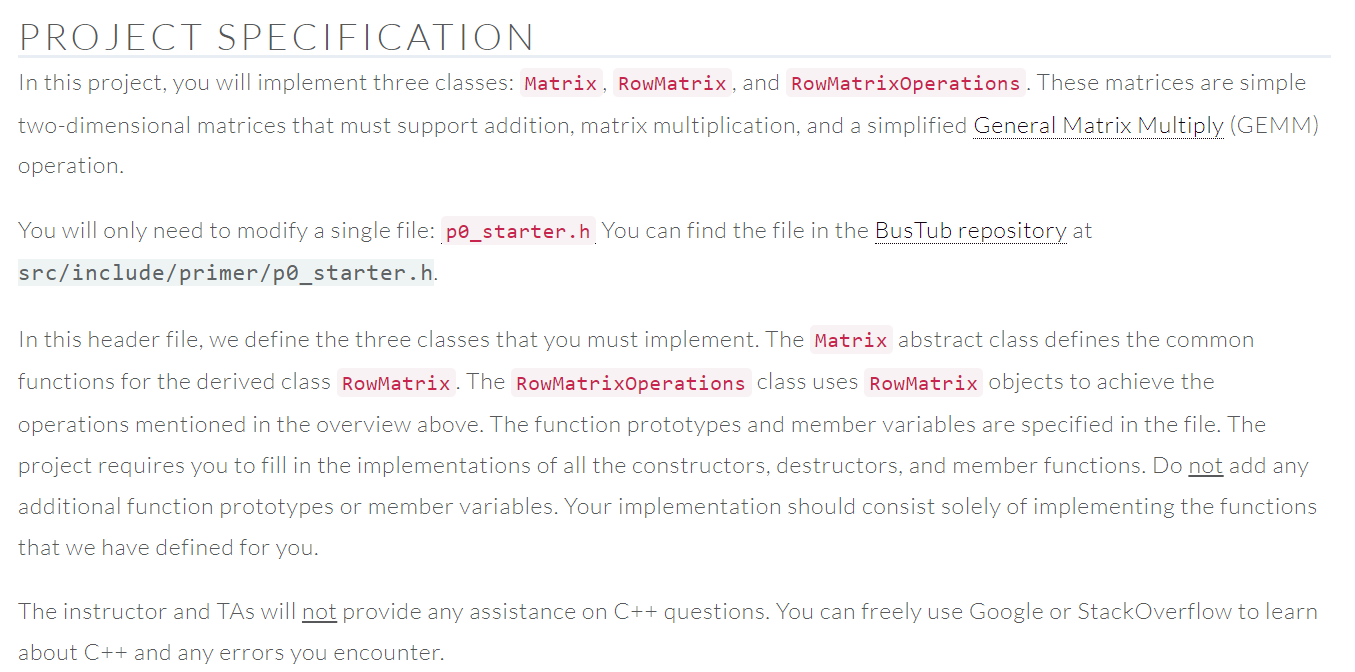
简单翻译一下上述要求,就是我们需要实现定义在 src/include/primer/p0_starter.h 中的三个类 Matrix、RowMatrix 和 RowMatrixOperations,其中 Matrix 是 RowMatrix 的父类,RowMatrixOperations 定义了三个用于数组运算的成员函数:Add、Multiply 和 GEMM(就是 \(\boldsymbol{A}*\boldsymbol{B} + \boldsymbol{C}\))。
代码实现
Matrix 类
抽象基类 Matrix 需要我们编写的代码很少,只要完成构造函数和析构函数即可,下面省略了一些不需要我们写的代码:
template <typename T>

class Matrix {

 protected:

  /**

   *

   * Construct a new Matrix instance.

   * @param rows The number of rows

   * @param cols The number of columns

   *

   */

  Matrix(int rows, int cols) : rows_(rows), cols_(cols), linear_(new T[rows * cols]) {}

  int rows_;

  int cols_;

  T *linear_;

 public:

  /**

   * Destroy a matrix instance.

   * TODO(P0): Add implementation

   */

  virtual ~Matrix() { delete[] linear_; }

};
linear_ 指向一个由二维矩阵展平而得的一维数组,里面共有 rows * cols 个类型为 T 的元素。由于我们在堆上分配数组的空间使用的是 new T[],所以删除的时候也得用 delete[]。
RowMatrix 类
这个类用于表示二维矩阵,需要实现父类 Matrix 中的所有纯虚函数,为了方便访问数据元素,RowMatrix 多定义了一个指针数组 data_,里面的每个元素分别指向了二维矩阵每行首元素的地址:
template <typename T>

class RowMatrix : public Matrix<T> {

 public:

  /**

   * Construct a new RowMatrix instance.

   * @param rows The number of rows

   * @param cols The number of columns

   */

  RowMatrix(int rows, int cols) : Matrix<T>(rows, cols) {

    data_ = new T *[rows];

    for (int i = 0; i < rows; ++i) {

      data_[i] = &this->linear_[i * cols];

    }

  }

  /**

   * @return The number of rows in the matrix

   */

  auto GetRowCount() const -> int override { return this->rows_; }

  /**

   * @return The number of columns in the matrix

   */

  auto GetColumnCount() const -> int override { return this->cols_; }

  /**

   * Get the (i,j)th matrix element.

   *

   * Throw OUT_OF_RANGE if either index is out of range.

   *

   * @param i The row index

   * @param j The column index

   * @return The (i,j)th matrix element

   * @throws OUT_OF_RANGE if either index is out of range

   */

  auto GetElement(int i, int j) const -> T override {

    if (i < 0 || i >= GetRowCount() || j < 0 || j >= GetColumnCount()) {

      throw Exception(ExceptionType::OUT_OF_RANGE, "The index out of range");

    }

    return data_[i][j];

  }

  /**

   * Set the (i,j)th matrix element.

   *

   * Throw OUT_OF_RANGE if either index is out of range.

   *

   * @param i The row index

   * @param j The column index

   * @param val The value to insert

   * @throws OUT_OF_RANGE if either index is out of range

   */

  void SetElement(int i, int j, T val) override {

    if (i < 0 || i >= GetRowCount() || j < 0 || j >= GetColumnCount()) {

      throw Exception(ExceptionType::OUT_OF_RANGE, "The index out of range");

    }

    data_[i][j] = val;

  }

  /**

   * Fill the elements of the matrix from `source`.

   *

   * Throw OUT_OF_RANGE in the event that `source`

   * does not contain the required number of elements.

   *

   * @param source The source container

   * @throws OUT_OF_RANGE if `source` is incorrect size

   */

  void FillFrom(const std::vector<T> &source) override {

    if (static_cast<int>(source.size()) != GetRowCount() * GetColumnCount()) {

      throw Exception(ExceptionType::OUT_OF_RANGE, "The number of elements of `source` is different from matrix");

    }

    for (int i = 0; i < GetRowCount(); ++i) {

      for (int j = 0; j < GetColumnCount(); ++j) {

        data_[i][j] = source[i * GetColumnCount() + j];

      }

    }

  }

  /**

   * Destroy a RowMatrix instance.

   */

  ~RowMatrix() override { delete[] data_; }

 private:

  T **data_;

};
需要注意的是,在 RowMatrix 中访问基类部分的成员(非虚函数)时需要加上 this 指针,不然编译时会报错说找不到指定的成员。
RowMatrixOperations 类
实现该类的三个成员函数之前应该检查数据维度是否匹配,不匹配就返回空指针,否则开个循环遍历二维矩阵完成相关操作即可:
template <typename T>

class RowMatrixOperations {

 public:

  /**

   * Compute (`matrixA` + `matrixB`) and return the result.

   * Return `nullptr` if dimensions mismatch for input matrices.

   * @param matrixA Input matrix

   * @param matrixB Input matrix

   * @return The result of matrix addition

   */

  static auto Add(const RowMatrix<T> *matrixA, const RowMatrix<T> *matrixB) -> std::unique_ptr<RowMatrix<T>> {

    if (matrixA->GetRowCount() != matrixB->GetRowCount() || matrixA->GetColumnCount() != matrixB->GetColumnCount()) {

      return std::unique_ptr<RowMatrix<T>>(nullptr);

    }

    auto rows = matrixA->GetRowCount();

    auto cols = matrixA->GetColumnCount();

    auto matrix = std::make_unique<RowMatrix<T>>(rows, cols);

    for (int i = 0; i < rows; ++i) {

      for (int j = 0; j < cols; ++j) {

        matrix->SetElement(i, j, matrixA->GetElement(i, j) + matrixB->GetElement(i, j));

      }

    }

    return matrix;

  }

  /**

   * Compute the matrix multiplication (`matrixA` * `matrixB` and return the result.

   * Return `nullptr` if dimensions mismatch for input matrices.

   * @param matrixA Input matrix

   * @param matrixB Input matrix

   * @return The result of matrix multiplication

   */

  static auto Multiply(const RowMatrix<T> *matrixA, const RowMatrix<T> *matrixB) -> std::unique_ptr<RowMatrix<T>> {

    if (matrixA->GetColumnCount() != matrixB->GetRowCount()) {

      return std::unique_ptr<RowMatrix<T>>(nullptr);

    }

    auto rows = matrixA->GetRowCount();

    auto cols = matrixB->GetColumnCount();

    auto matrix = std::make_unique<RowMatrix<T>>(rows, cols);

    for (int i = 0; i < rows; ++i) {

      for (int j = 0; j < cols; ++j) {

        T sum = 0;

        for (int k = 0; k < matrixA->GetColumnCount(); ++k) {

          sum += matrixA->GetElement(i, k) * matrixB->GetElement(k, j);

        }

        matrix->SetElement(i, j, sum);

      }

    }

    return matrix;

  }

  /**

   * Simplified General Matrix Multiply operation. Compute (`matrixA` * `matrixB` + `matrixC`).

   * Return `nullptr` if dimensions mismatch for input matrices.

   * @param matrixA Input matrix

   * @param matrixB Input matrix

   * @param matrixC Input matrix

   * @return The result of general matrix multiply

   */

  static auto GEMM(const RowMatrix<T> *matrixA, const RowMatrix<T> *matrixB, const RowMatrix<T> *matrixC)

      -> std::unique_ptr<RowMatrix<T>> {

    if (matrixA->GetColumnCount() != matrixB->GetRowCount()) {

      return std::unique_ptr<RowMatrix<T>>(nullptr);

    }

    if (matrixA->GetRowCount() != matrixC->GetRowCount() || matrixB->GetColumnCount() != matrixC->GetColumnCount()) {

      return std::unique_ptr<RowMatrix<T>>(nullptr);

    }

    return Add(Multiply(matrixA, matrixB).get(), matrixC);

  }

};
测试
打开 test/primer/starter_test.cpp,将各个测试用例里面的 DISABLED_ 前缀移除,比如 TEST(StarterTest, DISABLED_SampleTest) 改为 TEST(StarterTest, SampleTest),之后运行下述命令:
mkdir build

cd build

cmake ..

make starter_test

./test/starter_test
测试结果如下图所示:

总结
这次实验感觉比较简单,主要考察虚函数、模板和动态内存(包括智能指针)的知识,就是没搞明白为什么函数都用尾置返回类型,而且 Google 风格也让人很不习惯,缩进居然只有两格,函数居然开头大写。以上~~
CMU15445 之 Project#0 - C++ Primer 详解的更多相关文章
- QuartusII13.0使用教程详解(一个完整的工程建立)
好久都没有发布自己的博客了,因为最近学校有比赛,从参加到现在都是一脸懵逼,幸亏有bingo大神的教程,让我慢慢走上了VIP之旅,bingo大神的无私奉献精神值得我们每一个业界人士学习,向bingo致敬 ...
- IIS7.0 Appcmd 命令详解和定时重启应用池及站点的设置
IIS7.0 Appcmd 命令详解 废话不说!虽然有配置界面管理器!但是做安装包的时候命令创建是必不可少的!最近使用NSIS制作安装包仔细研究了一下Appcmd的命令,可谓是功能齐全. 上网查了些资 ...
- loadrunner11.0 安装破解详解使用教程
loadrunner11.0 安装破解详解使用教程 来源:互联网 作者:佚名 时间:01-21 10:25:34 [大 中 小] 很多朋友下载了loadrunner11但不是很会使用,这里简单介绍下安 ...
- Apache2.2+Tomcat7.0整合配置详解
一.简单介绍 Apache.Tomcat Apache HTTP Server(简称 Apache),是 Apache 软件基金协会的一个开放源码的网页服务器,可以在 Windows.Unix.Lin ...
- IIS7.0 Appcmd 命令详解
原文 IIS7.0 Appcmd 命令详解 一:准备工作 APPcmd.exe 位于 C:\Windows\System32\inetsrv 目录 使用 Cd c:\Windows\System32\ ...
- Android EventBus 3.0 实例使用详解
EventBus的使用和原理在网上有很多的博客了,其中泓洋大哥和启舰写的非常非常棒,我也是跟着他们的博客学会的EventBus,因为是第一次接触并使用EventBus,所以我写的更多是如何使用,源码解 ...
- RxJava2.0的使用详解
RxJava2.0的使用详解 1,初识RxJava RxJava就是一种用Java语言实现的响应式编程,来创建基于事件的异步程序 RxJava是一个基于事件订阅的异步执行的一个类库,目前比较火的一些技 ...
- 转 OAuth 2.0授权协议详解
http://www.jb51.net/article/54948.htm 作者:阮一峰 字体:[增加 减小] 类型:转载 时间:2014-09-10我要评论 这篇文章主要介绍了OAuth 2.0授权 ...
- 命令创建.net core3.0 web应用详解(超详细教程)
原文:命令创建.net core3.0 web应用详解(超详细教程) 你是不是曾经膜拜那些敲几行代码就可以创建项目的大神,学习了命令创建项目你也可以成为大神,其实命令创建项目很简单. 1.cmd命令行 ...
随机推荐
- Go xmas2020 学习笔记 04、Strings
04-Strings.unicode.utf-8.类型描述符.go 字符串在内存中的存储. Strings. String structure. String functions. Practice
- ArcGIS使用技巧(一)——数据存储
新手,若有错误还请指正! 日常接触ArcGIS较多,发现好多人虽然也在用ArcGIS,但一些基础的小技巧并不知道,写下来希望对大家有所帮助. ArcGIS默认的存储数据库是在C盘(图1),不修改存储数 ...
- 01. 树莓派初始配置——ssh连接使用root用户登录
ssh连接使用root用户登录 普通的"pi"用户没有权限访问某些文件夹,或者对它们只有只读功能.部分操作需要在每条命令前都要加上"sudo",非常不方便.切换 ...
- ps、top命令查找不到进程的解决方案
netstat -anpt发现一个奇怪的连接,但是ps和top命令确查不到此进程,这很可能是因为因为ps和top命令被替换了导致这些进程被过滤掉了.因此我这里有个脚本专门查找出来隐藏的进程 #!/us ...
- Elemnt ui 组件封装(form)
<template> <el-form class="form" :inline="formConfig.inline" :model=&qu ...
- Ansible的参数介绍
安装完成ansible后查看ansible的参数:ansible -h ansible 命令格式:Usage: ansible <host-pattern> [options] ansib ...
- uniapp封装request方法及调用
export default { doRequest(method, url, data) { // 如果data为空 if (!data) var data = [] var arr = [] ar ...
- 使用python脚本+zabbix前端监控云联网底层TCP数据流所负载的链路质量,并在丢包时联动保存MTR记录
背景 目前国内各家云联网跨区域数据传输,会将数据流通过哈希运算负载到不同的底层链路上,而底层链路质量差异较大,这种情况导致的现象就是,使用传统的icmp监控线路正常,但是业务一直不稳定,所以才有了使用 ...
- k8s client-go源码分析 informer源码分析(4)-DeltaFIFO源码分析
client-go之DeltaFIFO源码分析 1.DeltaFIFO概述 先从名字上来看,DeltaFIFO,首先它是一个FIFO,也就是一个先进先出的队列,而Delta代表变化的资源对象,其包含资 ...
- 如何让 Windows 把 TypeScript 文件当作文本文件
TL;DR 修改注册表项 HKEY_CLASSES_ROOT\.ts 为 HKEY_CLASSES_ROOT\.txt 的值 起因 Windows10 总把 TypeScript 文件自动当成视频,放 ...