
C#中的枚举器
更新记录
本文迁移自Panda666原博客,原发布时间:2021年6月28日。
一、先从可枚举类型讲起
1.1 什么是可枚举类型?
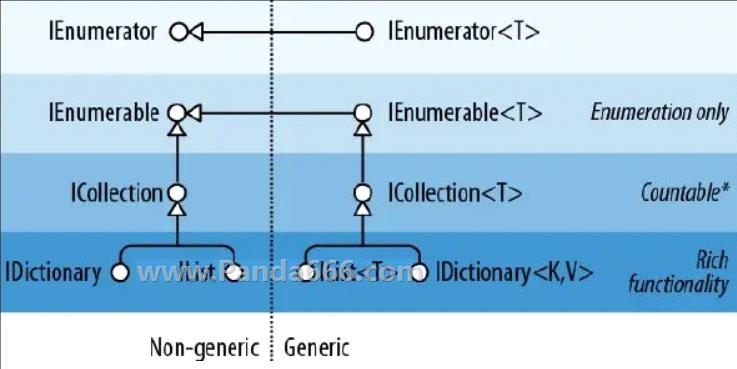
可枚举类型,可以简单的理解为:
有一个类,类中有挺多的数据,用一种统一的方式把他们列举出来。
在.NET中满足以下任意条件的都是可枚举类型:
Implements System.Collections.IEnumerable
Implements System.Collections.Generic.IEnumerable
Has a public parameterless method named GetEnumerator that returns an enumerator
这三条看起来非常的简单。第一条实现了IEnumerable接口就行了。第二条实现了IEnumerable接口就行了。第三条就更简洁了,实现了GetEnumerator方法就行了。所以可以发现,可枚举类型实现起来非常的方便。
1.2 那么问题来了,为什么需要可枚举类型?
上面不是说了吗,用一种统一的方式把数据列举出来。
那么问题来了,为什么需要用统一的方式取出数据?
因为方便取出数据,一百个类有一百个取出数据的方式,维护起来就很难受了。
所以统一数据的取出方式,是非常有必要的。
1.3 具体实现可枚举类型
说了这么多,是什么,为什么,来看看怎么用。我们先来看看,上面说到的2个接口。
System.Collections.IEnumerable接口的定义
namespace System.Collections

{

    public interface IEnumerable

    {

        IEnumerator GetEnumerator();

    }

}
System.Collections.Generic.IEnumerable接口 的定义
public interface IEnumerable<out T> : IEnumerable

{

    IEnumerator<T> GetEnumerator();

}
注意点:
可以看到2个接口大同小异,都有GetEnumerator方法,但要注意的是2个方法的返回类型是不同的。
GetEnumerator从字面意思也能看出来,表示获得Enumerator。
那么什么是Enumerator?Enumerator表示枚举器。
我们的数据统一数据的取出方式全部都靠枚举器帮我们代劳,而不是直接定义在本类中,当然你也可以这样做,但不建议。接下来现在我们来定义几个可枚举类型。
继承自IEnumerable的可枚举类型
public class PandaClass1 : IEnumerable

{

    public IEnumerator GetEnumerator()

    {

        //内部没有具体实现,所以先抛出异常

        throw new NotImplementedException();

    }

}
继承自IEnumerable的可枚举类型
public class PandaClass2 : IEnumerable<int>

{

    public IEnumerator<int> GetEnumerator()

    {

        //内部没有具体实现,所以先抛出异常

        throw new NotImplementedException();

    }

    IEnumerator IEnumerable.GetEnumerator()

    {

        //内部没有具体实现,所以先抛出异常

        throw new NotImplementedException();

    }

}
直接实现GetEnumerator方法的可枚举类型
public class PandaClass3

{

    public IEnumerator GetEnumerator()

    {

        //内部没有具体实现,所以先抛出异常

        throw new NotImplementedException();

    }

}
直接实现GetEnumerator方法的可枚举类型
public class PandaClass4

{

    public IEnumerator<int> GetEnumerator()

    {

        //内部没有具体实现,所以先抛出异常

        throw new NotImplementedException();

    }

}
到这里我们已经搞定可枚举类型了,怎么进行枚举?
二、有趣的枚举器(Enumerator)
2.1 那么问题来了,什么是枚举器。
Enumerator在英文中有列举出人或物的意思。所以是列举器的意思?不急,我们来对比看看程序中什么是枚举器。
在.NET中满足以下任意条件的都是枚举器:
1、Implements System.Collections.IEnumerator
2、Implements System.Collections.Generic.IEnumerator
3、Has a public parameterless method named MoveNext and property called Current
第三条中的实现MoveNext方法和Current属性倒是挺好理解的,只要实现了这2个成员就叫枚举器。
比如下面这类就叫枚举器
public class Enumerator

{

  public IteratorVariableType Current { get {...} }

  public bool MoveNext() {...}

}
那么第一二条中的接口是什么,不慌,我们先来看看这2个接口的定义。
IEnumerator接口的定义
namespace System.Collections

{

    public interface IEnumerator

    {

        object Current { get; }

        bool MoveNext();

        void Reset();

    }

}
IEnumerator接口的定义
namespace System.Collections.Generic

{

    public interface IEnumerator<out T> : IEnumerator, IDisposable

    {

        T Current { get; }

    }

}
需要注意的点:
IEnumerator接口返回的是object类型。
从接口的定义我们可以发现IEnumerator继承自IEnumerator。
所以IEnumerator是同样包含的有MoveNext()和Reset()方法的。
MoveNext()方法表示移动到下一个元素。
Reset()方法表示重置枚举器。
Current属性用于获得当前的元素值。
2.2 实现枚举器
直接继承IEnumerator接口实现枚举器
public class PandaEnumerator1 : IEnumerator

{

    //内部没有具体实现,所以先抛出异常

    public object Current => throw new NotImplementedException();

    public bool MoveNext()

    {

        //内部没有具体实现,所以先抛出异常

        throw new NotImplementedException();

    }

    public void Reset()

    {

        //内部没有具体实现,所以先抛出异常

        throw new NotImplementedException();

    }

}
直接继承IEnumerator接口实现枚举器
public class PandaEnumerator2 : IEnumerator<int>

{

    //内部没有具体实现,所以先抛出异常

    public int Current => throw new NotImplementedException();

    //内部没有具体实现,所以先抛出异常

    object IEnumerator.Current => throw new NotImplementedException();

    //用于释放枚举器使用的资源

    public void Dispose()

    {

        throw new NotImplementedException();

    }

    public bool MoveNext()

    {

        //内部没有具体实现,所以先抛出异常

        throw new NotImplementedException();

    }

    public void Reset()

    {

        //内部没有具体实现,所以先抛出异常

        throw new NotImplementedException();

    }

}
直接实现要求的方法实现枚举器
public class PandaEnumerator3

{

    //内部没有具体实现,所以先抛出异常

    public object Current => throw new NotImplementedException();

    public bool MoveNext()

    {

        //内部没有具体实现,所以先抛出异常

        throw new NotImplementedException();

    }

    public void Reset()

    {

        //内部没有具体实现,所以先抛出异常

        throw new NotImplementedException();

    }

}
三、组合枚举类型和枚举器
那么问题来了,枚举类型和枚举器都搞定了。怎么把他们组合起来?怎么用来?
我们这里用一个实例来进行演示。我们先定义一个学生类来表示要枚举的数据。
/// <summary>

/// 学生数据

/// </summary>

public class Student

{

    /// <summary>

    /// 编号

    /// </summary>

    public string Id { get; set; }

    /// <summary>

    /// 姓名

    /// </summary>

    public string Name { get; set; }

    /// <summary>

    /// 年龄

    /// </summary>

    public int Age { get; set; }

}
然后我们定义枚举器
/// <summary>

/// 枚举器

/// </summary>

public class StudentIEnumerator : IEnumerator<Student>

{

    /// <summary>

    /// 用于遍历的学生信息

    /// </summary>

    private List<Student> InnerStudents { get; set; }

    /// <summary>

    /// 当前的位置

    /// </summary>

    private int CurrentPosition { get; set; }

    public StudentIEnumerator(List<Student> students)

    {

        this.InnerStudents = students;

        this.CurrentPosition = -1;

    }

    //获得当前的元素

    public Student Current => this.InnerStudents[this.CurrentPosition];

    //如果无需兼容老代码,可以无需修改

    object IEnumerator.Current => throw new NotImplementedException();

    public void Dispose()

    {

    }

    public bool MoveNext()

    {

        if(this.CurrentPosition < this.InnerStudents.Count-1)

        {

            ++this.CurrentPosition;

            return true;

        }

        return false;

    }

    public void Reset()

    {

        this.CurrentPosition = -1;

    }

}
最后定义可枚举类型
/// <summary>

/// 可枚举类型

/// </summary>

public class StudentCollecion : IEnumerable<Student>

{

    /// <summary>

    /// 学生数据

    /// </summary>

    public List<Student> Students { get; set; }

    public StudentCollecion()

    {

        //初始化List

        this.Students = new List<Student>();

        //虚构用于测试的学生信息

        this.Students.Add(new Student() {

            Id = "666",

            Name = "Panda",

            Age = 18

        });

        this.Students.Add(new Student()

        {

            Id = "888",

            Name = "Donkey",

            Age = 18

        });

        this.Students.Add(new Student()

        {

            Id = "999",

            Name = "Dog",

            Age = 18

        });

        this.Students.Add(new Student()

        {

            Id = "777",

            Name = "Pig",

            Age = 18

        });

        this.Students.Add(new Student()

        {

            Id = "333",

            Name = "Monkey",

            Age = 18

        });

    }

    /// <summary>

    /// 获得枚举器

    /// 返回我们自定义的配套枚举器

    /// </summary>

    /// <returns></returns>

    public IEnumerator<Student> GetEnumerator()

    {

        return new StudentIEnumerator(this.Students);

    }

    //如果无需兼容老代码可以不用修改

    IEnumerator IEnumerable.GetEnumerator()

    {

        throw new NotImplementedException();

    }

}
四、使用可枚举类型
那么问题来了,怎么使用可枚举类型?
方式一:使用foreach。这是最常用的方式。
StudentCollecion students = new StudentCollecion();

foreach (var student in students)

{

    Console.WriteLine(student.Id);

}
注意:foreach只是方式二的语法糖。如果枚举器实现了IDisposable接口,foreach会自动调用dispose方法。
方式二:直接使用迭代器
StudentCollecion students = new StudentCollecion();

//获得实例的枚举器

IEnumerator<Student> enumerator = students.GetEnumerator();

//手动操作

while (enumerator.MoveNext())

{

    //获得元素值

    Console.WriteLine(enumerator.Current.Name);

}

//重置一下枚举器

enumerator.Reset();
五、总结
实例完整源代码
using System;

using System.Collections;

using System.Collections.Generic;

namespace Panda666comTest

{

    /// <summary>

    /// 枚举器

    /// </summary>

    public class StudentIEnumerator : IEnumerator<Student>

    {

        /// <summary>

        /// 用于遍历的学生信息

        /// </summary>

        private List<Student> InnerStudents { get; set; }

        /// <summary>

        /// 当前的位置

        /// </summary>

        private int CurrentPosition { get; set; }

        public StudentIEnumerator(List<Student> students)

        {

            this.InnerStudents = students;

            this.CurrentPosition = -1;

        }

        //获得当前的元素

        public Student Current => this.InnerStudents[this.CurrentPosition];

        //如果无需兼容老代码,可以无需修改

        object IEnumerator.Current => throw new NotImplementedException();

        public void Dispose()

        {

        }

        public bool MoveNext()

        {

            if (this.CurrentPosition < this.InnerStudents.Count - 1)

            {

                ++this.CurrentPosition;

                return true;

            }

            return false;

        }

        public void Reset()

        {

            this.CurrentPosition = -1;

        }

    }

    /// <summary>

    /// 学生数据

    /// </summary>

    public class Student

    {

        /// <summary>

        /// 编号

        /// </summary>

        public string Id { get; set; }

        /// <summary>

        /// 姓名

        /// </summary>

        public string Name { get; set; }

        /// <summary>

        /// 年龄

        /// </summary>

        public int Age { get; set; }

    }

    /// <summary>

    /// 可枚举类型

    /// </summary>

    public class StudentCollecion : IEnumerable<Student>

    {

        /// <summary>

        /// 学生数据

        /// </summary>

        public List<Student> Students { get; set; }

        public StudentCollecion()

        {

            //初始化List

            this.Students = new List<Student>();

            //虚构用于测试的学生信息

            this.Students.Add(new Student()

            {

                Id = "666",

                Name = "Panda",

                Age = 18

            });

            this.Students.Add(new Student()

            {

                Id = "888",

                Name = "Donkey",

                Age = 18

            });

            this.Students.Add(new Student()

            {

                Id = "999",

                Name = "Dog",

                Age = 18

            });

            this.Students.Add(new Student()

            {

                Id = "777",

                Name = "Pig",

                Age = 18

            });

            this.Students.Add(new Student()

            {

                Id = "333",

                Name = "Monkey",

                Age = 18

            });

        }

        /// <summary>

        /// 获得枚举器

        /// 返回我们自定义的配套枚举器

        /// </summary>

        /// <returns></returns>

        public IEnumerator<Student> GetEnumerator()

        {

            return new StudentIEnumerator(this.Students);

        }

        //如果无需兼容老代码可以不用修改

        IEnumerator IEnumerable.GetEnumerator()

        {

            throw new NotImplementedException();

        }

    }

    class Program

    {

        static void Main(string[] args)

        {

            //实例化可枚举类型

            StudentCollecion students = new StudentCollecion();

            //方式一:使用foreach来遍历可枚举类型

            foreach (var student in students)

            {

                Console.WriteLine(student.Id);

            }

            //方式二:使用手动调用枚举器

            //获得实例的枚举器

            IEnumerator<Student> enumerator = students.GetEnumerator();

            //手动操作

            while (enumerator.MoveNext())

            {

                //获得元素值

                Console.WriteLine(enumerator.Current.Name);

            }

            //重置一下枚举器

            enumerator.Reset();

            enumerator.Dispose();

            //wait

            Console.WriteLine("Success");

            Console.ReadKey();

        }

    }

}
C#中的枚举器的更多相关文章
- ruby中迭代器枚举器的理解
参考<ruby编程语言>5.3迭代器和可枚举对象 迭代器一个迭代器是一个方法,这个方法里面有yield语句,这个方法里的yield语句,与传递给这个方法的块进行数据传输 yield将数据传 ...
- C#中的枚举器(转)
术语表 Iterator:枚举器(迭代器) 如果你正在创建一个表现和行为都类似于集合的类,允许类的用户使用foreach语句对集合中的成员进行枚举将会是很方便的.这在C# 2.0中比 C# 1.1更容 ...
- C#图解教程 第十八章 枚举器和迭代器
枚举器和迭代器 枚举器和可枚举类型 foreach语句 IEnumerator接口 使用IEnumerable和IEnumerator的示例 泛型枚举接口迭代器 迭代器块使用迭代器来创建枚举器使用迭代 ...
- JAVA中的数据结构——集合类(序):枚举器、拷贝、集合类的排序
枚举器与数据操作 1)枚举器为我们提供了访问集合的方法,而且解决了访问对象的“数据类型不确定”的难题.这是面向对象“多态”思想的应用.其实是通过抽象不同集合对象的共同代码,将相同的功能代码封装到了枚举 ...
- C#中的foreach语句与枚举器接口(IEnumerator)及其泛型 相关问题
这个问题从<C#高级编程>数组一节中的foreach语句(6.7.2)发现的. 因为示例代码与之前的章节连贯,所以我修改了一下,把自定义类型改为了int int[] bs = { 2, 3 ...
- C#2.0中使用yield关键字简化枚举器的实现
我们知道要使用foreach语句从客户端代码中调用迭代器,必需实现IEnumerable接口来公开枚举器,IEnumerable是用来公开枚举器的,它并不实现枚举器,要实现枚举器必需实现IEnumer ...
- Python 中的枚举类型~转
Python 中的枚举类型 摘要: 枚举类型可以看作是一种标签或是一系列常量的集合,通常用于表示某些特定的有限集合,例如星期.月份.状态等. 枚举类型可以看作是一种标签或是一系列常量的集合,通常用于表 ...
- for..in遍历,枚举器
#pragma mark ------------for循环遍历集合中的元素------ //创建一个数组,包含5个字符串对象,倒序取出数组中的所有元素,并存储到另一可变数组中 NSArray *ar ...
- ruby迭代器枚举器
迭代器一个迭代器是一个方法,这个方法里面有yield语句,使用了yield的方法叫做迭代器,迭代器并非一定要迭代,与传递给这个方法的块进行数据传输 yield将数据传给代码快,代码块再把数据传输给yi ...
随机推荐
- Vue3 + Echarts 5 绘制带有立体感流线中国地图,建议收藏
本文绘制的地图效果图如下: 一.Echarts 使用五部曲 1.下载并引入 echarts Echarts 已更新到了 5.0 版本,安装完记得检查下自己的版本是否是 5.0 . npm instal ...
- LC-35
题目地址:https://leetcode-cn.com/problems/search-insert-position/ 一样的二分条件,多一个限制插入. 所以思考插入什么位置? 在 [left, ...
- JavaScript高级教程
JavaScript高级教程 基础总结深入 数据类型 分类 you are so nb! undefined :undefined string :任意字符串 sybmol: object:任意对象, ...
- Codeforces Round #707 (Div. 2)A.英语漏洞 + C.Going Home C题收获不小
A题英语漏洞 A题传送门: https://codeforces.com/contest/1501/problem/A 其实题目说的很明白, 只是我傻傻的会错了意, 话不多说, 开整. 前两行是说, ...
- 新手小白入门C语言第三章:关于数据类型
C 语言包含的数据类型 1.整型 整型分为整形常量和整形变量,常量就是我们平时所看到的准确的数字,例如:1.20.333等等,变量则按我的理解是我像内存去申请一个存储空间,告诉内存空间我申请了这个地方 ...
- Java语言学习day19--7月25日
今日内容介绍1.继承2.抽象类3.综合案例---员工类系列定义 ###01继承的概述 *A:继承的概念 *a:继承描述的是事物之间的所属关系,通过继承可以使多种事物之间形成一种关系体系 *b:在Jav ...
- 2021.05.03 T3 数字
2021.05.03 T3 数字 问题描述 一个数字被称为好数字当他满足下列条件: 1. 它有**2*n**个数位,n是正整数(允许有前导0) 2. 构成它的每个数字都在给定的数字集合S中. 3. 它 ...
- 6.2 计划任务crond
创建.编辑计划任务的命令为crontab -e,查看当前计划任务的命令为crontab -l,删除某条计划任务的命令为crontab -r. 参数 作用 -e 编辑计划任务 -u 指定用户名称 -l ...
- 【题解】金牌导航-高斯消元/Luogu P3232 游走
题目描述: 详细分析: 我们对于编号的分配,很明显可以发现如下的分配就是期望最小的:对经过的期望次数越大的边赋予更小的编号. 那么问题就转化为了怎么求一条边的经过的期望次数,我们发现边数非常大所以肯定 ...
- [LBS学习笔记4]地理特征POI、AOI、路径轨迹
1 简述 今天继续LBS地理信息的学习,目标是写到10篇博客的时候,做出一个地图工具页面用,包含地图空间索引Geohash.S2.H3的可视化展示. 地理特征分为点(POI).线(路径).面(AOI) ...