
安装elasticsearch5.4.1集群和head插件
这里用的系统版本是CentOS6.6。
192.168.3.56    ES01

192.168.3.49    ES02

192.168.3.57    ES03
1、为三个节点安装java环境
# yum install -y java java-1.8.0-openjdk-devel

# vim /etc/profile.d/java.sh

export JAVA_HOME=/usr

# source /etc/profile.d/java.sh
2、同步时间
# ntpdate pool.ntp.org
3、上官网下载rpm包,或者按照guide设置官方repo,分别为三个节点安装ES
# yum install -y elasticsearch-5.4.1.rpm
https://www.elastic.co/guide/en/elasticsearch/reference/current/install-elasticsearch.html
4、修改配置文件
节点1,ES01:
# vim /etc/elasticsearch/elasticsearch.yml

cluster.name: oupenges

node.name: es01

bootstrap.system_call_filter: false

http.cors.enabled: true

http.cors.allow-origin: "*"

bootstrap.memory_lock: true

network.host: 192.168.3.56

discovery.zen.ping.unicast.hosts: ["192.168.3.56", "192.168.3.49", "192.168.3.57"]
节点2,ES02:
# vim /etc/elasticsearch/elasticsearch.yml

cluster.name: oupenges

node.name: es02

bootstrap.system_call_filter: false

http.cors.enabled: true

http.cors.allow-origin: "*"

bootstrap.memory_lock: true

network.host: 192.168.3.49

discovery.zen.ping.unicast.hosts: ["192.168.3.56", "192.168.3.49", "192.168.3.57"]
节点3,ES03:
# vim /etc/elasticsearch/elasticsearch.yml

cluster.name: oupenges

node.name: es03

bootstrap.system_call_filter: false

http.cors.enabled: true

http.cors.allow-origin: "*"

bootstrap.memory_lock: true

network.host: 192.168.3.57

discovery.zen.ping.unicast.hosts: ["192.168.3.56", "192.168.3.49", "192.168.3.57"]
两个http参数的含义可以参考这里:
https://www.elastic.co/guide/en/elasticsearch/reference/current/modules-http.html
5、修改limits.conf,系统默认的1024太小,这里需要至少2048才能启动服务
# vim /etc/security/limits.conf

*               hard    nofile  65536

*               soft    nofile  65536

*               hard    memlock unlimited

*               soft    memlock unlimited

elasticsearch   hard    nproc   514834

elasticsearch   soft    nproc   514834
https://www.elastic.co/guide/en/elasticsearch/reference/current/setting-system-settings.html#limits.conf
https://www.elastic.co/guide/en/elasticsearch/reference/current/_memory_lock_check.html
6、启动服务
# service elasticsearch start

# chkconfig elasticsearch on
7、通过cluster API查看集群状态:
# curl -XGET 'http://192.168.3.56:9200/_cluster/health?pretty=true'

{

  "cluster_name" : "oupenges",

  "status" : "green",

  "timed_out" : false,

  "number_of_nodes" : 3,

  "number_of_data_nodes" : 3,

  "active_primary_shards" : 71,

  "active_shards" : 142,

  "relocating_shards" : 0,

  "initializing_shards" : 0,

  "unassigned_shards" : 0,

  "delayed_unassigned_shards" : 0,

  "number_of_pending_tasks" : 0,

  "number_of_in_flight_fetch" : 0,

  "task_max_waiting_in_queue_millis" : 0,

  "active_shards_percent_as_number" : 100.0

}
8、安装head插件(需要事先安装nodejs和phantomjs,这里只说一下phantomjs)
安装phantomjs:
# wget https://bitbucket.org/ariya/phantomjs/downloads/phantomjs-2.1.1-linux-x86_64.tar.bz2

# tar xvf phantomjs-2.1.1-linux-x86_64.tar.bz2

# cd phantomjs-2.1.1-linux-x86_64/

# ln -sv /root/phantomjs-2.1.1-linux-x86_64/bin/phantomjs /usr/bin/
运行head:
# git clone https://github.com/mobz/elasticsearch-head.git

# cd elasticsearch-head/

# npm install

# nohup npm run start &
默认监听9100端口,用浏览器访问:http://192.168.3.56:9100/
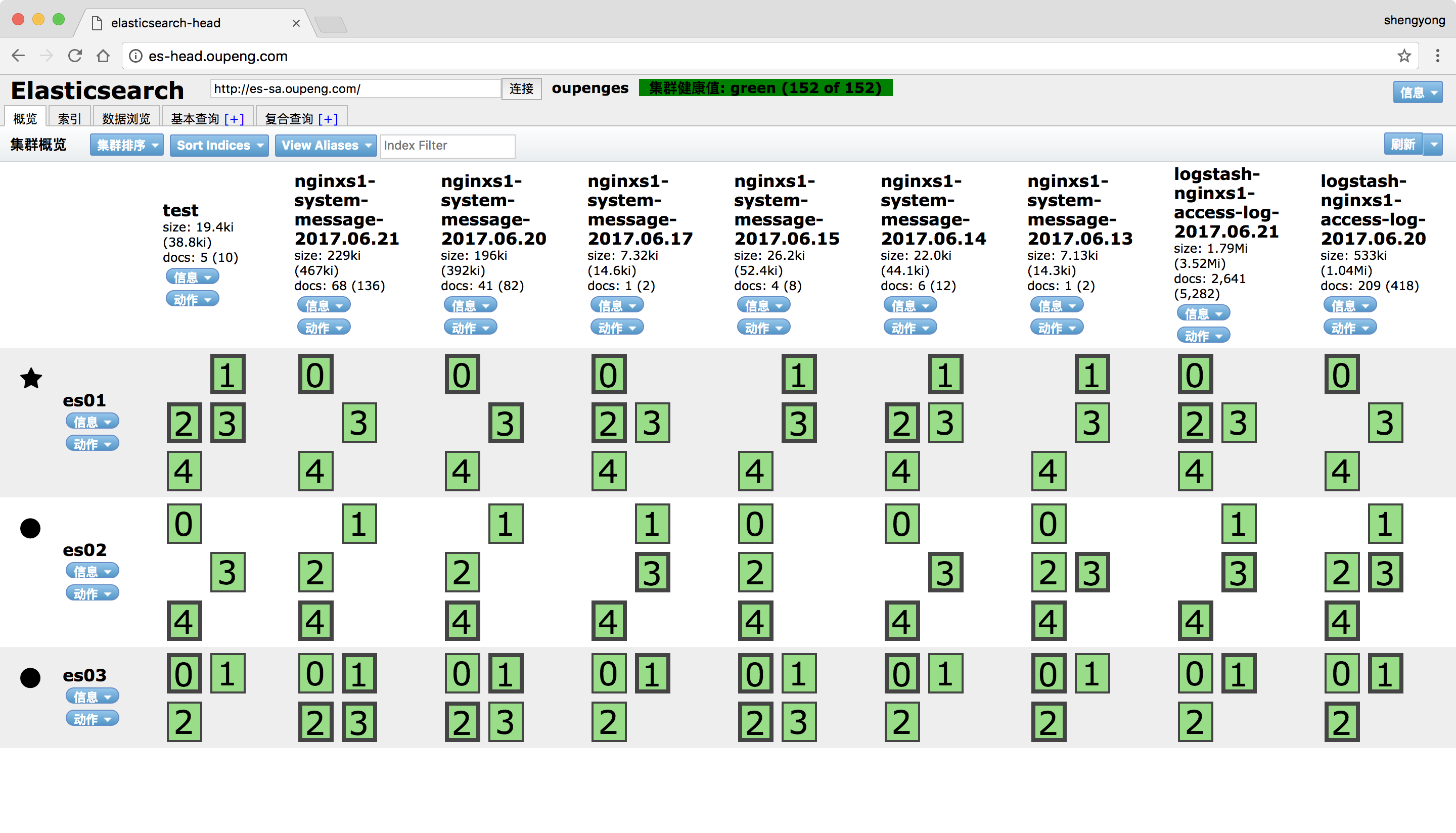
安装elasticsearch5.4.1集群和head插件的更多相关文章
- ElasticSearch-5.3.1集群环境搭建,安装ElasticSearch-head插件,安装错误解决
说起来甚是惭愧,博主在写这篇文章的时候,还没有系统性的学习一下ES,只知道可以拿来做全文检索,功能很牛逼,但是接到了任务不想做也不行, leader让我搭建一下分布式的ES集群环境,用来支持企业信用数 ...
- windows安装elasticsearch服务以及elasticsearch5.6.10集群的配置(elasticsearch5.6.10配置跟1.1.1的配置不太相同,有些1.1.1版本下的配置指令在5.6.10中不能使用)
1.下载elasticsearch5.6.10安装包 下载地址为: https://artifacts.elastic.co/downloads/elasticsearch/elasticsearc ...
- 【Nutch2.3基础教程】集成Nutch/Hadoop/Hbase/Solr构建搜索引擎:安装及运行【集群环境】
1.下载相关软件,并解压 版本号如下: (1)apache-nutch-2.3 (2) hadoop-1.2.1 (3)hbase-0.92.1 (4)solr-4.9.0 并解压至/opt/jedi ...
- Cloudera Manager安装_搭建CDH集群
2017年2月22日, 星期三 Cloudera Manager安装_搭建CDH集群 cpu 内存16G 内存12G 内存8G 默认单核单线 CDH1_node9 Server || Agent ...
- 使用kubeadm安装kubernetes高可用集群
kubeadm安装kubernetes高可用集群搭建 第一步:首先搭建etcd集群 yum install -y etcd 配置文件 /etc/etcd/etcd.confETCD_NAME=inf ...
- centos7安装redis-4.0.1集群
试验机操作系统:CentOS Linux release 7.2.1511 (Core) 本文的目的是教会大家快速搭建redis集群,完了再深入学习. 试问如果不上手试验,看的资料再多有个毛用? 下载 ...
- Linux系统下安装Redis和Redis集群配置
Linux系统下安装Redis和Redis集群配置 一. 下载.安装.配置环境: 1.1.>官网下载地址: https://redis.io/download (本人下载的是3.2.8版本:re ...
- 基于CentOS与VmwareStation10搭建Oracle11G RAC 64集群环境:3.安装Oracle RAC-3.6.集群管理命令
3.6. 集群管理命令 3.6.1. RAC的启动与关闭 oracle rac默认会开机自启动,如需维护时可使用以下命令: 关闭: crsctl stop cluster 停止本节点集群服务 crsc ...
- 完整安装sqlserver always on集群
准备工作 1. 四台已安装windows server 2008 r2 系统的虚拟机,配置如下: CPU : 1核 MEMORY : 2GB DISK : 40GB(未分区) NetAdapter ...
随机推荐
- Controller组件- 集合点的功能-loadrunner
1.添加集合点功能的做法 ,注意在开始事务前加,不然就会把等待时间也加进去. 2.Controller 中也要开启集合点的功能,才能使用
- 32bit GM命令
GM 命令[32位服务端GM命令] //announce message this basicly tells a announcement on the whole server.. you can ...
- JS模块化样例
var fn_pageBtn = (function(){ var m1 = function(){ alert(1); }; var m2 = function(){ alert(2); }; re ...
- textarea拖拽控制
一.用处 textarea默认时允许用户以拖拽形式来改变textarea大小,但textarea的大小变化会撑大其父节点,有时会破坏整体布局,有时我们并不希望textarea随意拖拽. forklif ...
- 部署mysql版本项目问题记录
一,com.mysql.cj.jdbc.exceptions.CommunicationsException: Communications link failure报错 将url从jdbc:mysq ...
- Last Daily Scrum (2015/11/9)
今晚我们终于完成了新版本的爬虫工作,可以替换掉之前部署在服务器上的那个爬虫了.由于周末大家各种原因导致了我们迭代一的截止日没有完成所有任务,所以今天晚上大家加班加点终于把这一迭代的爬虫项目完成了. 成 ...
- Daily Srum 10.26
Daily Scrum Meeting 虽然TFS的相关使用已经在上面贴出来一段时间,但是要运用TFS还是有些困难的,特别是TFS的代码管理机制,所以我们让部分人先弄清楚,然后再教授给其他人.终于大家 ...
- 结对项目:SudokuGame
1. Github项目地址:https://github.com/ZiJiaW/SudokuGame GUI在BIN目录下的SudokuGUI.rar中,解压后打开SudokuGame.exe即可.2 ...
- 第二阶段Sprint冲刺会议7
进展:试着把视频录制功能加到时间提醒中,但是整合没有成功,今天没有进展.
- DPDK flow_classify 源码阅读
代码部分 /* SPDX-License-Identifier: BSD-3-Clause * Copyright(c) 2017 Intel Corporation */ #include < ...