
UICamera(NGUI Event system)原理
看了UICamera的源码就显而易见了:

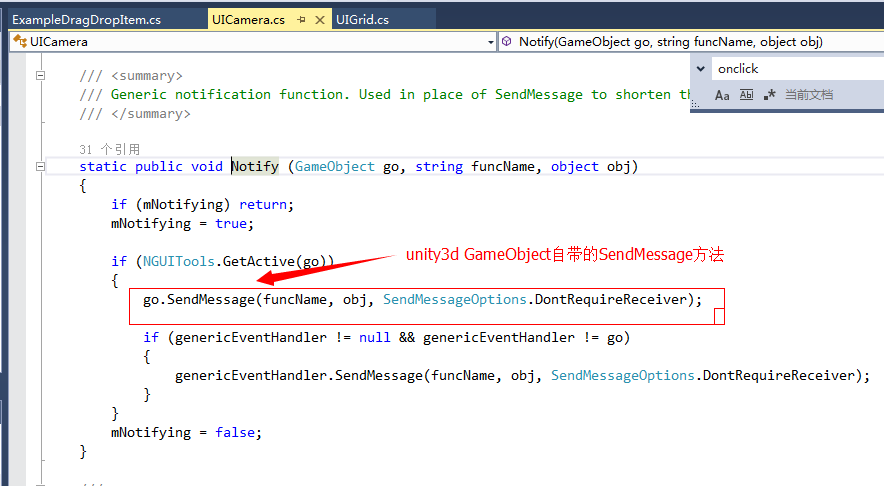
UICamera is a somewhat poorly named component. In fact, its name is kept only for backwards compatibility purposes.
What the UICamera script actually does is sends out NGUI events to all the objects seen by the camera it's attached to. It doesn't have to have anything to do with UI though. In fact, if you wish to receive NGUI events on your in-game objects such as OnPress, OnClick, OnDrag etc, then all you need to do is attach the UICamera script to your main camera.
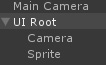
You can have several UICamera scripts in the scene. Most games will have one on the camera that draws the widgets, and another on the camera that draws the game.
NOTE: For UICamera to work, "Raycasts Hit Triggers" (基于射线碰撞测试,可以理解为什么需要box colider了)must be checked in the Physics settings.
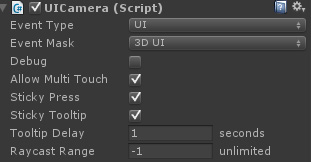
The first option on the UICamera, Event Type is what determines how the script sorts whats underneath the mouse and touch events. If it's set to UI mode, then it's always based on widget's depth -- just like the draw order. Changing this option to World mode is something you should do if your UICamera is attached to your Main Camera. Doing so will sort the hit objects by their distance to the camera.
Event Mask is what determines which game object layers will be capable of receiving events. In most cases you can leave this on "Everything", as this value is combined with the UnityEngine.Camera's Culling Mask, but you can fine-tune it if you wish. If you ever change the Layer of your game object containing the UI hierarchy, make sure to adjust the Event Mask or you will suddenly find your UI no longer responding to events.
Debug option can be used to debug what's currently under the mouse. If you can't figure out what's intercepting mouse events when you click on some button, just turn on this option and you will be able to see it in the top-right corner.
Allow Multi-Touch option controls whether multiple touches will be supported. If turned off, multiple touches will all be treated as a single touch.
Sticky Tooltip option fine-tunes the tooltip behaviour. If off, the tooltip will hide as soon as the mouse moves again. If on, the tooltip will remain open while the mouse is over the same object.
Tooltip Delay controls the delay between the mouse stopping movement over some object and the OnTooltip notification being sent to that object. This value is in seconds.
Raycast Range controls the length of the raycast, and in most cases this value can be safely ignored. This value is in world units, so if your camera has the near clip of 0.3 and far clipping of 1000, you and you are finding that some far-away objects are not responding to clicks, set this value to something like 2000 (something greater than the difference between your camera's far and near clipping planes).
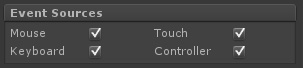
Event Sources section controls what kind of event types will be processed. If one of the options is turned off, those events will no longer be processed. Some platforms force-disable specific events under the hood. For example targeting consoles will automatically turn off mouse and touch events.

Thresholds section lets you fine-tune how the mouse and touch events behave by tweaking the thresholds of click, drag and tap events. These values are in pixels.

Axes and Keys section lets you choose which axes result in which movement. These axes should match the names in your project's Input Manager.
Pro-Tip #1
UICamera sends out the following events to colliders:
- OnHover (isOver) is sent when the mouse hovers over a collider or moves away.
- OnPress (isDown) is sent when a mouse button gets pressed on the collider.
- OnSelect (selected) is sent when a mouse button is first pressed on a game object. Repeated presses on the same object won't result in a new OnSelect.
- OnClick () is sent with the same conditions as OnSelect, with the added check to see if the mouse has not moved much. UICamera.currentTouchID tells you which button was clicked.
- OnDoubleClick () is sent when the click happens twice within a fourth of a second. UICamera.currentTouchID tells you which button was clicked.
- OnDragStart () is sent to a game object under the touch just before the OnDrag() notifications begin.
- OnDrag (delta) is sent to an object that's being dragged.
- OnDragOver (draggedObject) is sent to a game object when another object is dragged over its area.
- OnDragOut (draggedObject) is sent to a game object when another object is dragged out of its area.
- OnDragEnd () is sent to a dragged object when the drag event finishes.
- OnInput (text) is sent when typing (after selecting a collider by clicking on it).
- OnTooltip (show) is sent when the mouse hovers over a collider for some time without moving.
- OnScroll (float delta) is sent out when the mouse scroll wheel is moved.
- OnKey (KeyCode key) is sent when keyboard or controller input is used.
UICamera(NGUI Event system)原理的更多相关文章
- The Event System
The Event System 在Qt中,事件是继承了虚拟类QEvent的对象,它代表了程序所发生的事情或者程序需要知道的一个外部活动的结果.事件可以被任意 QObject子类的实例接收和处理,是与 ...
- Building Robust and Flexible Event System in Unity3D
Building Robust and Flexible Event System in Unity3D 1. Prerequisites 1.1 Observer Pattern According ...
- Node.js的事件轮询Event Loop原理
Node.js的事件轮询Event Loop原理解释 事件轮询主要是针对事件队列进行轮询,事件生产者将事件排队放入队列中,队列另外一端有一个线程称为事件消费者会不断查询队列中是否有事件,如果有事件,就 ...
- 【SaltStack官方版】—— Events&Reactor系统—EVENT SYSTEM
Events&Reactor系统 EVENT SYSTEM The Salt Event System is used to fire off events enabling third pa ...
- Bootstrap3 Grid system原理及应用
刚开始用Bootstrap的格子系统写布局的时候遇到了这样一个问题: 我的页面中有这样一个布局 我希望当屏幕的宽度小于他们俩宽度之和的时候,右边的部分会掉下来,他们垂直摆放. 而我用col-xs-6的 ...
- event system
事件的概念 简单来说, 就是应用程序感兴趣的应用内部或者外部的活动结果. 在Qt中, 使用QEvent 抽象这些活动. 事件驱动模型 事件驱动模型现在在计算机很多领域都有使用. 例如 BSD sock ...
- NGUI UIPanel绘制原理学习
NGUI底层绘制都是调用UIDrawCall来完成的,它会动态实例化出材质球,改变UV偏移和缩放(图集显示).并且全部是面片 UIPanel也是面片,但是内部物体遮罩比较特殊,经过查找发现,影响UIP ...
- [React] Normalize Events with Reacts Synthetic Event System
Event handlers are passed an instance of SyntheticEvent in React. In this video we'll take a look at ...
- ngui处理不规则按钮点击
吐个槽 棋牌类游戏做什么中国地图!!! 然后就要用到不规则按钮点击了 你懂的 213的unity虽然已经加入了polygoncollider 2d的支持 但是 但是 但是 是2d的 也就是说如果不 ...
随机推荐
- JAVA规范
---------------------------------------------------------- Web Service技术 --------------------------- ...
- Spring Boot 运作原理
Spring Boot 运作原理 1.Spring Boot 简介 SpringBoot是由Pivotal团队提供的全新框架,其设计目的是用来简化新Spring应用的初始搭建以及开发过程.该框架使用了 ...
- ASP.NET Web API 记录请求响应数据到日志的一个方法
原文:http://blog.bossma.cn/dotnet/asp-net-web-api-log-request-response/ ASP.NET Web API 记录请求响应数据到日志的一个 ...
- Qt 4.7.2移植到ARM教程
Qt的移植包括步骤如下: 1.下载并安装VMware WorkStation 12(最好比较高级的版本,早期的版本共享目录在虚拟机里可能显 示不了). 2.下载ubuntu 14.0.4(最好是lts ...
- 小程序navigator点击有时候会闪一下
<navigator hover-class="none">
- Tasker to proximity screen off
If you are using proximity screen off pro or smart screen off, you may know how convenient it is to ...
- LM358资料及引脚图
LM358里面包括有两个高增益.独立的.内部频率补偿的双运放,适用于电压范围很宽的单电源,而且也适用于双电源工作方式,它的应用范围包括传感放大器.直流增益模块和其他所有可用单电源供电的使用运放的地方使 ...
- hdu2158
最短区间版大家来找碴 Time Limit: 5000/2000 MS (Java/Others) Memory Limit: 32768/32768 K (Java/Others) Total ...
- 在MyEclipse上安装svn插件
最近需要用到myeclipse做一个商城的项目开发,用svn作为项目的版本控制软件.但是在myeclipse上安装svn插件就是装不好,反复折腾了好几次都安装不成功.网上提供的安装办法有两种,一是:在 ...
- 模拟登陆CSDN——就是这么简单
工具介绍 本篇文章主要是解说怎样模拟登陆CSDN.使用的工具是HttpClient+Jsoup 当中HttpClient主要是负责发送请求,而Jsoup主要是解析HTML 你可能对HttpClient ...