
解决Failed to load the JNI shared library xxx/xxx/jvm.dll 错误
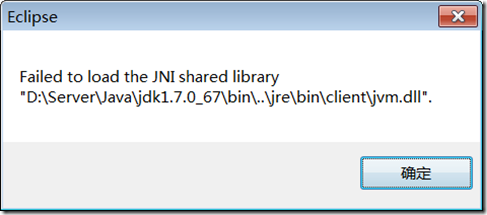
原因:jdk发生变化(新装了32位jdk),eclipse在启动时使用了 系统环境变量中的jdk路径(32位).
解决:只要把旧的64位的jre路径指定给eclipse启动文件即可。
在eclipse.ini中,第一行增加
-vm
D:/Server/Java64/jre7/bin/javaw.exe
Eclipse和MyEclipse启动时对jre依赖的区别:
- myeclipse2013的启动依赖自身带的jre环境
#utf8 (do not remove)
-startup
plugins/org.eclipse.equinox.launcher_1.3.0.v20120522-1813.jar
--launcher.library
plugins/org.eclipse.equinox.launcher.i18n.win32.win32.x86_64_3.2.0.v201103301700
-vm
binary/com.sun.java.jdk.win32.x86_64_1.6.0.u43/bin/javaw.exe
-install
D:\Server\MyEclipse2013
-vmargs
-Xmx512m
-XX:MaxPermSize=256m
-XX:ReservedCodeCacheSize=64m
-Dosgi.nls.warnings=ignore
- eclipse的启动 要求安装jre,并首先考虑使用eclipse.ini指定的jre中的javaw.exe, 若找不到会在环境变量中的javaw.exe
-vm
D:/Server/Java64/jre7/bin/javaw.exe
-startup
plugins/org.eclipse.equinox.launcher_1.3.0.v20140415-2008.jar
--launcher.library
plugins/org.eclipse.equinox.launcher.win32.win32.x86_64_1.1.200.v20150204-1316
-product
org.eclipse.epp.package.jee.product
--launcher.defaultAction
openFile
--launcher.XXMaxPermSize
256M
-showsplash
org.eclipse.platform
--launcher.XXMaxPermSize
256m
--launcher.defaultAction
openFile
--launcher.appendVmargs
-vmargs
-Dosgi.requiredJavaVersion=1.6
-Xms40m
-Xmx512m
需要注意的是,eclipse版本若是32位的,那么jre也应该是32位的。也就是说要对应起来,不然无法启动的。
解决Failed to load the JNI shared library xxx/xxx/jvm.dll 错误的更多相关文章
- 如何解决failed to load the jni shared library问题
如何解决failed to load the jni shared library问题 首先,我们来查看JDK是多少位的,在搜索框中输入cmd,然后打开命令行窗口. 在命令行中输入java -ve ...
- 怎么解决Failed to load the JNI shared library
怎么解决Failed to load the JNIshared library 解决Failed to load the JNIshared library唯一的方法就是重新安装eclipse, ...
- 启动 Eclipse 弹出“Failed to load the JNI shared library jvm.dll”错误的解决方法!&&在eclipse.ini中为eclipse指定jdk启动
参考:http://blog.csdn.net/zyz511919766/article/details/7442633 http://blog.sina.com.cn/s/blog_028f0c1c ...
- 启动 Eclipse 弹出“Failed to load the JNI shared library jvm.dll”错误的解决方法!
启动 Eclipse 弹出"Failed to load the JNI shared library jvm.dll"错误的解决方法 http://blog.csdn.net/z ...
- 启动eclipse时出现“Failed to load the JNI shared library jvm.dll”错误及解决-及eclipse版本查看
启动eclipse时出现“Failed to load the JNI shared library jvm.dll”错误及解决-及eclipse版本查看 学习了:https://www.cnblog ...
- 解决eclipse启动时出现“failed to load the jni shared library”
如何解决启动eclipse出现failed to load the jni shared library的问题 问题描述:启动eclipse时,出现以下弹出框 此时,即表示eclispe和jdk位数不 ...
- 启动eclipse时出现“Failed to load the JNI shared library jvm.dll”错误及解决
昨晚安装另一个版本的eclipse,启动时出现了"Failed to load the JNI shared library jvm.dll"错误: 1.刚开始以为是因为当时没有将 ...
- 启动Eclipse 弹出"Failed to load the JNI shared library jvm.dll"错误
启动Eclipse 弹出"Failed to load the JNI shared library jvm.dll"错误,如下 原因:eclipse的版本与jre或者jdk版本不 ...
- Eclipse启动 报错[Failed to load the JNI shared library jvm.dll
准备要做java服务器,在安装开发环境时,启动Eclipse报错[Failed to load the JNI shared library jvm.dll] 研究了下,造成错误的原因是由于eclip ...
随机推荐
- 【云+社区极客说】新一代大数据技术:构建PB级云端数仓实践
本文来自腾讯云技术沙龙,本次沙龙主题为构建PB级云端数仓实践 在现代社会中,随着4G和光纤网络的普及.智能终端更清晰的摄像头和更灵敏的传感器.物联网设备入网等等而产生的数据,导致了PB级储存的需求加大 ...
- 马尔科夫随机场(Markov Random Field)
马尔可夫随机场(Markov Random Field),它包含两层意思:一是什么是马尔可夫,二是什么是随机场. 马尔可夫过程可以理解为其当前的状态只与上一刻有关而与以前的是没有关系的.X(t+1)= ...
- [转] What is a Full Stack developer?
期望一个凡人掌握开发过程中各个方面的知识,合理吗?也许不合理,但是Facebook正是要寻找这样的人.在一个OSCON会议上,一名Facebook的工程师告诉我的,他们只聘请“全能(Full stac ...
- [转] Hadoop管理员的十个最佳实践
前言 接触Hadoop有两年的时间了,期间遇到很多的问题,既有经典的NameNode和JobTracker内存溢出故障,也有HDFS存储小文件问题,既有任务调度问题,也有MapReduce性能问题.遇 ...
- 从以前的项目格式迁移到 VS2017 新项目格式
以前的项目格式使用的是 csproj 的格式,但是 .net core 支持使用 project.json 格式的项目文件,后来还是决定不使用这个格式. VS2017 的项目格式更好读.更简单而且减少 ...
- 阿里云1核1GIIS都装不上
没有启用虚拟内存启用之后就可以安装了 注意还要把自动更新服务关掉
- [PHP] 重回基础(date函数和strtotime函数)
date():格式化一个本地时间或者日期,当前时间 2016年5月13日 15:19:49 使用函数date(),输出当前是月份中的第几天,参数:String类型 d 例如:echo date(&qu ...
- SpringBoot+Mybatis整合入门(一)
SpringBoot+Mybatis 四步整合 第一步 添加依赖 springBoot+Mybatis相关依赖 <!--springBoot相关--> <parent> < ...
- 《码出高效 Java开发手册》第四章 走进JVM(未整理)
码云地址: https://gitee.com/forxiaoming/JavaBaseCode/tree/master/EasyCoding
- java 数据脱敏
所谓数据脱敏是指对某些敏感信息通过脱敏规则进行数据的变形,实现敏感隐私数据的可靠保护.在涉及客户安全数据或者一些商业性敏感数据的情况下,在不违反系统规则条件下,对真实数据进行改造并提供测试使用,如身份 ...