
【转】np.linspace()、np.logspace()、np.arange()
转自:https://blog.csdn.net/ui_shero/article/details/78881067
1.np.linspace() 生成(start,stop)区间指定元素个数num的list,均匀分布
Parameters
----------
start : scalar #scalar:标量
The starting value of the sequence.
stop : scalar
The end value of the sequence, unless `endpoint` is set to False.
In that case, the sequence consists of all but the last of ``num + 1``
evenly spaced samples, so that `stop` is excluded. Note that the step
size changes when `endpoint` is False.
num : int, optional #oprional:可选项
Number of samples to generate. Default is 50. Must benon-negative.
endpoint : bool, optional #是否包括右边界点
If True, `stop` is the last sample. Otherwise, it is not included.
Default is True.
retstep : bool, optional #返回步长
---------------------
作者:IT_Shero
来源:CSDN
原文:https://blog.csdn.net/ui_shero/article/details/78881067
版权声明:本文为博主原创文章,转载请附上博文链接!
-----------------------------------
np.linspace(2.0, 3.0, num=5, retstep=True)
(array([ 2. , 2.25, 2.5 , 2.75, 3. ]),0.25)
np.linspace(2.0, 3.0, num=5)
array([ 2. , 2.25, 2.5 , 2.75, 3. ])
np.linspace(2.0, 3.0, num=5, endpoint=False)
array([ 2. , 2.2, 2.4, 2.6, 2.8])
--------------------------------
import numpy as np
import matplotlib.pyplot as plt
N = 8
y = np.zeros(N)
x1 = np.linspace(0, 10, N, endpoint=True)
x2 = np.linspace(0, 10, N, endpoint=False)
plt.plot(x1, y, 'o')
plt.plot(x2, y + 0.5, 'o')
plt.ylim([-0.5, 1]) #设置y轴区间
(-0.5, 1)
plt.show()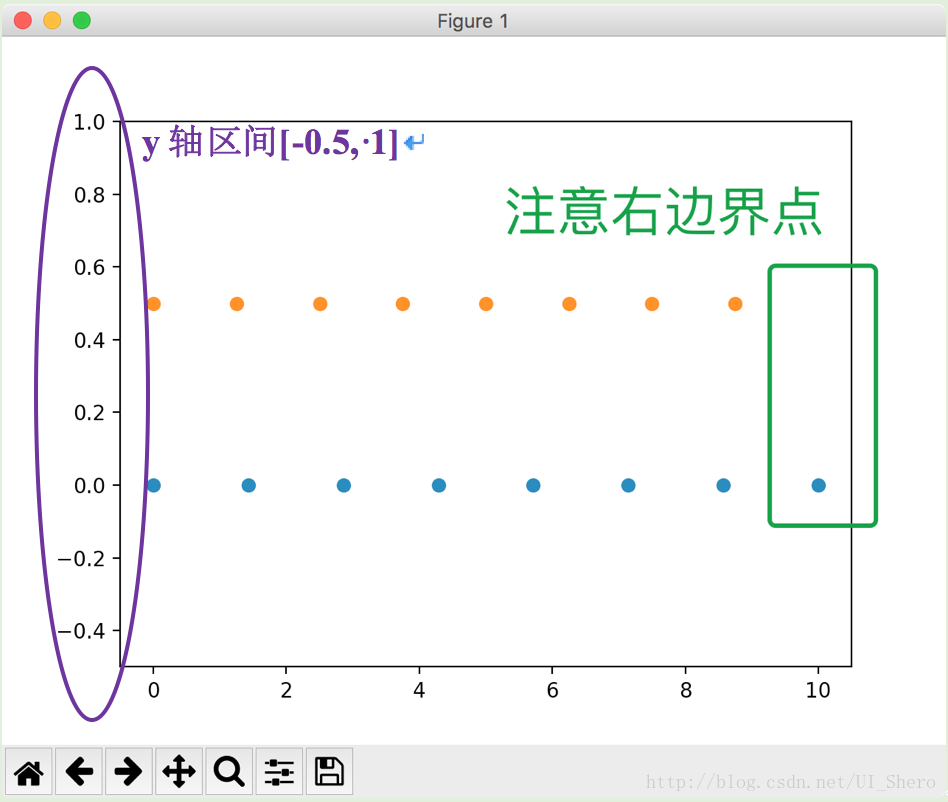
2.np.logspace() log分布间距生成list
Parameters
----------
start : float #基底base的start次幂作为左边界
``base ** start`` is the starting value of the sequence.
stop : float #基底base的stop次幂作为右边界
``base ** stop`` is the final value of the sequence, unless `endpoint`
is False. In that case, ``num + 1`` values are spaced over the
interval in log-space, of which all but the last (a sequence of
length ``num``) are returned.
num : integer, optional
Number of samples to generate. Default is 50.
endpoint : boolean, optional
If true, `stop` is the last sample. Otherwise, it is not included.
Default is True.
base : float, optional #基底
The base of the log space. The step size between the elements in
``ln(samples) / ln(base)`` (or ``log_base(samples)``) is uniform.
Default is 10.0.
dtype : dtype
The type of the output array. If `dtype` is not given, infer the data
type from the other input arguments.
---------------------
np.logspace(2.0, 3.0, num=4)
array([ 100. , 215.443469 , 464.15888336, 1000. ])
np.logspace(2.0, 3.0, num=4, endpoint=False)
array([ 100. , 177.827941 , 316.22776602, 562.34132519])
np.logspace(2.0, 3.0, num=4, base=2.0)
array([ 4. , 5.0396842 , 6.34960421, 8. ])
---------------------
import numpy as np
import matplotlib.pyplot as plt
N = 10
x1 = np.logspace(0.1, 1, N, endpoint=True)
x2 = np.logspace(0.1, 1, N, endpoint=False)
y = np.zeros(N)
plt.plot(x1, y, 'o')
plt.plot(x2, y + 0.5, '<')
plt.ylim([-0.5, 1])
(-0.5, 1)
plt.show()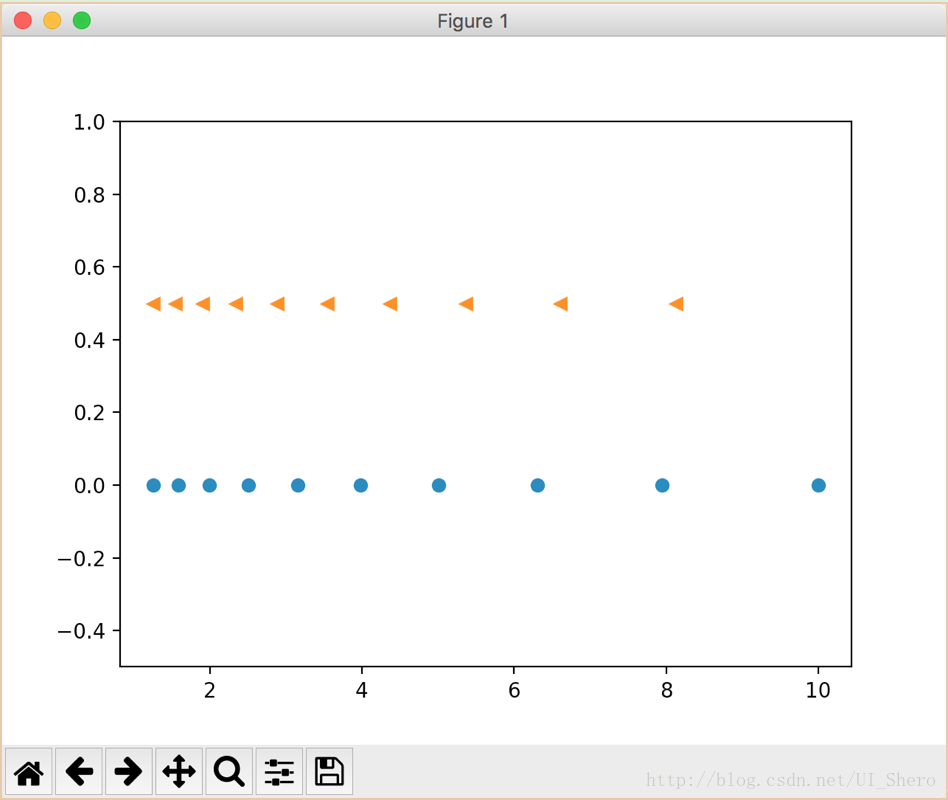
3.np.arange() 生成(start,stop)区间指定步长step的list
np.arange(3)
array([0, 1, 2])
np.arange(3.0)
array([ 0., 1., 2.])
np.arange(3,7)
array([3, 4, 5, 6])
np.arange(3,7,2)
array([3, 5])
【转】np.linspace()、np.logspace()、np.arange()的更多相关文章
- 区分range() , np.arange() , np.linspace()
content: range() np.arange() np.linspace() 一.range(start, stop, step) 1.range() 为 python 自带函数 2.生成一个 ...
- Python中range, np.arange, np.linspace的区别
目录 range np.arange np.linspace range 特点 range()是python内置函数,指定开始值,终值和步长生成等差数列的一维数组 不包含终值 步长只能是整数,生成整数 ...
- Python:range、np.arange和np.linspace
1. range range是python内置的一个类,该类型表示一个不可改变(immutable)的数字序列,常常用于在for循环中迭代一组特殊的数,它的原型可以近似表示如下: class rang ...
- 深度学习原理与框架-神经网络-线性回归与神经网络的效果对比 1.np.c_[将数据进行合并] 2.np.linspace(将数据拆成n等分) 3.np.meshgrid(将一维数据表示为二维的维度) 4.plt.contourf(画出等高线图,画算法边界)
1. np.c[a, b] 将列表或者数据进行合并,我们也可以使用np.concatenate 参数说明:a和b表示输入的列表数据 2.np.linspace(0, 1, N) # 将0和1之间的数 ...
- NP:建立可视化输入的二次函数数据点集np.linspace+np.random.shuffle+np.random.normal
import numpy as np import matplotlib.pyplot as plt def fix_seed(seed=1): #重复观看一样东西 # reproducible np ...
- np.linspace,numpy中的linspace()
import numpy as np x=np.linspace(1,10) y=np.linspace(1,10,num=10,retstep=True)#num可省略 print(x) print ...
- (数学)P、NP、NPC、NP hard问题
概念定义: P问题:能在多项式时间内解决的问题: NP问题:(Nondeterministic Polynomial time Problem)不能在多项式时间内解决或不确定能不能在多项式时间内解决, ...
- 浮点型数据需要转化为int,才能作为点,被读取abc = np.array(abc, dtype=np.int)
import cv2 import numpy as np import matplotlib.pyplot as plt img = 'test.jpg' img = cv2.imread(img) ...
- python中numpy库ndarray多维数组的的运算:np.abs(x)、np.sqrt(x)、np.modf(x)等
numpy库提供非常便捷的数组运算,方便数据的处理. 1.数组与标量之间可直接进行运算 In [45]: aOut[45]:array([[ 0, 1, 2, 3], [ 4, 5, 6, 7], [ ...
随机推荐
- 最简单的socket通信
服务器端程序 import socket # 套接字 sk = socket.socket() # 先买一部手机 # sk.bind(('192.168.13.2',9000)) # 绑定一个电话卡 ...
- 自动化构建工具--gulp的初识和使用
gulp 首先:什么是gulp? gulp是前端开发过程中对代码进行构建的工具,是自动化项目的构建利器:她不仅能对网站资源进行优化,而且在开发过程中很多重复的任务能够使用正确的工具自动完成:使用她,我 ...
- CF954F Runner's Problem
离散化+矩阵快速幂 首先看数据范围可以确定该题的算法为矩阵快速幂 然后易得转移矩阵 \[\begin{bmatrix} 1 & 1 & 0 \\ 1 & 1 & 1 \ ...
- shiro标签的使用
guest标签 用户没有身份验证时显示相应信息,即游客访问信息. user标签 用户已经身份验证/记住我登录后显示相应的信息. authenticated标签 用户已经身份验证通过, ...
- Ubuntu加入opencv库的环境变量
1.用gedit打开/etc/ld.so.conf 终端输入: sudo gedit /etc/ld.so.conf 文件末行加入:include /usr/loacal/lib .然后终端执行指令: ...
- Modernizing Business Process with Cloud and AI
The world is awash with digital transformation. Every customer and partner that I talk to, across ev ...
- flutter控件之ListView滚动布局
ListView即滚动列表控件,能将子控件组成可滚动的列表.当你需要排列的子控件超出容器大小,就需要用到滚动块. import 'package:flutter/material.dart'; cla ...
- ReactNative应用<DCL每日查看>开发总结
App效果: 功能和交互简单描述: 针对微信使用用户每天的零碎时间来进行天气,新闻要点等查看,免去了打开其他App来查看; 针对每一天可以设置一项重要任务计划,可开启通知提醒,让每一天任务简化,免去太 ...
- 团队项目个人进展——Day05
一.昨天工作总结 冲刺第五天,学习了官方文档说明,学习并但是并未实现地图的放大与缩小 二.遇到的问题 对一些框架和API不太熟悉 未实现地图的放大与缩小 三.今日工作规划 深入学习有关视频与文档说明
- Oracle诊断工具 - ORA-4030 Troubleshooting Tool
ORA-4030 说明Oracle服务器进程(server process)无法在操作系统(OS)上分配到足够的内存. 导致ORA-4030 的主要原因有: -物理内存不足 -OS kernel/ ...