
使用Microsoft Unity进行日志记录
需要记录日志的地方包括:进入方法的时候,传参的时候,统计执行时间,方法返回参数的时候,退出语句块的时候,出现异常的时候,等等。先来体验不使用Micirosoft Unity进行日志记录。
class Program{static void Main(string[] args){Add(1, 2);Console.ReadKey();}private static int Add(int a, int b){int result = 0;string temp = string.Empty;string returnValue = string.Empty;try{//记录进入方法Console.WriteLine("马上要执行方法了");temp = string.Format("输入的参数为:a={0},b={1}", a, b);Console.WriteLine(temp);//统计方法执行时间Stopwatch watch = new Stopwatch();watch.Start();result = a + b;watch.Stop();Console.WriteLine("程序执行时间为{0}", watch.Elapsed);//记录返回值returnValue = string.Format("返回结果是:{0}", result);Console.WriteLine(returnValue);//记录方法执行接收Console.WriteLine("方法执行结束");}catch (Exception ex){//记录异常Console.WriteLine(string.Format("异常信息是:{0},输入参数是:{1}", ex.ToString(), temp));throw;}finally{//记录异常处理Console.WriteLine("异常已经被处理了");}return result;}}
以上,还是存在一些问题:
○ 违反了"DRY"原则,如果还有其它方法,需要不断地写记录的逻辑
○ 对阅读代码造成影响
○ 耗时
Microsoft Unity的出现就是解决以上问题。
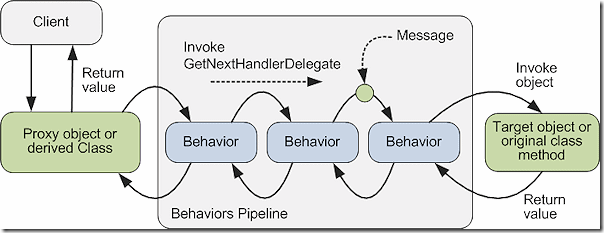
○ Proxy object or derived class是Unity拦截器,在执行方法前后进行拦截
○ Behaviors Pipeline是拦截行为管道,通过API注册
○ Target Object or Original class method是进行拦截的目标对象
□ 引用Unity和Unity.Interception组件
输入关键字Unity,通过NuGet安装Unity。
输入关键字Unity.Interception,通过NuGet安装Unity Interception Extension。
安装完后,相关组件包括: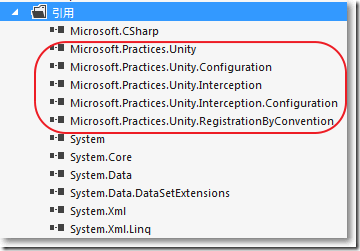
□ 自定义拦截器
自定义的拦截器必须实现IInterceptionBehavior接口。
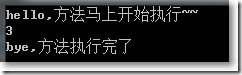
public class MyInterceptionBehavior : IInterceptionBehavior{//返回拦截行为所需要的接口public IEnumerable<Type> GetRequiredInterfaces(){return Type.EmptyTypes;}/// <summary>/// 使用本方法实施拦截行为/// </summary>/// <param name="input">目标方法的参数</param>/// <param name="getNext">在拦截管道中的拦截行为的委托</param>/// <returns>目标方法的返回值</returns>public IMethodReturn Invoke(IMethodInvocation input, GetNextInterceptionBehaviorDelegate getNext){Console.WriteLine("hello,方法马上开始执行~~");IMethodReturn msg = getNext()(input, getNext);Console.WriteLine("bye,方法执行完了");return msg;}//是否启用拦截public bool WillExecute{get { return true; }}}
□ 定义一个计算的接口
public interface ICalculator{int Add(int value1, int value2);int Subtract(int value1, int value2);int Multiply(int value1, int value2);int Divide(int value1, int value2);}
□ 对接口实现
public class Calculator : ICalculator{public int Add(int value1, int value2){int res = value1 + value2;Console.WriteLine(res);return res;}public int Subtract(int value1, int value2){int res = value1 - value2;return res;}public int Multiply(int value1, int value2){int res = value1 * value2;return res;}public int Divide(int value1, int value2){int res = value1 / value2;return res;}}
□ 配置文件中配置Unity
<configuration><configSections><sectionname="unity"type="Microsoft.Practices.Unity.Configuration.UnityConfigurationSection,Microsoft.Practices.Unity.Configuration"/></configSections><unity xmlns="http://schemas.microsoft.com/practices/2010/unity"><alias alias="ICalculator" type="MyLogging.ICalculator, MyLogging"/><alias alias="Calculator" type="MyLogging.Calculator, MyLogging"/><alias alias="MyBehavior" type="MyLogging.MyInterceptionBehavior, MyLogging" /><sectionExtensiontype="Microsoft.Practices.Unity.InterceptionExtension.Configuration.InterceptionConfigurationExtension,Microsoft.Practices.Unity.Interception.Configuration" /><container><extension type="Interception"/><register type="ICalculator" mapTo="Calculator"><interceptor type="InterfaceInterceptor" /><interceptionBehavior type="MyBehavior"/></register></container></unity></configuration>
以上,
○ 通过<alias>节点为接口和类设置别名
○ type="MyLogging.ICalculator, MyLogging"中,逗号前面是类名,逗号后面是程序集名称
□ 客户端调用
using System;using System.Collections.Generic;using Microsoft.Practices.Unity;using Microsoft.Practices.Unity.InterceptionExtension;class Program{static void Main(string[] args){//加载UnityContainerIUnityContainer container = new UnityContainer();container = Microsoft.Practices.Unity.Configuration.UnityContainerExtensions.LoadConfiguration(container);//解析出接口ICalculator calc = Microsoft.Practices.Unity.UnityContainerExtensions.Resolve<ICalculator>(container);//执行方法int res = calc.Add(1, 2);Console.ReadKey();}}
参考资料:
http://www.lm-tech.it/Blog/post/2011/10/18/How-to-use-the-Unity-Interception-Extension.aspx
使用Microsoft Unity进行日志记录的更多相关文章
- Asp.Net Core 2.0 项目实战(9) 日志记录,基于Nlog或Microsoft.Extensions.Logging的实现及调用实例
本文目录 1. Net下日志记录 2. NLog的使用 2.1 添加nuget引用NLog.Web.AspNetCore 2.2 配置文件设置 2.3 依赖配置及调用 ...
- 微软企业库5.0 学习之路——第九步、使用PolicyInjection模块进行AOP—PART4——建立自定义Call Handler实现用户操作日志记录
在前面的Part3中, 我介绍Policy Injection模块中内置的Call Handler的使用方法,今天则继续介绍Call Handler——Custom Call Handler,通过建立 ...
- RMS Server打开或关闭日志记录
原文: https://technet.microsoft.com/zh-cn/library/cc732758 在 Active Directory Rights Management Servic ...
- PHP日志记录规范PSR-3
.note-content { font-family: "Helvetica Neue", Arial, "Hiragino Sans GB", STHeit ...
- (转)解释一下SQLSERVER事务日志记录
本文转载自桦仔的博客http://www.cnblogs.com/lyhabc/archive/2013/07/16/3194220.html 解释一下SQLSERVER事务日志记录 大家知道在完整恢 ...
- 警告: 程序集绑定日志记录被关闭(IIS7 64位系统)
部署一个.NET程序在IIS7服务器,出现如下信息: 说明: 执行当前 Web 请求期间,出现未处理的异常.请检查堆栈跟踪信息,以了解有关该错误以及代码中导致错误的出处的详细信息. 异常详细信息: S ...
- 解释一下SQLSERVER事务日志记录
解释一下SQLSERVER事务日志记录 大家知道在完整恢复模式下,SQLSERVER会记录每个事务所做的操作,这些记录会存储在事务日志里,有些软件会利用事务日志来读取 操作记录恢复数据,例如:log ...
- IIS 7完全攻略之日志记录配置(摘自网络)
IIS 7完全攻略之日志记录配置 作者:泉之源 [IT168 专稿]除了 Windows 提供的日志记录功能外,IIS 7.0 还可以提供其他日志记录功能.例如,可以选择日志文件格式并指定要记录的请求 ...
- 内存中OLTP(Hekaton)里的事务日志记录
在今天的文章里,我想详细讨论下内存中OLTP里的事务日志如何写入事务日志.我们都知道,对于你的内存优化表(Memory Optimized Tables),内存中OLTP提供你2个持久性(durabi ...
随机推荐
- dedecms自定义模型之独立模型在首页、列表页、内容调用内容
dedecms关于自定义模型(独立模型)的首页.列表页.内容怎么调用?在后台自定义模型(独立模型)的建立及自定义字段的添加比较简单,需要注意两点: (1)如果某个字段需要在前台列表页显示,则在前台参数 ...
- PreparedStatement 查询 In 语句 setArray 等介绍。
ps = conn.prepareStatement("SELECT tid,jdp_response FROM jdp_tb_trade WHERE tid IN (?) ORDER BY ...
- Sql Server2005 Transact-SQL 新兵器学习总结之-排名函数
Transact-SQL提供了4个排名函数: rand() , dense_rand() , row_number() , ntile() 下面是对这4个函数的解释:rank() 返回结果集的分区内每 ...
- 20165203《Java程序设计》第九周学习总结
20165203<Java程序设计>第九周学习总结 教材学习内容总结 URL类 URL类是java.net包中的一个重要的类,URL的实例封装着一个统一资源定位符,使用URL创建对象的应用 ...
- python 学习之dict和set类型
什么是dict 我们已经知道,list 和 tuple 可以用来表示顺序集合,例如,班里同学的名字: ['Adam', 'Lisa', 'Bart'] 或者考试的成绩列表: [95, 85, 59] ...
- IDEA导入eclipse项目并部署运行完整步骤(转发)
首先说明一下:idea里的project相当于eclipse里的workspace,而idea里的modules相当于eclipse里的project 1.File-->Import Proje ...
- redis集群错误解决:/usr/lib/ruby/gems/1.8/gems/redis-3.0.0/lib/redis/client.rb:79:in `call': ERR Slot 15495 is already busy (Redis::CommandError)
错误信息: /usr/lib/ruby/gems/1.8/gems/redis-3.0.0/lib/redis/client.rb:79:in `call': ERR Slot 15495 is al ...
- NetCore+Dapper WebApi架构搭建(四):仓储的依赖注入
上一节我们讲到实体,仓储接口和仓储接口的实现需要遵循约定的命名规范,不仅是规范,而且为了依赖注入,现在我们实现仓储的依赖注入 在NetCore WebApi项目中新添加一个文件夹(Unit),当然你也 ...
- [MySQL-笔记]创建高性能索引
索引,MySQL中也叫“键”,是存储引擎中用于快速找到记录的一种数据结构,具体的工作方式就像书本中的索引一样,但是具体的实现方式会有差别. 一.索引分类 B-Tree索引: 优点: MyISAM中,索 ...
- windows下thrift的使用(python)
1.下载thrift,下载地址:http://archive.apache.org/dist/thrift/0.9.3/ 2.在编写python的thrift代码时,需要先安装thrift modul ...