
Linux --- vim 安装、支持python3的配置、插件自动补全YCM的安装配置及全过程错误总结
1.git(用来下载vim和相关插件)
sudo apt-get install git
2,cmake(用来编译clang-llvm)
sudo apt-get install build-essential cmake
3.vim,这里手动编译vim,因为需要python支持,直接apt-get的话会遇到很多麻烦
过程参考 https://github.com/Valloric/YouCompleteMe/wiki/Building-Vim-from-source

先安装依赖项,注意,Ubuntu 16.04是 `liblua5.1-dev`而不是 `lua5.1-dev`
sudo apt-get install libncurses5-dev libgnome2-dev libgnomeui-dev \

    ibgtk2.0-dev libatk1.0-dev libbonoboui2-dev \

    libcairo2-dev libx11-dev libxpm-dev libxt-dev python-dev \

    python3-dev ruby-dev lua5.1 liblua5.1-dev libperl-dev git
4.验证安装
vim --version
查找到python,前面有加号即支持python
python3

注意:虽然 vim --version | grep python显示的python前面确实是加号, 但没有针对Ubuntu 16.04更改配置,导致vim支持还是没有安装。
所以个人认为。如果已经有vim的话还是移除它,重新安装
4.1移除:
sudo apt-get remove vim vim-runtime gvim

sudo apt-get remove vim-tiny vim-common vim-gui-common vim-nox
4.2配置:
cd ~

git clone https://github.com/vim/vim.git

cd vim

./configure --with-features=huge \

            --enable-multibyte \

            --enable-rubyinterp=yes \

            --enable-pythoninterp=yes \

            --with-python-config-dir=/usr/lib/python2.7/config-x86_64-linux-gnu \

            --enable-python3interp=yes \

            --with-python3-config-dir=/usr/lib/python3.5/config-3.5m-x86_64_linux-gnu \

            --enable-perlinterp=yes \

            --enable-luainterp=yes \

            --enable-gui=gtk2 --enable-cscope --prefix=/usr

make VIMRUNTIMEDIR=/usr/share/vim/vim81
4.3安装:
cd ~/vim

sudo make install
安装成功后,打开vim,命令模式下输入 :echo has("python") || has("python3"),结果是1就代表成功了。
4.4如果卸载的话相反的,需要保留vim文件夹并且安装checkinstall
sudo apt-get install checkinstall

cd ~/vim

sudo checkinstall
5.安装Vundle(用来管理vim插件)(类似于Python的pip)
5.1.安装:
git clone https://github.com/VundleVim/Vundle.vim.git ~/.vim/bundle/Vundle.vim
5.2.创建并配置.vimrc配置文件
将配置文件添加到你的用户的home文件夹中:
sudo vim ~/vimrc
添加如下内容(大佬配置一):
set nocompatible              " be iMproved, required

filetype off                  " required

" set the runtime path to include Vundle and initialize

set rtp+=~/.vim/bundle/Vundle.vim

call vundle#begin()

" alternatively, pass a path where Vundle should install plugins

"call vundle#begin('~/some/path/here')

" let Vundle manage Vundle, required

Plugin 'VundleVim/Vundle.vim'

Plugin 'Valloric/YouCompleteMe'

" The following are examples of different formats supported.

" Keep Plugin commands between vundle#begin/end.

" plugin on GitHub repo

Plugin 'tpope/vim-fugitive'

" plugin from http://vim-scripts.org/vim/scripts.html

" Plugin 'L9'

" Git plugin not hosted on GitHub

Plugin 'git://git.wincent.com/command-t.git'

" git repos on your local machine (i.e. when working on your own plugin)

Plugin 'file:///home/gmarik/path/to/plugin'

" The sparkup vim script is in a subdirectory of this repo called vim.

" Pass the path to set the runtimepath properly.

Plugin 'rstacruz/sparkup', {'rtp': 'vim/'}

" Install L9 and avoid a Naming conflict if you've already installed a

" different version somewhere else.

" Plugin 'ascenator/L9', {'name': 'newL9'}

" All of your Plugins must be added before the following line

call vundle#end()            " required

filetype plugin indent on    " required

" To ignore plugin indent changes, instead use:

"filetype plugin on

"

" Brief help

" :PluginList       - lists configured plugins

" :PluginInstall    - installs plugins; append `!` to update or just :PluginUpdate

" :PluginSearch foo - searches for foo; append `!` to refresh local cache

" :PluginClean      - confirms removal of unused plugins; append `!` to auto-approve removal

"

" see :h vundle for more details or wiki for FAQ

" Put your non-Plugin stuff after this line
或者添加如下内容(大佬配置二):
"vundle

set nocompatible

filetype off

set rtp+=~/.vim/bundle/Vundle.vim

call vundle#begin()

Plugin 'VundleVim/Vundle.vim'

"git interface

Plugin 'tpope/vim-fugitive'

"filesystem

Plugin 'scrooloose/nerdtree'

Plugin 'jistr/vim-nerdtree-tabs'

Plugin 'kien/ctrlp.vim'

"html

"  isnowfy only compatible with python not python3

"Plugin 'jtratner/vim-flavored-markdown'

Plugin 'suan/vim-instant-markdown'

Plugin 'nelstrom/vim-markdown-preview'

"python sytax checker

Plugin 'nvie/vim-flake8'

Plugin 'vim-scripts/indentpython.vim'

Plugin 'scrooloose/syntastic'

"auto-completion stuff

"Plugin 'klen/python-mode'

Plugin 'Valloric/YouCompleteMe'

"Plugin 'klen/rope-vim'

"Plugin 'davidhalter/jedi-vim'

Plugin 'ervandew/supertab'

""code folding

Plugin 'tmhedberg/SimpylFold'

"Colors!!!

Plugin 'altercation/vim-colors-solarized'

Plugin 'jnurmine/Zenburn'

call vundle#end()

filetype plugin indent on    " enables filetype detection

let g:SimpylFold_docstring_preview = 1

""autocomplete

"let g:ycm_autoclose_preview_window_after_completion=1

" YouCompleteMe

set runtimepath+=~/.vim/bundle/YouCompleteMe

let g:ycm_collect_identifiers_from_tags_files = 1           " 开启 YCM 基于标签引擎

let g:ycm_collect_identifiers_from_comments_and_strings = 1 " 注释与字符串中的内容也用于补全

let g:syntastic_ignore_files=[".*\.py$"]

let g:ycm_seed_identifiers_with_syntax = 1                  " 语法关键字补全

let g:ycm_complete_in_comments = 1

let g:ycm_confirm_extra_conf = 0

let g:ycm_key_list_select_completion = ['<c-n>', '<Down>']  " 映射按键, 没有这个会拦截掉tab, 导致其他插件的tab不能用.

let g:ycm_key_list_previous_completion = ['<c-p>', '<Up>']

let g:ycm_complete_in_comments = 1                          " 在注释输入中也能补全

let g:ycm_complete_in_strings = 1                           " 在字符串输入中也能补全

let g:ycm_collect_identifiers_from_comments_and_strings = 1 " 注释和字符串中的文字也会被收入补全

let g:ycm_global_ycm_extra_conf='~/.vim/bundle/YouCompleteMe/third_party/ycmd/cpp/ycm/.ycm_extra_conf.py'

let g:ycm_show_diagnostics_ui = 0                           " 禁用语法检查

inoremap <expr> <CR> pumvisible() ? "\<C-y>" : "\<CR>" |            " 回车即选中当前项

nnoremap <c-j> :YcmCompleter GoToDefinitionElseDeclaration<CR>|     " 跳转到定义处

"let g:ycm_min_num_of_chars_for_completion=2                 " 从第2个键入字符就开始罗列匹配

"custom keys

let mapleader=" "

map <leader>g  :YcmCompleter GoToDefinitionElseDeclaration<CR>

"

call togglebg#map("<F5>")

"colorscheme zenburn

"set guifont=Monaco:h14

let NERDTreeIgnore=['\.pyc$', '\~$'] "ignore files in NERDTree

"I don't like swap files

set noswapfile

"turn on numbering

set nu

"it would be nice to set tag files by the active virtualenv here

":set tags=~/mytags "tags for ctags and taglist

"omnicomplete

autocmd FileType python set omnifunc=pythoncomplete#Complete

"------------Start Python PEP 8 stuff----------------

" Number of spaces that a pre-existing tab is equal to.

au BufRead,BufNewFile *py,*pyw,*.c,*.h set tabstop=4

"spaces for indents

au BufRead,BufNewFile *.py,*pyw set shiftwidth=4

au BufRead,BufNewFile *.py,*.pyw set expandtab

au BufRead,BufNewFile *.py set softtabstop=4

" Use the below highlight group when displaying bad whitespace is desired.

highlight BadWhitespace ctermbg=red guibg=red

" Display tabs at the beginning of a line in Python mode as bad.

au BufRead,BufNewFile *.py,*.pyw match BadWhitespace /^\t\+/

" Make trailing whitespace be flagged as bad.

au BufRead,BufNewFile *.py,*.pyw,*.c,*.h match BadWhitespace /\s\+$/

" Wrap text after a certain number of characters

au BufRead,BufNewFile *.py,*.pyw, set textwidth=100

" Use UNIX (\n) line endings.

au BufNewFile *.py,*.pyw,*.c,*.h set fileformat=unix

" Set the default file encoding to UTF-8:

set encoding=utf-8

" For full syntax highlighting:

let python_highlight_all=1

syntax on

" Keep indentation level from previous line:

autocmd FileType python set autoindent

" make backspaces more powerfull

set backspace=indent,eol,start

"Folding based on indentation:

autocmd FileType python set foldmethod=indent

"use space to open folds

nnoremap <space> za

"----------Stop python PEP 8 stuff--------------

"js stuff"

autocmd FileType javascript setlocal shiftwidth=2 tabstop=2
5.3.直接运行vim,输入:PluginInstall,等待安装,结束后退出即可。
以后安装插件,直接可以编辑 .vimrc 文件,例如在.vimrc的 call vundle#begin()和 call vundle#end()之间加上 Plugin 'Valloric/YouCompleteMe',再运行 :PluginInsstall即安装YCM插件,
由于YouCompleteMe有223M左右,所以需要耐心等待,可以时不时用命令 du -s ~/.vim/bundle/YouCompleteMe观察文件夹大小
6.YCM(YouCompleteMe)自动补全
(用Vundle下载慢的话,可以先去官网下载:`git clone https://github.com/Valloric/YouCompleteMe ~/.vim/bundle/YouCompleteMe` )

使用的话有些特殊,需要编译之后才能使用。
6.1. cd ~/.vim/bundle/YouCompleteMe
6.2. 安装支持补全的语言关联: ./install.py
# 这里可以使用install --help查看支持哪些补全
./install.py --clang-completer # 关联C家族的语言; ./install.py # 支持python补全
6.3. 配置文件.ycm_extra_conf.py,包含了补全的系统头文件和源文件出处。(python可以不用配置)
修改flags下的列表即可,在里面添加所需的目录
sudo cp  ~/.vim/bundle/YouCompleteMe/third_party/ycmd/examples/.ycm_extra_conf.py ~/

sudo vim ~/.ycm_extra_conf.py
改前
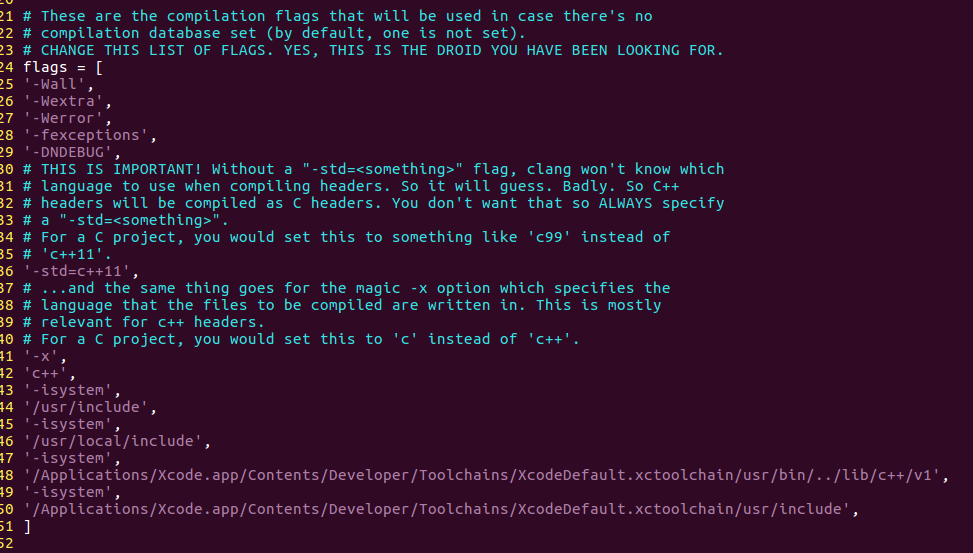
改后

如果出现错误:
则 sudo vim ~/.ycm_extra_conf.py , 然后修改目录:

把.ycm_extra_conf.py放在当前目录配置,是因为YCM是先在当前目录查找再网上走一直递归到找到为止,并且只会加载一次,方便修改。
End
附录博客:
Vundle新老版本的Vundle安装见此文章vundle: vim插件管理安装之错误总结
.vimrc大佬配置二无注释的可以见此文章:Vim配置(python版)
YCM的安装配置见此文章Ubuntu 16.04 64位安装YouCompleteMe
Linux --- vim 安装、支持python3的配置、插件自动补全YCM的安装配置及全过程错误总结的更多相关文章
- Vim自动补全神器YouCompleteMe的配置
简介:YouCompleteMe号称Vim的自动补全神器,该项目在github的地址:YouCompleteMe:以下在10.0.1 build-1379776平台配置完成 插件安装操作: 1.确保V ...
- [转] vim配置python自动补全
vim python自动补全插件:pydiction 可以实现下面python代码的自动补全: 1.简单python关键词补全 2.python 函数补全带括号 3.python 模块补全 4.pyt ...
- Python-2.7 配置tab自动补全功能
作者博文地址:http://www.cnblogs.com/spiritman/ 之前一直使用shell编程,习惯了shell的 tab 自动补全功能,而Python的命令行却不支持 tab 自动补全 ...
- Python-2.7 配置 tab 自动补全功能
作者博文地址:http://www.cnblogs.com/liu-shuai/ 之前一直使用shell编程,习惯了shell的 tab 自动补全功能,而Python的命令行却不支持 tab 自动补全 ...
- VIM 代码自动补全, YouCompleteMe安装及配置
效果 下载 使用Vundle安装 YCM 1. 安装Vundle window用户安装vundle参考这里:Windows下 vundle的安装和使用 2.
- 配置Git自动补全功能
Git装好后,默认是不会有按tab补全命令的功能的.可如下配置: 去git的源码中,找到contrib/completion/git-completion.bash 将git-completion.b ...
- Linux下Python模式下【Tab】自动补全
注:此文为转载他人博客,如有侵权,请联系我删除 1.我们需要一个tab补全的功能脚本 #!/usr/bin/python # python tab file import sys import re ...
- vscode中html和vue没有自动补全,需要怎么配置
先安装HTML Snippets插件 点击 文件-首选项-设置,然后根据以下操作 然后在setting.json中加入以下代码 然后就有提示了
- eclipse配置代码自动补全auto-completion
你如果使用的是JAVA EE的模式,就这样配置: 1. Window>Preferences>Java>Editor>Content Assist>Auto Activa ...
随机推荐
- SSL Certificates深入理解
http://www.littlewhitedog.com/content-71.html https://www.verisign.com/en_US/website-presence/websit ...
- mysql root更改远程登录
mysql> select user,host from mysql.user; +---------------+-------------+ | user | host | +------- ...
- 【Oracle】PL/SQL Developer使用技巧(持续更新中)
1.关键字自动大写 在sql命令窗口中输入SQL语句时,想要关键字自动大写,引人注目该怎么办呢? 一步设置就可以达成了.点击Tools->Preference->Editor,看到截图中这 ...
- Jquery Ajax 提交json数据
在MVC控制器(这里是TestController)下有一个CreateOrder的Action方法 [HttpPost] public ActionResult CreateOrder(List&l ...
- VS C#程序打包覆盖安装不能更新的解决方法
最近写个小程序,打包覆盖安装更新时老是不起作用,还是原来的程序. 在网上四处查找,productcode和ersion都已经更改,removepreviousversions也设置成true了,可就是 ...
- c# 托管和非托管的介绍
在.net 编程环境中,系统的资源分为托管资源和非托管资源. 对于托管的资源的回收工作,是不需要人工干预回收的,而且你也无法干预他们的回收,所能够做的 只是了解.net CLR如何做这些操作.也就是说 ...
- Python下操作sqlite3
import sqlite3 dbpath = 'C:\\Django\\workplace\\sf\\d1.sqlite3' conn = sqlite3.connect(dbpath) cu = ...
- (matlab)plot画图的颜色线型(转)
http://wenku.baidu.com/link?url=SVVMVH8QlDIu2hVKDtoBYs6l0CnQvFnFHJJ9yexmYVKQqhz47qIr7aK7LOf8nN0qNdy8 ...
- September 10th 2017 Week 37th Sunday
Dream most deep place, only then the smile is not tired. 梦的最深处,只有微笑不累. Everyday I expect I can go to ...
- SDN2017 第一次作业
作业链接 阅读LearningNetworkProgramming.pdf,思考后回答以下问题: 你会选择作 网络编程 方向的程序员吗?为什么? 请搜寻并列出至少3个有影响力的中英文SDN的门户网站. ...