
Excel中复杂跨行跨列数据
XSSFWorkbook wb = new XSSFWorkbook();
// 工作表
XSSFSheet sheet = wb.createSheet("车辆使用情况统计");
XSSFCellStyle style = wb.createCellStyle();
style.setAlignment(XSSFCellStyle.ALIGN_CENTER);
style.setVerticalAlignment(XSSFCellStyle.VERTICAL_CENTER);
// 第一季度
XSSFRow row1 = sheet.createRow(0);
row1.setHeight((short)500);
XSSFCell title1 = row1.createCell(0);
title1.setCellStyle(style);
title1.setCellValue("全年");
CellRangeAddress regiontitletitle1 = new CellRangeAddress(0, 1, 0, 1);
sheet.addMergedRegion(regiontitletitle1);
XSSFRow row_2 = sheet.createRow(2);
row_2.setHeight((short)500);
XSSFCell title2 = row_2.createCell(0);
title2.setCellStyle(style);
title2.setCellValue("里程表数(Km)");
CellRangeAddress regiontitletitle2 = new CellRangeAddress(2, 2, 0, 1);
sheet.addMergedRegion(regiontitletitle2);
//第二行数据
Cell(row_2, style, sheet, clsyqkArray);
XSSFRow row_3 = sheet.createRow(3);
row_3.setHeight((short)500);
XSSFCell title3 = row_3.createCell(0);
title3.setCellStyle(style);
title3.setCellValue("行驶里程(Km)");
CellRangeAddress regiontitletitle3 = new CellRangeAddress(3, 3, 0, 1);
sheet.addMergedRegion(regiontitletitle3);
//第三行数据
Cell(row_3, style, sheet, clsyqkArray);
XSSFRow row_4 = sheet.createRow(4);
row_4.setHeight((short)500);
XSSFCell title4 = row_4.createCell(0);
title4.setCellStyle(style);
title4.setCellValue("耗油量(L)");
CellRangeAddress regiontitletitle4 = new CellRangeAddress(4, 4, 0, 1);
sheet.addMergedRegion(regiontitletitle4);
Cell(row_4, style, sheet, clsyqkArray);
XSSFRow row_5 = sheet.createRow(5);
row_5.setHeight((short)500);
XSSFCell title5 = row_5.createCell(0);
title5.setCellStyle(style);
title5.setCellValue("百公里油耗(L/100km)");
CellRangeAddress regiontitletitle5 = new CellRangeAddress(5, 5, 0, 1);
sheet.addMergedRegion(regiontitletitle5);
Cell(row_5, style, sheet, clsyqkArray);
XSSFRow row_6 = sheet.createRow(6);
row_6.setHeight((short)500);
XSSFCell title6 = row_6.createCell(0);
title6.setCellStyle(style);
title6.setCellValue("燃油费(元)");
CellRangeAddress regiontitletitle6 = new CellRangeAddress(6, 6, 0, 1);
sheet.addMergedRegion(regiontitletitle6);
Cell(row_6, style, sheet, clsyqkArray);
XSSFRow row_7 = sheet.createRow(7);
row_7.setHeight((short)500);
XSSFCell title7 = row_7.createCell(0);
title7.setCellStyle(style);
title7.setCellValue("维修保养费(元)");
CellRangeAddress regiontitletitle7 = new CellRangeAddress(7, 7, 0, 1);
sheet.addMergedRegion(regiontitletitle7);
Cell(row_7, style, sheet, clsyqkArray);
XSSFRow row_8 = sheet.createRow(8);
row_8.setHeight((short)500);
XSSFCell title8 = row_8.createCell(0);
title8.setCellStyle(style);
title8.setCellValue("路桥费(元)");
CellRangeAddress regiontitletitle8 = new CellRangeAddress(8, 8, 0, 1);
sheet.addMergedRegion(regiontitletitle8);
Cell(row_8, style, sheet, clsyqkArray);
XSSFRow row_9 = sheet.createRow(9);
row_9.setHeight((short)500);
XSSFCell title9 = row_9.createCell(0);
title9.setCellStyle(style);
title9.setCellValue("保险费(元)");
CellRangeAddress regiontitletitle9 = new CellRangeAddress(9, 9, 0, 1);
sheet.addMergedRegion(regiontitletitle9);
Cell(row_9, style, sheet, clsyqkArray);
XSSFRow row_10 = sheet.createRow(10);
row_10.setHeight((short)500);
XSSFCell title10 = row_10.createCell(0);
title10.setCellStyle(style);
title10.setCellValue("其它费用(元)");
CellRangeAddress regiontitletitle10 = new CellRangeAddress(10, 10, 0, 1);
sheet.addMergedRegion(regiontitletitle10);
Cell(row_10, style, sheet, clsyqkArray);
XSSFRow row_11 = sheet.createRow(11);
row_11.setHeight((short)500);
XSSFCell title11 = row_11.createCell(0);
title11.setCellStyle(style);
title11.setCellValue("全年里程合计(Km)");
CellRangeAddress regiontitletitle11 = new CellRangeAddress(11, 11, 0, 1);
sheet.addMergedRegion(regiontitletitle11);
XSSFCell title11_text = row_11.createCell(2);
title11_text.setCellStyle(style);
title11_text.setCellValue(qnlchj);
CellRangeAddress regiontitletitletitle11_text = new CellRangeAddress(11, 11, 2, 17);
sheet.addMergedRegion(regiontitletitletitle11_text);
XSSFRow row_12 = sheet.createRow(12);
row_12.setHeight((short)500);
XSSFCell title12 = row_12.createCell(0);
title12.setCellStyle(style);
title12.setCellValue("全年油耗量合计(L)");
CellRangeAddress regiontitletitle12 = new CellRangeAddress(12, 12, 0, 1);
sheet.addMergedRegion(regiontitletitle12);
XSSFCell title12_text = row_12.createCell(2);
title12_text.setCellStyle(style);
title12_text.setCellValue(qnjyl);
CellRangeAddress regiontitletitletitle12_text = new CellRangeAddress(12, 12, 2,9);
sheet.addMergedRegion(regiontitletitletitle12_text);
XSSFCell title12_text1 = row_12.createCell(10);
title12_text1.setCellStyle(style);
title12_text1.setCellValue("全年百公里油耗(L/100Km)");
CellRangeAddress regiontitletitletitle12_text1 = new CellRangeAddress(12, 12, 10,13);
sheet.addMergedRegion(regiontitletitletitle12_text1);
XSSFCell title12_text2 = row_12.createCell(14);
title12_text2.setCellStyle(style);
title12_text2.setCellValue(qnbglyh);
CellRangeAddress regiontitletitletitle12_text2 = new CellRangeAddress(12, 12, 14,17);
sheet.addMergedRegion(regiontitletitletitle12_text2);
XSSFRow row_13 = sheet.createRow(13);
row_13.setHeight((short)500);
XSSFCell title13 = row_13.createCell(0);
title13.setCellStyle(style);
title13.setCellValue("全年费用合计(元)");
CellRangeAddress regiontitletitle13 = new CellRangeAddress(13, 13, 0, 1);
sheet.addMergedRegion(regiontitletitle13);
XSSFCell title13_text = row_13.createCell(2);
title13_text.setCellStyle(style);
title13_text.setCellValue(ryf+wxbyf+qtfy+lqf+bxf);
CellRangeAddress regiontitletitletitle13_text = new CellRangeAddress(13, 13, 2, 17);
sheet.addMergedRegion(regiontitletitletitle13_text);
XSSFRow row_14 = sheet.createRow(14);
row_14.setHeight((short)500);
XSSFCell title14 = row_14.createCell(0);
title14.setCellStyle(style);
title14.setCellValue("分析说明");
CellRangeAddress regiontitletitle14 = new CellRangeAddress(14, 14, 0, 1);
sheet.addMergedRegion(regiontitletitle14);
XSSFCell title14_text = row_14.createCell(2);
title14_text.setCellStyle(style);
title14_text.setCellValue("");
CellRangeAddress regiontitletitletitle14_text = new CellRangeAddress(14, 14,2, 17);
sheet.addMergedRegion(regiontitletitletitle14_text);
XSSFCell cell1 = row1.createCell(2);
cell1.setCellStyle(style);
cell1.setCellValue("第一季度");
XSSFRow row2 = sheet.createRow(1);
row2.setHeight((short)500);
XSSFCell cell2 = row2.createCell(2);
cell2.setCellStyle(style);
cell2.setCellValue("1月");
XSSFCell cell3 = row2.createCell(3);
cell3.setCellStyle(style);
cell3.setCellValue("2月");
XSSFCell cell4 = row2.createCell(4);
cell4.setCellStyle(style);
cell4.setCellValue("3月");
XSSFCell cell5 = row2.createCell(5);
cell5.setCellStyle(style);
cell5.setCellValue("小计");
CellRangeAddress region = new CellRangeAddress(0, 0, 2, 5);
sheet.addMergedRegion(region);
// 第二季度
XSSFCell cell6 = row1.createCell(6);
cell6.setCellStyle(style);
cell6.setCellValue("第二季度");
XSSFCell cell7 = row2.createCell(6);
cell7.setCellStyle(style);
cell7.setCellValue("4月");
XSSFCell cell8 = row2.createCell(7);
cell8.setCellStyle(style);
cell8.setCellValue("5月");
XSSFCell cell9 = row2.createCell(8);
cell9.setCellStyle(style);
cell9.setCellValue("6月");
XSSFCell cell10 = row2.createCell(9);
cell10.setCellStyle(style);
cell10.setCellValue("小计");
CellRangeAddress region1 = new CellRangeAddress(0, 0, 6, 9);
sheet.addMergedRegion(region1);
// 第三季度
XSSFCell cell11 = row1.createCell(10);
cell11.setCellStyle(style);
cell11.setCellValue("第三季度");
XSSFCell cell12 = row2.createCell(10);
cell12.setCellStyle(style);
cell12.setCellValue("7月");
XSSFCell cell13 = row2.createCell(11);
cell13.setCellStyle(style);
cell13.setCellValue("8月");
XSSFCell cell14 = row2.createCell(12);
cell14.setCellStyle(style);
cell14.setCellValue("9月");
XSSFCell cell15 = row2.createCell(13);
cell15.setCellStyle(style);
cell15.setCellValue("小计");
CellRangeAddress region2 = new CellRangeAddress(0, 0, 10, 13);
sheet.addMergedRegion(region2);
// 第四季度
XSSFCell cell21 = row1.createCell(14);
cell21.setCellStyle(style);
cell21.setCellValue("第四季度");
XSSFCell cell22 = row2.createCell(14);
cell22.setCellStyle(style);
cell22.setCellValue("10月");
XSSFCell cell23 = row2.createCell(15);
cell23.setCellStyle(style);
cell23.setCellValue("11月");
XSSFCell cell24 = row2.createCell(16);
cell24.setCellStyle(style);
cell24.setCellValue("12月");
XSSFCell cell25 = row2.createCell(17);
cell25.setCellStyle(style);
cell25.setCellValue("小计");
CellRangeAddress region4 = new CellRangeAddress(0, 0, 14, 17);
sheet.addMergedRegion(region4);
if(wb !=null){
try
{
String fileName = "Excel-" + String.valueOf(System.currentTimeMillis()).substring(4, 13) + ".xls";
String headStr = "attachment; filename=" + fileName + "";
response.reset();// 清空输出流
response.setContentType("APPLICATION/OCTET-STREAM");
response.setHeader("Content-Disposition", headStr);
OutputStream out = response.getOutputStream();
wb.write(out);
out.close();
}
catch (IOException e)
{
e.printStackTrace();
}
}
}
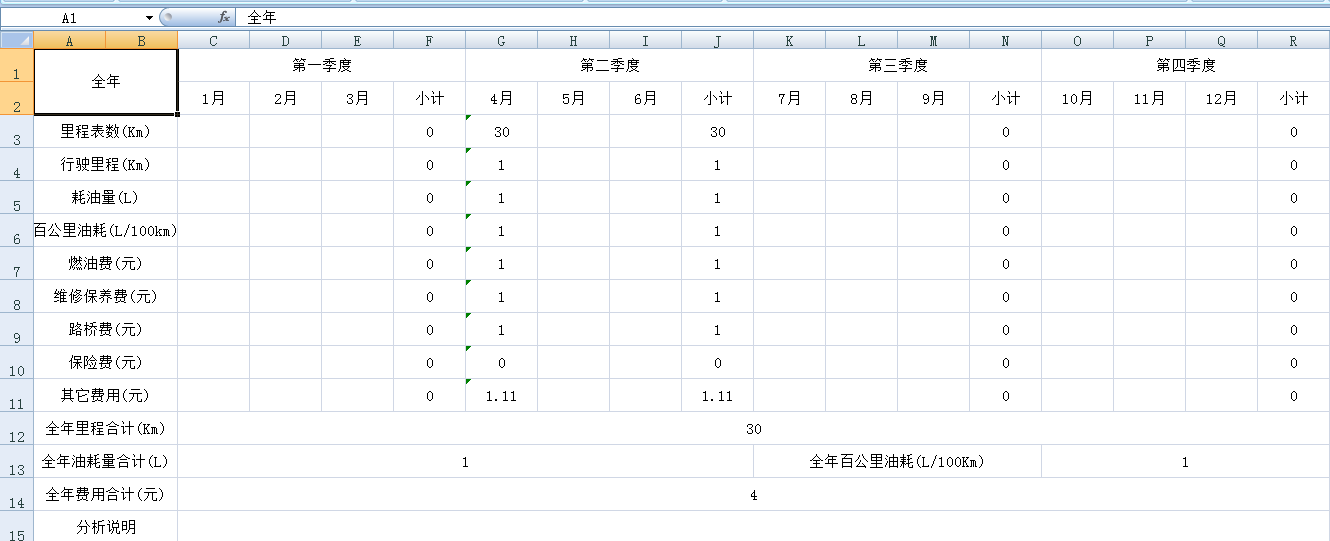
Excel中复杂跨行跨列数据的更多相关文章
- 在excel中如何给一列数据批量加上双引号
在实际开发中,会遇到这样的需求,大量的数据,需要从配置文件里读取,客户给到的枚举值是字符串,而配置文件里的数据,是json格式,需要加上双引号,这样就需要使用Excel来批量格式化一下数据. 客户给到 ...
- 在EXCEL中,判断同列数据重复,并标识出来
推荐方法:建立辅助列,查找B列数据是否重复.=IF(COUNTIF(B:B,B1)>1,"重复","")按住公式单元格右下角实心十字,向下拖拽复制公式.= ...
- excel 快速比对两列数据差异
excel 快速比对两列数据差异 CreateTime--2018年5月31日11:19:35 Author:Marydon 1.情景展示 找出两列数据的差异 2.具体操作 方式一:使用条件格式 ...
- 在EXCEL中如何让一列数字变成文本格式?就是想让单元格的左上角变一个绿绿的?
如何在EXCEL中如何让一列数字变成文本格式?就是想让单元格的左上角变一个绿绿的? 解决方案:将整列单元格格式设为文本,然后,选中该列,数据--分列--完成 详细步骤: (1)选中1行或者1列,再单击 ...
- C# 使用Epplus导出Excel [1]:导出固定列数据
C# 使用Epplus导出Excel [1]:导出固定列数据 C# 使用Epplus导出Excel [2]:导出动态列数据 C# 使用Epplus导出Excel [3]:合并列连续相同数据 C# 使用 ...
- C# 使用Epplus导出Excel [2]:导出动态列数据
C# 使用Epplus导出Excel [1]:导出固定列数据 C# 使用Epplus导出Excel [2]:导出动态列数据 C# 使用Epplus导出Excel [3]:合并列连续相同数据 C# 使用 ...
- excel中快捷计算单一列中的所有的值
excel中快捷计算单一列中的所有的值 比如B列中所有的值 =SUM(B1:B100) 计算B列第一行到第100行的值 又学了一招 如果想统计B列所有的值 可以用 =SUM(B:B)
- 【转载】C#通过Remove方法移除DataTable中的某一列数据
在C#中的Datatable数据变量的操作过程中,有时候我们需要移除当前DataTable变量中的某一列的数据,此时我们就需要使用到DataTable变量内部的Columns属性变量的Remove方法 ...
- excel中在某一列上的所有单元格的前后增加
excel中在某一列上的所有单元格的前后增加数字汉字字符等东西的函数这样写 “东西”&哪一列&“东西” 例如 “1111”&E1&“3333”
随机推荐
- 前端之JavaScript笔记3
一 创建添加节点 <!DOCTYPE html> <html lang="en"> <head> <meta charset=" ...
- 多网卡下对ServerSocket以TCP协议绑定IP和端口的测试
一.引言:之前开发TCP协议的程序(C#里是Socket为主)都是基于主机上只有一个IP的,后来项目里涉及到了主机需要同时连接内外和外网的情况,在该主机上部署着一套WCS系统和一套WMS系统:WCS系 ...
- Python 字典(Dictionary) keys()方法
Python 字典(Dictionary) keys() 函数以列表返回一个字典所有的键. 语法 keys()方法语法: dict.keys() 参数 NA. 返回值 返回一个字典所有的键. 实例 以 ...
- (KMP扩展 利用循环节来计算) Cyclic Nacklace -- hdu -- 3746
http://acm.hdu.edu.cn/showproblem.php?pid=3746 Cyclic Nacklace Time Limit: 2000/1000 MS (Java/Others ...
- 20155302 2016-2017-2 《Java程序设计》第六周学习总结
20155302 2016-2017-2 <Java程序设计>第6周学习总结 教材学习内容总结 Java中的流分为两种,一种是字节流,另一种是字符流,分别由四个抽象类来表示(每种流包括输入 ...
- 基于FPGA的4x4矩阵键盘驱动调试
好久不见,因为博主最近两个月有点事情,加上接着考试,考完试也有点事情要处理,最近才稍微闲了一些,这才赶紧记录分享一篇博文.FPGA驱动4x4矩阵键盘.这个其实原理是十分简单,但是由于博主做的时候遇到了 ...
- Linux操作系统文件系统基础知识详解
一 .Linux文件结构 文件结构是文件存放在磁盘等存贮设备上的组织方法.主要体现在对文件和目录的组织上. 目录提供了管理文件的一个方便而有效的途径. Linux使用标准的目录结构,在安装的时候,安装 ...
- C# Timer类
C# 有三种不同的Timer类 1.Threading.Timer 2.Timer.Timer 3.Forms.Timer using System; using System.Collections ...
- 导出delphi编写的ios程序在xcode下的日志
- Jenkins中执行docker命令报错
Cannot connect to the Docker daemon. Is the docker daemon running on this host? 在配置Jenkins从Gitlab自 ...