
查找Python包的依赖包(语句)
Window 10家庭中文版,Python 3.6.4,
今天看完了urllib3的官文(官方文档),因为没有具体使用过,所以,仍然是一知半解,但是,突然想知道 urllib3以及前面学习过的requests模块都依赖了什么其它模块。
于是,就有了一段200来行的程序和本文了。
功能名称:
查找Python包的依赖包(语句)
功能介绍:
找到Python包(包括子目录)中所有Python语句中的from、import语句,from语句获取import前面的部分,import语句获取整行。
使用方法:
使用包的绝对路径建立类ModuleYilai(模块依赖)的实例,然后调用实例方法yilais就可以获得Python包的依赖包呢,以列表形式返回。
程序介绍:
class ModuleYilai
查找包依赖类;
def ispackage(dirpath)
检查文件夹是否是Python包,判断是否含有__init__.py文件;
def get_all_dirs(dirpath, level=True)
获取给定dirpath目录及其子目录的绝对路径的列表,level为True时包含目录本身;用到了递归,内部使用时,level为False;
def get_all_pyfiles(dirpath)
获取目录下的所有Python文件(*.py);
def get_pyfile_yilais(pyfile)
获取Python文件中所有的from子句、import子句;
需要说明的是,在建立正则表达时是,会忽略了from子句、import子句位于文件开头的情况,故程序中对from子句、import子句分别使用了两次正则匹配;
当然,from子句、import子句的规则还是挺多了,目前程序未能完美(100%)匹配,因此,尚有改进空间,很大;
代码如下(就不添加行号了,方便大家复制):
'''

获取一个Python包的依赖包(语句列表)

2018-06-24 1625:第一版,并不完善,短时间内也不准备完善了

'''

import os

import logging

import re

zllog = logging.getLogger("zl.yilai")

class ModuleYilai:

    '''

    找到模块依赖的模块:

    '''

    __module_path = ''

    __module_name = ''

    __yilai_modules = set()

    def __init__(self, module_path):

        '''

        输入模块的安装路径:绝对路径,不能为根目路“/”

        '''

        zllog.debug('ModuleYilai.__init__')

        # 检查module_path是否符合要求

        if not isinstance(module_path, str):

            print('moule_path (%s) is not str' % type(module_path))

            return

        if len(module_path) == 1:

            print('the length of module_path (%s) is 1' % module_path)

            return

        if not os.path.isabs(module_path):

            print('module_path (%s) is not an absolute path' % module_path)

            return

        if not os.path.isdir(module_path):

            print('module_path (%s) is not a directory' % module_path)

            return

        if not os.path.exists(module_path):

            print('module path (%s) does not exist' % module_path)

            return

        if module_path.endswith('//') or module_path.endswith('\\\\'):

            print('too many forward slashes or back slashes in the end of the module_path (%s)' % module_path)

            return

        # 目录下是否有__init__.py文件

        # 存在此文件,那么,这是一个package

        dl = os.listdir(module_path)

        try:

            dl.index('__init__.py')

        except:

            print('module_path (%s) is not a package: there is no __init__.py' % module_path)

            return

        # 检查完毕后,设置内部_module_path

        self.__module_path = module_path

        # 找出模块名称

        temp_path = module_path

        if temp_path.endswith('/') or temp_path.endswith('\\'):

            print('module_path processing...')

            temp_path = temp_path[:len(temp_path) - 1]

        last_slash_index = temp_path.rfind('/')

        if last_slash_index < 0:

            last_slash_index = temp_path.rfind('\\')

        self.__module_name = temp_path[last_slash_index + 1:]

        # 寻找模块依赖,并将找打的依赖模块存放到_yilai_modules中

        self._search_yilais()

    # 寻找模块依赖

    def _search_yilais(self):

        if self.__module_path == '':

            return

        # 1.找到模块下每一个目录(包括目录本身)

        dirlist = get_all_dirs(self.__module_path)

        zllog.debug('length of dirlist: ', len(dirlist))

        # 2.找到模块下每一个模块文件(*.py),将其绝对路径存入列表中

        pyfiles = []

        for item in dirlist:

            pyfiles.extend(get_all_pyfiles(item))

        zllog.debug('length of pyfiles: ', len(pyfiles))

        # 3.找到每一个模块文件的依赖模块

        fileyilais = []

        for item in pyfiles:

            fileyilais.extend(get_pyfile_yilais(item))

        zllog.debug('length of fileyilais: ', len(fileyilais))

        # 4.将fileyilais转换为set并将其存入实例的_yilai_modules中

        self.__yilai_modules = set(fileyilais)

        zllog.debug('length of self.__yilai_modules: ', len(self.__yilai_modules))

    # 获取模块名称

    def mod_name(self):

        return self.__module_name

    # 获取依赖的包的列表

    def yilais(self):

        return list(self.__yilai_modules)

# 判断一个文件夹是否是Python包

def ispackage(dirpath):

    try:

        dl = os.listdir(dirpath)

        dl.index('__init__.py')

        return True

    except:

        return False

# 找到dirpath下所有目录(包括目录本身),以列表形式返回

# 递归算法

# level为True时,添加目录本身,否则,不添加(查找子目录下的目录时不添加)

def get_all_dirs(dirpath, level=True):

    # 统一使用UNIX样式路径分隔符(/)

    # 替换后,Windows下也可以运行

    dirpath = dirpath.replace('\\', '/')

    dirlist = []

    # 添加目录自身

    if level:

        dirlist.append(dirpath)

    dl = os.listdir(dirpath)

    # 排除其中的__pycache__和test文件夹

    try:

        dl.remove('__pycache__')

        dl.remove('test')

    except:

        pass

    for item in dl:

        itempath = dirpath + '/' + item

        if os.path.isdir(itempath):

            # 将目录添加到返回列表中

            dirlist.append(itempath)

            # 执行get_all_dirs获取其下的目录并添加到dirlist中!

            dirlist.extend(get_all_dirs(itempath, level=False))

    return dirlist

# 找到diapath下所有Python模块(*.py文件),以列表形式返回

# dirpath为绝对路径

def get_all_pyfiles(dirpath):

    # 统一使用UNIX样式路径分隔符(/)

    # 替换后,Windows下也可以运行

    dirpath = dirpath.replace('\\', '/')

    rs = []

    if not os.path.isdir(dirpath):

        return

    dl = os.listdir(dirpath)

    for item in dl:

        itempath = dirpath + '/' + item

        # 检查是否是文件,是否要是py文件

        if os.path.isfile(itempath) and item.endswith('.py'):

            rs.append(itempath)

    return rs

# 获取一个Python模块(.py文件)导入的包

# 结果以列表形式返回

#

# 可能的形式:

# 1.import sys

# 2.from __future__ import absolute_import

# 3.from socket import error as SocketError, timeout as SocketTimeout

# 4.

# from .connection import (

#     port_by_scheme,

#     DummyConnection,

#     HTTPConnection, HTTPSConnection, VerifiedHTTPSConnection,

#     HTTPException, BaseSSLError,

# )

# 5.

# if six.PY2:

#     # Queue is imported for side effects on MS Windows

#     import Queue as _unused_module_Queue  # noqa: F401

# 6.import mod1, mod2, mod3

# 7....

def get_pyfile_yilais(pyfile):

    '''

    格式很多,尚未完善!!

    '''

    rs = []

    if not os.path.isfile(pyfile):

        print('[get_pyfile_yilais] pyfile (%s) is not a file.' % pyfile)

        return rs

    with open(pyfile, 'r', encoding='utf-8') as f:

        content = f.read()

        #rs1 = re.findall('\n(from\s+.+)\s', content)

        # from可以在文件的开头,或者一行的开头,或者注释中,需要前面两种

        rs1 = re.findall('^(from\s+[\_\.0-9a-zA-Z]+)\s', content)

        rs2 = re.findall('\n(from\s+[\_\.0-9a-zA-Z]+)\s', content)

        #print('rs1 = ', rs1)

        #print('rs2 = ', rs2)

        rs3 = re.findall('^(import\s+.+)', content)

        rs4 = re.findall('\n(import\s+.+)', content)

        #print('rs3 = ', rs3)

        #print('rs4 = ', rs4)

        rs = rs1 + rs2 + rs3 + rs4

    return rs

if __name__ == '__main__':

    # 一些测试

    #m1 = ModuleYilai('C:\\Python36\\Lib\\sqlite3')

    #m2 = ModuleYilai('C:\\Python36\\Lib\\sqlite3\\')

    #m3 = ModuleYilai('C:\\Python36\\Lib')

    #m4 = ModuleYilai('C:\\Python36\\Lib\\')

    #m5 = ModuleYilai('C:/Python36/Lib/sqlite3')

    #m6 = ModuleYilai('C:/Python36/Lib/sqlite3/')

    #m7 = ModuleYilai('C:/Python36/Lib/sqlite3//')

    #m8 = ModuleYilai('C')

    #m9 = ModuleYilai('/')

    #m10 = ModuleYilai('\\')

    # 测试get_pyfile_yilais

    #get_pyfile_yilais('C:\\Python36\\Lib\\sqlite3\\dbapi2.py')

    #print()

    #get_pyfile_yilais('C:\\Python36\\Lib\\site-packages\\urllib3\\connectionpool.py')

    # 测试get_all_dirs

    #retlist = get_all_dirs('C:\\Python36\\Lib\\site-packages\\urllib3')

    #for item in retlist:

    #    print(item)

    # Test urllib3 module

    m1 = ModuleYilai('C:\\Python36\\Lib\\site-packages\\urllib3')

    print('module name: ', m1.mod_name())

    print('length: ', len(m1.yilais()))

    print(m1.yilais())

    print()

    # Test of requests module

    m2 = ModuleYilai('C:\\Python36\\Lib\\site-packages\\requests')

    print('module name: ', m2.mod_name())

    print('length: ', len(m2.yilais()))

    print(m2.yilais())

    print()

    # Test of D:\\Users\\log

    m3 = ModuleYilai('D:\\Users\\log')

    print('module name: ', m3.mod_name())

    print('length: ', len(m3.yilais()))

    print(m3.yilais())
mdeps.py
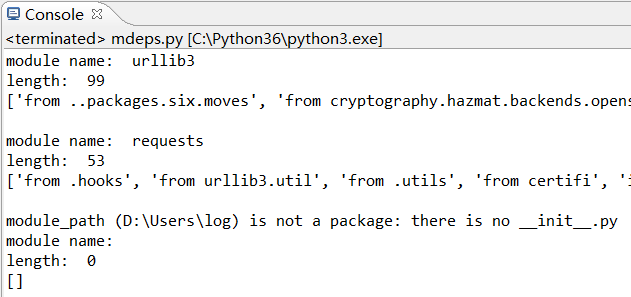
测试结果:
改进方式:
本想在程序中使用logging记录日志,发现它和print混用时在Console输出的消息是混乱的;
使用setLevel函数设置了日志优先级,可是,没能输出想要的调试信息,还需继续研究;
程序使用自己的杂乱的方法进行了测试,更高质量的测试工具unittest、pytest没能用到;
对于from子句、import的抓取,目前只使用了两个简单的规则,其它的尚需进一步完善,但孤可能不会继续了;
对模块以一个点、两个点开头的方式没有做处理;
代码中的def ispackage(dirpath)函数没有用到,本想检测目录是否是Python包的,可自行添加;
本次收获:
写了一个Python类了,还用到了两个下划线开头的私有变量;
用了一些list、set、str的方法呢;
练习了正则表达式的使用,不过,还是不很熟练,需提高;
轻车熟路地使用了with语句;
今天添加了几个小时的认真时间;
查找Python包的依赖包(语句)的更多相关文章
- python安装mysql-python依赖包
# 背景 新公司,对换工作了!接口自动化使用的是python的behave框架,因此需要折腾python了,而公司配的笔记本是windows的,因此要在windows下折腾python了 # 步骤 项 ...
- Linux下离线安装python项目的依赖包
第一步新建一个site-packages文件夹,把python项目有需要的依赖包名称导出到site-packages下的requirements.txt中 $ pip3 freeze > req ...
- python 导入导出依赖包命令
程序中必须包含一个 requirements.txt 文件,用于记录所有依赖包及其精确的版本号.如果 要在另一台电脑上重新生成虚拟环境,这个文件的重要性就体现出来了,例如部署程序时 使用的电脑.pip ...
- 离线下载解决Nuget程序包及其依赖包的方法
由于使用的一台电脑没有联网,但是需要asp.net core项目时使用到一个package,于是在nuget.org上手动下载.但是最后发现,依赖的包实在太多,手动下载太费时.于是晚上花时间研究了一下 ...
- React框架搭建单页面应用package.json基本包和依赖包
{ //依赖包 "devDependencies": { //babel "babel-core": "6.24.1", "bab ...
- Python离线安装依赖包
1.制作requirement.txt pip freeze > requirement.txt 2.下载离线Pytho安装包 pip download -r requirement.txt - ...
- maven打jar包包括依赖包
<build> <plugins> <plugin> <artifactId>maven-compiler-plugin</artifactId& ...
- 5.Python安装依赖(包)模块方法介绍
1.前提条件 1). 确保已经安装需要的Python版本 2). 确保已经将Python的目录加入到环境变量中 2. Python安装包的几种常用方式 1). pip安装方式(正常在线安装) 2). ...
- windows下安装python和依赖包的利器——Anaconda
在windows下安装python和很多依赖包,安装起来略为痛苦,可以使用python的大整合包——Anaconda Anaconda下载地址: http://continuum.io/downloa ...
随机推荐
- 沉迷AC自动机无法自拔之:穿越广场 square
如标题所言,我已经沉迷于AC自动机无法自拔了... 这又是一道AC自动的题,红红火火恍恍惚惚 穿越广场 [问题描述] L 国的仪仗队要穿越首都广场了.首都广场可以看做是一块 N*M 的矩形网格,仪仗队 ...
- CentOS7搭建elasticsearch集群
准备三个节点,系统版本为CentOS7.3. 11.0.10.18 es01 11.0.10.19 es02 11.0.10.20 es03 1.安装java环境 # yum install -y j ...
- Java之使用链表实现队列
import java.util.Iterator; import java.util.NoSuchElementException; /** * 使用链表来实现队列 * 1.考虑结点的结构,包括当前 ...
- java多线程 -- ConcurrentHashMap 锁分段 机制
hashtable效率低ConcurrentHashMap 线程安全,效率高 Java 5.0 在 java.util.concurrent 包中提供了多种并发容器类来改进同步容器 的性能. Conc ...
- Andrioid Studio生成jar, aar包
在Android Studio中对一个自己库进行生成操作时将会同时生成*.jar与*.aar文件.分别存储位置:*.jar:库/build/intermediates/bundles/debug(re ...
- 在mvc中 怎么给@Html.HiddenFor()赋值
@Html.HiddenFor(model => model.CreatedBy, new { @value=currentInfo.UserID}) value始终是null@Html.Tex ...
- 语法:c++对关于空指针0/NULL/nullptr三者的演变
来源: https://blog.csdn.net/u010558281/article/details/77793644 字面意义上的解释: 0:整型常量 NULL:预处理符号 nullptr:空指 ...
- 题解【bzoj1503 [NOI2004]郁闷的出纳员】
Description 给出一个下限 \(m\) ,要求维护以下操作 插入一个数(如果小于下限就不加) 给每个数加上一个数 给每个数减去一个数,并且删除掉 \(< m\) 的所有数 求目前第 \ ...
- 【Asp.net入门2-01】C#基本功能
C#是一种功能强大的语言,但并不是所有程序员都熟悉我们将在本书中讨论的所有功能.因此, 本章将介绍优秀的Web窗体程序员需要了解的C#语言功能. 本章仅简要介绍每一项功能.有关C#语言本身的知识不是本 ...
- centos7 U盘安装卡在 starting dracut initqueue hook解决办法
U盘安装centos7启动过程中出现: [ok] Reached target Basic System 或者 [ok] starting dracut initqueue hook 到下一行就不 ...