
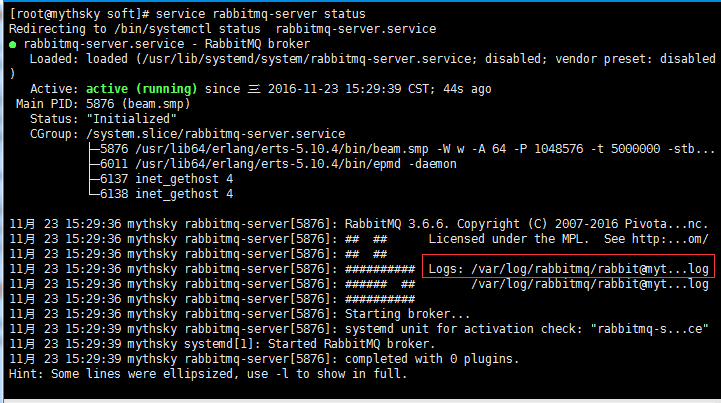
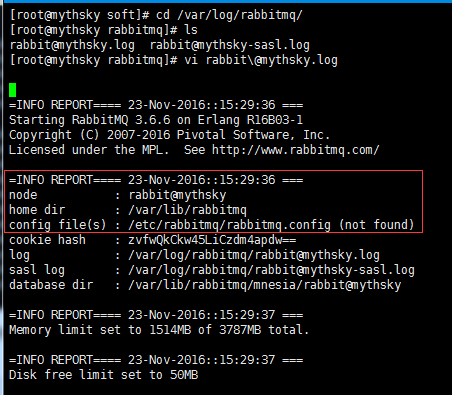
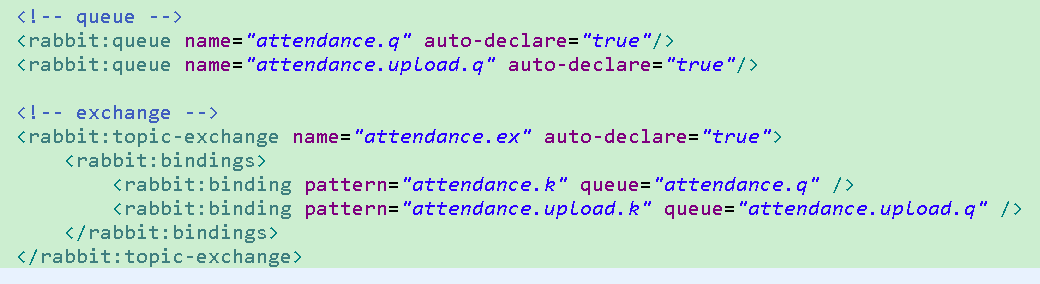
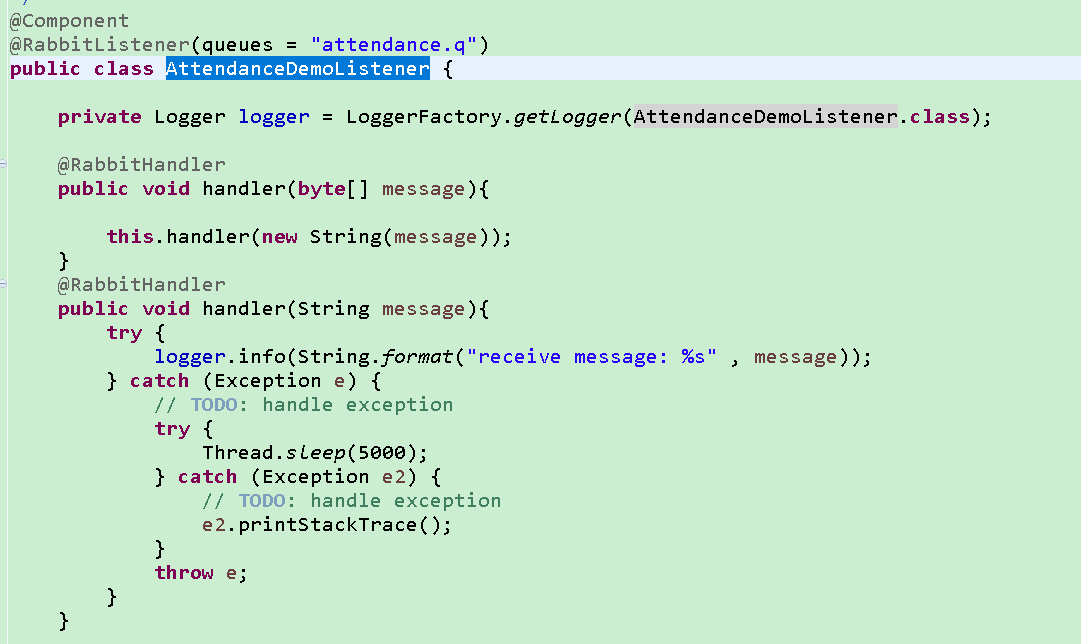
centos7 rabbitmq安装以及应用



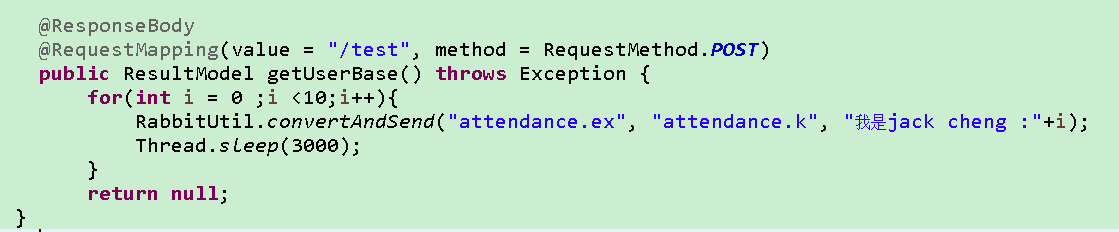
public class RabbitUtil {

    @Autowired

    private ConnectionFactory connectionFactory;

    @Autowired

    private RabbitTemplate rabbitTemplate;

    private static RabbitUtil rabbitUtil;

    @PostConstruct

    private void init() {

        rabbitUtil = this;

        rabbitUtil.rabbitTemplate = this.rabbitTemplate;

        rabbitUtil.connectionFactory = this.connectionFactory;

    }

    public static RabbitTemplate getRabbitTemplate() {

        return rabbitUtil.rabbitTemplate;

    }

    public static ConnectionFactory getConnectionFactory() {

        return rabbitUtil.connectionFactory;

    }

    /**

     * 发送RMQ消息

     *

     * @param message

     * @throws AmqpException

     */

    public void convertAndSend(String message) throws AmqpException {

        convertAndSend(null, null, message, false);

    }

    /**

     * 发送RMQ消息

     *

     * @param routingKey

     * @param message

     * @throws AmqpException

     */

    public void convertAndSend(String routingKey, String message) throws AmqpException {

        convertAndSend(null, routingKey, message, false);

    }

    /**

     * 发送RMQ消息

     *

     * @param exchange

     * @param routingKey

     * @param message

     * @throws AmqpException

     */

    public static void convertAndSend(String exchange, String routingKey, String message) throws AmqpException {

        convertAndSend(exchange, routingKey, message, false);

    }

    private static void convertAndSend(String exchange, String routingKey, Object message, boolean waitForAck)

            throws AmqpException {

        if (waitForAck) {

        } else {

            if (StringUtils.isNotEmpty(exchange) && StringUtils.isNotEmpty(routingKey)) {

                getRabbitTemplate().convertAndSend(exchange, routingKey, message);

            } else if (StringUtils.isNotEmpty(routingKey)) {

                getRabbitTemplate().convertAndSend(routingKey, message);

            } else {

                getRabbitTemplate().convertAndSend(message);

            }

        }

    }

    /**

     * 查询队列消息数量

     * @param queue

     * @throws Exception

     */

    public static long getMessageCount(String queue) throws Exception {

        Connection connection = null;

        Channel channel = null;

        try {

            ConnectionFactory connectionFactory = getConnectionFactory();

            connection = connectionFactory.createConnection();

            channel = connection.createChannel(false);

            return channel.messageCount(queue);

        } finally {

            if(channel != null){

                channel.close();

            }

            if(connection != null){

                connection.close();

            }

        }

    }
centos7 rabbitmq安装以及应用的更多相关文章
- centos7 rabbitmq安装/配置
原文:centos7 rabbitmq安装/配置 因为RabbitMQ是由erlang实现的,所以要先安装erlang再安装rabbitMQ 1.先配置yum软件源地址EPEL(EPEL是 ...
- Linux(CENTOS7) RabbitMq安装
RabbitMQ是一个在AMQP协议标准基础上完整的,可服用的企业消息系统.它遵循Mozilla Public License开源协议,采用 Erlang 实现的工业级的消息队列(MQ)服务器,Rab ...
- centos7 rabbitmq 安装
http://www.rabbitmq.com/install-rpm.html Overview rabbitmq-server is included in Fedora. However, th ...
- 使用专业的消息队列产品rabbitmq之centos7环境安装
我们在项目开发的时候都不可避免的会有异步化的问题,比较好的解决方案就是使用消息队列,可供选择的队列产品也有很多,比如轻量级的redis, 当然还有重量级的专业产品rabbitmq,rabbitmq ...
- [转]centos7环境安装rabbitMQ
使用专业的消息队列产品rabbitmq之centos7环境安装 http://www.cnblogs.com/huangxincheng/p/6006569.html CentOS7上安装Rabbit ...
- RabbitMQ消息队列(三)-Centos7下安装RabbitMQ3.6.1
如果你看过前两章对RabbitMQ已经有了一定了解,现在已经摩拳擦掌,来吧动手吧! 用什么系统 本文使用的是Centos7,为了保证对linux不太熟悉的伙伴也能轻松上手(避免折在安装的路上),下面是 ...
- 【rabbitmq】Centos7 下安装rabbitmq
rabbitmq安装 rabbitmq的安装依赖erlang,首先应该先安装erlang,然后安装rabbitmq: Step1:安装erlang erlang-rpm安装教程 选择在Centos7 ...
- centos7下安装rabbitmq
RabbitMQ: RabbitMQ是流行的开源消息队列系统,是AMQP(Advanced Message Queuing Protocol高级消息队列协议)的标准实现,用erlang语言开发.Rab ...
- centos7环境安装rabbitMQ
使用专业的消息队列产品rabbitmq之centos7环境安装 http://www.cnblogs.com/huangxincheng/p/6006569.html [源码安装,适用GNOME + ...
随机推荐
- MacBook Pro 一月使用体验
从 2013 年开始,就特别想买 MBP,终于在 2015 年的尾巴用上了 MBPR.原本是要在使用一周后写一份使用体验的,但因为懒,现在拖到一个月了,刚好现在也是2016年的一月,就把标题改成一月使 ...
- leetcode268
public class Solution { public int MissingNumber(int[] nums) { var list = nums.OrderBy(x => x).To ...
- JS数组对象的方法
concat 返回一个新数组,这个数组是由两个或更多数组组合而成的 array.concat(b,c); join 返回字符串值,其中包括了连接到一起的数组的所有元素,元素由指定分隔符分割开来 arr ...
- reportng代替testng的默认报告——pom设置
既然是maven项目,直接关注pom设置. 这篇写得很清楚了:maven+testng+reportng的pom设置 强调一点的是,guice必须依赖,就因这个卡了大半天. <dependenc ...
- php解析url并得到url中的参数
<?php $url = 'http://www.baidu.com/index.php?m=content&c=index&a=lists&catid=6&ar ...
- spring cloud: eureka搭建
1. 添加pom 依赖: <parent> <groupId>org.springframework.boot</groupId> <artifactId&g ...
- playbook相关
ansible-playbook site.yml -f 10 ansible-playbook常用参数说明: -f 10 启用10个并发进程数执行playbook -u RM ...
- How to Pronounce EVERY
How to Pronounce EVERY Share Tweet Share Tagged With: 2-Syllable Everybody should learn the word ‘ev ...
- Delphi 解析系统环境变量
// http://www.outofmemory.cn function ExpandEnvironment(const strValue: string): string; var chrResu ...
- 手动安装yii2.0-redis扩展
1.点击下载:yii2.0-redis扩展 2.把下载的扩展文件放到vendor/yiisoft/下,命名为yii2-redis 3.修改vender/yiisoft/下的extensions.php ...