
Spring Boot 表单验证、AOP统一处理请求日志、单元测试
一、使用@Valid表单验证
于实体类中添加@Min等注解
 @Entity

 public class Girl {

     @Id

     @GeneratedValue

     private Integer id;

     private String cupSize;

     @Min(value = 18,message = "未成年禁止入内!")

     private Integer age;

 ...

 }
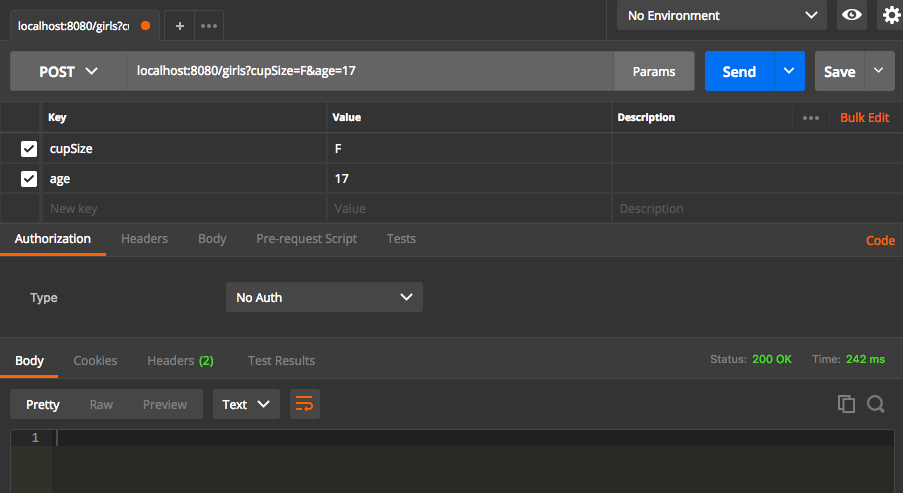
给指定的访问方法参数添加@Valid 注解,并使用BindingResult bindingResult对象获取返回结果
 @PostMapping(value = "/girls")

     public Girl addgirl(@Valid Girl girl, BindingResult bindingResult){

         if (bindingResult.hasErrors()){

             System.out.println(bindingResult.getFieldError().getDefaultMessage());

             return null;

         }

         girl.setCupSize(girl.getCupSize());

         girl.setAge(girl.getAge());

         return girlRepository.save(girl);

     }

二、使用AOP处理请求
使用AOP统一处理请求日志
在pom文件中添加aop依赖,
<!-- aop依赖 -->

        <dependency>

            <groupId>org.springframework.boot</groupId>

            <artifactId>spring-boot-starter-aop</artifactId>

        </dependency>
新建aspect类:
 @Aspect

 @Component

 public class HttpAspect {

     @Pointcut("execution(public * com.cenobitor.controller.GirlController.girlList(..))")

     public void log(){

     }

     @Before("log()")

     public void doBefore(){

         System.out.println(11111111);

     }

     @After("log()")

     public void doAfter(){

         System.out.println(22222222);

     }

 }
 /*

 * 以日志的形式取代sout,显示更详细的信息

 * */

 @Aspect

 @Component

 public class HttpAspect {

     //import org.slf4j.Logger;

     private final static Logger LOGGER = LoggerFactory.getLogger(HttpAspect.class);

     //设置切点,简化代码

     @Pointcut("execution(public * com.cenobitor.controller.GirlController.girlList(..))")

     public void log(){

     }

     //获取请求信息

     @Before("log()")

     public void doBefore(JoinPoint joinPoint){

         ServletRequestAttributes  attributes = (ServletRequestAttributes) RequestContextHolder.getRequestAttributes();

         HttpServletRequest request = attributes.getRequest();

         //URL

         LOGGER.info("url={}",request.getRequestURL());

         //IP

         LOGGER.info("ip={}",request.getRemoteAddr());

         //METHOD

         LOGGER.info("method={}",request.getMethod());

         //类方法

         LOGGER.info("class_method={}",joinPoint.getSignature().getDeclaringTypeName()+"."+joinPoint.getSignature().getName());

         //参数

         LOGGER.info("args={}",joinPoint.getArgs());

     }

     @After("log()")

     public void doAfter(){

         LOGGER.info("222222222222");

     }

     //打印返回结果

     @AfterReturning(returning = "object",pointcut = "log()")

     public void doAfterReturning(Object object){

         LOGGER.info("response={}",object.toString());

     }

 }
三、单元测试
- 基本代码:
 @RestController

 public class CustomerController {

     @Autowired

     private CustomerService customerService;

     @GetMapping(value = "customer_findById")

     public Customer findById(@RequestParam("id") Integer id){

         return customerService.findById(id);

     }

 }vv
 @Service

 @Transactional

 public class CustomerServiceImpl implements CustomerService {

     @Autowired

     private CustomerRepository customerRepository;

     @Override

     public Customer findById(Integer id) {

         return customerRepository.findOne(id);

     }

 }
- service层测试
 @RunWith(SpringRunner.class)

 @SpringBootTest

 public class CustomerServiceTest {

     @Autowired

     private CustomerService customerService;

     @Test

     public void findByIdTest(){

         Customer customer = customerService.findById(1);

         Assert.assertEquals("张三",customer.getName());

     }

 }
- API测试(即controller层测试):
 @RunWith(SpringRunner.class)

 @SpringBootTest

 @AutoConfigureMockMvc

 public class CustomerControllerTest {

     @Autowired

     private MockMvc mvc;

     @Test

     public void findById() throws Exception {

         mvc.perform(MockMvcRequestBuilders.get("/customer_findById?id=1"))

                 .andExpect(MockMvcResultMatchers.status().isOk())

                 .andExpect(MockMvcResultMatchers.content().string("abc"));//返回结果

     }

 }
- 常用命令:
- 执行打包并进行单元测试
mvn clean package
- 执行打包并跳过所有单元测试
mvn clean package -Dmaven.test.skip=true
Spring Boot 表单验证、AOP统一处理请求日志、单元测试的更多相关文章
- spring boot 表单验证
1 设置某个字段的取值范围 1.1 取值范围验证:@Min,@Max ① 实例类的属性添加注解@Min ② Controller中传入参数使用@Valid注解 1.2 不能为空验证:@NotNull ...
- Spring进行表单验证
转自:https://www.tianmaying.com/tutorial/spring-form-validation 开发环境 IDE+Java环境(JDK 1.7或以上版本) Maven 3. ...
- SpringBoot学习笔记(七):SpringBoot使用AOP统一处理请求日志、SpringBoot定时任务@Scheduled、SpringBoot异步调用Async、自定义参数
SpringBoot使用AOP统一处理请求日志 这里就提到了我们Spring当中的AOP,也就是面向切面编程,今天我们使用AOP去对我们的所有请求进行一个统一处理.首先在pom.xml中引入我们需要的 ...
- spring boot中表单验证的使用
一.前言 为啥子要搞这个表单验证呢?答案简单而现实,举个栗子,你辛辛苦苦的写了一个录入个人信息的功能,比如年龄这个位置,用户就没看到一下子写了个性别男,一提交,直接报错了,是不是很尴尬呢, 作为一个测 ...
- Flask10 登录模块、表单框架、表单渲染、表单验证、bookie、请求之前钩子、g对象、编写装饰器
from flask import Flask from flask import request from flask import render_template from flask_wtf i ...
- Spring MVC 表单验证
1. 基于 JSR-303(一个数据验证的规范): import javax.validation.constraints.Min; import javax.validation.constrain ...
- Spring常用表单验证注解
下面是主要的验证注解及说明: 注解 适用的数据类型 说明 @AssertFalse Boolean, boolean 验证注解的元素值是false @AssertTrue Boolean, boole ...
- spring boot -表单校验步骤 +@NotEmpty,@NotNull和@NotBlank的区别
1.实体类属性上添加注解规则 如 public class User { @NotBlank private Integer id ; 2.在方法中添加注解@Valid和一个校验结果参数(Bindin ...
- Springboot中AOP统一处理请求日志
完善上面的代码: 现在把输出信息由先前的system.out.println()方式改为由日志输出(日志输出的信息更全面) 现在在日志中输出http请求的内容 在日志中获取方法返回的内容
随机推荐
- daemon_int
摘自 UNP #include "unp.h" #include <syslog.h> #define MAXFD 64 extern int daemon_proc; ...
- [bug]小米部分机型(5x、mix2)中,文字/背景闪现然后消失
2/9更新 后来遇到float 元素也这样,改成flex布局就没问题.不知道具体原因. 描述: 使用vue 2.4开发HTML5时,遇到在小米部分机型(5x.mix2)中,文字/文字背景闪现然后消失. ...
- WEB-INFO 目录
WEB-INF下面的内容都是只能由服务器级别才能访问,客户端并不能访问. 转发就是服务器级别,浏览器的地址不会变,因为,客户端发送一个请求,服务器受理之后,发现要请求内容还要再去别的请求,那么转发就是 ...
- 模仿 AppStore 顶部动画
App Store 顶部动画 App Store 中 Games.Apps.Updates 的顶部动画的特点: 自然状态下是大标题,右边有一个 button 顶上去时,变成小标题,右边按钮消失 导航栏 ...
- vue-cli新建vue项目安装axios后在IE下报错
使用脚手架新建了一个vue项目,可以在IE9+浏览器运行,但是在添加了axios后,在IE下就报错了 首先是安装axios,在命令行执行: $ npm install axios -s //执行命令, ...
- 安装vue后报错 bash: vue: command not found
今天参照之前写的vue的环境搭建一个新的项目 http://www.cnblogs.com/stella1024/p/7570884.html 安装完vue,并提示成功: $ npm install ...
- POJ 2253
#include<iostream> #include<stdio.h> #include<math.h> #include<iomanip> #def ...
- commons-logging.jar 和 log4j.jar 的关系
在用springmvc开发项目的时候,在日志管理这一块,我们一般用的都是log4j进行日志管理,但是我们在导入spring相关的jar的时候,都会看到commons-logging.jar包,为什么我 ...
- PreparedStatement插入values
public interface PreparedStatementextends Statement 表示预编译的 SQL 语句的对象. SQL 语句被预编译并存储在 PreparedStateme ...
- 软件魔方制作系统启动盘并安装win10系统
不多说,直接上干货! 推荐软件:软件魔方 http://mofang.ruanmei.com/ 这里,我想说的是,这个软件来制作系统盘,是真的方便和好处多多.具体我不多说,本人也是用过其他的如大白菜 ...