
【原】Spring整合Shiro基础搭建[3]
1.前言
上个Shiro Demo基础搭建是基于官方的快速入门版本,没有集成其他框架,只是简单的通过Main方法来执行Shiro工作流程,并测试一下比较核心的函数;但在企业开发中一般都会集成Spring,因为被Spring管理后很多事情都交给了Spring框架进行了管理,而且Spring框架提供了丰富的支持类,不仅方便我们开发人员进行扩展,也利于维护,通过Spring管理我们能把更多的细节放在业务上,提高我们的开发效率。
搭建环境(eclipse+jdk1.7+tomcat7.0)
- 首先是 新建一个web工程,引入Spring和Shiro相关jar包,如图

2. 新建一个applicationContext.xml文件,用来配置Shiro
<?xml version="1.0" encoding="UTF-8"?>

<beans xmlns="http://www.springframework.org/schema/beans"

    xmlns:xsi="http://www.w3.org/2001/XMLSchema-instance"

    xsi:schemaLocation="http://www.springframework.org/schema/beans http://www.springframework.org/schema/beans/spring-beans.xsd">

<bean id="securityManager" class="org.apache.shiro.web.mgt.DefaultWebSecurityManager">

    <property name="cacheManager" ref="cacheManager"></property>

    <property name="realm" ref="jdbcRealm"></property>

</bean>

<bean id="cacheManager" class="org.apache.shiro.cache.ehcache.EhCacheManager">

    <property name="cacheManagerConfigFile" value="classpath:ehcache.xml"></property>

</bean>

<bean id="jdbcRealm" class="com.zdd.shiro.ShiroRealm"></bean>

<bean id="lifecycleBeanPostProcessor" class="org.apache.shiro.spring.LifecycleBeanPostProcessor">

</bean>

<!--  5. 启用 IOC 容器中使用 shiro 的注解. 但必须在配置了 LifecycleBeanPostProcessor 之后才可以使用. -->

    <bean class="org.springframework.aop.framework.autoproxy.DefaultAdvisorAutoProxyCreator"

          depends-on="lifecycleBeanPostProcessor"/>

    <bean class="org.apache.shiro.spring.security.interceptor.AuthorizationAttributeSourceAdvisor">

        <property name="securityManager" ref="securityManager"/>

    </bean>

 <!--

    6. 配置 ShiroFilter.

    6.1 id 必须和 web.xml 文件中配置的 DelegatingFilterProxy 的 <filter-name> 一致.

                      若不一致, 则会抛出: NoSuchBeanDefinitionException. 因为 Shiro 会来 IOC 容器中查找和 <filter-name> 名字对应的 filter bean.

    -->

    <bean id="shiroFilter" class="org.apache.shiro.spring.web.ShiroFilterFactoryBean">

        <property name="securityManager" ref="securityManager"/>

        <property name="loginUrl" value="/login.jsp"/>

        <property name="successUrl" value="/list.jsp"/>

        <property name="unauthorizedUrl" value="/unauthorized.jsp"/>

         <property name="filterChainDefinitions">

            <value>

                /login.jsp = anon

                # everything else requires authentication:

                /** = authc

            </value>

        </property>

    </bean>

</beans>
3. 配置ehcache.xml
<ehcache>

    <!-- Sets the path to the directory where cache .data files are created.

         If the path is a Java System Property it is replaced by

         its value in the running VM.

         The following properties are translated:

         user.home - User's home directory

         user.dir - User's current working directory

         java.io.tmpdir - Default temp file path -->

    <diskStore path="java.io.tmpdir"/>

    <cache name="authorizationCache"

           eternal="false"

           timeToIdleSeconds="3600"

           timeToLiveSeconds="0"

           overflowToDisk="false"

           statistics="true">

    </cache>

    <cache name="authenticationCache"

           eternal="false"

           timeToIdleSeconds="3600"

           timeToLiveSeconds="0"

           overflowToDisk="false"

           statistics="true">

    </cache>

    <cache name="shiro-activeSessionCache"

           eternal="false"

           timeToIdleSeconds="3600"

           timeToLiveSeconds="0"

           overflowToDisk="false"

           statistics="true">

    </cache>

    <!--Default Cache configuration. These will applied to caches programmatically created through

        the CacheManager.

        The following attributes are required for defaultCache:

        maxInMemory       - Sets the maximum number of objects that will be created in memory

        eternal           - Sets whether elements are eternal. If eternal,  timeouts are ignored and the element

                            is never expired.

        timeToIdleSeconds - Sets the time to idle for an element before it expires. Is only used

                            if the element is not eternal. Idle time is now - last accessed time

        timeToLiveSeconds - Sets the time to live for an element before it expires. Is only used

                            if the element is not eternal. TTL is now - creation time

        overflowToDisk    - Sets whether elements can overflow to disk when the in-memory cache

                            has reached the maxInMemory limit.

        -->

    <defaultCache

        maxElementsInMemory="10000"

        eternal="false"

        timeToIdleSeconds="120"

        timeToLiveSeconds="120"

        overflowToDisk="true"

        />

    <!--Predefined caches.  Add your cache configuration settings here.

        If you do not have a configuration for your cache a WARNING will be issued when the

        CacheManager starts

        The following attributes are required for defaultCache:

        name              - Sets the name of the cache. This is used to identify the cache. It must be unique.

        maxInMemory       - Sets the maximum number of objects that will be created in memory

        eternal           - Sets whether elements are eternal. If eternal,  timeouts are ignored and the element

                            is never expired.

        timeToIdleSeconds - Sets the time to idle for an element before it expires. Is only used

                            if the element is not eternal. Idle time is now - last accessed time

        timeToLiveSeconds - Sets the time to live for an element before it expires. Is only used

                            if the element is not eternal. TTL is now - creation time

        overflowToDisk    - Sets whether elements can overflow to disk when the in-memory cache

                            has reached the maxInMemory limit.

        -->

    <!-- Sample cache named sampleCache1

        This cache contains a maximum in memory of 10000 elements, and will expire

        an element if it is idle for more than 5 minutes and lives for more than

        10 minutes.

        If there are more than 10000 elements it will overflow to the

        disk cache, which in this configuration will go to wherever java.io.tmp is

        defined on your system. On a standard Linux system this will be /tmp"

        -->

    <cache name="sampleCache1"

        maxElementsInMemory="10000"

        eternal="false"

        timeToIdleSeconds="300"

        timeToLiveSeconds="600"

        overflowToDisk="true"

        />

    <!-- Sample cache named sampleCache2

        This cache contains 1000 elements. Elements will always be held in memory.

        They are not expired. -->

    <cache name="sampleCache2"

        maxElementsInMemory="1000"

        eternal="true"

        timeToIdleSeconds="0"

        timeToLiveSeconds="0"

        overflowToDisk="false"

        /> -->

    <!-- Place configuration for your caches following -->

</ehcache>

   4.  新建一个spring-servlet.xml,用来配置Spring MVC,因为项目用到的Spring mvc

<?xml version="1.0" encoding="UTF-8"?>

<beans xmlns="http://www.springframework.org/schema/beans"

    xmlns:xsi="http://www.w3.org/2001/XMLSchema-instance"

    xmlns:mvc="http://www.springframework.org/schema/mvc"

    xmlns:context="http://www.springframework.org/schema/context"

    xsi:schemaLocation="http://www.springframework.org/schema/mvc http://www.springframework.org/schema/mvc/spring-mvc-4.0.xsd

        http://www.springframework.org/schema/beans http://www.springframework.org/schema/beans/spring-beans.xsd

        http://www.springframework.org/schema/context http://www.springframework.org/schema/context/spring-context-4.0.xsd">

    <context:component-scan base-package="com.zdd.shiro"></context:component-scan>

    <bean class="org.springframework.web.servlet.view.InternalResourceViewResolver">

        <property name="prefix" value="/"></property>

        <property name="suffix" value=".jsp"></property>

    </bean>

    <mvc:annotation-driven></mvc:annotation-driven>

    <mvc:default-servlet-handler/>

</beans>
5. 配置web.xml,注意的是需要配置Shiro拦截器,因为集成Spring后每次请求都需要被Shiro拦截
<?xml version="1.0" encoding="UTF-8"?>

<web-app xmlns:xsi="http://www.w3.org/2001/XMLSchema-instance"

    xmlns="http://java.sun.com/xml/ns/javaee"

    xsi:schemaLocation="http://java.sun.com/xml/ns/javaee http://java.sun.com/xml/ns/javaee/web-app_2_5.xsd"

    id="WebApp_ID" version="2.5">

    <!-- needed for ContextLoaderListener -->

    <context-param>

        <param-name>contextConfigLocation</param-name>

        <param-value>classpath:applicationContext.xml</param-value>

    </context-param>

    <!-- Bootstraps the root web application context before servlet initialization -->

    <listener>

        <listener-class>org.springframework.web.context.ContextLoaderListener</listener-class>

    </listener>

    <!-- The front controller of this Spring Web application, responsible for handling all application requests -->

    <servlet>

        <servlet-name>spring</servlet-name>

        <servlet-class>org.springframework.web.servlet.DispatcherServlet</servlet-class>

        <load-on-startup>1</load-on-startup>

    </servlet>

    <!-- Map all requests to the DispatcherServlet for handling -->

    <servlet-mapping>

        <servlet-name>spring</servlet-name>

        <url-pattern>/</url-pattern>

    </servlet-mapping>

    <!-- Shiro Filter is defined in the spring application context: -->

    <!--

    1. 配置  Shiro 的 shiroFilter.

    2. DelegatingFilterProxy 实际上是 Filter 的一个代理对象. 默认情况下, Spring 会到 IOC 容器中查找和

    <filter-name> 对应的 filter bean. 也可以通过 targetBeanName 的初始化参数来配置 filter bean 的 id.

    -->

    <filter>

        <filter-name>shiroFilter</filter-name>

        <filter-class>org.springframework.web.filter.DelegatingFilterProxy</filter-class>

        <init-param>

            <param-name>targetFilterLifecycle</param-name>

            <param-value>true</param-value>

        </init-param>

    </filter>

    <filter-mapping>

        <filter-name>shiroFilter</filter-name>

        <url-pattern>/*</url-pattern>

    </filter-mapping>

</web-app>
6. 在applicationContext,xml中我配置的是 只有login页面可以匿名访问,其他的都需要认证能访问,所以新建一个login.jsp和一个user.jsp,测试下效果

以上就是一个基础的Shiro和Spring集成的一个demo,其中的大部分代码和配置文件也是官网提供。
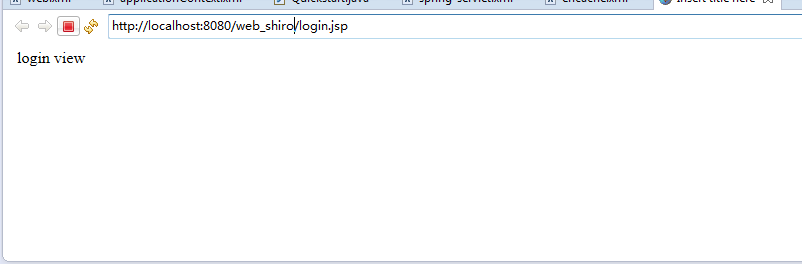
最后运行项目后默认是跳转到了login.jsp页面(因为在上面代码里配置了只有认证后才能访问其他页面)
【原】Spring整合Shiro基础搭建[3]的更多相关文章
- spring整合shiro框架
上一篇文章已经对shiro框架做了一定的介绍,这篇文章讲述使用spring整合shiro框架,实现用户认证已经权限控制 1.搭建环境 这里不在赘述spring环境的搭建,可以简单的搭建一个ssm框架, ...
- Spring整合Shiro做权限控制模块详细案例分析
1.引入Shiro的Maven依赖 <!-- Spring 整合Shiro需要的依赖 --> <dependency> <groupId>org.apache.sh ...
- Spring整合Shiro并扩展使用EL表达式
Shiro是一个轻量级的权限控制框架,应用非常广泛.本文的重点是介绍Spring整合Shiro,并通过扩展使用Spring的EL表达式,使@RequiresRoles等支持动态的参数.对Shiro的介 ...
- Spring 整合 Shiro
一.引入依赖 <!-- spring start --> <dependency> <groupId>org.springframework</groupId ...
- Spring整合Shiro 权限 角色 用户关系分析
Spring整合Shiro 权限 角色 用户关系分析 作者 : Stanley 罗昊 [转载请注明出处和署名,谢谢!] 前置内容 之前我们学习了,使用注解的方式去完成权限的控制,当然,也是静态的,也就 ...
- 【shiro】2.spring整合shiro,注解控制shiro用户/角色/权限And/OR,没有权限跳转到固定页面
这几天粗浅的把shiro整合到spring中,并且注解控制shiro用户/角色/权限And/OR 步骤: 1.首先maven搭建web项目 2.创建数据库 user/role/authority 其中 ...
- Spring整合Shiro
apache shiro 是一个安全认证框架,和 spring security 相比,在于他使用了比较简洁易懂的 认证和授权方式.其提供的 native-session(即把用户认证后的授权信息保存 ...
- spring整合shiro配置BUG,Tomcat启动不了:Error during artifact deployment. See server log for details
现象 spring配置shiro权限控制之后,项目无法启动 [2019-08-09 09:00:35,800] Artifact export_web_manager:war exploded: Er ...
- 7. 整合shiro,搭建粗粒度权限管理
shiro是一个易用的权限管理框架,只需提供一个Realm即可在项目中使用,本文就将结合上一篇中搭建的权限模块.角色模块和用户模块来搭建一个粗粒度的权限管理系统,具体如下:1. 添加shiro依赖和与 ...
随机推荐
- day 76 滑动窗口 ,头像上传
一.上传文件 前端html <!DOCTYPE html> <html lang="en"> <head> <meta charset=& ...
- Day 26封装
一.封装 广义上的封装: 属于一个类的静态和动态属性,总是出现在一个类中. 使用的永远用类名或者对象名调用. 狭义上的封装:就是把变量和方法私有化,在类的外部以及子类中不能直接使用了 . class ...
- java删除字符串最后一个字符的几种方法
偶然看到的,记录一下,以免忘记 字符串:string s = "1,2,3,4,5," 目标:删除最后一个 "," 方法: 1.用的最多的是Substri ...
- mybatis中单个参数的引用
单个参数时在test条件中不能用参数名来引用,可以使用_parameter
- Memcached 查看列出所有key方法
Memcached没有一个比较简单的方法可以直接象Redis那样keys *列出所有的Session key,并根据key get对应的session内容,但是还是可以查看的 memcached 查看 ...
- 常见无线组网分析(NB-IOT组网和Mesh组网)
NB-IOT LoRa Zigbee WIFI 蓝牙 组网方式 基于现有蜂窝组网 基于LoRa网关 基于Zigbee网关 基于无线路由器 居于蓝牙Mesh的网关 网络部署方式 节点 节点 + 网关 ...
- JSON.stringify和JSON.parse的使用
JSON.stringify 函数 (JavaScript)将 JavaScript 值转换为 JavaScript 对象表示法 (Json) 字符串.JSON.stringify(value [, ...
- Python小白学习之路(三)—【数字功能】【字符串功能】
数字(int)常见功能 在网络课上,老师把这些功能称为神奇的魔法,想要揭开魔法神奇的面纱,想要看看有什么招数,在Pycharm里敲击三个字母(int),按住Ctrl,将鼠标点在int上,这时鼠标会变成 ...
- php语法分析
php的语法分析的主要作用是验证词法分析的基础上将token组成的序列,在php这门语言中是否是一个有效的句子,也可以理解为这些token序列是否匹配设计php这门语言时的语法模型,在匹配的情况下构建 ...
- numpy的ravel()和flatten()函数比较
功能 两个函数的功能都是将多维数组降为一维. 用法 import numpy as np arr = np.array([[1, 2],[3, 4]]) arr.flatten() arr.ravel ...