
Android 轻松实现语音识别
2010-11-12 17:01:51


苹果的iphone 有语音识别用的是Google 的技术,做为Google 力推的Android 自然会将其核心技术往Android 系统里面植入,并结合google 的云端技术将其发扬光大。
所以Google Voice Recognition在Android 的实现就变得极其轻松。

语音识别,借助于云端技术可以识别用户的语音输入,包括语音控制等技术,下面我们将利用Google 提供的Api 实现这一功能。
功能点为:通过用户语音将用户输入的语音识别出来,并打印在列表上。
功能界面如下:
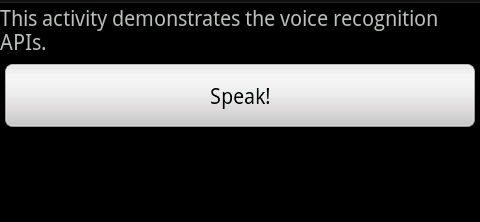
用户通过点击speak按钮显示界面:
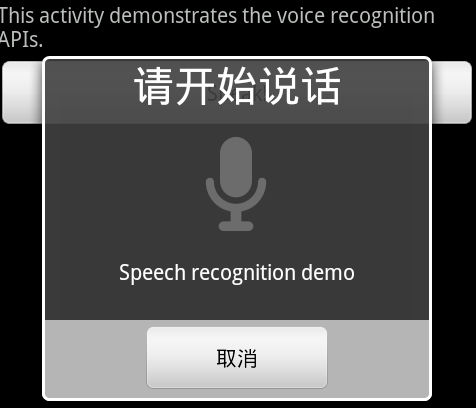
用户说完话后,将提交到云端搜索:

在云端搜索完成后,返回打印数据:
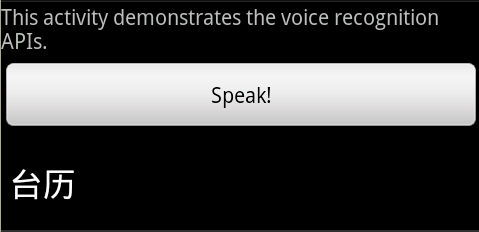
完整代码如下:
/*

 * Copyright (C) 2008 The Android Open Source Project

 *

 * Licensed under the Apache License, Version 2.0 (the "License");

 * you may not use this file except in compliance with the License.

 * You may obtain a copy of the License at

 *

 *      http://www.apache.org/licenses/LICENSE-2.0

 *

 * Unless required by applicable law or agreed to in writing, software

 * distributed under the License is distributed on an "AS IS" BASIS,

 * WITHOUT WARRANTIES OR CONDITIONS OF ANY KIND, either express or implied.

 * See the License for the specific language governing permissions and

 * limitations under the License.

 */

package com.example.android.apis.app;

import com.example.android.apis.R;

import android.app.Activity;

import android.content.Intent;

import android.content.pm.PackageManager;

import android.content.pm.ResolveInfo;

import android.os.Bundle;

import android.speech.RecognizerIntent;

import android.view.View;

import android.view.View.OnClickListener;

import android.widget.ArrayAdapter;

import android.widget.Button;

import android.widget.ListView;

import java.util.ArrayList;

import java.util.List;

/**

 * Sample code that invokes the speech recognition intent API.

 */

public class VoiceRecognition extends Activity implements OnClickListener {


    private static final int VOICE_RECOGNITION_REQUEST_CODE = 1234;


    private ListView mList;

    /**

     * Called with the activity is first created.

     */

    @Override

    public void onCreate(Bundle savedInstanceState) {

        super.onCreate(savedInstanceState);

        // Inflate our UI from its XML layout description.

        setContentView(R.layout.voice_recognition);

        // Get display items for later interaction

        Button speakButton = (Button) findViewById(R.id.btn_speak);


        mList = (ListView) findViewById(R.id.list);

        // Check to see if a recognition activity is present

        PackageManager pm = getPackageManager();

        List<ResolveInfo> activities = pm.queryIntentActivities(

                new Intent(RecognizerIntent.ACTION_RECOGNIZE_SPEECH), 0);

        if (activities.size() != 0) {

            speakButton.setOnClickListener(this);

        } else {

            speakButton.setEnabled(false);

            speakButton.setText("Recognizer not present");

        }

    }

    /**

     * Handle the click on the start recognition button.

     */

    public void onClick(View v) {

        if (v.getId() == R.id.btn_speak) {

            startVoiceRecognitionActivity();

        }

    }

    /**

     * Fire an intent to start the speech recognition activity.

     */

    private void startVoiceRecognitionActivity() {

        Intent intent = new Intent(RecognizerIntent.ACTION_RECOGNIZE_SPEECH);

        intent.putExtra(RecognizerIntent.EXTRA_LANGUAGE_MODEL,

                RecognizerIntent.LANGUAGE_MODEL_FREE_FORM);

        intent.putExtra(RecognizerIntent.EXTRA_PROMPT, "Speech recognition demo");

        startActivityForResult(intent, VOICE_RECOGNITION_REQUEST_CODE);

    }

    /**

     * Handle the results from the recognition activity.

     */

    @Override

    protected void onActivityResult(int requestCode, int resultCode, Intent data) {

        if (requestCode == VOICE_RECOGNITION_REQUEST_CODE && resultCode == RESULT_OK) {

            // Fill the list view with the strings the recognizer thought it could have heard

            ArrayList<String> matches = data.getStringArrayListExtra(

                    RecognizerIntent.EXTRA_RESULTS);

            mList.setAdapter(new ArrayAdapter<String>(this, android.R.layout.simple_list_item_1,

                    matches));

        }

        super.onActivityResult(requestCode, resultCode, data);

    }

}
Android 轻松实现语音识别的更多相关文章
- 轻松实现语音识别的完整代码在android开发中
苹果的iphone 有语音识别用的是Google 的技术,做为Google 力推的Android 自然会将其核心技术往Android 系统里面植入,并结合google 的云端技术将其发扬光大. * C ...
- Android 调用谷歌语音识别
調用谷歌语音识别其实很简单,直接利用 intent 跳转到手机里面的谷歌搜索 代码也很简单,直接调用方法 startVoiceRecognitionActivity() 如果大家手机里面没有谷歌搜索, ...
- Android开发之语音识别
2013-07-03 语音识别 2008年Google语音搜索在iphone平台上线,Android 1.5 将语音识别应用到搜索功能上. 手动输入是目前主要与手机互动的方式,语音搜索宗旨是最大限度地 ...
- Android使用百度语音识别api代码实现。
第一步 ① 创建平台应用 点击百度智能云进入,没有账号的可以先注册账号,这里默认都有账号了,然后登录. 然后左侧导航栏点击找到语音技术 然后会进入一个应用总览页面, 然后点击创建应用 立即创建 点击查 ...
- Android 轻松实现仿淘宝地区选择
介绍 最近用淘宝客户端的时候,编辑地址的时候有个地区选择的功能.看上面的效果觉得挺酷,滚动的时候,是最后一个从下面飞上来挨着前一个.就自己鼓捣一个出来玩玩. 说了效果可能不太直观,下面上两张图看看效果 ...
- android 讯飞语音识别(离线)注意事项
讯飞语音识别:使用注意事项:mainfest.xml中一定要记得权限写进去21001:我的情况是没有写SpeechApp类,并且需要在application中注册:20005:无匹配结果23300:本 ...
- TitleLayout——一个Android轻松实现标题栏的库
TitleLayout 多功能.通用的.可在布局或者使用Java代码实现标题栏: 支持沉浸式状态栏: 支持左侧返回按钮不需要手动实现页面返回: 支持左侧按钮,中间标题,右边按钮点击 左侧支持图片+文字 ...
- TitleLayout——一个Android轻松实现通用、标准、支持沉浸式状态栏的标题栏库
TitleLayout 多功能.通用的.可在布局或者使用Java代码实现标题栏:支持沉浸式状态栏,支持左侧返回按钮(不需要手动实现页面返回),左侧支持图片+文字.图片.文字:右侧支持图片.文字等. 堆 ...
- Android 轻松实现后台搭建+APP版本更新
http://blog.csdn.net/u012422829/article/details/46355515 (本文讲解了在Android中实现APP版本更新,文末附有源码.) 看完本文,您可以学 ...
随机推荐
- ASP.NET MVC中使用jQuery时的浏览器缓存问题
介绍 尽管jQuery在浏览器ajax调用的时候对缓存提供了很好的支持,还是有必要了解一下如何高效地使用http协议. 首先要做的事情是在服务器端支持HTTP GET,定义不同的URL输出不同的数据( ...
- Longest Consecutive Sequence leetcode java
题目: Given an unsorted array of integers, find the length of the longest consecutive elements sequenc ...
- YUI+Ant 实现JS CSS压缩
今天研究了一下YUI yahoo开源框架,感觉很猛啊. 于是乎我做了一个YUI的ant实现,网上好多关于bat的实现,我就另辟蹊径,出个关于这个的ant实现,嘿嘿独一无二的文章,如果转载的话,其注明作 ...
- 20个令人惊叹的音乐应用程序UI,值得收藏
我们无法想象世界上没有手机.他们已经成为日常生活中不可缺失的一部分.今天的手机可以让你不只是拨打电话和发送消息.它可以让你浏览网页空间,拍照,看书,听音乐等等. 回顾一下互联网,你会看到不同的音乐AP ...
- Android -- MeasureSpec
自定义控件都会去重写View的onMeasure方法,因为该方法指定该控件在屏幕上的大小. protected void onMeasure (int widthMeasureSpec, int he ...
- 敏捷方法之极限编程(XP)和 Scrum区别
敏捷(Agile)作为一种开发流程, 目前为各大公司所采用, 敏捷流程的具体实践有XP 和Scrum, 似乎很少有文章介绍这两者的区别, 发现一篇外文, 见解非常深刻, 特将其翻译一把. 原文(DIF ...
- IE11与Cognos怪谈
想必大家都知道高版本的IE运行Cognos相关组件的时候要设置兼容性,安全级别相对调低等设置.但是升级了win10系统后,默认的IE版本是IE11的,装了Cognos10.2.1之后,进行了一个常规的 ...
- [Algorithm] Largest sum of non-adjacent numbers
Given a list of integers, write a function that returns the largest sum of non-adjacent numbers. Num ...
- Jquery attr("checked") 返回checked或undefined 获取选中失效
$('#cb').attr('checked'); 返回的是checked或者是undefined,不是原来的true和false了,有关此问题的解决方法如下: <input type='che ...
- C#.NET常见问题(FAQ)-interface接口如何理解
个人把interface理解为一种比较特殊的判断技巧,不是常规的变量类型比如判断字符串,判断数组,而是判断类的实例是否拥有某些属性或者方法(比如有十个女的穿一样的衣服,头上盖住,让新郎去猜哪一个是他的 ...