
扩展类 HOW TO EXTEND CLASSES TO MAKE NEW CLASSES IN PYTHON
How to Extend Classes to Make New Classes in Python - dummies https://www.dummies.com/programming/python/how-to-extend-classes-to-make-new-classes-in-python/
As you might imagine, creating a fully functional, production-grade class in Python (one that is used in a real-world application actually running on a system that is accessed by users) is time consuming because real classes perform a lot of tasks. Fortunately, Python supports a feature called inheritance. By using inheritance, you can obtain the features you want from a parent class when creating a child class.
Overriding the features that you don’t need and adding new features lets you create new classes relatively fast and with a lot less effort on your part. In addition, because the parent code is already tested, you don’t have to put quite as much effort into ensuring that your new class works as expected.
BUILDING THE CHILD CLASS
Parent classes are normally supersets of something. For example, you might create a parent class named Car and then create child classes of various car types around it.
In this case, you build a parent class named Animal and use it to define a child class named Chicken. Of course, you can easily add other child classes after you have Animal in place, such as a Gorilla class. However, for this example, you build just the one parent and one child class.
class Animal:

 def __init__(self, Name=", Age=0, Type="):

  self.Name = Name

  self.Age = Age

  self.Type = Type

 def GetName(self):

  return self.Name

 def SetName(self, Name):

  self.Name = Name

 def GetAge(self):

  return self.Age

 def SetAge(self, Age):

  self.Age = Age

 def GetType(self):

  return self.Type

 def SetType(self, Type):

  self.Type = Type

 def __str__(self):

  return "{0} is a {1} aged {2}".format(self.Name,

           self.Type,

           self.Age)

class Chicken(Animal):

 def __init__(self, Name=", Age=0):

  self.Name = Name

  self.Age = Age

  self.Type = "Chicken"

 def SetType(self, Type):

  print("Sorry, {0} will always be a {1}"

   .format(self.Name, self.Type))

 def MakeSound(self):

  print("{0} says Cluck, Cluck, Cluck!".format(self.Name))
The Animal class tracks three characteristics: Name, Age, and Type. A production application would probably track more characteristics, but these characteristics do everything needed for this example. The code also includes the required accessors for each of the characteristics. The __str__() method completes the picture by printing a simple message stating the animal characteristics.
The Chicken class inherits from the Animal class. Notice the use of Animal in parentheses after the Chicken class name. This addition tells Python that Chicken is a kind of Animal, something that will inherit the characteristics of Animal.
Notice that the Chicken constructor accepts only Name and Age. The user doesn’t have to supply a Type value because you already know that it’s a chicken. This new constructor overrides the Animal constructor. The three attributes are still in place, but Type is supplied directly in the Chickenconstructor.
Someone might try something funny, such as setting her chicken up as a gorilla. With this in mind, the Chicken class also overrides the SetType() setter. If someone tries to change the Chicken type, that user gets a message rather than the attempted change. Normally, you handle this sort of problem by using an exception, but the message works better for this example by making the coding technique clearer.
Finally, the Chicken class adds a new feature, MakeSound(). Whenever someone wants to hear the sound a chicken makes, he can call MakeSound() to at least see it printed on the screen.
TESTING THE CLASS IN AN APPLICATION
Testing the Chicken class also tests the Animal class to some extent. Some functionality is different, but some classes aren’t really meant to be used. The Animal class is simply a parent for specific kinds of animals, such as Chicken. The following steps demonstrate the Chicken class so that you can see how inheritance works.
Open a Python File window.
You see an editor in which you can type the example code.
Type the following code into the window — pressing Enter after each line:
import Animals

MyChicken = Animals.Chicken("Sally", 2)

print(MyChicken)

MyChicken.SetAge(MyChicken.GetAge() + 1)

print(MyChicken)

MyChicken.SetType("Gorilla")

print(MyChicken)

MyChicken.MakeSound()
The first step is to import the Animals module. Remember that you always import the filename, not the class. The Animals.py file actually contains two classes in this case: Animal and Chicken.
The example creates a chicken, MyChicken, named Sally, who is age 2. It then starts to work with MyChicken in various ways.
For example, Sally has a birthday, so the code updates Sally’s age by 1. Notice how the code combines the use of a setter, SetAge(), with a getter, GetAge(), to perform the task. After each change, the code displays the resulting object values for you. The final step is to let Sally say a few words.
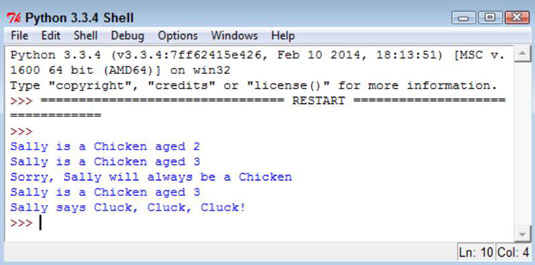
Choose Run→Run Module.
You see each of the steps used to work with MyChicken. As you can see, using inheritance can greatly simplify the task of creating new classes when enough of the classes have commonality so that you can create a parent class that contains some amount of the code.
https://stackoverflow.com/questions/15374857/should-all-python-classes-extend-object
python继承(二)extends - baiyan_er的博客 - CSDN博客 https://blog.csdn.net/baiyan_er/article/details/78935451
class car(object):
    def __init__(self, brand, color):
        self.brand = brand
        self.color = color

    def run(self):
        print('A car is running.', self.brand, self.color)

class SUV(car):
    def __init__(self, brand, color, seats):
        car.brand = brand
        car.color = color
        self.seats = seats

    def run(self):
        print('A SUV is runnung.', self.brand, self.color, self.seats)

aCar = car('carBrand', 'red')
aCar.run()
aSUV = SUV('suvBrand', 'black', 5)
aSUV.run()
A car is running. carBrand red
A SUV is runnung. suvBrand black 5
方法重写:子类继承父类时,子类的方法签名和父类一样,此时子类重写了父类的方法,当生成子类对象时,调用的是子类重写的方法
class car(object):

    def __init__(self,brand,color):

        self.brand=brand

        self.color=color

    def run(self):

        print("汽车在公路上行驶...")

class  suv(car):

    def __init__(self,brand,color,seats):

       car.brand=brand

       car.color=color

       self.seats=seats

    def run(self):

        print("suv汽车在公路上行驶...")

suv=suv("奔驰","黑色",5)

suv.run()

# 子类和父类的方法名子是一样的方法的重写
多继承:类同时继承多个父类,class c(A,B),iv e AB均有相同方法,而子类又得写时,调用写在前面的方法,如果子类没有方法,则调用自己前面的方法
可以通过:类名 . __mro__ 输出类的访问顺序
class A(object):

    def test(self):

        print("......A........")

class B(object):

    def test(self):

        print("......B........")

class C(A,B):

    def test(self):

        super().test()

        print("......C........")

c=C()

c.test()

print(C.__mro__)
扩展类 HOW TO EXTEND CLASSES TO MAKE NEW CLASSES IN PYTHON的更多相关文章
- tp5自定义扩展类的使用extend
1.在入口index.php定义目录 define('EXTEND_PATH', __DIR__ .'/../extend/'); 2.在使用页引用 use lib\Page; 3.初始化 $page ...
- js深入研究之扩展类,克隆对象,混合类(自定义的extend函数,clone函数,与augment函数)
1.类扩展 /* EditInPlaceField类 */ /* 扩展函数 */ function extend(subClass, superClass) { var F = function() ...
- C# 扩展类
C# 中提供一个非常实用的供能,扩展方法(Extension method) 扩展方法是通过额外的静态方法扩展现有的类型.通过扩展方法,可以对已有类型做自己想做的相关扩展.方法:定义静态类,扩展方法也 ...
- GenericAPIView类与几个扩展类的综合使用
五个扩展类 扩展类 作用 封装的方法 状态码(成功,失败) ListModelMixin 查询多条数据 list 200 CreateModelMixin 新增一条数据 create 201,400 ...
- DRF框架(五)——context传参,二次封装Response类,两个视图基类(APIView/GenericAPIView),视图扩展类(mixins),子类视图(工具视图),视图集(viewsets),工具视图集
复习 1.整体修改与局部修改 # 序列化get (给前端传递参数) #查询 ser_obj = ModelSerializer(model_obj) #只传递一个参数,默认是instance的参数,查 ...
- Dubbo#编译动态扩展类
这篇排版有问题 后面修改....**** 以ExtensionLoader.getExtensionLoader(Protocol.class).getAdaptiveExtension();为例 - ...
- 针对thinkphp 5框架存储过程bug而重写的存储过程的扩展类
近期用tp5框架调取存储过程发现有bug,借鉴了一些官方的函数.以及找了个mysqli的类把存储过程重新写了个扩展类,下面两个类直接放置项目extend目录的stored(这个文件夹名称请按个人习惯命 ...
- tp中调用PHP系统扩展类
例如使用Redis扩展类: use Reids; $redis = new Redis();
- Java+7入门经典 - 6 扩展类与继承 Part 1/2
第6章 扩展类与继承 面向对象编程的一个重要特性: 允许基于已定义的类创建新的类; 6.1 使用已有的类 派生 derivation, 派生类 derived class, 直接子类 direct s ...
随机推荐
- GoldenGate Lag For Huge Insert
前些天客户的ogg延迟到达8小时左右.于是我当时用logdump追踪了一下: 看进程状态: send extsa staus EXTRACT ZBDBA (PID 2269368) Current s ...
- SqlServer+Topshelf+Quartznet做集群,定时任务分布式处理
接触Quartznet之前,老东家用的是总监自己写的分布式任务框架,好用但是配置麻烦,unity,一个微软容器,配置节点错一个,整个使用到unity文件的项目全部跑不起来,这后果真的受不了... 目前 ...
- Redis(四):常用数据类型和命令
命令手册网址 http://doc.redisfans.com/ Redis数据类型 l String l Hash l List l Set l Sorted Set Redis中还有3种特殊的数据 ...
- java-ApiDemo
"飞机大战"玩了一段时间,稍后补上飞机大战完全代码. 赶紧继续后续课程 API String相关方法: 注意:涉及截取/删除/插入字符串位置时,指的是下标x的位置:如果是范围,则带 ...
- 使用MyBatis_Generator生成Dto、Dao、Mapping
由于MyBatis属于一种半自动的ORM框架,所以主要的工作将是书写Mapping映射文件,但是由于手写映射文件很容易出错,所以查资料发现有现成的工具可以自动生成底层模型类.Dao接口类甚至Mappi ...
- linux下1号进程的前世(kthread_init)今生(init)
参考: 1. Linux下1号进程的前世(kernel_init)今生(init进程)----Linux进程的管理与调度(六) 2. linux挂载根文件系统过程 3. BusyBox init工作 ...
- liunx系统安装composer与配置
1.下载composer curl -sS https://getcomposer.org/installer | php 2.我把它放在系统的PATH目录中,这样就能在全局访问它. mv compo ...
- 【转】 详细介绍windows下使用python pylot进行网站压力测试
windows下使用python进行网站压力测试,有两个必不可少的程序需要安装,一个是python,另一个是pylot.python是一个安装软件,用来运行python程序,而pylot则是pytho ...
- Oracle Parallel模式
一.Parallel 1. 用途 强行启用并行度来执行当前SQL.这个在Oracle 9i之后的版本可以使用,之前的版本现在没有环境进行测试.也就是说,加上这个说明,可以强行启用Oracle的多线程处 ...
- Spring Hello World 实例
Hello World 实例 让我们使用 Spring 框架开始实际的编程.在你开始使用 Spring 框架编写第一个例子之前,你必须确保已经正确地设置了 Spring 环境,正如在 Spring—— ...