
processing学习整理---Structure
1、语法介绍:与java很相近,可以认为就是java。
2、运行命令(linux):
processing-java --output=/tmp/processing-xx --run --force --sketch={问存在路径}
3、sketch:
每个sketch(草稿)就是保存在电脑相应文件夹中的,存放有相关processing代码的文件,后缀为:pde以及影音文件(另外存放在data文件夹中)。
4、变量:
1)、区分大小写。
2)、类型包括:整形(int),浮点型(float),字符串(String),布尔型(boolean)
5、坐标(Coordinates):
x轴向右渐增,y轴向右渐增,z轴向外渐增。
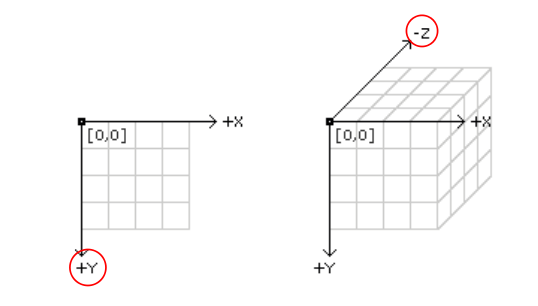
// Sets the screen to be 640 pixels wide and 360 pixels high 窗口大小

size(640, 360);

// Set the background to black and turn off the fill color背景颜色

background(0);

noFill();

// The two parameters of the point() method each specify coordinates.

// The first parameter is the x-coordinate and the second is the Y

stroke(255);//画笔颜色

point(width * 0.5, height * 0.5);

point(width * 0.5, height * 0.25);

// Coordinates are used for drawing all shapes, not just points.

// Parameters for different functions are used for different purposes.

// For example, the first two parameters to line() specify

// the coordinates of the first endpoint and the second two parameters

// specify the second endpoint

stroke(0, 153, 255);

line(0, height*0.33, width, height*0.33);

// By default, the first two parameters to rect() are the

// coordinates of the upper-left corner and the second pair

// is the width and height

stroke(255, 153, 0);

rect(width*0.25, height*0.1, width * 0.5, height * 0.8);//矩形
6、判断:
< == > != >= <= && || !
7、类:
Object 和 class
8、3D:
pushMatrix();
translate(width/2,height/2);
rotateX(1);
box(150);
popMatrix();
lights();//在draw里面调用即可。
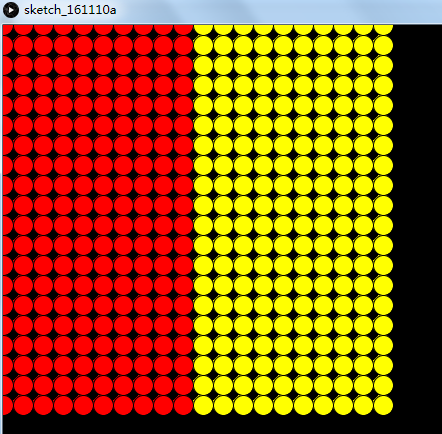
9、循环:
void setup(){

  size(600,600);

  background(0);

}

void draw(){

for (int i=0;i<20;i++){

  for (int j=0;j<20;j++){

    if(i<10){

      fill(255,0,0);

    }else{

      fill(255,255,0);

    }

    ellipse(i*20,j*20,20,20);

  }

}

}
10、函数
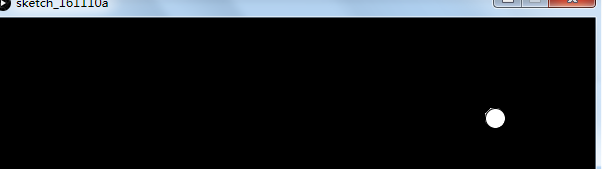
函数可以写在函数里面:
Ball myBall;

void setup(){

  size(600,600);

  background(0);

  myBall = new Ball(500,100);

}

void draw(){

  myBall.display();

}

class Ball{

  int x= 500;

  int y= 500;

  //construct

  Ball(int x, int y){

    this.x = x;

    this.y = y;

  }

 void display(){

   ellipse(x,y,20,20);

 }

}
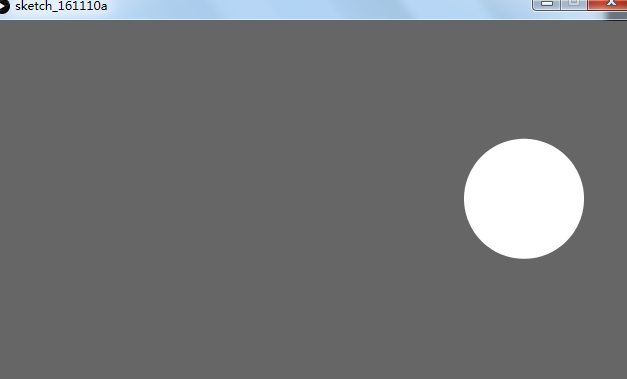
11、Ball bounce and graity 跳跃和重力
//When the shape hits the edge of the window, it reverses its direction.

int rad = 60;        // Width of the shape

float xpos, ypos;    // Starting position of shape

float xspeed = 2.8;  // Speed of the shape

float yspeed = 2.2;  // Speed of the shape

int xdirection = 1;  // Left or Right

int ydirection = 1;  // Top to Bottom

void setup()

{

  size(640, 360);

  noStroke();

  frameRate(30);

  ellipseMode(RADIUS);

  // Set the starting position of the shape

  xpos = width/2;

  ypos = height/2;

}

void draw()

{

  background(102);

  // Update the position of the shape

  xpos = xpos + ( xspeed * xdirection );

  ypos = ypos + ( yspeed * ydirection );

  // Test to see if the shape exceeds the boundaries of the screen

  // If it does, reverse its direction by multiplying by -1

  if (xpos > width-rad || xpos < rad) {

    xdirection *= -1;

  }

  if (ypos > height-rad || ypos < rad) {

    ydirection *= -1;

  }

  // Draw the shape

  ellipse(xpos, ypos, rad, rad);

}
12、数组
myBalls = new Ball[100];
for(int i=0;i<myBalls.length;i++){
myBalls[i] = new Ball(xpos,ypos);
}
13、ArrayList
ArrayList myList;
mylist.add(new Ball(200,200));
mylist.size();
mylist.get(1);
14、声明和注解
// The size function is a statement that tells the computer

// how large to make the window.

// Each function statement has zero or more parameters.

// Parameters are data passed into the function

// and are used as values for telling the computer what to do.

size(640, 360);

// The background function is a statement that tells the computer

// which color (or gray value) to make the background of the display window

background(204, 153, 0);
15、setup & draw
int y = 100;

// The statements in the setup() function

// execute once when the program begins //只执行一次

void setup() {

  size(640, 360);  // Size must be the first statement

  stroke(255);     // Set line drawing color to white

  frameRate(30); //帧率

}

// The statements in draw() are executed until the

// program is stopped. Each statement is executed in

// sequence and after the last line is read, the first

// line is executed again.//一直执行直到程序停止,每一个变量以队列的方式被读取来执行,直到最后一个,然后又去执行第一个。

void draw() {

  background(0);   // Clear the screen with a black background

  y = y - 1;

  if (y < 0) {

    y = height;

  }

  line(0, y, width, y);

}
16、No Loop:让draw()方法只执行一次。
float y;

// The statements in the setup() function

// execute once when the program begins

void setup()

{

  size(640, 360);  // Size should be the first statement

  stroke(255);     // Set line drawing color to white

  noLoop();

  y = height * 0.5;

}

// The statements in draw() are executed until the

// program is stopped. Each statement is executed in

// sequence and after the last line is read, the first

// line is executed again.

void draw()

{

  background(0);   // Set the background to black

  y = y - 1;

  if (y < 0) { y = height; }

  line(0, y, width, y);

}
17、Loop:让draw()方法持续执行。下面列子:在鼠标点击是让draw()持续执行:
float y = 100;

// The statements in the setup() function

// run once when the program begins

void setup() {

  size(640, 360);  // Size should be the first statement

  stroke(255);     // Set stroke color to white

  noLoop();

  y = height * 0.5;

}

// The statements in draw() are run until the

// program is stopped. Each statement is run in

// sequence and after the last line is read, the first

// line is run again.

void draw() {

  background(0);   // Set the background to black

  line(0, y, width, y);

  y = y - 1;

  if (y < 0) {

    y = height;

  }

}

void mousePressed() {

  loop();

}
18、Redraw:让draw()执行一次。下面列子:当鼠标点击时,执行draw():
float y;

// The statements in the setup() function

// execute once when the program begins

void setup() {

  size(640, 360);  // Size should be the first statement

  stroke(255);     // Set line drawing color to white

  noLoop();

  y = height * 0.5;

}

// The statements in draw() are executed until the

// program is stopped. Each statement is executed in

// sequence and after the last line is read, the first

// line is executed again.

void draw() {

  background(0);   // Set the background to black

  y = y - 4;

  if (y < 0) { y = height; }

  line(0, y, width, y);

}

void mousePressed() {

  redraw();

}
19、方法调用:
void setup() {

  size(640, 360);

  background(51);

  noStroke();

  noLoop();

}

void draw() {

  drawTarget(width*0.25, height*0.4, 200, 4);

  drawTarget(width*0.5, height*0.5, 300, 10);

  drawTarget(width*0.75, height*0.3, 120, 6);

}

void drawTarget(float xloc, float yloc, int size, int num) {

  float grayvalues = 255/num;

  float steps = size/num;

  for (int i = 0; i < num; i++) {

    fill(i*grayvalues);

    ellipse(xloc, yloc, size - i*steps, size - i*steps);

  }

}
20、Recursion (递归):
void setup() {

  size(640, 360);

  noStroke();

  noLoop();

}

void draw() {

  drawCircle(width/2, 280, 6);

}

void drawCircle(int x, int radius, int level) {

  float tt = 126 * level/4.0;

  fill(tt);

  ellipse(x, height/2, radius*2, radius*2);

  if(level > 1) {

    level = level - 1;

    drawCircle(x - radius/2, radius/2, level);

    drawCircle(x + radius/2, radius/2, level);

  }

}
21、Create Graphics.(画图):
PGraphics pg;

void setup() {

  size(640, 360);

  pg = createGraphics(400, 200);

}

void draw() {

  fill(0, 12);

  rect(0, 0, width, height);

  fill(255);

  noStroke();

  ellipse(mouseX, mouseY, 60, 60);

  pg.beginDraw();

  pg.background(51);

  pg.noFill();

  pg.stroke(255);

  pg.ellipse(mouseX-120, mouseY-60, 60, 60);

  pg.endDraw();

  // Draw the offscreen buffer to the screen with image()

  image(pg, 120, 60);

}
processing学习整理---Structure的更多相关文章
- processing学习整理---Image
1.Load and Display(加载与显示) Images can be loaded and displayed to the screen at their actual size or ...
- processing学习整理---Input(输入)
1.鼠标1D. 左右移动鼠标可移动天平. “mouseX”变量用于控制矩形的大小和颜色. void setup(){ size(640,360); noStroke(); colorMode(RGB, ...
- dataTables 插件学习整理
在项目中使用了dataTables 插件,学习整理一下. dataTables 的官方中文网站 http://www.datatables.club 引入文件: 所有的都要引入 jq文件 1. dat ...
- js数组学习整理
原文地址:js数组学习整理 常用的js数组操作方法及原理 1.声明数组的方式 var colors = new Array();//空的数组 var colors = new Array(3); // ...
- TweenMax学习整理--特有属性
TweenMax学习整理--特有属性 构造函数:TweenMax(target:Object, duration:Number, vars:Object) target:Object -- 需要缓 ...
- HttpClient学习整理
HttpClient简介HttpClient 功能介绍 1. 读取网页(HTTP/HTTPS)内容 2.使用POST方式提交数据(httpClient3) 3. 处理页面重定向 ...
- !!对python列表学习整理列表及数组详细介绍
1.Python的数组分三种类型:(详细见 http://blog.sina.com.cn/s/blog_6b783cbd0100q2ba.html) (1) list 普通的链表,初始化后可以通过特 ...
- Java设计模式(学习整理)---命令模式
设计模式之Command(学习整理) 1.Command定义 不少Command模式的代码都是针对图形界面的,它实际就是菜单命令,我们在一个下拉菜单选择一个命令时,然后会执行一些动作. 将这些命令封装 ...
- Wix学习整理(5)——安装时填写注册表
原文:Wix学习整理(5)--安装时填写注册表 一 Microsoft操作系统的注册表 什么是注册表? 注册表是Mircrosoft Windows中的一个重要的数据库,用于存储系统和应用程序的设置信 ...
随机推荐
- iphone断点下载,断点续传
本文转载至 http://blog.csdn.net/zaitianaoxiang/article/details/6650469 - (void)loadView { NSURLConnection ...
- 【BZOJ2186】[Sdoi2008]沙拉公主的困惑 线性筛素数
[BZOJ2186][Sdoi2008]沙拉公主的困惑 Description 大富翁国因为通货膨胀,以及假钞泛滥,政府决定推出一项新的政策:现有钞票编号范围为1到N的阶乘,但是,政府只发行编号与M! ...
- 《从零开始学Swift》学习笔记(Day 27)——可选类型
原创文章,欢迎转载.转载请注明:关东升的博客 可选类型: 我们先看看如下代码: n1 = nil //编译错误 let str: String = nil //编译错误 Int和String类型不能接 ...
- asp.net mvc全局错误处理
方式一:全局捕获异常 根据错误编码直接跳转到对应静态页面 1,在Global.asax.cs文件中添加错误处理方法Application_Error 代码如下 protected void Appli ...
- client-server model peer-to-peer architecture 主从式架构
w https://zh.wikipedia.org/wiki/主从式架构 主从式架构 (Client–server model) 或客户端-服务器(Client/Server)结构简称C/S结构,是 ...
- 【转】虚拟 IO 服务器(VIOS)和 IBM i
Power 主机上的虚拟化应用,简单阐述虚拟 IO 服务器的功能,用途,优点,以及虚拟 IO 服务器在高级虚拟化技术的作用.举例说明虚拟 IO 服务器与 IBM i 分区直接互联特性. 引言 随着信息 ...
- 利用jdk中工具完成Java程序监控方法记录
转载加自己整理的部分内容,转载自:http://jiajun.iteye.com/blog/810150 记录下JConsole使用方法 一.JConsole是什么 从Java 5开始 引入了 ...
- Django的admin样式丢失【静态文件收集】
在部署完Django项目后,进行admin后台登录发现样式丢失,后台日志显示:js和css文件丢失 解决办法: 配置settings.py如下: #DEBUG打开时,app的静态文件默认从这里读取 S ...
- HDU1950-Bridging signals-最长上升子序列
Description 'Oh no, they've done it again', cries the chief designer at the Waferland chip factory. ...
- 003-centos搭建idea开发java
一.jdk安装 卸载openjdk 安装jdk 配置环境变量 二.下载idea 安装:http://www.cnblogs.com/bjlhx/p/6667291.html 三.配置git http: ...