
springboot springmvc 支持 https
Spring Mvc和Spring Boot配置Tomcat支持Https
背景
最近在项目开发中需要让自己的后端Restful接口支持https,在参考了很多前辈们的博客后总结了一些。
SpringBoot配置支持https
spring boot因为是使用内置的tomcat,所以只需要一些简单的配置即可。
1.首先打开命令行工具,比如cmd,输入以下命令 keytool -genkey -alias tomcat -storetype PKCS12 -keyalg RSA -keysize 2048 -keystore keystore.p12 -validity 3650
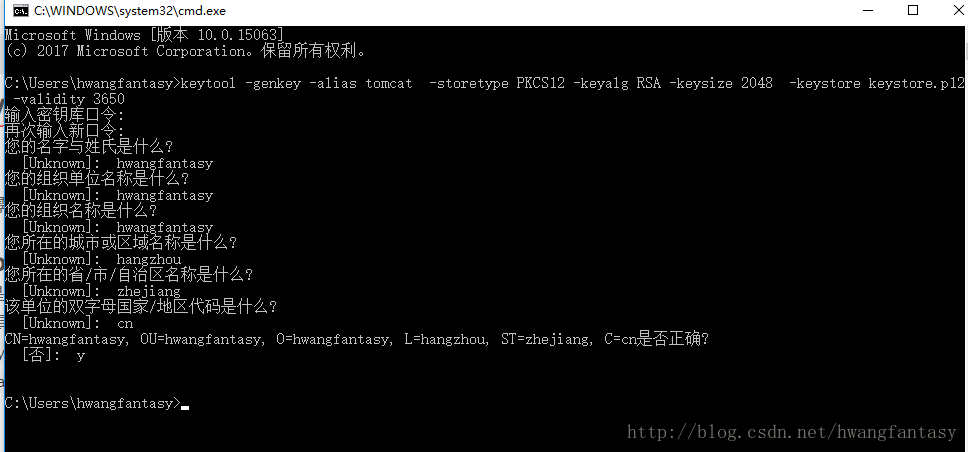
2.然后在你的根目录下面会看到一个.p12的文件,如下图所示:
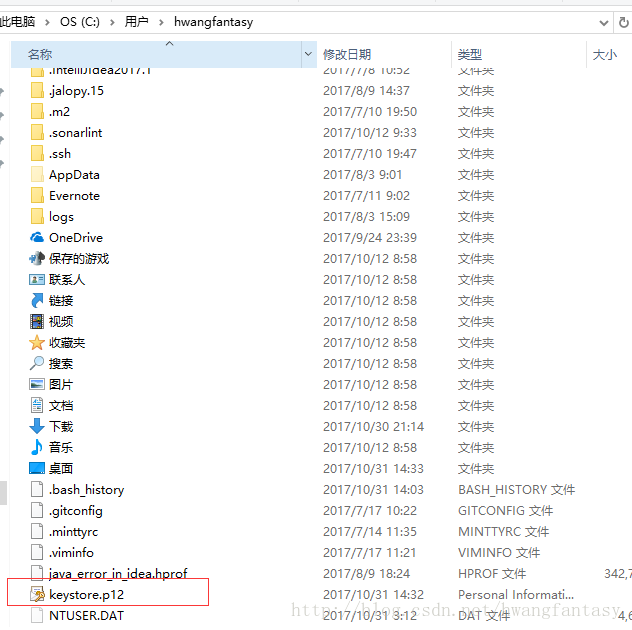
3.将它移到你的spring boot项目中的resources目录下
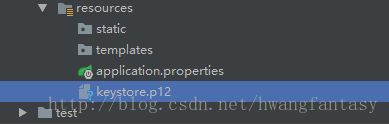
4.最后在application.properties中添加以下配置:
server.port=8888

server.ssl.key-store=classpath:keystore.p12

server.ssl.key-store-password=123456(此处密码为第一步中创建.p12文件时你输入的口令)

server.ssl.keyStoreType=PKCS12

server.ssl.keyAlias=tomcat
5.最后启动你的spring boot项目即可用https的方式访问你的接口了。
SpringMvc配置支持https
由于spring mvc的项目需要依赖我们系统安装的tomcat,所以需要对我们系统的tomcat进行相关配置
1.首先同样需要生成密钥文件等
打开命令行输入 keytool -genkeypair -alias "tomcat" -keyalg "RSA" -keystore "C:\Program Files\Apache\apache-tomcat-7.0.77\bin\tomcat.keystore"
输入的相关配置和之前spring boot生成的那些问题是一样的
输入密钥库口令:

再次输入新口令:

您的名字与姓氏是什么?

[Unknown]: hwangfantasy

您的组织单位名称是什么?

[Unknown]: hwangfantasy

您的组织名称是什么?

[Unknown]: hwangfantasy

您所在的城市或区域名称是什么?

[Unknown]: hangzhou

您所在的省/市/自治区名称是什么?

[Unknown]: zhejiang

该单位的双字母国家/地区代码是什么?

[Unknown]: cn

CN=hwangfantasy, OU=hwangfantasy, O=hwangfantasy, L=hangzhou, ST=zhejiang, C=cn是否正确?

[否]: y

输入 <tomcat> 的密钥口令

(如果和密钥库口令相同, 按回车):
然后在你的tomcat的bin目录下会出现一个 tomcat.keystore文件。
2.修改server.xml
找到tomcat/conf目录下面的server.xml。找到其中含有 Define a SSL HTTP/1.1 Connector on port 8443
节点的Connector,取消掉原本的注释,并修改成以下内容:
<Connector port="8443" protocol="org.apache.coyote.http11.Http11Protocol"

            maxThreads="150" SSLEnabled="true"

            scheme="https" secure="true"

            clientAuth="false" sslProtocol="TLS"

            keystoreFile="C:/Program Files/Apache/apache-tomcat-7.0.77/bin/tomcat.keystore"

keystorePass="123456" />其实就是增加了keystoreFile和keystorePass两个属性,其中keystoreFile最好使用绝对路径,因为如果你和我一样使用intellj idea作为开发工具的话,使用相对路径,则idea启动spring mvc项目是无法成功加载keystore的,因为idea读取的配置是从idea的临时目录下 C:\Users\hwangfantasy\.IntelliJIdea2017.1\system\tomcat
读取的,而keystore不会在临时目录下,所以需要改成绝对路径才能保证通过idea去启动tomcat时能成功加载https的配置。
3.最后启动tomcat即可使用https接口
最后无论是将你的web项目copy到tomcat下的webapps目录下直接启动还是通过idea等工具启动项目和tomcat都可以成功使用https接口了。
springboot springmvc 支持 https的更多相关文章
- Spring Mvc和Spring Boot配置Tomcat支持Https
SpringBoot配置支持https spring boot因为是使用内置的tomcat,所以只需要一些简单的配置即可. 1.首先打开命令行工具,比如cmd,输入以下命令 keytool -genk ...
- Springboot 配置 ssl 实现HTTPS 请求 & Tomcat配置SSL支持https请求
SSL(Secure Sockets Layer 安全套接层),及其继任者传输层安全(Transport Layer Security,TLS)是为网络通信提供安全及数据完整性的一种安全协议.TLS与 ...
- SpringBoot无废话入门03:SpringMVC支持
1.默认配置 Springboot对于路径的默认位置为: spring.resources.static-locations=classpath:/META-INF/resources/,classp ...
- SpringBoot添加支持CORS跨域访问
原文:https://www.jianshu.com/p/c6ea21b64f6e CORS(Cross-Origin Resource Sharing)"跨域资源共享",是一个W ...
- springboot+springmvc+mybatis项目整合
介绍: 上篇给大家介绍了ssm多模块项目的搭建,在搭建过程中spring整合springmvc和mybatis时会有很多的东西需要我们进行配置,这样不仅浪费了时间,也比较容易出错,由于这样问题的产生, ...
- SpringBoot学习(3)-SpringBoot添加支持CORS跨域访问
SpringBoot学习(3)-SpringBoot添加支持CORS跨域访问 https://blog.csdn.net/yft_android/article/details/80307672
- SpringMvc支持跨域访问,Spring跨域访问,SpringMvc @CrossOrigin 跨域[转]
SpringMvc支持跨域访问,Spring跨域访问,SpringMvc @CrossOrigin 跨域 原文地址:https://www.cnblogs.com/fanshuyao/p/716847 ...
- SpringBoot+SpringMVC+MyBatis快速整合搭建
作为开发人员,大家都知道,SpringBoot是基于Spring4.0设计的,不仅继承了Spring框架原有的优秀特性,而且还通过简化配置来进一步简化了Spring应用的整个搭建和开发过程.另外Spr ...
- 真——Springcloud支持Https
很久不写了,因为一直没有一个项目的需求推动,担心写的东西可能不是太实际.其间学习的事倒是做了不少,设计模式.领域开发.Antlr.kubernetes等等,其实大部分都记在纸质笔记上了.. 基于对新技 ...
随机推荐
- 用nw.js开发markdown编辑器-已完成功能介绍
这里文章都是从个人的github博客直接复制过来的,排版可能有点乱. 原始地址 http://benq.im/2015/10/29/hexomd-introduction 文章目录 1. 功能列表 ...
- unity,实现屏幕后处理的两种方法
方法一: Main Camera的Target Texture保持为None.挂一个Blit脚本,在其中的OnRenderImage中调用Graphics.Blit(sourceTexture,des ...
- Android WebView学习
Android WebView学习 文章来源:小小懒羊羊个人知识管理库 权限: <uses-permission android:name="android.permission.IN ...
- Atitit.java相比c#.net的优点 优缺点 v2 q330
Atitit.java相比c#.net的优点 优缺点 v2 q330 1. 跨平台可在LINUX上,mac跑以外.主要如下: 1 2. IDE ECLIPSE(500m)是绿色的,换机器不用安装,C ...
- Atitit. camel分词器 分词引擎 camel拆分 的实现设计
Atitit. camel分词器 分词引擎 camel拆分 的实现设计 1. camel分词器1 1.1. 实现的界定符号大写字母小写字母数字1 1.2. 特殊处理 对于JSONObject 多个大写 ...
- 使用GraphicsMagick/ImageMagick批量对图片瘦身
GrahpicsMagick: find . -iname "*.jpg" -exec gm convert -strip +profile "*" -qual ...
- 实战c++中的string系列--std::string与MFC中CString的转换
搞过MFC的人都知道cstring,给我们提供了非常多便利的方法. CString 是一种非常实用的数据类型. 它们非常大程度上简化了MFC中的很多操作,使得MFC在做字符串操作的时候方便了非常多.无 ...
- vSphere共享存储全配置流程
1.Openfiler的安装 Openfiler 由rPath Linux驱动,它是一个基于浏览器的免费网络存储管理实用程序,可以在单一框架中提供基于文件的网络连接存储 (NAS) 和基于块的存储区域 ...
- 【Mac + Appium】之运行报错:[UiAutomator] UiAutomator exited unexpectedly with code 0, signal null
产生下面的原因是因为:与uiautomator2的weditor冲突,两者不能同时使用. 有时打开appium时会报错: [UiAutomator] UiAutomator exited unexpe ...
- oracle定时job
转载自:http://www.cnblogs.com/hoojo/p/oracle_procedure_job_interval.html Oracle job procedure 存储过程定时任务 ...