
vue 项目 npm install 报错解决
node-sass 安装报错解决办法
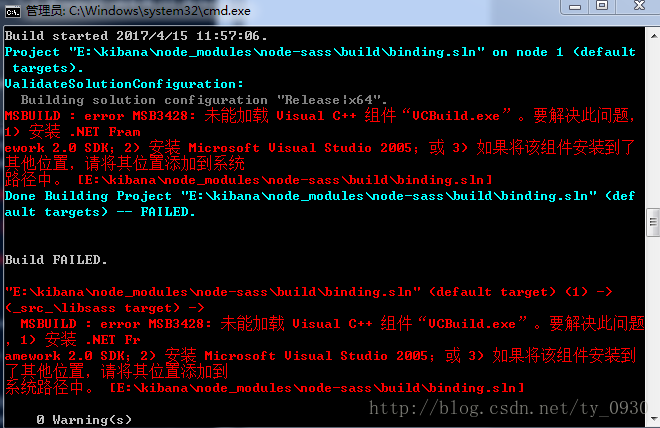
E:\kibana>npm install node-sass

> node-sass@3.8.0 install E:\kibana\node_modules\node-sass

> node scripts/install.js

Cannot download "https://github.com/sass/node-sass/releases/download/v3.8.0/win3

2-x64-48_binding.node":

tunneling socket could not be established, cause=socket hang up

Hint: If github.com is not accessible in your location

      try setting a proxy via HTTP_PROXY, e.g.

      export HTTP_PROXY=http://example.com:1234

or configure npm proxy via

      npm config set proxy http://example.com:8080

> node-sass@3.8.0 postinstall E:\kibana\node_modules\node-sass

> node scripts/build.js

Building: D:\Program Files\nodejs\node.exe E:\kibana\node_modules\node-gyp\bin\n

ode-gyp.js rebuild --verbose --libsass_ext= --libsass_cflags= --libsass_ldflags=

 --libsass_library=

gyp info it worked if it ends with ok

gyp verb cli [ 'D:\\Program Files\\nodejs\\node.exe',

gyp verb cli   'E:\\kibana\\node_modules\\node-gyp\\bin\\node-gyp.js',

gyp verb cli   'rebuild',

gyp verb cli   '--verbose',

gyp verb cli   '--libsass_ext=',

gyp verb cli   '--libsass_cflags=',

gyp verb cli   '--libsass_ldflags=',

gyp verb cli   '--libsass_library=' ]

gyp info using node-gyp@3.6.0

gyp info using node@6.2.0 | win32 | x64

gyp verb command rebuild []

gyp verb command clean []

gyp verb clean removing "build" directory

gyp verb command configure []

gyp verb check python checking for Python executable "python2" in the PATH

gyp verb `which` failed Error: not found: python2

gyp verb `which` failed     at getNotFoundError (E:\kibana\node_modules\which\wh

ich.js:13:12)

gyp verb `which` failed     at F (E:\kibana\node_modules\which\which.js:68:19)

gyp verb `which` failed     at E (E:\kibana\node_modules\which\which.js:80:29)

gyp verb `which` failed     at E:\kibana\node_modules\which\which.js:89:16

gyp verb `which` failed     at E:\kibana\node_modules\isexe\index.js:42:5

gyp verb `which` failed     at E:\kibana\node_modules\isexe\windows.js:36:5

gyp verb `which` failed     at FSReqWrap.oncomplete (fs.js:117:15)

gyp verb `which` failed  python2 { Error: not found: python2

gyp verb `which` failed     at getNotFoundError (E:\kibana\node_modules\which\wh

ich.js:13:12)

gyp verb `which` failed     at F (E:\kibana\node_modules\which\which.js:68:19)

gyp verb `which` failed     at E (E:\kibana\node_modules\which\which.js:80:29)

gyp verb `which` failed     at E:\kibana\node_modules\which\which.js:89:16

gyp verb `which` failed     at E:\kibana\node_modules\isexe\index.js:42:5

gyp verb `which` failed     at E:\kibana\node_modules\isexe\windows.js:36:5

gyp verb `which` failed     at FSReqWrap.oncomplete (fs.js:117:15) code: 'ENOENT

' }

gyp verb check python checking for Python executable "python" in the PATH

gyp verb `which` succeeded python C:\Python27\python.EXE

gyp verb check python version `C:\Python27\python.EXE -c "import platform; print

(platform.python_version());"` returned: "2.7.12\r\n"

gyp verb get node dir no --target version specified, falling back to host node v

ersion: 6.2.0

gyp verb command install [ '6.2.0' ]

gyp verb install input version string "6.2.0"

gyp verb install installing version: 6.2.0

gyp verb install --ensure was passed, so won't reinstall if already installed

gyp verb install version is already installed, need to check "installVersion"

gyp verb got "installVersion" 9

gyp verb needs "installVersion" 9

gyp verb install version is good

gyp verb get node dir target node version installed: 6.2.0

gyp verb build dir attempting to create "build" dir: E:\kibana\node_modules\node

-sass\build

gyp verb build dir "build" dir needed to be created? E:\kibana\node_modules\node

-sass\build

gyp verb Not using VS2017: Could not use PowerShell to find VS2017

gyp verb build/config.gypi creating config file

gyp verb build/config.gypi writing out config file: E:\kibana\node_modules\node-

sass\build\config.gypi

gyp verb config.gypi checking for gypi file: E:\kibana\node_modules\node-sass\co

nfig.gypi

gyp verb common.gypi checking for gypi file: E:\kibana\node_modules\node-sass\co

mmon.gypi

gyp verb gyp gyp format was not specified; forcing "msvs"

gyp info spawn C:\Python27\python.EXE

gyp info spawn args [ 'E:\\kibana\\node_modules\\node-gyp\\gyp\\gyp_main.py',

gyp info spawn args   'binding.gyp',

gyp info spawn args   '-f',

gyp info spawn args   'msvs',

gyp info spawn args   '-G',

gyp info spawn args   'msvs_version=auto',

gyp info spawn args   '-I',

gyp info spawn args   'E:\\kibana\\node_modules\\node-sass\\build\\config.gypi',

gyp info spawn args   '-I',

gyp info spawn args   'E:\\kibana\\node_modules\\node-gyp\\addon.gypi',

gyp info spawn args   '-I',

gyp info spawn args   'C:\\Users\\15061857\\.node-gyp\\6.2.0\\include\\node\\com

mon.gypi',

gyp info spawn args   '-Dlibrary=shared_library',

gyp info spawn args   '-Dvisibility=default',

gyp info spawn args   '-Dnode_root_dir=C:\\Users\\15061857\\.node-gyp\\6.2.0',

gyp info spawn args   '-Dnode_gyp_dir=E:\\kibana\\node_modules\\node-gyp',

gyp info spawn args   '-Dnode_lib_file=node.lib',

gyp info spawn args   '-Dmodule_root_dir=E:\\kibana\\node_modules\\node-sass',

gyp info spawn args   '-Dnode_engine=v8',

gyp info spawn args   '--depth=.',

gyp info spawn args   '--no-parallel',

gyp info spawn args   '--generator-output',

gyp info spawn args   'E:\\kibana\\node_modules\\node-sass\\build',

gyp info spawn args   '-Goutput_dir=.' ]

gyp verb command build []

gyp verb build type Release

gyp verb architecture x64

gyp verb node dev dir C:\Users\15061857\.node-gyp\6.2.0

gyp verb found first Solution file build/binding.sln

gyp verb could not find "msbuild.exe" in PATH - finding location in registry

gyp verb "Release" dir needed to be created? null

gyp verb copying "node.lib" for x64 C:\Users\15061857\.node-gyp\6.2.0\Release\no

de.lib

gyp info spawn C:\Windows\Microsoft.NET\Framework\v4.0.30319\msbuild.exe

gyp info spawn args [ 'build/binding.sln',

gyp info spawn args   '/nologo',

gyp info spawn args   '/p:Configuration=Release;Platform=x64' ]

Build started 2017/4/15 11:57:06.

Project "E:\kibana\node_modules\node-sass\build\binding.sln" on node 1 (default

 targets).

ValidateSolutionConfiguration:

  Building solution configuration "Release|x64".

MSBUILD : error MSB3428: 未能加载 Visual C++ 组件“VCBuild.exe”。要解决此问题,

1) 安装 .NET Fram

ework 2.0 SDK;2) 安装 Microsoft Visual Studio 2005;或 3) 如果将该组件安装到了

其他位置,请将其位置添加到系统

路径中。 [E:\kibana\node_modules\node-sass\build\binding.sln]

Done Building Project "E:\kibana\node_modules\node-sass\build\binding.sln" (def

ault targets) -- FAILED.

Build FAILED.

"E:\kibana\node_modules\node-sass\build\binding.sln" (default target) (1) ->

(_src_\libsass target) ->

  MSBUILD : error MSB3428: 未能加载 Visual C++ 组件“VCBuild.exe”。要解决此问题

,1) 安装 .NET Fr

amework 2.0 SDK;2) 安装 Microsoft Visual Studio 2005;或 3) 如果将该组件安装到

了其他位置,请将其位置添加到

系统路径中。 [E:\kibana\node_modules\node-sass\build\binding.sln]

    0 Warning(s)

    1 Error(s)

Time Elapsed 00:00:00.23

gyp ERR! build error

gyp ERR! stack Error: `C:\Windows\Microsoft.NET\Framework\v4.0.30319\msbuild.exe

` failed with exit code: 1

gyp ERR! stack     at ChildProcess.onExit (E:\kibana\node_modules\node-gyp\lib\b

uild.js:285:23)

gyp ERR! stack     at emitTwo (events.js:106:13)

gyp ERR! stack     at ChildProcess.emit (events.js:191:7)

gyp ERR! stack     at Process.ChildProcess._handle.onexit (internal/child_proces

s.js:204:12)

gyp ERR! System Windows_NT 6.1.7601

gyp ERR! command "D:\\Program Files\\nodejs\\node.exe" "E:\\kibana\\node_modules

\\node-gyp\\bin\\node-gyp.js" "rebuild" "--verbose" "--libsass_ext=" "--libsass_

cflags=" "--libsass_ldflags=" "--libsass_library="

gyp ERR! cwd E:\kibana\node_modules\node-sass

gyp ERR! node -v v6.2.0

gyp ERR! node-gyp -v v3.6.0

gyp ERR! not ok

Build failed

npm WARN optional SKIPPING OPTIONAL DEPENDENCY: fsevents@^1.0.0 (node_modules\ba

bel-cli\node_modules\chokidar\node_modules\fsevents):

npm WARN notsup SKIPPING OPTIONAL DEPENDENCY: Unsupported platform for fsevents@

1.1.1: wanted {"os":"darwin","arch":"any"} (current: {"os":"win32","arch":"x64"}

)

npm WARN optional SKIPPING OPTIONAL DEPENDENCY: fsevents@^1.0.0 (node_modules\ch

okidar\node_modules\fsevents):

npm WARN notsup SKIPPING OPTIONAL DEPENDENCY: Unsupported platform for fsevents@

1.1.1: wanted {"os":"darwin","arch":"any"} (current: {"os":"win32","arch":"x64"}

)

npm WARN optional SKIPPING OPTIONAL DEPENDENCY: fsevents@^1.0.0 (node_modules\wa

tchpack\node_modules\chokidar\node_modules\fsevents):

npm WARN notsup SKIPPING OPTIONAL DEPENDENCY: Unsupported platform for fsevents@

1.1.1: wanted {"os":"darwin","arch":"any"} (current: {"os":"win32","arch":"x64"}

)

npm WARN grunt-angular-translate@0.3.0 requires a peer of grunt@~0.4.0 but none

was installed.

npm ERR! code ELIFECYCLE

npm ERR! errno 1

npm ERR! node-sass@3.8.0 postinstall: `node scripts/build.js`

npm ERR! Exit status 1

npm ERR!

npm ERR! Failed at the node-sass@3.8.0 postinstall script 'node scripts/build.js

'.

npm ERR! Make sure you have the latest version of node.js and npm installed.

npm ERR! If you do, this is most likely a problem with the node-sass package,

npm ERR! not with npm itself.

npm ERR! Tell the author that this fails on your system:

npm ERR!     node scripts/build.js

npm ERR! You can get information on how to open an issue for this project with:

npm ERR!     npm bugs node-sass

npm ERR! Or if that isn't available, you can get their info via:

npm ERR!     npm owner ls node-sass

npm ERR! There is likely additional logging output above.

npm ERR! A complete log of this run can be found in:

npm ERR!     C:\Users\15061857\AppData\Roaming\npm-cache\_logs\2017-04-15T03_57_

07_545Z-debug.log

解决办法:

主要是windows平台缺少编译环境,

1、先运行: npm install -g node-gyp

2、然后运行:运行 npm install –global –production windows-build-tools  cmd 管理员运行以下命令
npm install –global –production windows-build-tools
npm install  -global -production windows-build-tools
可以自动安装跨平台的编译器:gym
vue 项目 npm install 报错解决的更多相关文章
- VSCode 启动 Vue 项目 npm install 报错
1. 报错后,查看了版本. 查看node版本:node -v 查看npm版本:npm -v 查看Augular版本:ng --version 2. 感觉 Augular CLI版本太低,使用以下方 ...
- npm install 报错解决办法
npm install 报错解决办法 原因是因为node_modules可能有意外改动,导致依赖库不完整,删除项目下的node_modules,在你的项目目录下,重新执行npm install,这会重 ...
- vue中npm install 报错之一
报错原因: 这是因为文件phantomjs-2.1.1-windows.zip过大,网络不好,容易下载失败 PhantomJS not found on PATH 解决方案一: 选择用cnpm ins ...
- centos7 laravel 项目 npm install报错
npm install 初始化项目依赖的前端资源 报错 ERR xxx .. socket,symbol link is not supported ... 如果报错了 重新npm install ...
- 新建 Vue项目 使用iView报错解决
错误如下: error in ./src/index.less Module build failed: // https://github.com/ant-design/ant-motion/iss ...
- 在运行vue项目时,执行npm install报错小记
在运行vue项目时,执行npm install 报错,导致后续的执行报各种错误,根据报错,尝试了网上的各种办法,最后发现时网络问题下载失败导致,解决办法: 安装cnpm==>npm instal ...
- npm install 报错 error Unexpected end of JSON input while parsing near '...sShrinkwrap":false,"d' 解决办法
npm install 报错 : error Unexpected end of JSON input while parsing near '...sShrinkwrap":false,& ...
- npm install 报错:node-pre-gyp ERR! 问题解决
npm install报错问题解决 问题: E:\CodeSpace\GitlabTest\desktop>npm install > lifeccp-desktop@1.1.9 post ...
- 执行npm install报错:npm ERR! code EINTEGRITY
命令行执行npm install报错如下: D:\frontend\viewsdev>npm install npm ERR! code EINTEGRITY npm ERR! sha512-8 ...
随机推荐
- 有关IM即时通讯原理
在网上搜索了一些资料,谈谈自己对IM即时通讯的理解 IM全称为Instant Messaging,即时通讯,如qq那种的. 现在有两个用户UserA, UserB, 俩人是一个IM通讯软件的好友,Us ...
- MongoDB之索引
索引是用来加快查询的,这里不解说索引的原理和数据结构.事实上大部分数据库的索引就是B+Tree,想要了解的同学能够看索引原理,要掌握怎样为查询配置最佳索引会有些难度. MongoDB索引差点儿和关系型 ...
- MII_GMII_RGMII_RMII_SMII_SSMII_TBI_RTBI
简介 MII是英文Medium Independent Interface的缩写,翻译成中文是“介质独立接口”,该接口一般应用于以太网硬件平台的MAC层和PHY层之间,MII接口的类型有很多,常用的有 ...
- InputArray和OutputArray
源码路径:~/opencv-2.4.9/modules/core/include/opencv2/core/core.hpp where _InputArray is a class that can ...
- linq基础,正则表达式,.net相关
声明扩展方法的步骤:类必须是static,方法是static,第一个参数是被扩展的对象,前面标注this.使用扩展方法的时候必须保证扩展方法类已经在当前代码中using. LINQ:将int数组中大 ...
- 随机生成数,摘自算法竞赛入门经典P120-P123测试STL。
//#include<bits/stdc++.h> #include<cstring> #include<iostream> #include<cstdio& ...
- Java并发计数器探秘
前言 一提到线程安全的并发计数器,AtomicLong 必然是第一个被联想到的工具.Atomic* 一系列的原子类以及它们背后的 CAS 无锁算法,常常是高性能,高并发的代名词.本文将会阐释,在并发场 ...
- 最新win7系统安全稳定版
最新win7系统32位安全稳定版 V2016年2月,具有更安全.更稳定.更人性化等特点.集成最常用的装机软件,集成最全面的硬件驱动,精心挑选的系统维护工具,加上萝卜独有人性化的设计.是电脑城.个人.公 ...
- java 证书 .cer 和 .pfx
作为文件形式存在的证书一般有这几种格式: 1.带有私钥的证书 由Public Key Cryptography Standards #12,PKCS#12标准定义,包含了公钥和私钥的二进制格式的证书形 ...
- WPF-Binding的源
1. 绑定到其它元素 <Grid> <StackPanel> <TextBox x:Name="textbox1" /> <Label C ...