
Shiro+easyUI+SpringMVC实现登录认证
最近在做一个小项目,其中认证这块使用shiro+SpringMVC+easyUI,因为easyUI在提交数据的时候使用的是ajax的异步提交,所以shiro在处理数据的时候需要重写FormAuthenticationFilter的相关方法,所以在此记录下实现的过程,以供大伙参考。
本文只给出核心代码,完整代码可去本人github上查看
https://github.com/q279583842q/SRM.git
ShiroLoginFilter
因为shiro默认的处理验证的方式是验证成功直接跳转到我们配置的successURL中,如果认证失败则会跳转到我们指定的fail地址,而和easyUI一块使用的话通过ajax提交,shiro只需要给调用者返回一个验证的结果就可以了,所以我们需要重写FormAuthenticationFilter中的相关方法,如下:
/**

 * 拦截验证后的请求

 * @author 波波烤鸭

 * @email dengpbs@163.com

 *

 */

public class ShiroLoginFilter extends FormAuthenticationFilter{

	private static final Logger log = LoggerFactory.getLogger(FormAuthenticationFilter.class);

	 /**

     * 表示当访问拒绝时

     * @param request

     * @param response

     * @return

     * @throws Exception

     */

    @Override

    protected boolean onAccessDenied(ServletRequest request, ServletResponse response) throws Exception {

        if(this.isLoginRequest(request, response)) {

            if(this.isLoginSubmission(request, response)) {

                if(log.isTraceEnabled()) {

                    log.trace("Login submission detected.  Attempting to execute login.");

                }

                return this.executeLogin(request, response);

            } else {

                if(log.isTraceEnabled()) {

                    log.trace("Login page view.");

                }

                return true;

            }

        } else {

            if(log.isTraceEnabled()) {

                log.trace("Attempting to access a path which requires authentication.  Forwarding to the Authentication url [" + this.getLoginUrl() + "]");

            }

            this.saveRequestAndRedirectToLogin(request, response);

            return false;

        }

    }

    /**

     *

     * 当登录成功

     *

     * @param token

     * @param subject

     * @param request

     * @param response

     * @return

     * @throws Exception

     */

    @Override

    protected boolean onLoginSuccess(AuthenticationToken token, Subject subject, ServletRequest request, ServletResponse response) throws Exception {

        HttpServletResponse httpServletResponse = (HttpServletResponse) response;

        String requestType = ((HttpServletRequest)request).getHeader("X-Requested-With");

        System.out.println("访问成功....");

        if (requestType==null){// 不是ajax请求

        	System.out.println("访问成功....1");

            issueSuccessRedirect(request, response);

        } else {

        	System.out.println("访问成功....2");

            httpServletResponse.setCharacterEncoding("UTF-8");

            PrintWriter out = httpServletResponse.getWriter();

            out.println(JSONObject.toJSON(Resp.success()));

            out.flush();

            out.close();

        }

        return false;

    }

    /**

     *

     * 当登录失败

     *

     * @param token

     * @param e

     * @param request

     * @param response

     * @return

     */

    @Override

    protected boolean onLoginFailure(AuthenticationToken token, AuthenticationException e, ServletRequest request, ServletResponse response) {

        System.out.println("访问失败...");

    	String requestType = ((HttpServletRequest)request).getHeader("X-Requested-With");

    	System.out.println("访问失败..."+requestType);

    	if (requestType==null) {// 不是ajax请求

    		System.out.println("访问失败...1");

            setFailureAttribute(request, e);

            return true;

        }

        try {

        	System.out.println("访问失败...2");

            response.setCharacterEncoding("UTF-8");

            PrintWriter out = response.getWriter();

            String message = e.getClass().getSimpleName();

            String info = null;

            if ("IncorrectCredentialsException".equals(message)) {

                info = "密码错误";

            } else if ("UnknownAccountException".equals(message)) {

                info = "账号不存在";

            } else if ("LockedAccountException".equals(message)) {

                info = "账号被锁定";

            } else {

                info = "未知错误";

            }

            out.println(JSONObject.toJSON(Resp.fail(ErrorCode.SYSTEM_ERROR, info)));

            out.flush();

            out.close();

        } catch (IOException e1) {

            // TODO Auto-generated catch block

            e1.printStackTrace();

        }

        return false;

    }

}
自定义realm
/**

 * 认证和授权的自定义Realm

 *

 * @author 波波烤鸭

 * @email dengpbs@163.com

 *

 */

public class SecurityRealm extends AuthorizingRealm {

	@Resource

	private IUserService userService;

	/**

	 * 认证的方法

	 */

	@Override

	protected AuthenticationInfo doGetAuthenticationInfo(AuthenticationToken token) throws AuthenticationException {

		// 获取提交的账号

		UsernamePasswordToken t = (UsernamePasswordToken) token;

		// 获取登录的账号

		String userName = t.getUsername();

		System.out.println("---->" + userName);

		User user = new User();

		user.setUsername(userName);

		List<User> list = userService.login(userName);

		if (list == null || list.size() != 1) {

			// 账号不存在或者用户过多都返回null

			return null;

		}

		user = list.get(0);

		SimpleAuthenticationInfo info = new SimpleAuthenticationInfo(user, user.getPassword(), "bobo");

		return info;

	}

	/**

	 * 授权的方法

	 */

	@Override

	protected AuthorizationInfo doGetAuthorizationInfo(PrincipalCollection arg0) {

		// 省略 。。。

		return null;

	}

}
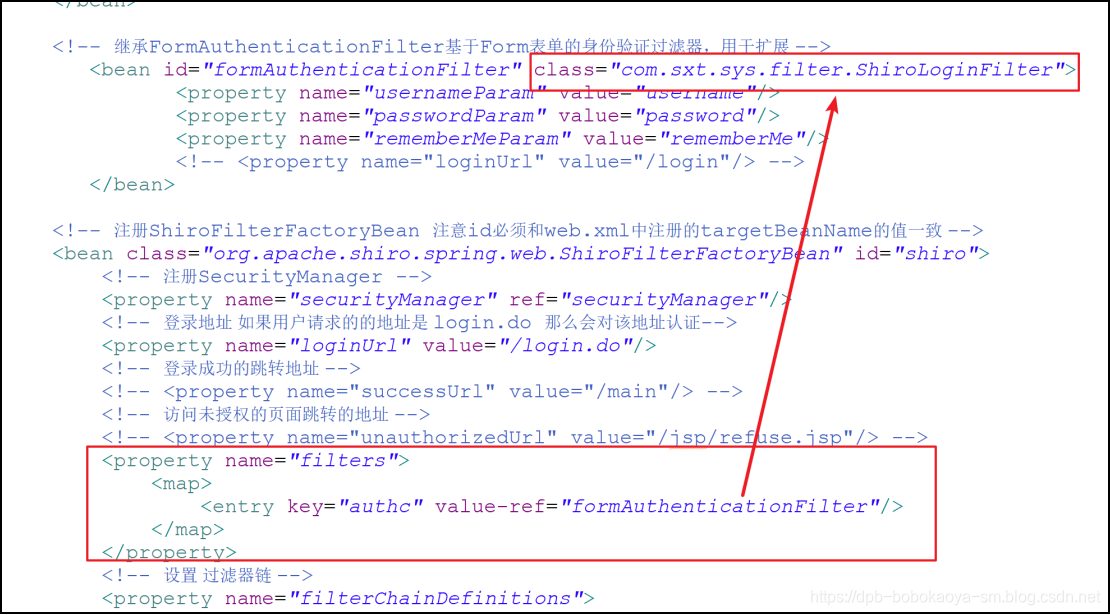
shiro的配置文件
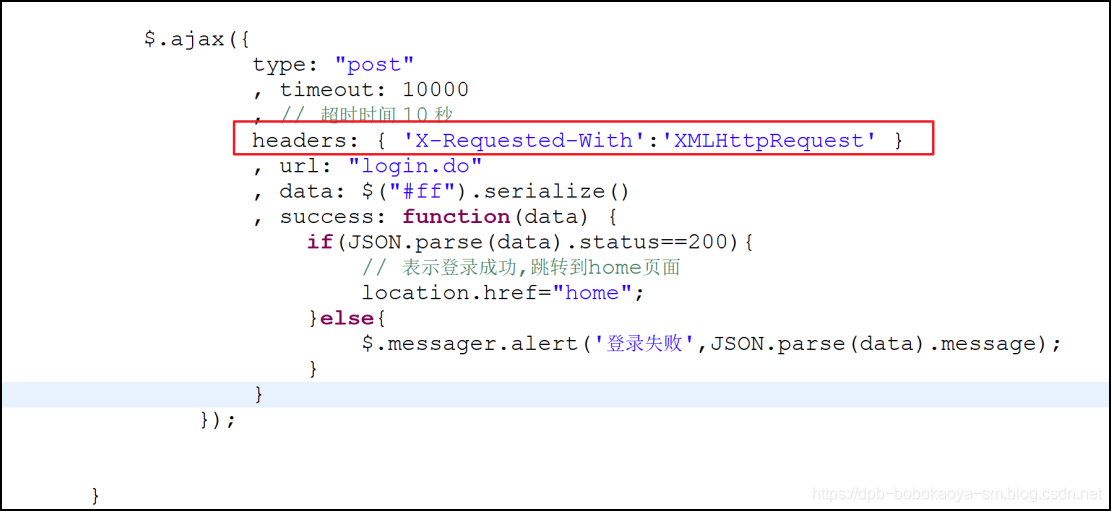
easyUI中提交数据
$.ajax({

	type: "post"

	, timeout: 10000

	, // 超时时间 10 秒

	headers: { 'X-Requested-With':'XMLHttpRequest' }

	, url: "login.do"

	, data: $("#ff").serialize()

	, success: function(data) {

		if(JSON.parse(data).status==200){

			// 表示登录成功,跳转到home页面

			location.href="home";

		}else{

			$.messager.alert('登录失败',JSON.parse(data).message);

		}

	}

});
如此就可以实现我们需要的功能了,希望此文对你有所帮助^ _ ^
Shiro+easyUI+SpringMVC实现登录认证的更多相关文章
- spring boot(十四)shiro登录认证与权限管理
这篇文章我们来学习如何使用Spring Boot集成Apache Shiro.安全应该是互联网公司的一道生命线,几乎任何的公司都会涉及到这方面的需求.在Java领域一般有Spring Security ...
- Spring Cloud之路:(七)SpringBoot+Shiro实现登录认证和权限管理
版权声明:本文为博主原创文章,未经博主允许不得转载. https://blog.csdn.net/sage_wang/article/details/79592269一.Shiro介绍1.Shiro是 ...
- shiro中接入单点登录功能
最近新建的系统中使用了shiro,而shiro框架中包含登录认证和鉴权的功能,因为我们系统要统一接入公司内部的单点登录(isso)系统,所以通过isso的登录用户,需要在shiro中置为已认证,一下提 ...
- Shiro 整合SpringMVC 并实现权限管理,登录和注销
Shiro 整合SpringMVC 并且实现权限管理,登录和注销 Apache Shiro是Java的一个安全框架.目前,使用Apache Shiro的人越来越多,因为它相当简单,对比Spring S ...
- shiro实现APP、web统一登录认证和权限管理
先说下背景,项目包含一个管理系统(web)和门户网站(web),还有一个手机APP(包括Android和IOS),三个系统共用一个后端,在后端使用shiro进行登录认证和权限控制.好的,那么问题来了w ...
- 将 Shiro 作为应用的权限基础 二:基于SpringMVC实现的认证过程
认证就是验证用户身份的过程.在认证过程中,用户需要提交实体信息(Principals)和凭据信息(Credentials)以检验用户是否合法.最常见的“实体/凭证”组合便是“用户名/密码”组合. 一. ...
- springboot+mybatis+shiro——登录认证和权限控制
转载:https://z77z.oschina.io/ 一.引入依赖 shiro-all包含shiro所有的包.shiro-core是核心包.shiro-web是与web整合.shiro-spring ...
- SpringMVC拦截器实现登录认证(转发)
感谢原作者,转发自:http://blog.csdn.net/u014427391/article/details/51419521 以Demo的形式讲诉拦截器的使用 项目结构如图: 需要的jar:有 ...
- JavaEE权限管理系统的搭建(四)--------使用拦截器实现登录认证和apache shiro密码加密
RBAC 基于角色的权限访问控制(Role-Based Access Control)在RBAC中,权限与角色相关联,用户通过成为适当角色的成员而得到这些角色的权限.这就极大地简化了权限的管理.在一个 ...
随机推荐
- json格式的数据及遍历:
代码: <!DOCTYPE html> <html lang="en"> <head> <meta charset="UTF-8 ...
- myeclipse中配置自己安装的Tomcat
myeclipse中配置自己安装的Tomcat 在myeclipse中配置好jdk,Tomcat之后,如果是web项目需要部署运行,但在部署时发现配置好的Tomcat没有显示,只显示了myeclips ...
- Vue(三十三)国际化解决方案
摘自:https://blog.csdn.net/qq_41485414/article/details/81093999 (1)第一种方式:中英文两套页面 优点:技术含量最低 缺点:占内存,响应慢, ...
- php基础-mysqli
基本八个步骤 //连接数据库 $link = mysqli_connect('localhost', 'root', ''); //判断是否连接成功 if (!$link) { exit('数据库连接 ...
- HTML入门11
在网页中添加矢量图形, 使用矢量图形在很多情况下,效果较好,拥有较小的文件尺寸,高度缩放,下面具体讲解如何在网页中添加矢量图形 位图和矢量图 位图文件包含了每个像素的位置和色彩信息,流行的位图格式包括 ...
- 04.封装ajax
<script> //封装ajax // 函数名 ajax // 函数的参数 // url: 请求的地址 // type: 请求的方式 get /post // data: 要上传的数据 ...
- vue项目实践-添加axios封装api请求
安装 axios npm install axios --save 创建实例 (utils/fetch.js) axios 默认提交格式为:application/json 可使用 qs 模块(需要安 ...
- PHPWord导出word文档
最近接了个把数据导出到word文档的需求,之前一直都是使用PHPExcel库导出excel的,还是头次接到导出到word文档的需求,我想既然有PHPExcel,那么肯定也会有PHPWord库吧,在网上 ...
- [Swift]LeetCode864. 获取所有钥匙的最短路径 | Shortest Path to Get All Keys
We are given a 2-dimensional grid. "." is an empty cell, "#" is a wall, "@& ...
- arm-none-eabi-gcc编译报错:exit.c:(.text.exit+0x16): undefined reference to `_exit'
该问题的出现是链接文件导致的,是不同的gcc交叉编译器支持的链接文件不同造成的,有几种方法可以解决这个问题. 方法一:更换arm-none-eabi-gcc的版本,这个一般是新的gcc编译器才会抱着错 ...