
【Mybatis】使用Mybatis-Generator自动生成entity、dao、mapping
使用过mybatis的应该都有用过Mybatis-Generator,本文主要介绍使用Mybatis-Generator来自动生成entity、dao、mapping文件。
Mybatis-Generator的github下载地址:https://github.com/mybatis/generator/releases
下面是本人下载后文件整理了下:
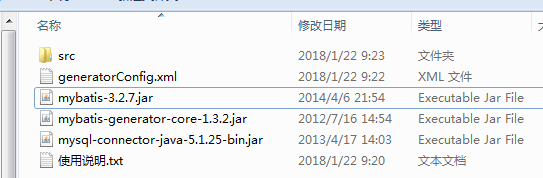
这里根据自已的数据库连接信息及表等修改generatorConfig.xml,该文件如下:
<?xml version="1.0" encoding="UTF-8"?>

<!DOCTYPE generatorConfiguration

  PUBLIC "-//mybatis.org//DTD MyBatis Generator Configuration 1.0//EN"

  "http://mybatis.org/dtd/mybatis-generator-config_1_0.dtd">

<generatorConfiguration>

<!-- 数据库驱动-->

    <classPathEntry  location="mysql-connector-java-5.1.25-bin.jar"/>

    <context id="DB2Tables"  targetRuntime="MyBatis3">

        <commentGenerator>

            <property name="suppressDate" value="true"/>

            <!-- 是否去除自动生成的注释 true:是 : false:否 -->

            <property name="suppressAllComments" value="true"/>

        </commentGenerator>

        <!--数据库链接URL,用户名、密码 -->

        <jdbcConnection driverClass="com.mysql.jdbc.Driver" connectionURL="jdbc:mysql://127.0.0.1:3306/test001" userId="root" password="root">

        </jdbcConnection>

        <javaTypeResolver>

            <property name="forceBigDecimals" value="false"/>

        </javaTypeResolver>

        <!-- 生成模型的包名和位置-->

        <javaModelGenerator targetPackage="com.hin.entity" targetProject="src">

            <property name="enableSubPackages" value="true"/>

            <property name="trimStrings" value="true"/>

        </javaModelGenerator>

        <!-- 生成映射文件的包名和位置-->

        <sqlMapGenerator targetPackage="com.hin.mapping" targetProject="src">

            <property name="enableSubPackages" value="true"/>

        </sqlMapGenerator>

        <!--

        <sqlMapGenerator targetPackage="com.hin.mapping" targetProject="src/main/java">

            <property name="enableSubPackages" value="true"/>

        </sqlMapGenerator>

        -->

        <!-- 生成DAO的包名和位置-->

        <javaClientGenerator type="XMLMAPPER" targetPackage="com.hin.dao" targetProject="src">

            <property name="enableSubPackages" value="true"/>

        </javaClientGenerator>

        <!-- 要生成的表 tableName是数据库中的表名或视图名 domainObjectName是实体类名-->

        <table tableName="user" domainObjectName="User" enableCountByExample="false" enableUpdateByExample="false" enableDeleteByExample="false" enableSelectByExample="false" selectByExampleQueryId="false"></table>

        <table tableName="part" domainObjectName="Part" enableCountByExample="false" enableUpdateByExample="false" enableDeleteByExample="false" enableSelectByExample="false" selectByExampleQueryId="false"></table>

    </context>

</generatorConfiguration>
要修改处根据注释修改即可,这里的相关路径(如数据库驱动包,生成对应的相关文件位置可以自定义)不能带有中文。上面配置文件中的table部分:
<table tableName="user" domainObjectName="User" enableCountByExample="false" enableUpdateByExample="false" enableDeleteByExample="false" enableSelectByExample="false" selectByExampleQueryId="false"></table>
tableName和domainObjectName为必选项,分别代表数据库表名和生成的实力类名,其余的可以自定义去选择,一般情况下均为false。
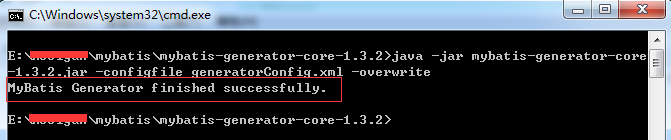
接着在该 目录下,打开命令行窗口,执行如下命令即可:
java -jar mybatis-generator-core-1.3.2.jar -configfile generatorConfig.xml -overwrite
如下执行结果:
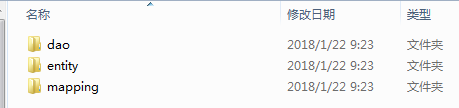
生成文件:
上述整理后的Mybatis-Generator下载地址:Mybatis-Generator
【Mybatis】使用Mybatis-Generator自动生成entity、dao、mapping的更多相关文章
- springboot学习随笔(四):Springboot整合mybatis(含generator自动生成代码)
这章我们将通过springboot整合mybatis来操作数据库 以下内容分为两部分,一部分主要介绍generator自动生成代码,生成model.dao层接口.dao接口对应的sql配置文件 第一部 ...
- MyBatis 使用Generator自动生成Model , Dao, mapper
最近 我新建了一 个maven 项目,使用的是spring + springmvc + mybatis框架. 听说Mybatis可以自动生成model和mapper以及dao层,我就从网上查了查资 ...
- mybatis generator.xml 配置 自动生成model,dao,mapping
generator.xml文件: <?xml version="1.0" encoding="UTF-8"?> <!DOCTYPE gener ...
- 使用MyBatis Generator自动创建代码(dao,mapping,poji)
连接的数据库为SQL server2008,所以需要的文件为sqljdbc4.jar 使用的lib库有: 在lib库目录下新建一个src文件夹用来存放生成的文件,然后新建generatorConfig ...
- 使用Generator 自动生成 model mapper mapping 文件
1.下载包 地址http://download.csdn.net/detail/u012909091/7206091 2.下载完成解压文件到任意目录 3.删除下mybatis-generator-co ...
- mybatis generate 自动生成 entity dao 和 xml 文件
其中的一种方式 ,使用maven 插件 <build> <plugins> <plugin> <groupId>org.mybatis.generato ...
- 使用Mybatis Generator自动生成Mybatis相关代码
本文将简要介绍怎样利用Mybatis Generator自动生成Mybatis的相关代码: 一.构建一个环境: 1. 首先创建一个表: CREATE TABLE pet (name VARCHAR(2 ...
- MyBatis使用Generator自动生成代码
MyBatis中,可以使用Generator自动生成代码,包括DAO层. MODEL层 .MAPPING SQL映射文件. 第一步: 配置好自动生成代码所需的XML配置文件,例如(generator. ...
- SpringBoot 添加mybatis generator 自动生成代码插件
自动生成数据层代码,提高开发效率 1.pom添加插件,并指定配置文件路径 <!-- mybatis generator 自动生成代码插件 --> <plugin> <gr ...
随机推荐
- EDI
EDI, Electronic Data Interchange,电子数据交换 EDI 商务是指将商业或行政事务按一个公认的标准,形成结构化的事务处理或文档数据格式,从计算机到计算机的电子传输方法.简 ...
- 关于HTTP以及TCP
HTTP协议 HTTP(HyperText Transport Protocol),中文译名为超文本传输协议,是一个基于TCP协议的网络协议,主要用于进行网页信息的传输. HTTP协议是在1960年由 ...
- NumPy库
NumPy详细教程(官网手册翻译) Python之Numpy详细教程 一.基础篇 1.NumPy - Ndarray 对象 ndarray描述相同类型的元素集合, 可以使用基于零的索引访问集合中的项目 ...
- 东软实习<3>
今天学习过程和小节 主要对多线程,单例模式以及jdbc进行了一些深入着重的学习, 还有就是学习了如何使用java操作HDFS 主要是对于一些继承调用的使用等 1.封装JDBC,自定义范型 2.反射,自 ...
- 1.7 All components require plug-in?
In Android, Activity, Service, ContentProvider, and BroadcastReceiver are called as four major compo ...
- [Swift]LeetCode55. 跳跃游戏 | Jump Game
Given an array of non-negative integers, you are initially positioned at the first index of the arra ...
- [Swift]LeetCode394. 字符串解码 | Decode String
Given an encoded string, return it's decoded string. The encoding rule is: k[encoded_string], where ...
- 机器学习入门18 - 生产机器学习系统(Production ML Systems)
除了实现机器学习算法之外,机器学习还包含许多其他内容.生产环境机器学习系统包含大量组件.无需自行构建所有内容,而是应该尽可能重复使用常规机器学习系统组件.通过了解机器学习系统的一些范例及其要求,可以明 ...
- Java集合类的那点通俗的认知
文/沉默王二 开门见山地说吧,Java提供了一套完整的集合类(也可以叫做容器类)来管理一组长度可变的对象(也就是集合的元素),其中常见的类型包括List.Set.Queue和Map.从我个人的编程经验 ...
- 死磕 java集合之CopyOnWriteArrayList源码分析
欢迎关注我的公众号"彤哥读源码",查看更多源码系列文章, 与彤哥一起畅游源码的海洋. 简介 CopyOnWriteArrayList是ArrayList的线程安全版本,内部也是通过 ...