
figure 的使用
1.figure语法及操作
(1)figure语法说明
figure(num=None, figsize=None, dpi=None, facecolor=None, edgecolor=None, frameon=True)
num:图像编号或名称,数字为编号 ,字符串为名称
figsize:指定figure的宽和高,单位为英寸;
dpi参数指定绘图对象的分辨率,即每英寸多少个像素,缺省值为80 1英寸等于2.5cm,A4纸是 21*30cm的纸张
facecolor:背景颜色
edgecolor:边框颜色
frameon:是否显示边框
(2)例子:
import matplotlib.pyplot as plt
创建自定义图像
fig=plt.figure(figsize=(4,3),facecolor='blue')
plt.show()
2.subplot创建单个子图
(1) subplot语法
subplot(nrows,ncols,sharex,sharey,subplot_kw,**fig_kw)
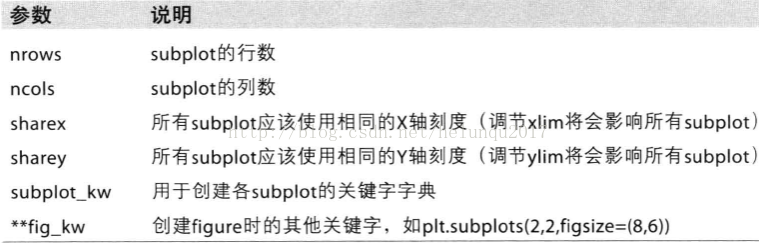
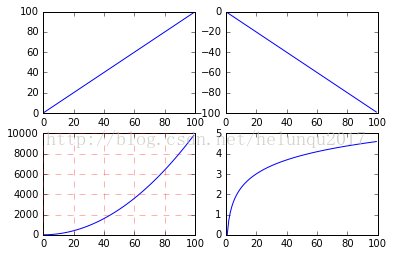
subplot可以规划figure划分为n个子图,但每条subplot命令只会创建一个子图 ,参考下面例子。
(2)例子
import numpy as np
import matplotlib.pyplot as plt
x = np.arange(0, 100)
#作图1
plt.subplot(221)
plt.plot(x, x)
#作图2
plt.subplot(222)
plt.plot(x, -x)
#作图3
plt.subplot(223)
plt.plot(x, x ** 2)
plt.grid(color='r', linestyle='--', linewidth=1,alpha=0.3)
#作图4
plt.subplot(224)
plt.plot(x, np.log(x))
plt.show()
3.subplots创建多个子图
(1)subplots语法
subplots参数与subplots相似
(2)例子
import numpy as np
import matplotlib.pyplot as plt
x = np.arange(0, 100)
#划分子图
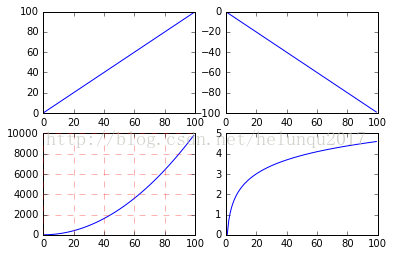
fig,axes=plt.subplots(2,2)
ax1=axes[0,0]
ax2=axes[0,1]
ax3=axes[1,0]
ax4=axes[1,1]
#作图1
ax1.plot(x, x)
#作图2
ax2.plot(x, -x)
#作图3
ax3.plot(x, x ** 2)
ax3.grid(color='r', linestyle='--', linewidth=1,alpha=0.3)
#作图4
ax4.plot(x, np.log(x))
plt.show()
4.面向对象API:add_subplots与add_axes新增子图或区域
add_subplot与add_axes都是面对象figure编程的,pyplot api中没有此命令
(1)add_subplot新增子图
add_subplot的参数与subplots的相似
import numpy as np
import matplotlib.pyplot as plt
x = np.arange(0, 100)
#新建figure对象
fig=plt.figure()
#新建子图1
ax1=fig.add_subplot(2,2,1)
ax1.plot(x, x)
#新建子图3
ax3=fig.add_subplot(2,2,3)
ax3.plot(x, x ** 2)
ax3.grid(color='r', linestyle='--', linewidth=1,alpha=0.3)
#新建子图4
ax4=fig.add_subplot(2,2,4)
ax4.plot(x, np.log(x))
plt.show()

figure 的使用的更多相关文章
- Matlab学习笔记 figure函数
Matlab学习笔记 figure函数 matlab中的 figure 命令,能够创建一个用来显示图形输出的一个窗口对象.每一个这样的窗口都有一些属性,例如窗口的尺寸.位置,等等.下面一一介绍它们. ...
- html5标签figure、figcaption
figure.figcaption,这俩个标签都是定义图文的 常常用到一种图片列表,图片+标题或者图片+标题+简单描述.以前的常规写法: <li> <img src="te ...
- figure元素
<!DOCTYPE html> <html lang="en"> <head> <meta charset="UTF-8&quo ...
- Key Figure中的Aggregation决定了DSO/CUBE转换规则中的Aggregation合计方式
声明:原创作品,转载时请注明文章来自SAP师太技术博客( 博/客/园www.cnblogs.com):www.cnblogs.com/jiangzhengjun,并以超链接形式标明文章原始出处,否则将 ...
- Key Figure、Exception Aggreagion、Non-Cumulative KeyFigure
声明:原创作品,转载时请注明文章来自SAP师太技术博客( 博/客/园www.cnblogs.com):www.cnblogs.com/jiangzhengjun,并以超链接形式标明文章原始出处,否则将 ...
- [Chapter 3 Process]Practice 3.12 Including the initial parent process, how many processes are created by the program shown in Figure 3.32?
3.12 Including the initial parent process, how many processes are created by the program shown in Fi ...
- matlab figure 窗口最大化
http://blog.163.com/yinhexiwen@126/blog/static/6404826620122942057214/ % figure 窗口最大化,坐标轴也随着窗口变大而相应变 ...
- matlab figure 论文级别绘图
1.将figure调整为最大: figure;set(gcf,'outerposition',get(0,'screensize')); 2.获得figure中的大小 [x,y] = ginput 3 ...
- latex figure \label 放在\caption 后
http://www.cnblogs.com/loca/p/4264686.html latex figure \label 放在\caption 后,否则将显示\section 或者\subsect ...
- [转] matlab figure最大化
http://blog.163.com/yinhexiwen@126/blog/static/6404826620122942057214/ % figure 窗口最大化,坐标轴也随着窗口变大而相应变 ...
随机推荐
- 按PEP8风格自动排版Python代码
Autopep8是一个将Python代码自动排版为PEP8风格的小工具.它使用pep8工具来决定代码中的哪部分需要被排版.Autopep8可以修复大部分pep8工具中报告的排版问题. 安装步骤如下: ...
- List、Map、Set之间的联系与区别:
一.数组和集合的区别: 1.数组的大小是固定的,并且同一个数组只能是相同的数据类型 2.集合的大小是不固定的,在不知道会有多少数据的情况下可使用集合. 二.集合的三种类型:list(列表).set(集 ...
- flask 利用flask_wtf扩展 创建web表单
在Flask中,为了处理web表单,我们一般使用Flask-WTF扩展,它封装了WTForms,并且它有验证表单数据的功能 创建语句格式: startTime = DateTimeField('计划开 ...
- PowerDesigner 批量添加字段
Option Explicit Dim mdl ' the current model Set mdl = ActiveModel Dim Tab 'running table Dim col_1 D ...
- CF 543C Remembering Strings
https://cn.vjudge.net/problem/CodeForces-543C 题目 You have multiset of n strings of the same length, ...
- 【MT】牛津的MT教程
Preamble This repository contains the lecture slides and course description for the Deep Natural Lan ...
- Lua中ipairs和pairs的区别详解
迭代器for遍历table时,ipairs和pairs的区别: 区别一:ipairs遇到nil会停止,pairs会输出nil值然后继续下去 区别二: , b = , x = , y = , " ...
- 「洛谷3338」「ZJOI2014」力【FFT】
题目链接 [BZOJ] [洛谷] 题解 首先我们需要对这个式子进行化简,否则对着这么大一坨东西只能暴力... \[F_i=\sum_{j<i} \frac{q_iq_j}{(i-j)^2}-\s ...
- api跨域
1.找方法名称是get开头的2.找get请求类型的 自定义webapi的路由规则,控制到action 1.跨域设置:(服务端)webconfig文件中,system.webServer节点下添加 &l ...
- MongoDB集群管理常用命令
1.以admin身份登录yqtrack_gather01库: mongo 127.0.0.1:27017/yqtrack_gather01 -u username -p password --auth ...