
日常问题181101: ueditor文本编辑器
下载地址:
https://ueditor.baidu.com/website/download.html#ueditor
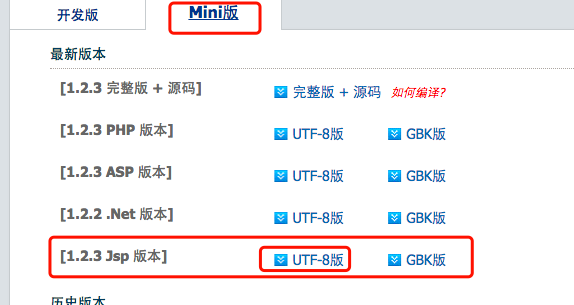
把下载好的文件整个复制到根目录(或是,想要存放的目录)
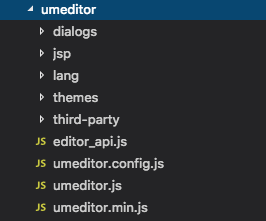
<link rel="stylesheet" href="/umeditor/themes/default/css/umeditor.css">
<script src="/umeditor/umeditor.config.js"> </script>

<script src="/umeditor/umeditor.min.js"> </script>

<script src="/umeditor/lang/zh-cn/zh-cn.js"> </script>
<div class="col-md-12 col-sm-12">

<script type="text/plain" id="myEditor" style="width:830px;height:200px;">

<p>这里我可以写一些输入提示</p>

</script>

</div>
var um = UM.getEditor('myEditor', { initialFrameWidth: null },{

toolbar:[

'source | undo redo | bold italic underline strikethrough | superscript subscript | forecolor backcolor | removeformat |',

'insertorderedlist insertunorderedlist | selectall cleardoc paragraph | fontfamily fontsize' ,

'| justifyleft justifycenter justifyright justifyjustify |',

'link unlink | image | map',

'| horizontal',

]

});
toolbars: [

    [

        'anchor', //锚点

        'undo', //撤销

        'redo', //重做

        'bold', //加粗

        'indent', //首行缩进

        'snapscreen', //截图

        'italic', //斜体

        'underline', //下划线

        'strikethrough', //删除线

        'subscript', //下标

        'fontborder', //字符边框

        'superscript', //上标

        'formatmatch', //格式刷

        'source', //源代码

        'blockquote', //引用

        'pasteplain', //纯文本粘贴模式

        'selectall', //全选

        'print', //打印

        'preview', //预览

        'horizontal', //分隔线

        'removeformat', //清除格式

        'time', //时间

        'date', //日期

        'unlink', //取消链接

        'insertrow', //前插入行

        'insertcol', //前插入列

        'mergeright', //右合并单元格

        'mergedown', //下合并单元格

        'deleterow', //删除行

        'deletecol', //删除列

        'splittorows', //拆分成行

        'splittocols', //拆分成列

        'splittocells', //完全拆分单元格

        'deletecaption', //删除表格标题

        'inserttitle', //插入标题

        'mergecells', //合并多个单元格

        'deletetable', //删除表格

        'cleardoc', //清空文档

        'insertparagraphbeforetable', //"表格前插入行"

        'insertcode', //代码语言

        'fontfamily', //字体

        'fontsize', //字号

        'paragraph', //段落格式

        'simpleupload', //单图上传

        'insertimage', //多图上传

        'edittable', //表格属性

        'edittd', //单元格属性

        'link', //超链接

        'emotion', //表情

        'spechars', //特殊字符

        'searchreplace', //查询替换

        'map', //Baidu地图

        'gmap', //Google地图

        'insertvideo', //视频

        'help', //帮助

        'justifyleft', //居左对齐

        'justifyright', //居右对齐

        'justifycenter', //居中对齐

        'justifyjustify', //两端对齐

        'forecolor', //字体颜色

        'backcolor', //背景色

        'insertorderedlist', //有序列表

        'insertunorderedlist', //无序列表

        'fullscreen', //全屏

        'directionalityltr', //从左向右输入

        'directionalityrtl', //从右向左输入

        'rowspacingtop', //段前距

        'rowspacingbottom', //段后距

        'pagebreak', //分页

        'insertframe', //插入Iframe

        'imagenone', //默认

        'imageleft', //左浮动

        'imageright', //右浮动

        'attachment', //附件

        'imagecenter', //居中

        'wordimage', //图片转存

        'lineheight', //行间距

        'edittip ', //编辑提示

        'customstyle', //自定义标题

        'autotypeset', //自动排版

        'webapp', //百度应用

        'touppercase', //字母大写

        'tolowercase', //字母小写

        'background', //背景

        'template', //模板

        'scrawl', //涂鸦

        'music', //音乐

        'inserttable', //插入表格

        'drafts', // 从草稿箱加载

        'charts', // 图表

    ]

]
日常问题181101: ueditor文本编辑器的更多相关文章
- Ueditor文本编辑器(新浪SAE平台版本) - 下载频道 - CSDN.NET
Ueditor文本编辑器(新浪SAE平台版本) - 下载频道 - CSDN.NET Ueditor文本编辑器(新浪SAE平台版本)
- UEditor文本编辑器
Ueditor是由百度web前端研发部开发所见即所得的编辑器,具有轻量,可定制,注重用户体验等特点.Ueditor基于BSD开源协议,除了具有代码精简.加载迅速的轻量级特质 外,还采用了分层理念,使开 ...
- ASP.MVC 项目中使用 UEditor 文本编辑器
1.下载UEditor 源文件,并导入项目中 2.添加项目中需要使用的CSS和JS //Ueditor 文本编辑器必备的StyleBundle和ScriptBundle StyleBundle ued ...
- JForum论坛添加UEditor文本编辑器
在使用JForum论坛中发现论坛自带的文本编辑器不好用,不能上传图片,样式编辑也很麻烦,就想着把这个文本编辑器替换掉,我这里选用的是百度的开源富文本编辑器UEditor 替换后的效果图 替换方法如下 ...
- 个人纪录(初)----Ueditor文本编辑器的引用
源码下载地址:http://ueditor.baidu.com/website/ 打开源码参考.html 把ueditor引入自己的web项目下. 在需要引入文本的地方写个div,设置样式等. 并且在 ...
- ueditor文本编辑器的使用
1,头部引用 <link href="ueditor/themes/default/css/ueditor.css" rel="stylesheet" t ...
- ueditor 文本编辑器
百度编辑器 压缩包在文件里 百度UEditor编辑器使用教程与使用方法 发布时间:2014-08-23 14:23:34.0 作者:青岛做网站 我们在做网站的时候,网站后台系统一般都会用到 ...
- 2016/05/16 UEditor 文本编辑器 使用教程与使用方法
第一:百度UEditor编辑器的官方下载地址 ueditor 官方地址:http://ueditor.baidu.com/website/index.html 开发文档地址:http://uedito ...
- Html引入百度富文本编辑器ueditor
在日常工作用,肯定有用到富文本编辑器的时候,富文本编辑器功能强大使用方便,我用的是百度富文本编辑器,首先需要下载好百度编辑器的demo, 然后创建ueditor.html文件,引入百度编辑器,然后在h ...
随机推荐
- centos7.6设置sftp服务
sftp是Secure File Transfer Protocol的缩写,安全文件传送协议. CentOS自带 SSH 服务,直接配置即可 1. 查看ssh版本 sftp是基于ssh协议的,首先查看 ...
- mysql插入大数据
/*部门表*/ CREATE TABLE dept( id INT UNSIGNED PRIMARY KEY AUTO_INCREMENT, /*id*/ deptno MEDIUMINT UNSIG ...
- windows环境下curl 安装和使用
原文:https://blog.csdn.net/qq_21126979/article/details/78690960?locationNum=10&fps=1 一.curl 安装 cur ...
- W3CSchool实战闯关笔记(JavaScript)
//handsome /** *ugly **/ 第一关注释 // 举例 var myName; // Define myName below this line 第二关声明变量 // Setup v ...
- 详解MariaDB数据库的触发器
1.什么是触发器 触发器是一种特殊的存储过程,它在插入,删除或修改特定表中的数据时触发执行 它比数据库本身标准的功能有更精细和更复杂的数据控制能力 2.触发器的作用: 2.1 安全性 可以基于数据库的 ...
- selenium对百度进行登录注销
#百度登录退出demo import time from selenium import webdriver from selenium.webdriver.common.action_chains ...
- Ubuntu18.10 安装和使用MySQL
https://blog.csdn.net/weixx3/article/details/80782479 sudo apt-get updatesudo apt-get install mysql- ...
- 使用 Vscode +PlantUml 画uml图
什么是PlantUML PlantUML是一个快速创建UML图形的组件,官网上之所以称它是一个组件,主要是因为多数情况下我们都是在Eclipse.NetBenas.Intellijidea. Emac ...
- 【Vue】动态加载Html片段
在编写Vue页面的时候,会碰到这么一个需求.由于页面组件比较多,不可能一次性将所有的页面都打包,只能按需获取相应的页面进行显示. 比如有一个App页面,需要异步获取html片段通过v-html指令加载 ...
- js过滤html标签
function deleteHtmlTag(str){ str = str.replace(/<[^>]+>|&[^>]+;/g,"").trim ...