
Orange Greenworks
对于steam游戏开发,成就功能是必不可少的。
而Rpgmaker系列无自带的插件或指令实现,且多数游戏作者并无熟练的脚本编写能力,所以~~
我们要使用外部插件----Orange Work。
这里,我对orange work进行研究,并和大家一起分享使用方式。(啊,只对部分 重点进行翻译划线描红)
插件地址:http://hudell.com/blog/orangegreenworks/
Configuring the Plugin:配置
If you simply put the OrangeGreenworks plugin on your project, it will simulate a steam connection so you don’t get any errors while playtesting, even if you don’t have greenworks properly configured.(并不是放入就行~~~~~)
Configuring Greenworks:配置greenwork
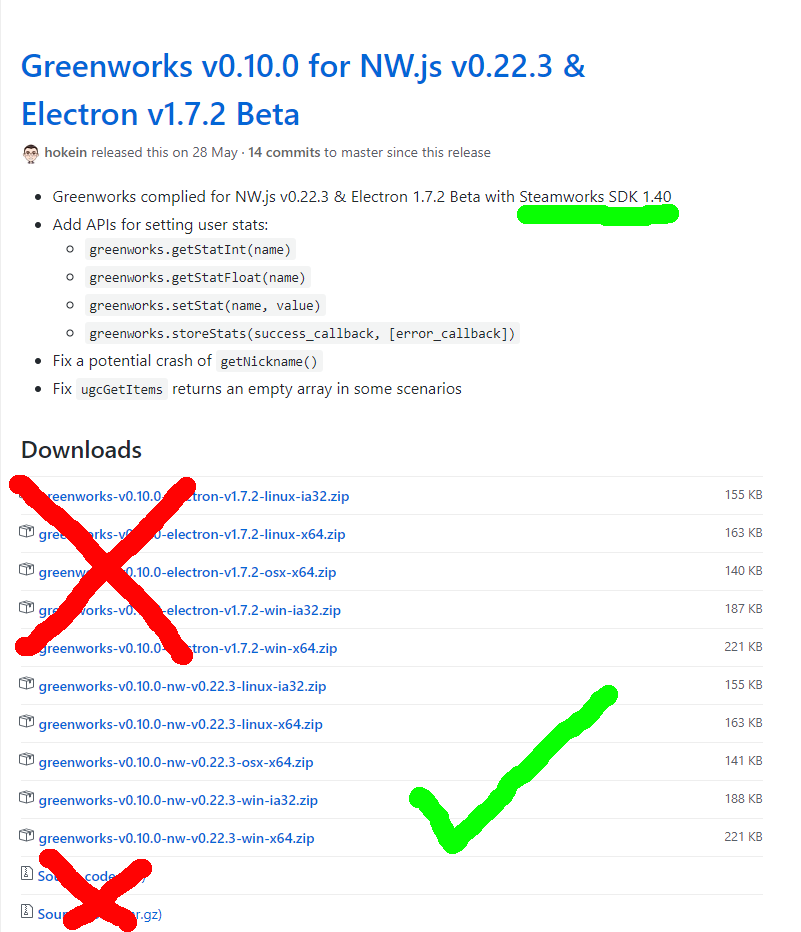
First of all, download the latest version of Greenworks (last time I checked the most recent version was 0.10.0). You need to pick the nwjs version (unless you’re using Electron).
Make sure to download it for the right OS and CPU (most of time you’ll use win-x64).
You can also download all 5 of them if you want, as the files will have different names and only the right one will be loaded.
首先下载最新版本的GreenWorks
你需要选择nwjs的版本(你也可以使用Electron;他们都是构建跨平台应用的玩意~~过多的东西不延伸了)
确保匹配当前你使用的电脑版本,64/32
(楼主下载的是greenworks-v0.14.0-nw-v0.31.5-win-x64.zip;如果以后有空做教程,就使用这个版本~~~)
You’ll get a zip file with a folder called “lib” and a file called greenworks.js. Put both of them on your project’s main folder.
The JS file is the same regardless of which zip you downloaded, so you only need one copy if you downloaded multiple zips.
解压后你会获得:
1.lib文件夹; 2.greenwork.js
将他们全部放入项目的主目录下,主目录下,主目录下,
js无论哪个版本都是一样的,神奇~~~~~
Next, download the version of the Steamworks SDK that your greenworks lib was compiled for (the greenworks download page should say what version it is. For greenworks 0.10, the best Steamworks SDK version is 1.40). You can find it for download on the steamworks site, if you log in with your steam account there.
然后下载与greenworks相匹配的steamworks SDK。
上边那个版本适用于Steamworks SDK 1.42
补充:
- Greenworks complied for for NW.js v0.31.5, v0.32.4, v0.33.3 and Electron v3.0.9, v4.0.0-beta 7 with Steamworks SDK 1.42
On the steamworks SDK files, there will be a folder called redistributable_bin. Open it and copy the steam_api.dll file.
Paste it inside the lib folder that you put on your project on the previous step.
在steamSDK文件夹中,有一个玩意儿叫做redistributable_bin;
打开它,拷贝steam_api.dll
粘贴到项目的lib文件夹中
With the newer versions of greenworks, there are several files that you have to copy and some that you have to rename, like this (you can ignore any OS/CPU you don’t care about):
传新版本的greenworks,有一系列需要你拷贝和重命名的文件,如下

Next, go to RPG Maker MV and deploy your game to any folder you want.
接下来,前往RMM展开你的游戏到任意文件夹。
Go to the deployed folder and make sure that the lib folder and greenworks.js file are inside the www folder.
Outside the www folder, delete everything except for the package.json file. We will replace those deleted files by a newer version of nw.js later.
在文件夹中确保lib文件夹与green.js在www文件夹下;
在www文件夹下,删除全部东西,除了package.json
我们将用nwjs创建那些删掉的东西(nwjs. I like it)
Now create a file called steam_appid.txt on the same folder of the deleted files and put your game’s appid inside of it. You can find this ID on the Steamworks page (it usually ends with a zero). This file is only needed for testing purposes, when you send your game to steam’s servers, you don’t need to include it.
现在,在删除掉东西的那个文件夹下,创建一个steam_appid.txt ,在其中写入游戏的appid.
appid可以在你的开发者页面找到(如果你购买了的话)
这只是为了测试使用,当你上传至steam服务器,你就不需要了
Finally, you’ll need to download nw.js. Once again, check the greenworks page to determine which version you should download (For greenworks 0.10, it is nw.js version 0.22.3). There are two different builds to choose from: Normal and SDK. In the SDK build, you can press the F12 key to open the console (good for testing). In the normal build, there’s no way to open the console (better for a final release). Place all of the nw.js files where you removed the old files earlier.
最后,你需要神器:nw.js
在greenwork页面确认你需要哪个版本,(对应上边的,0.31.5)
有两种创建方式可选择:通常方式与SDK
1.SDK,可以使用F12,便于调试
2.通常:利于最终发布
将nwjs的所有东西放入之前你删除掉东西的文件夹,是所有
Everything should be ready now. Run the nw file and your steam status should indicate that you’re running your game. If it is, then everything is working.
告一段落~~~~~
运行nw,你的steam状态会显示你在运行游戏,如果是的话,那么OK,可以接着向下看;
如果不是,back and check!!!
Available Commands:
划重点,敲黑板~~~~插件命令脚本
OrangeGreenworks.getScreenName();
This script call will return the Player’s Steam Screen Name. While playtesting, it will return “Play Test” instead.
You can set this name to a variable with the following script call:
返回玩家steam昵称,测试中显示play test
$gameVariables.setValue(VARIABLE_ID, OrangeGreenworks.getScreenName());
just replace VARIABLE_ID for the number of the variable that you want to store the name on.
用你想存储的值代替VARIABLE_ID
OrangeGreenworks.getUILanguage();
This script call will return the Player’s Steam UI Language. While playtesting, it will always return ‘english’.
返回steam界面语言,测试中显示“English”
OrangeGreenworks.getGameLanguage();
This script call will return the language that the player chose on the game settings. While playtesting, it will always return ‘english’.
获取游戏语言,测试中显示“English”
OrangeGreenworks.activateAchievement('ACHIEVEMENT_NAME');
This script call will activate an achievement called ACHIEVEMENT_NAME. While playtesting, it will only display a message on the console indicating that the achievement was activated.
召唤steam成就ACHIEVEMENT_NAME.
测试中,只显示成就激活
New commands (OrangeGreenworks 1.2):
新指令
$gameSwitches.setValue(SWITCH_ID, OrangeGreenworks.getAchievement('ACHIEVEMENT_NAME'));
Replace SWITCH_ID for the number of a switch in your game. This script call will check if the player already has the achievement called ACHIEVEMENT_NAME and change the value of the switch accordingly.
用游戏中的开关id代替SWITCH_ID
这条语句会在玩家完成成就ACHIEVEMENT_NAME和改变开关的值时执行。
OrangeGreenworks.clearAchievement('ACHIEVEMENT_NAME');
This script call will remove the achievement from the user. It’s useful when you’re testing the game, but probably won’t be needed for anything else.
移除成就,或许没什么用
(个人建议:成就二刷系统的建设,对疯狂成就党,比如完成XXX成就100次~~~~~)
$gameVariables.setValue(VARIABLE_ID, OrangeGreenworks.getNumberOfAchievements());
Replace VARIABLE_ID for the number of a variable in your game. This script will put in that variable the number of achievements that your game has.
用游戏中的变量值代替VARIABLE_ID。
这条语句将传值到你的成就
--------------------以下可以不怎么看了~~~~~---------------------------
最后,enjoy the designing~~~~~
Commands pending documentation (Already available in the plugin):
- activateGameOverlay
- isGameOverlayEnabled
- activateGameOverlayToWebPage
- isSubscribedApp
- getDLCCount
- isDLCInstalled
- installDLC
- uninstallDLC
- getStatInt
- getStatFloat
- setStat
- storeStats
Orange Greenworks的更多相关文章
- 利用Python【Orange】结合DNA序列进行人种预测
http://blog.csdn.net/jj12345jj198999/article/details/8951120 coursera上 web intelligence and big data ...
- orange pi pc 体验(一)
最近在淘宝上看到一款和树莓派差不多的卡片机,定价才99元,而且是国产的,忍不住入手了一个,就是orange pi 感兴趣的可以百度搜索下,深圳一个公司出的,不过资料比树莓派少了很多,论坛中人也没多少, ...
- 《Orange'S:一个操作系统的实现》笔记(一)
感觉自己对于操作系统始终没有一个清楚的概念,尤其最近困扰于实模式.保护模式以及寻址方式等一些概念.转而一想,所有的程序,最终都是操作的计算机资源,需要和操作系统打交道,所以操作系统有必要深入了解一下. ...
- python数据挖掘orange
http://blog.csdn.net/pipisorry/article/details/52845804 orange的安装 linux下的安装 先安装依赖pyqt4[PyQt教程 - pyth ...
- Orange——开源机器学习交互式数据分析工具
Orange为新手和专家提供开源机器学习和数据可视化.使用大型工具箱交互式数据分析工作流程. 交互式数据可视化 Orange的全部内容都是关于数据可视化,帮助发现隐藏的数据模式,提供数据分析过程背后的 ...
- Orange Pi 3 GPIO 笔记
这是我写过的最水的文章 设备:Orange pi H6,Pi 3 引脚图: (使用Wiringpi 查看GPIO) +------+-----+----------+------+---+Orange ...
- 女子监狱第四季/全集Orange Is the New Black迅雷下载
女子监狱 第三季 Orange Is the New Black 3 (2015) 本季看点:该剧由<吉尔莫女孩>.<单身毒妈第一季>编剧杰姬·科恩的打造.由<护士当家& ...
- 女子监狱第一季/全集Orange Is the New Black迅雷下载
本季第一季 Orange Is the New Black 1 (2013) 看点:该剧描述主人公Piper Chapman(Taylor Schilling)在大学里结识了毒贩Alex(Laura ...
- java 泛型没有协变类型, 所以要重用extends, 但使用List<? extends Fruit> 可以是ArrayList<Fruit>()、ArrayList<Apple>()、ArrayList<Orange>(), 因此不能add元素进去
class Fruit{} class Apple extends Fruit{} class SubApple extends Apple{} class Orange extends Fruit{ ...
随机推荐
- CentOS 7 下安装 teamviewer 13
CentOS 版本:centos-release-7-4.1708.el7.centos.x86_64(通过 rpm -q centos-release 查询) teamviewer 版本:teamv ...
- Android中的WeakReference 弱引用
WeakReference 弱引用 定义:弱引用,与强引用(我们常见的引用方式)相对:特点是:GC在回收时会忽略掉弱引用对象(忽略掉这种引用关系),即:就算弱引用指向了某个对象,但只要该对象没有被强引 ...
- 基于jQuery实现点击列表加载更多效果
<!DOCTYPE html> <html xmlns="http://www.w3.org/1999/xhtml"> <head> < ...
- XVII Open Cup named after E.V. Pankratiev. Grand Prix of America (NAIPC-2017)
A. Pieces of Parentheses 将括号串排序,先处理会使左括号数增加的串,这里面先处理减少的值少的串:再处理会使左括号数减少的串,这里面先处理差值较大的串.确定顺序之后就可以DP了. ...
- vue中Prop父子传值方法
在用vue做项目的过程中感觉很好玩,特做下笔记... 父组件中: <template> <div> <fpdx-modal :zbArr="polygonArr ...
- linux进阶指令
1.df 查看磁盘空间 2.free 查看内存使用 -m 表示以mb位单位查看 total 总大小 used 使用过的空间 free 空闲的空间 shared 共享内存 buffer ...
- angular.isElement()
<!DOCTYPE html> <html> <head> <meta charset="UTF-8"> <title> ...
- __x__(10)0906第三天__字符实体(转义字符)
实体:也叫转义字符,在网页中,一些类似“大于号”和“小于号”这样的字符,无法直接使用,需要用特殊的字符串来表示. 实体语法: “&实体名字;” 或者 “&实体编号;” 注意: 最好使用 ...
- laravel之模型Model
模型Model: 在控制器中调用:
- 小程序上拉加载更多数据(onReachBottom)
<!--pages/test/test.wxml--> <block wx:for="{{list}}" wx:key="item.id"&g ...