
spring框架应用系列四:切面编程(环绕通知与前后置通知区别)
切面编程(环绕通知与前后置通知区别)
本文系作者原创,转载请注明出处:http://www.cnblogs.com/further-further-further/p/7867034.html
解决问题
1、拥有前置通知和后置通知的功能,并能解决前置通知和后置通知在共享信息方面的不足(例如:统计切点方法执行时间);
2、在多线程并发条件下,能保证线程安全(因为在一个方法内定义的局部变量);
3、解决代码重复性,降低代码复杂程度;
内容说明
1、以下会给出前置通知、后置通知与环绕通知实例(观众观看表演),通过对比更能理解彼此之间的区别;
2、两者都通过@Component注解,扫描(Audience,Juggler)bean并注册到spring容器中时,需在XML配置文件中引入component-scan(前后置通知:<context:component-scan base-package="com.spring.example.aspectAspectJNoArgs"/> 环绕通知:<context:component-scan base-package="com.spring.example.aspectAround"/>)
3、切面是观众(Audience),切点是节目表演(Performance.perform())
前置通知:在节目表演之前,观众就坐(调用Audience的takeSeats方法),并关掉手机(调用Audience的turnOffCellPhones方法);
后置通知:在节目表演结束,观众鼓掌(调用Audience的applaud方法);
异常通知:节目表演出现异常,观众要求退票(调用Audience的demandRefund方法);
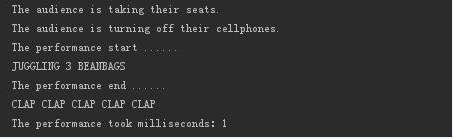
环绕通知:其他与上面相同,只是在节目表演开始与结束时打印时间,统计节目表演时长;
4、通过执行Juggler的perform方法,从而执行切面Audience中相应的方法,达到通知的效果;
应用实例:观众观看表演所做出的相应行为
先列出相关接口以及类代码
节目表演接口(切点方法)
 package com.spring.example.aspectAround;

 /**

  * Created by weixw on 2017/11/16.

  */

 public interface Performer {

     void perform();

 }
切点类实现接口Juggler
 package com.spring.example.aspectAround;

 import org.springframework.stereotype.Component;

 /**

  * Created by weixw on 2017/11/16.

  */

 @Component

 public class Juggler implements Performer {

     private int beanBags = 3;

     public Juggler(){

     }

     public Juggler(int beanBags){

         this.beanBags = beanBags ;

     }

     @Override

     public void perform()  {

         System.out.println("JUGGLING "+ beanBags + " BEANBAGS");

         try {

             Thread.sleep(1);

         }catch (InterruptedException e){

             e.printStackTrace();

         }

     }

 }
上述代码都能共用,下面分别列举前后置通知与环绕通知区别代码
前后置通知(通过AspectJ注解实现,注意:<aop:aspectj-autoproxy/>不能少,它实现了切面相关方法绑定在切点上,切点方法执行就能触发相应通知)
XML配置文件:spring/aspect-aspectJnoArgs.xml(放在spring文件夹下)
 <?xml version="1.0" encoding="UTF-8"?>

 <beans xmlns="http://www.springframework.org/schema/beans"

        xmlns:xsi="http://www.w3.org/2001/XMLSchema-instance"

        xmlns:aop="http://www.springframework.org/schema/aop"

        xmlns:context="http://www.springframework.org/schema/context"

        xsi:schemaLocation="http://www.springframework.org/schema/beans http://www.springframework.org/schema/beans/spring-beans.xsd  http://www.springframework.org/schema/aop http://www.springframework.org/schema/aop/spring-aop.xsd http://www.springframework.org/schema/context http://www.springframework.org/schema/context/spring-context.xsd">

     <!--使用前置通知和后置通知唯一方式:在前置通知中记录开始时间,并在后置通知中报告表演耗费的时长,必须保存开始时间。因为Audience是单例,如果像这样保-->

     <!--存状态,会存在线程安全问题;-->

     <context:component-scan base-package="com.spring.example.aspectAspectJNoArgs"/>

     <aop:aspectj-autoproxy/>

 </beans>
前后置通知切面实现类
 package com.spring.example.aspectAspectJNoArgs;

 import org.aspectj.lang.annotation.*;

 import org.springframework.stereotype.Component;

 /**

  * Created by weixw on 2017/11/16.

  * 通过AspectJ注解实现切面编程

  * 切点方法 id 默认是所依赖方法(public void performance(){})的小写方法名performance

  */

 @Component

 @Aspect

 public class Audience {

     @Pointcut("execution(* com.spring.example.aspectAspectJNoArgs.Performer.perform(..))") //定义切点

     public void performance(){}

     @Before("performance()")//表演之前

     public void takeSeats(){

         System.out.println("The audience is taking their seats.");

     }

     @Before("performance()")//表演之前

     public void turnOffCellPhones(){

         System.out.println("The audience is turning off their cellphones.");

     }

     @AfterReturning("performance()")//表演之后

     public void applaud(){

         System.out.println("CLAP CLAP CLAP CLAP CLAP ");

     }

     @AfterThrowing("performance()") //表演失败之后

     public void demandRefund(){

         System.out.println("Boo! We want our money back!");

     }

 }
环绕通知
XML配置文件:spring/aspect-around.xml(放在spring文件夹下)
 <?xml version="1.0" encoding="UTF-8"?>

 <beans xmlns="http://www.springframework.org/schema/beans"

        xmlns:xsi="http://www.w3.org/2001/XMLSchema-instance"

        xmlns:aop="http://www.springframework.org/schema/aop"

        xmlns:context="http://www.springframework.org/schema/context"

        xsi:schemaLocation="http://www.springframework.org/schema/beans http://www.springframework.org/schema/beans/spring-beans.xsd  http://www.springframework.org/schema/aop http://www.springframework.org/schema/aop/spring-aop.xsd http://www.springframework.org/schema/context http://www.springframework.org/schema/context/spring-context.xsd">

     <!--前置通知和后置通知是在一个方法中实现,所以不需要保存变量值,自然是线程安全的;-->

     <context:component-scan base-package="com.spring.example.aspectAround"/>

     <!--通过component-scan自动扫描,@Component注解将Magician注册到spring容器-->

     <aop:config>

             <!--audience :切面  watchPerformance:切面方法   performance:切点-->

             <aop:aspect ref="audience">

                 <aop:pointcut id="performance" expression="execution(* com.spring.example.aspectAround.Performer.perform(..))"/>

                 <aop:around pointcut-ref="performance" method="watchPerformance" />

             </aop:aspect>

     </aop:config>

 </beans>
环绕通知切面实现类
 package com.spring.example.aspectAround;

 import org.aspectj.lang.ProceedingJoinPoint;

 import org.springframework.stereotype.Component;

 /**

  * Created by weixw on 2017/11/16.

  */

 @Component

 public class Audience {

     public void takeSeats(){

         System.out.println("The audience is taking their seats.");

     }

     public void turnOffCellPhones(){

         System.out.println("The audience is turning off their cellphones.");

     }

     public void applaud(){

         System.out.println("CLAP CLAP CLAP CLAP CLAP");

     }

     public void demandRefund(){

         System.out.println("Boo! We want our money back!");

     }

     public void watchPerformance(ProceedingJoinPoint joinPoint){

         try{

             takeSeats(); //表演之前

             turnOffCellPhones(); //表演之前

             long start = System.currentTimeMillis();

             System.out.println("The performance start ......");//节目开始

             joinPoint.proceed(); //执行被通知的方法

             System.out.println("The performance end ......");//节目结束

             long end = System.currentTimeMillis(); //表演之后

             applaud();//表演之后

             System.out.println("The performance took milliseconds:"+ (end - start) );//表演时长

         }catch (Throwable t){

             demandRefund(); //表演失败之后

         }

     }

 }
测试代码
环绕通知测试代码如下,前后置通知测试代码只需将配置文件名称改成spring/aspect-aspectJnoArgs.xml即可
 package com.spring.example.aspectAround;/**

  * Created by weixw on 2017/11/16.

  */

 import javafx.application.Application;

 import javafx.stage.Stage;

 import org.springframework.context.ApplicationContext;

 import org.springframework.context.support.ClassPathXmlApplicationContext;

 public class Driver extends Application {

     public static void main(String[] args) {

         launch(args);

     }

     @Override

     public void start(Stage primaryStage) {

         try {

             ApplicationContext ctx = new ClassPathXmlApplicationContext("spring/aspect-around.xml");

             Performer performer = (Performer) ctx.getBean("juggler");

             performer.perform();

         }catch (Exception e){

             e.printStackTrace();

         }

     }

 }
运行结果
环绕通知结果:
前后置通知结果:
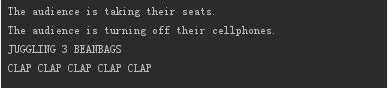
总结
上述列出前后置通知和环绕通知样例。对于有变量缓存需求,线程安全的应用场景,前后置通知实现比较困难,而环绕通知实现就非常容易;
不要让懒惰占据你的大脑,不要让妥协拖垮你的人生。青春就是一张票,能不能赶上时代的快车,你的步伐掌握在你的脚下。
spring框架应用系列四:切面编程(环绕通知与前后置通知区别)的更多相关文章
- Spring实战4:面向切面编程
主要内容 面向切面编程的基本知识 为POJO创建切面 使用@AspectJ注解 为AspectJ的aspects注入依赖关系 在南方没有暖气的冬天,太冷了,非常想念北方有暖气的冬天.为了取暖,很多朋友 ...
- Spring框架的第四天(整合ssh框架)
## Spring框架的第四天 ## ---------- **课程回顾:Spring框架第三天** 1. AOP注解方式 * 编写切面类(包含通知和切入点) * 开启自动代理 2. JDBC模板技术 ...
- Spring Boot之AOP面向切面编程-实战篇
目录 前言 编程范式主要有以下几类 引入pom依赖 aop注解 实现日志分割功能 前言 AOP是一种与语言无关的程序思想.编程范式.项目业务逻辑中,将通用的模块以水平切割的方式进行分离统一处理,常用于 ...
- Spring AOP前置通知和后置通知
Spring AOP AspectJ:Java社区里最完整最流行的AOP框架 在Spring2.0以上的版本中,可以使用基于AspectJ注解或基于XML配置的AOP 在Spring中启用Aspect ...
- spring框架应用系列三:切面编程(带参数)
本文系作者原创,转载请注明出处:http://www.cnblogs.com/further-further-further/p/7786715.html 解决问题 1.分离业务监控与业务处理.简单点 ...
- Spring Boot2(六):使用Spring Boot整合AOP面向切面编程
一.前言 众所周知,spring最核心的两个功能是aop和ioc,即面向切面和控制反转.本文会讲一讲SpringBoot如何使用AOP实现面向切面的过程原理. 二.何为aop aop全称Aspec ...
- Spring(三)面向切面编程(AOP)
在直系学长曾经的指导下,参考了直系学长的博客(https://www.cnblogs.com/WellHold/p/6655769.html)学习Spring的另一个核心概念--面向切片编程,即AOP ...
- Spring中AOP简介与切面编程的使用
Spring中AOP简介与使用 什么是AOP? Aspect Oriented Programming(AOP),多译作 "面向切面编程",也就是说,对一段程序,从侧面插入,进行操 ...
- 02 浅析Spring的AOP(面向切面编程)
1.关于AOP AOP(Aspect Oriented Programming),即面向切面编程,可以说是OOP(Object Oriented Programming,面向对象编程)的补充和完善.O ...
随机推荐
- [CF893F] Subtree Minimum Query
Description: 给定一棵树,每次询问某点子树中到其不超过k的所有点的最小点权 强制在线 Hint: \(n,m\le 10^5\) Solution: 看到题目第一反应是以深度为下标,dfs ...
- BZOJ1431 : MLand
考虑任意一棵生成树,它的代价是一个一次函数. 因此所有生成树的最小值随着时间变化呈现出的是一个上凸壳. 三分查找最大值即可. 时间复杂度$O(m\log m\log w)$. #include< ...
- docker-maven-plugin插件设置Docker的buildArgs
docker-maven-plugin是spotify出品的一款针对spring boot项目的docker插件,可将spring boot项目打包到docker镜像中. 如果在编译docker镜像时 ...
- js函数柯里化,实现bind
1.柯里化: 把接受多个参数的函数变换成接受一个单一参数(最初函数的第一个参数)的函数,并且返回接受余下的参数而且返回结果的新函数的技术. 举个栗子: 一个计算两数之和的函数,需要传递两个参数,柯里化 ...
- lavarel5.2官方文档阅读——架构基础
<目录> 1.请求的生命周期 2.应用的架构 3.服务提供者 4.服务容器 5.Facades外立面(从这节起,看中文版的:https://phphub.org/topics/1783) ...
- iview安装使用
iView 是一套基于 Vue.js 的开源 UI 组件库,主要服务于 PC 界面的中后台产品. 安装 cd 项目 cnpm install iview -S 在项目中引入iview 在入口文件mai ...
- 34 文件地理数据库(GDB)变文件夹了怎么办
我们都知道文件地理数据库(GDB)是ArcGIS软件特有的格式,有其独特的设计之处,在文件资源管理器中显示为.gdb的文件夹,但是里面的文件却看不明白,而且将gdb文件夹在Windows资源管理器中直 ...
- 【页面置换算法】LRC算法和FIFS算法
算法介绍 FIFO:该算法总是淘汰最先进入内存的页面,即选择在内存中驻留时间最久的页面予以淘汰.该算法实现简单,只需把一个进程已调入内存的页面,按先后次序链接成一个队列,并设置一个指针,称为替换指针, ...
- 实验三:分别用for,while;do-while循坏语句以及递归的方法计算n!,并输出算式。
源代码: package jiecheng;import java.util.Scanner;public class JieCheng {public static void main(String ...
- Java作业十三(2017-11-20)
/*使用一位数组解决 1 1 2 3 5 8 13 数列问题 斐波纳契数列 Fibonacci*/ package cn.GM; public class array { public static ...