
Messenger在MVVM模式中的应用
Messenger在MVVM模式中的应用
Messenger在MVVM中应用的前提
我们知道在MVVM架构中,系统平台的Silverlight客户端界面开发和业务逻辑已经被分开,XAML是SL的主要部分,界面设计者只需要绑定ViewModel里的数据即可。但是在ViewModel里有些时候是需要界面发出响应的,在这种情况下,Messenger显示出它的用处。
Messenger的架构
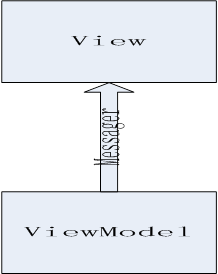
Messager构件代码
定义Imessager接口
注册一个接收消息的类型,比如某一控件来接收消息
void Register<TMessage>(object recipient, Action<TMessage> action);
给最近注册的类型发送消息
void Send<TMessage, TTarget>(TMessage message);
取消最近注册的类型,当执行该句后,不再接收任何消息
void Unregister(object recipient);
实现Imessager接口
public class Messenger : IMessenger
{
private static Messenger _defaultInstance;
private Dictionary<Type, List<WeakActionAndToken>> _recipientsOfSubclassesAction;
private Dictionary<Type, List<WeakActionAndToken>> _recipientsStrictAction;
public static Messenger Default
{
get
{
if (_defaultInstance == null)
{
_defaultInstance = new Messenger();
}
return _defaultInstance;
}
}
public static void OverrideDefault(Messenger newMessenger)
{
_defaultInstance = newMessenger;
}
public static void Reset()
{
_defaultInstance = null;
}
public virtual void Register<TMessage>(object recipient, Action<TMessage> action)
{
Register(recipient, null, false, action);
}
public virtual void Register<TMessage>(object recipient, bool receiveDerivedMessagesToo, Action<TMessage> action)
{
Register(recipient, null, receiveDerivedMessagesToo, action);
}
public virtual void Register<TMessage>(object recipient, object token, Action<TMessage> action)
{
Register(recipient, token, false, action);
}
public virtual void Register<TMessage>(
object recipient,
object token,
bool receiveDerivedMessagesToo,
Action<TMessage> action)
{
var messageType = typeof(TMessage);
Dictionary<Type, List<WeakActionAndToken>> recipients;
if (receiveDerivedMessagesToo)
{
if (_recipientsOfSubclassesAction == null)
{
_recipientsOfSubclassesAction = new Dictionary<Type, List<WeakActionAndToken>>();
}
recipients = _recipientsOfSubclassesAction;
}
else
{
if (_recipientsStrictAction == null)
{
_recipientsStrictAction = new Dictionary<Type, List<WeakActionAndToken>>();
}
recipients = _recipientsStrictAction;
}
List<WeakActionAndToken> list;
if (!recipients.ContainsKey(messageType))
{
list = new List<WeakActionAndToken>();
recipients.Add(messageType, list);
}
else
{
list = recipients[messageType];
}
var weakAction = new WeakAction<TMessage>(recipient, action);
var item = new WeakActionAndToken
{
Action = weakAction,
Token = token
};
list.Add(item);
Cleanup();
}
public virtual void Send<TMessage>(TMessage message)
{
SendToTargetOrType(message, null, null);
}
[SuppressMessage(
"Microsoft.Design",
"CA1004:GenericMethodsShouldProvideTypeParameter",
Justification = "This syntax is more convenient than other alternatives.")]
public virtual void Send<TMessage, TTarget>(TMessage message)
{
SendToTargetOrType(message, typeof(TTarget), null);
}
public virtual void Send<TMessage>(TMessage message, object token)
{
SendToTargetOrType(message, null, token);
}
/// <summary>
public virtual void Unregister(object recipient)
{
UnregisterFromLists(recipient, _recipientsOfSubclassesAction);
UnregisterFromLists(recipient, _recipientsStrictAction);
}
[SuppressMessage(
"Microsoft.Design",
"CA1004:GenericMethodsShouldProvideTypeParameter",
Justification =
"The type parameter TMessage identifies the message type that the recipient wants to unregister for.")]
public virtual void Unregister<TMessage>(object recipient)
{
Unregister<TMessage>(recipient, null);
}
public virtual void Unregister<TMessage>(object recipient, Action<TMessage> action)
{
UnregisterFromLists(recipient, action, _recipientsStrictAction);
UnregisterFromLists(recipient, action, _recipientsOfSubclassesAction);
Cleanup();
}
private static void CleanupList(IDictionary<Type, List<WeakActionAndToken>> lists)
{
if (lists == null)
{
return;
}
var listsToRemove = new List<Type>();
foreach (var list in lists)
{
var recipientsToRemove = new List<WeakActionAndToken>();
foreach (var item in list.Value)
{
if (item.Action == null
|| !item.Action.IsAlive)
{
recipientsToRemove.Add(item);
}
}
foreach (var recipient in recipientsToRemove)
{
list.Value.Remove(recipient);
}
if (list.Value.Count == 0)
{
listsToRemove.Add(list.Key);
}
}
foreach (var key in listsToRemove)
{
lists.Remove(key);
}
}
private static bool Implements(Type instanceType, Type interfaceType)
{
if (interfaceType == null
|| instanceType == null)
{
return false;
}
var interfaces = instanceType.GetInterfaces();
foreach (var currentInterface in interfaces)
{
if (currentInterface == interfaceType)
{
return true;
}
}
return false;
}
private static void SendToList<TMessage>(
TMessage message,
IEnumerable<WeakActionAndToken> list,
Type messageTargetType,
object token)
{
if (list != null)
{
var listClone = list.Take(list.Count()).ToList();
foreach (var item in listClone)
{
var executeAction = item.Action as IExecuteWithObject;
if (executeAction != null
&& item.Action.IsAlive
&& item.Action.Target != null
&& (messageTargetType == null
|| item.Action.Target.GetType() == messageTargetType
|| Implements(item.Action.Target.GetType(), messageTargetType))
&& ((item.Token == null && token == null)
|| item.Token != null && item.Token.Equals(token)))
{
executeAction.ExecuteWithObject(message);
}
}
}
}
private static void UnregisterFromLists(object recipient, Dictionary<Type, List<WeakActionAndToken>> lists)
{
if (recipient == null
|| lists == null
|| lists.Count == 0)
{
return;
}
lock (lists)
{
foreach (var messageType in lists.Keys)
{
foreach (var item in lists[messageType])
{
var weakAction = item.Action;
if (weakAction != null
&& recipient == weakAction.Target)
{
weakAction.MarkForDeletion();
}
}
}
}
}
private static void UnregisterFromLists<TMessage>(
object recipient,
Action<TMessage> action,
Dictionary<Type, List<WeakActionAndToken>> lists)
{
var messageType = typeof(TMessage);
if (recipient == null
|| lists == null
|| lists.Count == 0
|| !lists.ContainsKey(messageType))
{
return;
}
lock (lists)
{
foreach (var item in lists[messageType])
{
var weakActionCasted = item.Action as WeakAction<TMessage>;
if (weakActionCasted != null
&& recipient == weakActionCasted.Target
&& (action == null
|| action == weakActionCasted.Action))
{
item.Action.MarkForDeletion();
}
}
}
}
private void Cleanup()
{
CleanupList(_recipientsOfSubclassesAction);
CleanupList(_recipientsStrictAction);
}
private void SendToTargetOrType<TMessage>(TMessage message, Type messageTargetType, object token)
{
var messageType = typeof(TMessage);
if (_recipientsOfSubclassesAction != null)
{
var listClone = _recipientsOfSubclassesAction.Keys.Take(_recipientsOfSubclassesAction.Count()).ToList();
foreach (var type in listClone)
{
List<WeakActionAndToken> list = null;
if (messageType == type
|| messageType.IsSubclassOf(type)
|| Implements(messageType, type))
{
list = _recipientsOfSubclassesAction[type];
}
SendToList(message, list, messageTargetType, token);
}
}
if (_recipientsStrictAction != null)
{
if (_recipientsStrictAction.ContainsKey(messageType))
{
var list = _recipientsStrictAction[messageType];
SendToList(message, list, messageTargetType, token);
}
}
Cleanup();
}
private struct WeakActionAndToken
{
public WeakAction Action;
public object Token;
}
}
Messager在MVVM的实例
在ViewModel端
public void UpdateJob(object sender, RoutedEventArgs v)
{
var focusrow = (JobMVVMClient.JobBL.View_T_SegmentJob)SelectRow;
if (focusrow != null)
{
JobMVVMClient.JobBL.JobBLClient Job = new JobMVVMClient.JobBL.JobBLClient();
var row = (JobMVVMClient.JobBL.View_T_SegmentJob)selectRow;
if (row.班次号 == null || row.班组号 == null
|| row.计划结束时间 == null || row.计划开始时间 == null || row.投产量 == 0.0)
return;
Job.UpdateSegmentJobBySomeThingCompleted += (s, e) =>
{
if (e.Result)
{
MessageBox.Show(PromptString.UpdateJobYes);
foreach (var element in jobModel.Gradeinfo)
{
if (element.DetailID == row.班次号.ToString())
row.班次 = element.DetailName;
}
foreach (var element in jobModel.Groupinfo)
{
if (element.DetailID == row.班组号.ToString())
row.班组 = element.DetailName;
}
}
};
Messenger.Default.Send<bool?,JobMVVMClinet.Views.JobPlanUpdateView>(true);
//给位于View层中的JobPlanUpdateView这个界面发送bool消息,这个消息是true.
Job.UpdateSegmentJobBySomeThingAsync(row.工单ID, row.投产量, (DateTime)row.计划开始时间, (DateTime)row.计划结束时间, (int)row.班次号, (int)row.班组号);
Job.CloseAsync();
}
}
在VIEW端
public partial class JobPlanUpdateView : ChildWindow
{
public JobPlanUpdateView(CreateJobViewModel model)
{
InitializeComponent();
DataContext = model;
Messenger.Default.Register<bool?>(this, m => this.DialogResult = m);
//注册接收消息,并且做出响应处理
}
}
Messager总结
消息在MVVM中广泛应用,更好的运用MESSAGER能更好的处理View与ViewModel的关系,为MVVM添加喝彩。
Messenger在MVVM模式中的应用的更多相关文章
- 在MVVM模式中,按钮Click事件的绑定方法
在MVVM模式中,我们将Button的方法写到ViewModel中,然后绑定到前端界面.通常的做法是写一个类,继承ICommand接口,然而如果按钮比较多的话,就需要写很多的类,对于后期维护造成很大的 ...
- silverlighter下MVVM模式中利用Behavior和TargetedTriggerAction实现文本框的一些特效
在silverlight一般开发模式中,给文本框添加一些事件是轻而易举的,然而MVVM开发模式中,想要给文本框添加一些事件并非那么容易,因为MVVM模式中,只有ICommand接口,而且也只有Butt ...
- “Win10 UAP 开发系列”之 在MVVM模式中控制ListView滚动位置
这个扩展属性从WP8.1就开始用了,主要是为了解决MVVM模式中无法直接控制ListView滚动位置的问题.比如在VM中刷新了数据,需要将View中的ListView滚动到顶部,ListView只有一 ...
- WPF MVVM模式中,通过命令实现窗体拖动、跳转以及显隐控制
原文:WPF MVVM模式中,通过命令实现窗体拖动.跳转以及显隐控制 在WPF中使用MVVM模式,可以让我们的程序实现界面与功能的分离,方便开发,易于维护.但是,很多初学者会在使用MVVM的过程中遇到 ...
- WPF ContextMenu 在MVVM模式中绑定 Command及使用CommandParameter传参
原文:WPF ContextMenu 在MVVM模式中绑定 Command及使用CommandParameter传参 ContextMenu无论定义在.cs或.xaml文件中,都不继承父级的DataC ...
- 深入理解MVVM模式中Silverlight的Trigger、Action和Behavior及Silverlight的继承机制
接触Silverlight已经有两三个月了,开始一直感觉他和Winform很相似,拖拖控件就行了,所以一直把经历放在了研究后台和服务器交互和性能优化上面,很少去仔细研究Silverlight的页面.前 ...
- MVVM模式中WPF数据的完全绑定
一:截图,描述:将后台代码的姓名.年龄绑定到文本框,单击”增加年龄“--年龄自+1,单击”显示年龄“--弹出年龄的显示对话框,实现了从文本框修改年龄和后台更改年龄并显示到文本框 运行结果和解决方案管理 ...
- MVVM模式中ViewModel和View、Model有什么区别
Model:很简单,就是业务逻辑相关的数据对象,通常从数据库映射而来,我们可以说是与数据库对应的model. View:也很简单,就是展现出来的用户界面. 基本上,绝大多数软件所做的工作无非就是从数据 ...
- XAML: 在 MVVM 模式中,关于绑定的几处技巧
以下会提到三个绑定的技巧,分别是 在 ListView 中为 ListViewItem 的 MenuFlyout 绑定 Command: 在 ListView 的 事件中绑定所选择项目,即其 Sele ...
随机推荐
- emWin洗衣机简易操作界面,含uCOS-III和FreeRTOS两个版本
第3期:洗衣机简易操作界面 配套例子:V6-904_STemWin提高篇实验_洗衣机简易操作界面(uCOS-III)V6-905_STemWin提高篇实验_洗衣机简易操作界面(FreeRTOS) 例程 ...
- Http 1.x弊端与Http 2.0比较
HTTP2.0作为新版协议,改动细节必然很多,不过对应用开发者和服务提供商来说,影响较大的就几点. 新的二进制格式(Binary Format) http1.x诞生的时候是明文协议,其格式由三部分组成 ...
- Java面试题中常考的容易混淆的知识点区别
以下是我收集的Java编程里各种区别,供Java学习爱好者参考,这些区别都是每次Java面试中常考的,大家好好掌握,如有失误请留言指出.想要获取Java详细全套学习资料请到上海尚学堂官网获取. 1.H ...
- SpringBoot环境搭建
创建 maven 项目 , 选择的打包类型为 jar 类型 自己构建 SpringBoot 项目时 , 要继承 SpringBoot 的父项目 , 这里用的版本是 2.1.4 点击 Finish , ...
- 优化之Joiner组件
Joiner组件在运行时需要额外的内存空间处理中间结果,因此会影响性能 可通过查看Joiner performance计数器来决定Joiner组件是否需要优化 通过如下方式优化Joiner组件 将Ma ...
- Python档案袋( Socket 与 ScoketServer 通信 )
Socket有一个缓冲区,缓冲区是一个流,先进先出,发送和取出的可自定义大小的,如果取出的数据未取完缓冲区,则可能存在数据怠慢.其中[recv(1024)]表示从缓冲区里取最大为1024个字节,但实际 ...
- 深度学习笔记(七)SSD 论文阅读笔记简化
一. 算法概述 本文提出的SSD算法是一种直接预测目标类别和bounding box的多目标检测算法.与faster rcnn相比,该算法没有生成 proposal 的过程,这就极大提高了检测速度.针 ...
- hive中beeline取回数据的完整流程
这里我们从BeeLine.execute讲起. 接下来来到BeeLine.dispatch,这里的入参就是sql语句.方法的最后调用了Commands.sql,然后调用到了Commands.execu ...
- mockjs,json-server一起搭建前端通用的数据模拟框架
无论是在工作,还是在业余时间做前端开发的时候,难免出现后端团队还没完成接口的开发,而前端团队却需要实现对应的功能,不要问为什么,这是肯定存在的.本篇文章就是基于此原因而产出的.希望对有这方面的需求的同 ...
- Qt之自定义托盘(二)
上一篇文章讲述了自定义Qt托盘,不过不是使用QSystemTrayIcon这个类,而是我们自己完全自定义的一个类,我们只需要处理这个类的鼠标hover.鼠标左键点击.鼠标右键点击和鼠标左键双击,就可以 ...