
Lab 11-3
Analyze the malware found in Lab11-03.exe and Lab11-03.dll. Make sure that both files are in the same directory during analysis.
Questions and Short Answers
What interesting analysis leads can you discover using basic static analysis?
A: Lab11-03.exe contains the strings
inet_epar32.dllandnet start cisvc, which means that it probably starts the CiSvc indexing service. Lab11-03.dll contains the stringC:\WINDOWS\System32\kernel64x.dlland imports the API callsGetAsyncKeyStateandGetForegroundWindow, which makes us suspect it is a keylogger that logs to kernel64x.dll.What happens when you run this malware?
A: The malware starts by copying Lab11-03.dll to
inet_epar32.dllin the Windows system directory. The malware writes data to cisvc.exe and starts the indexing service. The malware also appears to write keystrokes to C:\Windows System32 kernel64x.dll.How does Lab11-03.exe persistently install Lab11-03.dll ?
A: The malware persistently installs Lab11-03.dll by trojanizing the indexing service by entry-point redirection. It redirects the entry point to run shellcode, which loads the DLL.
Which Windows system file does the malware infect?
A: The malware infects cisvc.exe to load inet_epar32.dll and call its export
zzz69806582.What does Lab11-03.dll do?
A: Lab11-03.dll is a polling keylogger implemented in its export
zzz69806582.Where does the malware store the data it collects?
A: The malware stores keystrokes and the window into which keystrokes were entered to C:\Windows\System32\kernel64x.dll.
Detailed Analysis
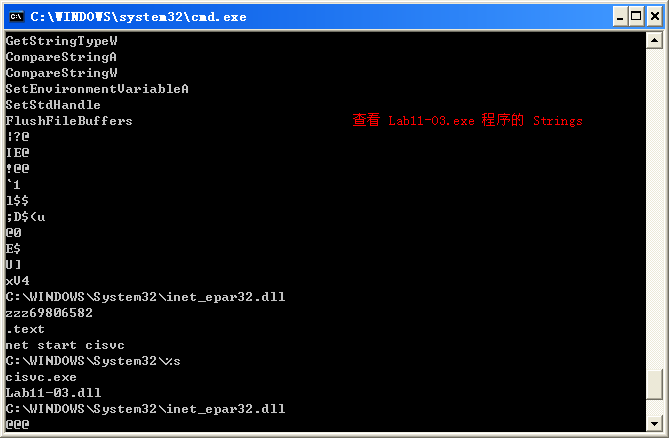
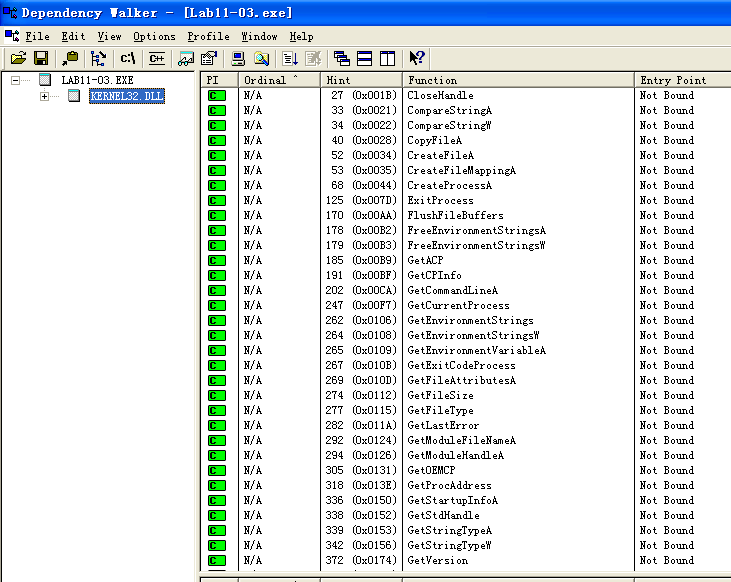
We’ll begin our analysis by examining the strings and imports for Lab11-03.exe and Lab11-03.dll. Lab11-03.exe contains the strings inet_epar32.dll and net start cisvc. The net start command is used to start a service on a Windows machine, but we don’t yet know why the malware would be starting the indexing service on the system, so we’ll dig down during in-depth analysis.
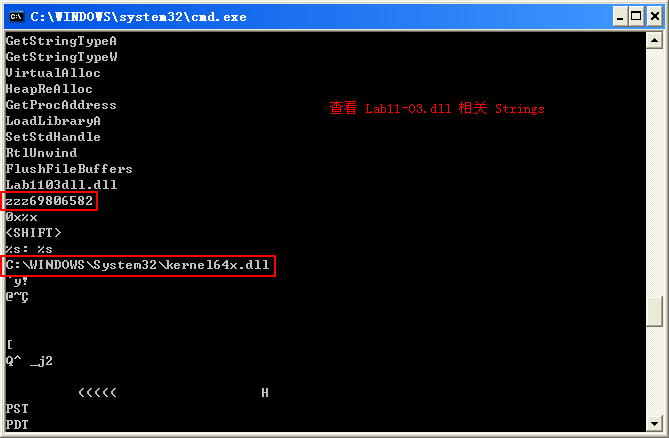
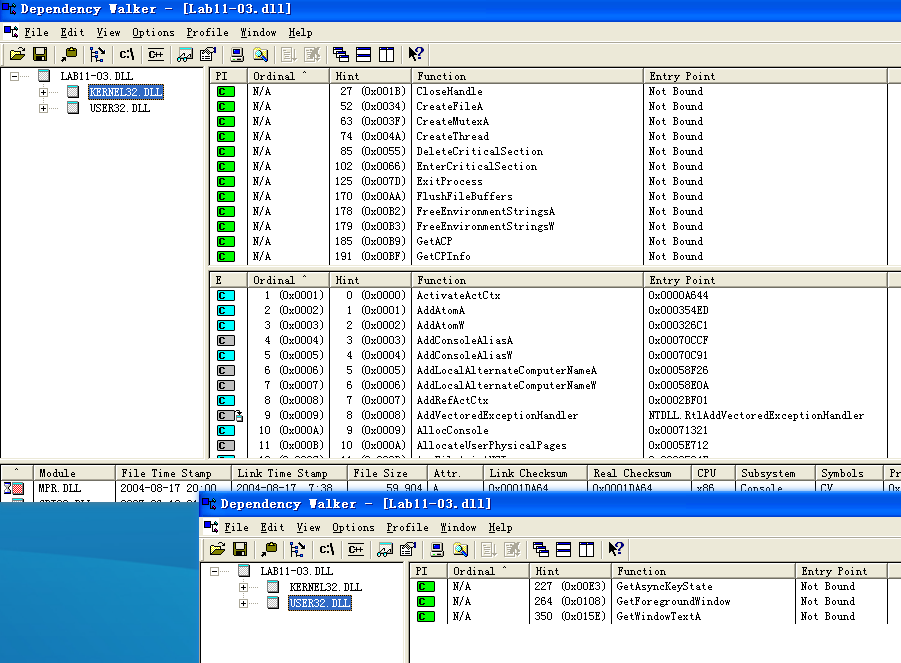
Lab11-03.dll contains the string C:\WINDOWS\System32\kernel64x.dll and imports the API calls GetAsyncKeyState and GetForegroundWindow, which makes us suspect it is a keylogger that logs keystrokes to kernel64x.dll. The DLL also contains an oddly named export: zzz69806582.
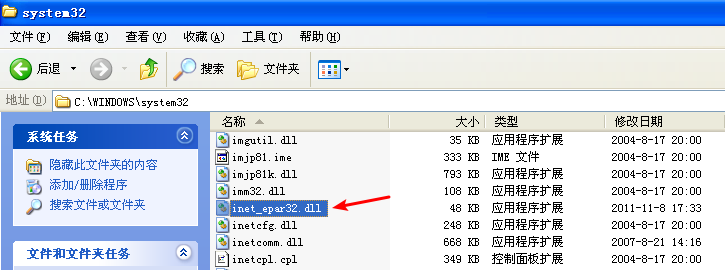
Next, we use dynamic analysis techniques to see what the malware does at runtime. We set up procmon and filter on Lab11-03.exe to see the malware create C:\Windows\System32\inet_epar32.dll. The DLL inet_epar32.dll is identical to Lab11-03.dll, which tells us that the malware copies Lab11-03.dll to the Windows system directory.

Further in the procmon output, we see the malware open a handle to cisvc.exe, but we don’t see any WriteFile operations.

Finally, the malware starts the indexing service by issuing the command net start cisvc. Using Process Explorer, we see that cisvc.exe is now running on the system. Since we suspect that the malware might be logging keystrokes, we open notepad.exe and enter a bunch of a characters. We see that kernel64x.dll is created. Suspecting that keystrokes are logged, we open kernel64x.dll in a hex editor and see the following output:

Our keystrokes have been logged to kernel64x.dll. We also see that the program in which we typed our keystrokes (Notepad) has been logged along with the keystroke data in hexadecimal. (The malware doesn’t turn the hexadecimal values into readable strings, so the malware author probably has a postprocessing script to more easily read what is entered.)
Next, we use in-depth techniques to determine why the malware is starting a service and how the keylogger is gaining execution. We begin by loading Lab11-03.exe into IDA Pro and examining the main function, as shown in Listing 11-17L.
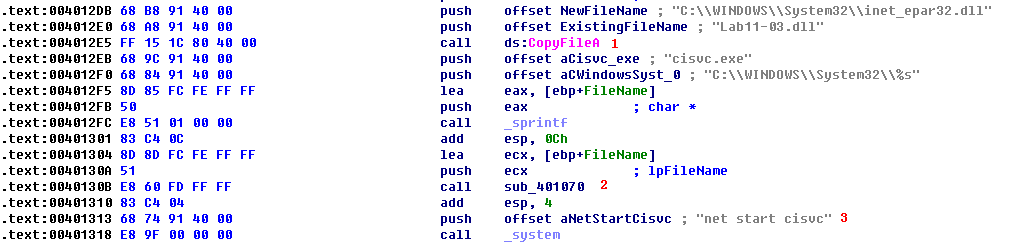
Listing 11-17L: Reviewing the main method of Lab11-03.exe
At \({\color{red}1}\), we see that the main method begins by copying Lab11-03.dll to inet_epar32.dll in C:\Windows\System32. Next, it builds the string C:\WINDOWS System32\cisvc.exe and passes it to sub_401070 at \({\color{red}2}\). Finally, the malware starts the indexing service by using system to run the command net start cisvc at \({\color{red}3}\).
We focus on sub_401070 to see what it might be doing with cisvc.exe. There is a lot of confusing code in sub_401070, so take a high-level look at this function using the cross-reference diagram shown in Figure 11-6L.
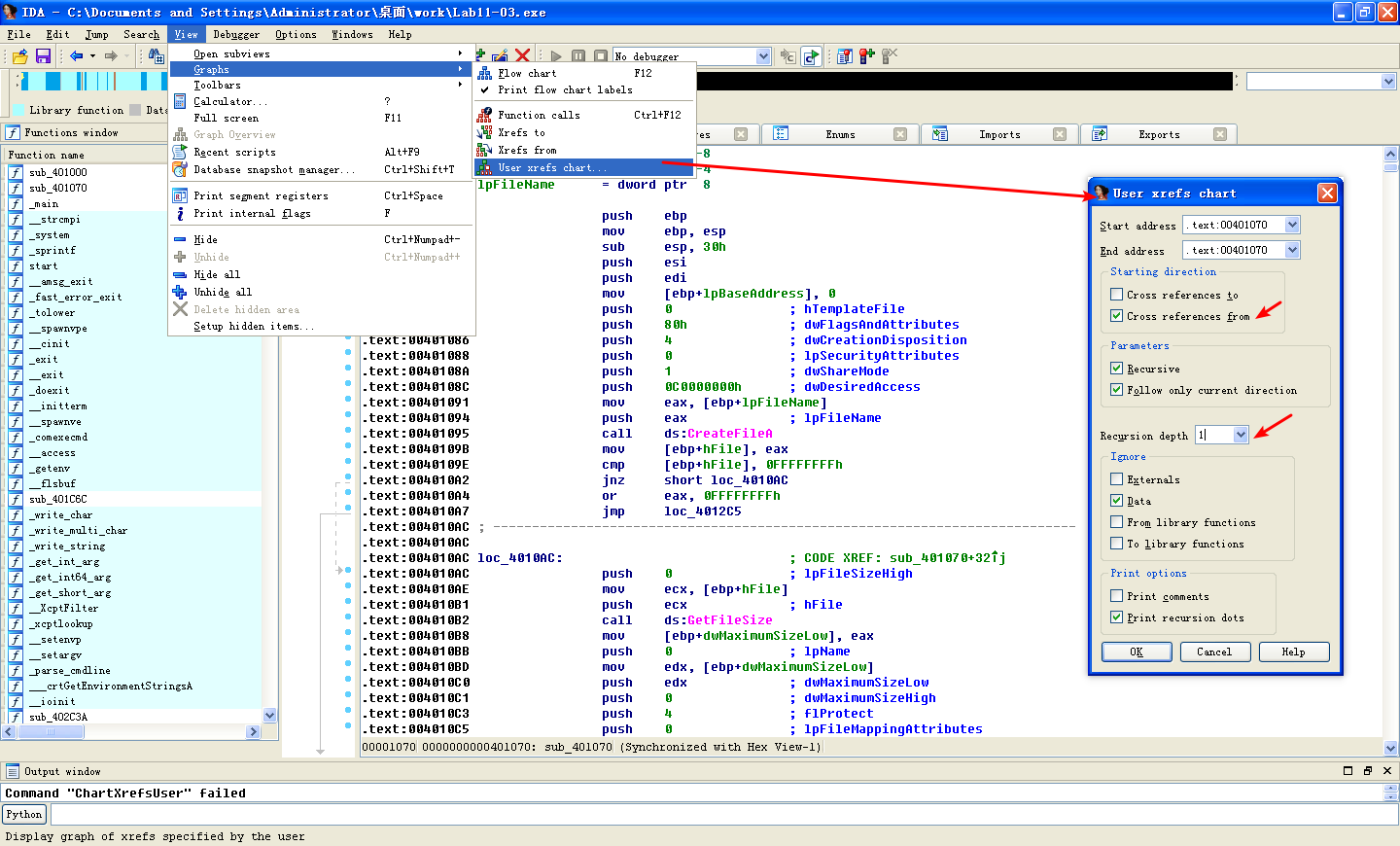
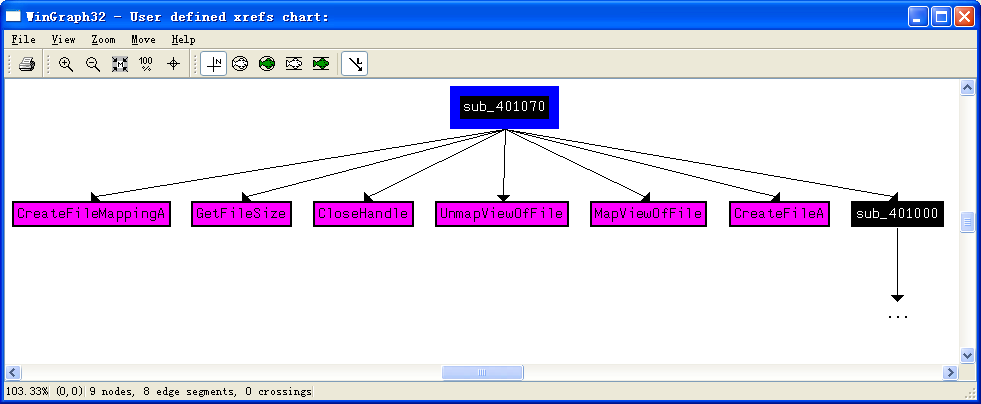
Figure 11-6L: Cross-reference graph for sub_401070
Using this diagram, we see that sub_401070 maps the cisvc.exe file into memory in order to manipulate it with calls to CreateFileA, CreateFileMappingA, and MapViewOfFile. All of these functions open the file for read and write access. The starting address of the memory-mapped view returned by MapViewOfFile (labeled lpBaseAddress by IDA Pro) is both read and written to. Any changes made to this file will be written to disk after the call to UnmapViewOfFile, which explains why we didn’t see a WriteFile function in the procmon output.
Several calculations and checks appear to be made on the PE header of cisvc.exe. Rather than analyze these complex manipulations, let’s focus on the data written to the file, and then extract the version of cisvc.exe written to disk for analysis.
A buffer is written to the memory-mapped file, as shown in Listing 11-18L.

Listing 11-18L: Writing 312 bytes of shellcode into cisvc.exe
At \({\color{red}1}\), the mapped location of the file is moved into EDI and adjusted by some offset using var_28. Next, ECX is loaded with 0x4E, the number of DWORDs to write (movsd). Therefore, the total number of bytes is 0x4E * 4 = 312 bytes in decimal. Finally, byte_409030 is moved into ESI at \({\color{red}2}\), and rep movsd copies the data at byte_409030 into the mapped file. We examine the data at 0x409030 and see the bytes in the left side of Table 11-1L.
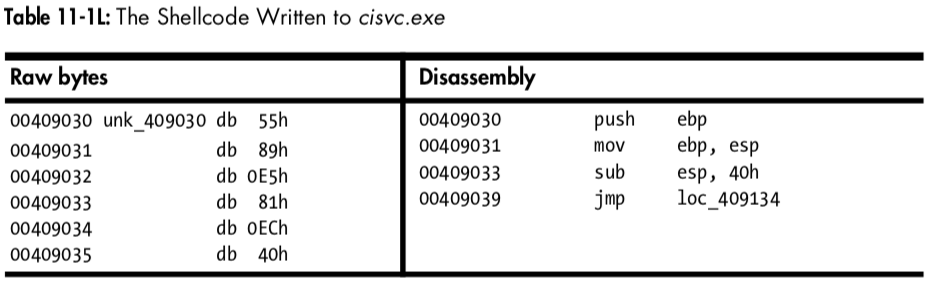
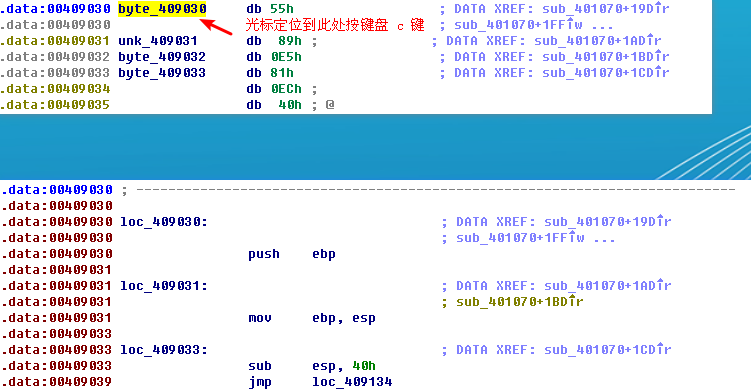
The left side of the table contains raw bytes, but if we put the cursor at 0x409030 and press C in IDA Pro, we get the disassembly shown in the right side of the table. This is shellcode—handcrafted assembly that, in this case, is used for process injection. Rather than analyze the shellcode (doing so can be a bit complicated and messy), we’ll guess at what it does based on the strings it contains.
Toward the end of the 312 bytes of shellcode, we see two strings:
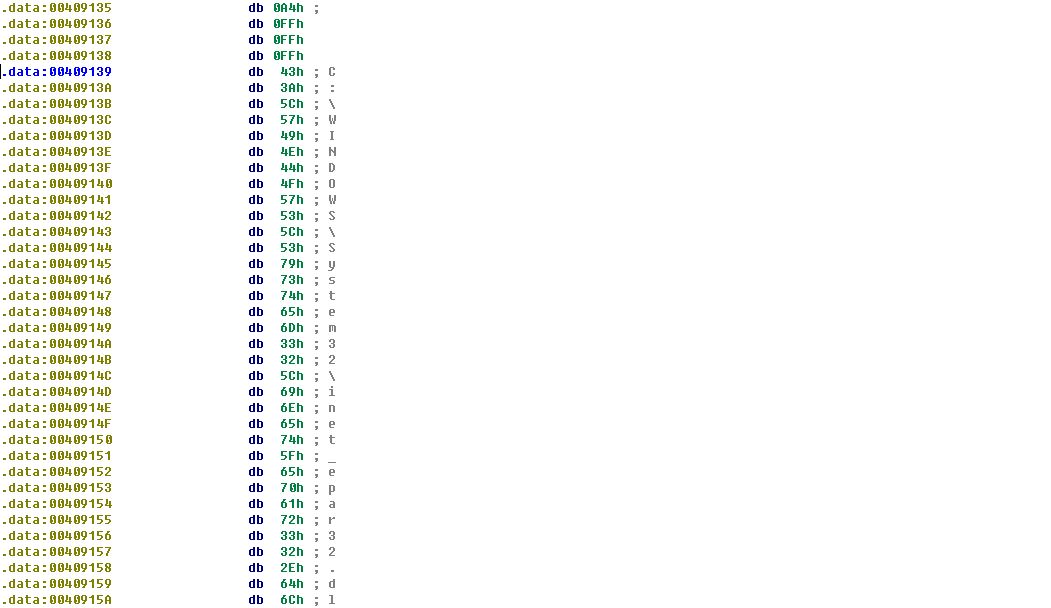

The appearance of the path to inet_epar32.dll and the export zzz69806582 suggest that this shellcode loads the DLL and calls its export.
Next, we compare the cisvc.exe binary as it exists after we run the malware to a clean version that existed before the malware was run. (Most hex editors provide a comparison tool.) Comparing the versions, we see two differences: the insertion of 312 bytes of shellcode and only a 2-byte change in the PE header. We load both of these binaries into PEview to see if we notice a difference in the PE header. This comparison is shown in Figure 11-7L.
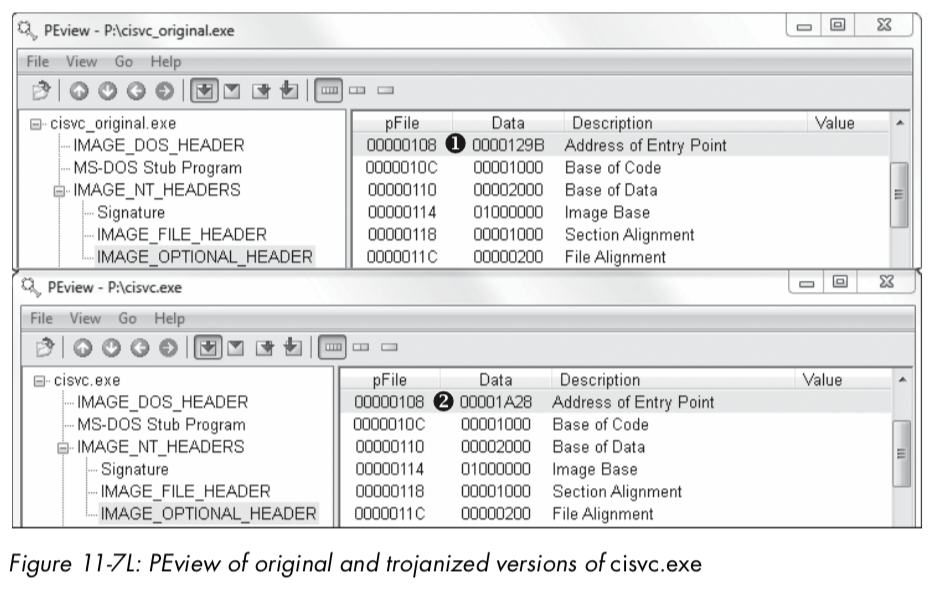
The top part of Figure 11-7L shows the original cisvc.exe (named cisvc_original.exe) loaded into PEview, and the bottom part shows the trojanized cisvc.exe. At \({\color{red}1}\) and \({\color{red}2}\), we see that the entry point differs in the two binaries. If we load both binaries into IDA Pro, we see that the malware has performed entry-point redirection so that the shellcode runs before the original entry point any time that cisvc.exe is launched. Listing 11-19L shows a snippet of the shellcode in the trojanized version of cisvc.exe.
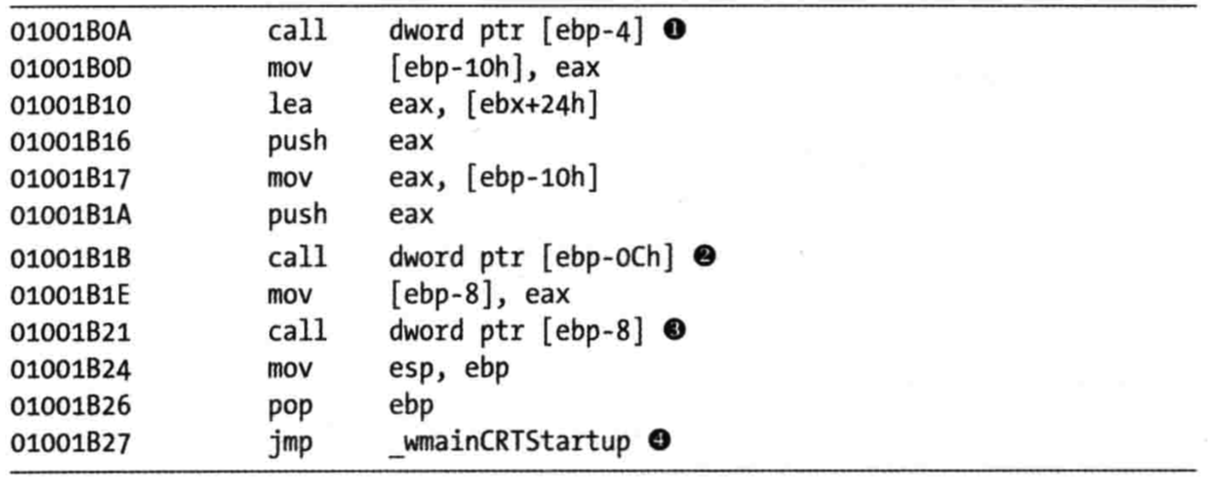
Listing 11-19L: Important calls within the shellcode inside the trojanized cisvc.exe
Now we load the trojanized version of cisvc.exe into a debugger and set
a breakpoint at 0x1001B0A. We find that at \({\color{red}1}\), the malware calls LoadLibrary to load inet_epar32.dll into memory. At \({\color{red}2}\), the malware calls GetProcAddress with the argument zzz69806582 to get the address of the exported function. At \({\color{red}3}\), the malware calls zzz69806582. Finally, the malware jumps to the original entry point at \({\color{red}4}\), so that the service can run as it would normally. The shellcode’s function matches our earlier suspicion that it loads inet_epar32.dll and calls its export.
Keylogger Analysis
Next, we analyze inet_epar32.dll, which is the same as Lab11-03.dll. We load Lab11-03.dll into IDA Pro and begin to analyze the file. The majority of the code stems from the zzz69806582 export. This export starts a thread and returns, so we will focus on analyzing the thread, as shown in Listing 11-20L.
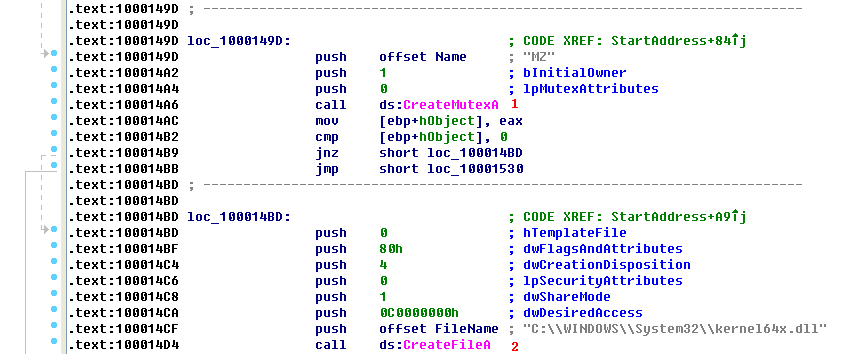
Listing 11-20L: Mutex and file creation performed by the thread created by zzz69806582
At \({\color{red}1}\), the malware creates a mutex named MZ. This mutex prevents the malware from running more than one instance of itself, since a previous call to OpenMutex (not shown) will terminate the thread if the mutex MZ already exists. Next, at \({\color{red}2}\), the malware opens or creates a file named kernel64x.dll for writing.
After getting a handle to kernel64x.dll, the malware sets the file pointer to the end of the file and calls sub_10001380, which contains a loop. This loop contains calls to GetAsyncKeyState, GetForegroundWindow, and WriteFile. This is consistent with the keylogging method we discussed in “User-Space Keyloggers” on page 239.
Summary
Lab11-03.exe trojanizes and then starts the Windows indexing service (cisvc.exe). The trojan shellcode loads a DLL and calls an exported function that launches a keylogger. The export creates the mutex MZ and logs all keystrokes to kernel64x.dll in the Windows system directory.
注:在做本实验的过程中,我选用的 Windows XP SP3 机器,并没有在相应目录下修改 CISVC.exe 文件,所以和这部分相关的,没有实现。
Preference
PRACTICAL MALWARE ANALYSIS: MALWARE BEHAVIOR(LAB 11-03)
Lab 11-3的更多相关文章
- RH033读书笔记(10)-Lab 11 Process Control
Lab 11 Process Control Sequence 1: Job Control 1. [student@stationX ~]$ su - 2. Begin some jobs in t ...
- RH133读书笔记(11)-Lab 11 System Rescue and Troubleshooting
Lab 11 System Rescue and Troubleshooting Goal: To build skills in system rescue procedures. Estimate ...
- Lab 1-1
LABS The purpose of the labs is to give you an opportunity to practice the skills taught in the chap ...
- 第一章 Lab
关于Lab 教材恶意代码分析实战 课后练习恶意代码样本https://practicalmalwareanalysis.com或https://nostarch.com/malware.htm 以下是 ...
- 7 天玩转 ASP.NET MVC — 第 3 天
目录 第 1 天 第 2 天 第 3 天 第 4 天 第 5 天 第 6 天 第 7 天 0. 前言 我们假定你在开始学习时已经阅读了前两天的学习内容.在第 2 天我们完成了关于显示 Employee ...
- RAC之常用方法-----新手入门
年后换工作新入职,公司开发在使用RAC,之前居然一直没有了解过,独立开发的弊端,信息闭塞,而且自己也懒,这几天看了下RAC,确实很强大有木有. 什么是ARC 简单的说,RAC就是一个第三方库,他可以大 ...
- vmware目录2
http://www.globalknowledge.com/training/course.asp?pageid=9&courseid=17880&country=United+St ...
- 很好的vmware目录
http://www.globalknowledge.com/training/course.asp?pageid=9&courseid=18023&country=United+St ...
- 【转】Automated Testing Detail Test Plan
Automated Testing Detail Test PlanAutomated Testing DTP Overview This Automated Testing Detail Test ...
- Cygwin Run in the Windows(Simulation of UNIX)
Preface Environment Cygwin Run in the Windows(Simulation of UNIX) Resource Cygwin Install:http://cyg ...
随机推荐
- json文件常用代码
1.json数据内容格式化处理 package com.sklm.lhb.json; public class JsonFormatTool { /** * 单位缩进字符串. */ private s ...
- mongodb和python交互
一.安装pymongo包 sudo pip install pymongo 二.新增数据: 增加一条: from pymongo import MongoClient client = MongoCl ...
- 创建 Visual Studio 2017 离线安装
代码示例: vs_Enterprise.exe --layout E:\VS2017LAYOUT --add Microsoft.VisualStudio.Workload.NetCoreTools ...
- Mysql复制一个数据库到另一个数据库
mysqldump -u root -p source_db > /home/db_bak.sql #导出数据库 123456 #输入数据库密码 扩展: mysqldump -u root -p ...
- 修改Aptana Studio默认编码
1,修改:Text file encoding 2,修改:Initial HTML file contents
- 【Diary】期中考+春游记
4.22-4.24 期中考 周一 早上 赶来三楼电教厅自习,疯狂复习历史.想到下午考语文历史两大文科,不由得有点慌吧. 突然,沙雕体委说了一句: 下午考政治,你不背诵吗 下午 语文感觉正常发挥. 政治 ...
- opencv学习之路(38)、Mat像素统计基础——均值,标准差,协方差;特征值,特征向量
本文部分内容转自 https://www.cnblogs.com/chaosimple/p/3182157.html 一.统计学概念 二.为什么需要协方差 三.协方差矩阵 注:上述协方差矩阵还需要除以 ...
- Bigger-Mai 养成计划,前端基础学习之HTML
HTML 超文本标记语言(Hyper Text Markup Language) 1.一套规则,浏览器认识的规则. 2.开发者: 学习Html规则 开发后台程序: - 写Html文件(充当模板的作用) ...
- 关于transactionscope 事务的脏数据
在一个项目中,关于新客的检测,如果查询到积分记录就是老客,因为检测的之前先积分,因为使用的是事务,造成本地代码没提交前已经有该会员的积分记录,而到数据库中却查询不到记录.造成永远都是老客,解决的方法是 ...
- linux下的nmap工具能干什么?
答:可以用来探测远程主机的操作系统类型,使用方法如下: nmap -A <ip address>