
spring定时器,定时器一次执行两次的问题
Spring 定时器
方法一:注解形式
配置文件头加上如下:
xmlns:task="http://www.springframework.org/schema/task"

http://www.springframework.org/schema/task

http://www.springframework.org/schema/task/spring-task.xsd
需要 quartz 包
<dependency>

        <groupId>org.quartz-scheduler</groupId>

        <artifactId>quartz</artifactId>

        <version>2.2.2</version>

</dependency>
<!-- 扫描包 -->
<context:component-scan base-package="com.hehe.content.job" />

    <!-- 启动定时任务  -->
 <task:annotation-driven/>
@Component

public class MyTask {

    @Scheduled(cron="0 0 2 * * ?") // 每天凌晨2点执行,该方法不能有返回值

    public void taskCycle(){

        System.out.println("======================");

    }

}
方法二:xml配置
<?xml version="1.0" encoding="UTF-8"?>

<beans xmlns="http://www.springframework.org/schema/beans"

    xmlns:xsi="http://www.w3.org/2001/XMLSchema-instance" xmlns:p="http://www.springframework.org/schema/p"

    xmlns:context="http://www.springframework.org/schema/context"

    xmlns:aop="http://www.springframework.org/schema/aop" xmlns:tx="http://www.springframework.org/schema/tx"

    xmlns:task="http://www.springframework.org/schema/task"

    xsi:schemaLocation="http://www.springframework.org/schema/beans

       http://www.springframework.org/schema/beans/spring-beans-4.1.xsd

       http://www.springframework.org/schema/context

       http://www.springframework.org/schema/context/spring-context-4.1.xsd

       http://www.springframework.org/schema/tx

       http://www.springframework.org/schema/tx/spring-tx-4.1.xsd

       http://www.springframework.org/schema/aop

       http://www.springframework.org/schema/aop/spring-aop-4.1.xsd

       http://www.springframework.org/schema/task

       http://www.springframework.org/schema/task/spring-task.xsd">

    <!-- 启动定时任务  -->

     <!-- <task:annotation-driven/>

     <context:component-scan base-package="com.hehe.content.job" />  -->

    <!-- 要调用的工作类 -->

        <bean id="quartzJob" class="com.hehe.content.job.MyTask"></bean>

        <!-- 定义调用对象和调用对象的方法 -->

        <bean id="jobtask" class="org.springframework.scheduling.quartz.MethodInvokingJobDetailFactoryBean">

            <!-- 调用的类 -->

            <property name="targetObject">

                <ref bean="quartzJob" />

            </property>

            <!-- 调用类中的方法 -->

            <property name="targetMethod">

                <value>taskCycle</value>

            </property>

        </bean>

        <!-- 定义触发时间 -->

        <bean id="doTime"

            class="org.springframework.scheduling.quartz.CronTriggerFactoryBean">

            <property name="jobDetail">

                <ref bean="jobtask" />

            </property>

            <!-- cron表达式 -->

            <property name="cronExpression">

                <value>0 0 2 * * ?</value>

            </property>

        </bean>

        <!-- 总管理类 如果将lazy-init='false'那么容器启动就会执行调度程序 -->

        <bean id="startQuertz" lazy-init="false" autowire="no"

            class="org.springframework.scheduling.quartz.SchedulerFactoryBean">

            <property name="triggers">

                <list>

                    <ref bean="doTime" />

                </list>

            </property>

        </bean>

</beans>
问题: 每次任务到点都执行两次!!!!!!
网上查了好多资料 ,都不是我的情况,后来发现是我的项目在启动的时候每次都会加载两次,原来是eclipse 中tomcat配置的问题
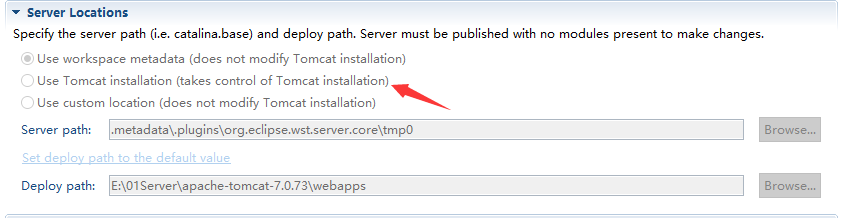
图中若选择的是第二个,项目会启动两次,这就导致了后面的定时器执行了两次。最后改为了第一选项就好了。
我在腾讯微视玩短视频 搜索用户 “lei9527” ,可以相互关注下哈
spring定时器,定时器一次执行两次的问题的更多相关文章
- 分析解决 spring quartz 中出现的执行两次问题
1. 问题描述 在开发询盘功能时,遇到一个需求,就是后台定时任务执行用电施工业务的工单下发. 使用的技术是 spring quartz,因为其他应用有先例,配置quartz 完成后,先写了一个 hel ...
- spring的 onApplicationEvent方法被执行两次问题
原文地址:http://www.cnblogs.com/a757956132/p/5039438.html 在做web项目开发中,尤其是企业级应用开发的时候,往往会在工程启动的时候做许多的前置检查. ...
- Spring的quartz定时器同一时刻重复执行二次的问题解决
最近用Spring的quartz定时器的时候,发现到时间后,任务总是重复执行两次,在tomcat或jboss下都如此. 打印出他们的hashcode,发现是不一样的,也就是说,在web容器启动的时候, ...
- spring task定时器的配置使用
spring task的配置方式有两种:配置文件配置和注解配置. 1.配置文件配置 在applicationContext.xml中增加spring task的命名空间: xmlns:task=&qu ...
- spring定时任务执行两次
最近用Spring的quartz定时器的时候,发现到时间后,任务总是重复执行两次,在tomcat或jboss下都如此. 打印出他们的hashcode,发现是不一样的,也就是说,在web容器启动的时候, ...
- 当spring 容器初始化完成后执行某个方法 防止onApplicationEvent方法被执行两次
在做web项目开发中,尤其是企业级应用开发的时候,往往会在工程启动的时候做许多的前置检查. 比如检查是否使用了我们组禁止使用的Mysql的group_concat函数,如果使用了项目就不能启动,并指出 ...
- Spring @Scheduled 在tomcat容器里面执行两次
今天在用spring里面的@Scheduled执行定时任务,但是发现到触发定时任务的时间点总会执行两次.原因是修改了tomcat conf包下面的server.xml文件导致的.配置如下: <H ...
- Spring任务调度定时器
1.在spring-context.xml配置 <!-- 计划任务配置,用 @Service @Lazy(false)标注类,用@Scheduled(cron = "0 0 2 * * ...
- 关于Spring中,定时任务执行两次的解决办法
原因:如果spring-quartz.xml文件,在Spring的配置文件spring-config.xml中被加载,那么定时任务会被Spring和SpringMVC扫描两次,所以会被执行两次. 解决 ...
随机推荐
- 【转】MVC、MVP与MVT
MVC是Model-View-Control的缩写,Model指的是数据层,View指的是UI层,Control指的是控制层,这三层之间彼此联系.View层的用户行为,触发Control层,Contr ...
- java重载与覆写
很多同学对于overload和override傻傻分不清楚,建议不要死记硬背概念性的知识,要理解着去记忆. 先给出我的定义: overload(重载):在同一类或者有着继承关系的类中,一组名称相同,参 ...
- 明显调用的表达式前的括号必须具有(指针)函数类型 编译器错误 C2064
看到“明显调用的表达式前的括号必须具有(指针)函数类型”这句时我才发现我的语文水平有多烂,怎么看都看不懂,折腾了半天才知道是哪里出了问题. 举个简单的例子 class CTest { void (CT ...
- 金融行业的BI应用分析
商业智能是一种提高企业智能化的手段,它可以满足企业发展的需要.提高企业的竞争力.同时,对于提高金融行业的风险管理.提升对外服务的质量都能够起到关键性的作用. 在市场竞争和银行业务转型期间,商业智能对于 ...
- swift 学习笔记
1. 数组中取出字符串的方法: 1)let string = "\arr[0]" 2) let string = String(stringInterpolationSegment ...
- APP级别处理未捕获异常
前言: 项目APP有时候会出现Crash,然后就是弹出系统强制退出的对话框,点击关闭APP. 有的APP进行了处理,会发现,当程序出现异常的时候,会Toast一个提示"程序出现异常,3秒后将 ...
- IO流总结
IO流的作用:用于设备和设备之间的数据传输. IO流的概念:流是一组有顺序的,有起点和终点的字节集合,是对数据传输的总称或抽象. IO流的分类: 按照操作数据的类型分为两种: 字节流和字符流. 按 ...
- Action.c(58): Error -27796: Failed to connect to server "hostname"
分析: 因为负载生成器的性能太好发数据特别快,服务器响应也特别快,从而导致负载生成器的端口在没有timeout之前就全部占满了. 解决方案一: 在负载生成器的注册表HKEY_LOCAL_MACHI ...
- (二)Spark-Linux环境准备-Java&Python版Spark
Spark-Linux环境准备 视频教程: 1.优酷 2.YouTube 硬软件环境 1.虚拟机:VMware Workstation 12 2.虚拟机操作系统:RedHat5u4,单核,1G内存,2 ...
- wamp下Apache配置vhost
1.由于后面虚拟机中需要用到Rewrite所以先编辑Apache的conf目录下的httpd.conf文件.(我的文件位置是:D:\Program Files\wamp\bin\apache\apac ...