
Oozie分布式任务的工作流——邮件篇
在大数据的当下,各种spark和hadoop的框架层出不穷。各种高端的计算框架,分布式任务如乱花般迷眼。你是否有这种困惑!——有了许多的分布式任务,但是每天需要固定时间跑任务,自己写个调度,既不稳定,又没有可靠的通知。
那么你应该是在找——Oozie。
Oozie是一款支持分布式任务调度的开源框架,它支持很多的分布式任务,比如map reduce,spark,sqoop,pig甚至shell等等。你可以以各种方式调度它们,把它们组成工作流。每个工作流节点可以串行也可以并行执行。
如果你定义好了一系列的任务,就可以开启工作流,设置一个coordinator调度器进行定时的调度了。
有了这些工作以后,还需要一个很重要的环节—— 就是邮件提醒。不管是任务执行成功还是失败,都可以发送邮件提醒。这样每天晚上收到任务成功的消息,就可以安心睡觉了。
因此,本篇就带你来看看如何在Oozie中使用Email。

Email Action
在Oozie中每个工作流的环节都被设计成一个Action,email就是其中的一个Action.
Email action可以在oozie中发送信息,在email action中必须指定接收的地址,主题subject和内容body。在接收地址参数中支持使用逗号分隔,添加多个邮箱地址。
email action是同步执行的,因此必须等到邮件发出后,这个action才算完成,才能执行下一个action。
email action里面的所有参数都可以使用EL表达式。
语法规则
<workflow-app name="[WF-DEF-NAME]" xmlns="uri:oozie:workflow:0.1">

    ...

    <action name="[NODE-NAME]">

        <email xmlns="uri:oozie:email-action:0.2">

            <to>[COMMA-SEPARATED-TO-ADDRESSES]</to>

            <cc>[COMMA-SEPARATED-CC-ADDRESSES]</cc> <!-- cc is optional -->

            <subject>[SUBJECT]</subject>

            <body>[BODY]</body>

            <content_type>[CONTENT-TYPE]</content_type> <!-- content_type is optional -->

            <attachment>[COMMA-SEPARATED-HDFS-FILE-PATHS]</attachment> <!-- attachment is optional -->

        </email>

        <ok to="[NODE-NAME]"/>

        <error to="[NODE-NAME]"/>

    </action>

    ...

</workflow-app>
to和cc命令指定了谁来接收邮件。可以通过逗号分隔来指定多个邮箱地址。to是必填项,cc是可选的。
主题subject和正文body用于指定邮件的标题和正文,email-action:0.2支持text/html这种格式的正文,默认是普通的文本"text/plain"
attachment用于在邮件中添加一个hdfs文件的附件,也可以通过逗号分隔符指定多个附件。如果路径声明的不全,那么也会被当做hdfs中的文件。本地文件是不能添加到附件中的。
配置
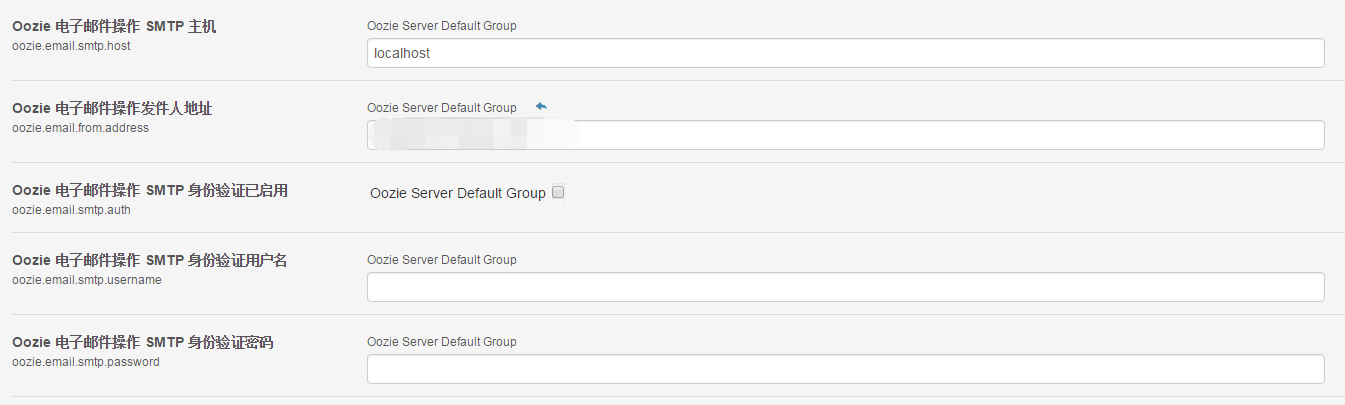
email action需要在oozie-site.xml中配置SMTP服务器配置。下面是需要配置的值:
oozie.email.smtp.host
这个值是SMTP服务器的地址,默认是loalhost
oozie.email.smtp.port
是SMTP服务器的端口号,默认是25.
oozie.email.from.address
发送邮件的地址,默认是oozie@localhost
oozie.email.smtp.auth
是否开启认证,默认不开启
oozie.email.smtp.username
如果开启认证,登录的用户名,默认是空
oozie.email.smtp.password
如果开启认证,用户对应的密码,默认是空
PS. 在linux可以通过find -name oozie-site.xml在当前目录下查找。在我们的CDH版本中这个文件在./etc/oozie/conf.dist/oozie-site.xml
遇到的问题
很多人会遇到无法发邮件的问题,首先是要开启SMTP服务,查看是否开启可以使用telnet localhost 25。
另外,如果使用的是企业邮箱,需要注意发件人的格式,必须符合企业邮箱的设置。并且收件人只能是企业邮箱的地址。
在Cloudera Mnager中的配置如下图:
样例
<workflow-app name="sample-wf" xmlns="uri:oozie:workflow:0.1">

    ...

    <action name="an-email">

        <email xmlns="uri:oozie:email-action:0.1">

            <to>bob@initech.com,the.other.bob@initech.com</to>

            <cc>will@initech.com</cc>

            <subject>Email notifications for ${wf:id()}</subject>

            <body>The wf ${wf:id()} successfully completed.</body>

        </email>

        <ok to="myotherjob"/>

        <error to="errorcleanup"/>

    </action>

    ...

</workflow-app>
上面的例子中,邮件发给了bob,the.other.bob以及抄送给will,并指定了邮件的标题和正文以及workflow的id。
附录
为了更多的了解Oozie,这里直接给出了Oozie相关的重要配置
oozie-site.xml配置
<?xml version="1.0"?>

<configuration>

    <!--oozie-default.xml文件是默认的配置-->

    <property>

        <name>oozie.service.ProxyUserService.proxyuser.hue.hosts</name>

        <value>*</value>

    </property>

    <property>

        <name>oozie.service.ProxyUserService.proxyuser.hue.groups</name>

        <value>*</value>

    </property>

</configuration>
oozie-defualt.xml
<?xml version="1.0"?>
<?xml-stylesheet type="text/xsl" href="configuration.xsl"?>
<!--
Licensed to the Apache Software Foundation (ASF) under one
or more contributor license agreements. See the NOTICE file
distributed with this work for additional information
regarding copyright ownership. The ASF licenses this file
to you under the Apache License, Version 2.0 (the
distributed under the License is distributed on an "AS IS" BASIS,
WITHOUT WARRANTIES OR CONDITIONS OF ANY KIND, either express or implied.
See the License for the specific language governing permissions and
limitations under the License.
-->
<configuration>
<!-- ************************** VERY IMPORTANT ************************** -->
<!-- This file is in the Oozie configuration directory only for reference. -->
<!-- It is not loaded by Oozie, Oozie uses its own privatecopy. -->
<!-- ************************** VERY IMPORTANT ************************** -->
<property>
<name>oozie.output.compression.codec</name>
<value>gz</value>
<description>
The name of the compression codec to use.
where codec class implements the interface org.apache.oozie.compression.CompressionCodec.
If oozie.compression.codecs is not specified, gz codec implementation is used by default.
</description>
</property>
<property>
<name>oozie.action.mapreduce.uber.jar.enable</name>
<value>false</value>
<description>
which specify the oozie.mapreduce.uber.jar configuration property will fail.
</description>
</property>
<property>
<name>oozie.processing.timezone</name>
<value>UTC</value>
<description>
is changed, note that GMT(+/-)#### timezones do not observe DST changes.
</description>
</property>
<!-- Base Oozie URL: <SCHEME>://<HOST>:<PORT>/<CONTEXT> -->
<property>
<name>oozie.base.url</name>
<value>http://localhost:8080/oozie</value>
<description>
Base Oozie URL.
</description>
</property>
<!-- Services -->
<property>
<name>oozie.system.id</name>
<value>oozie-${user.name}</value>
<description>
The Oozie system ID.
</description>
</property>
<property>
<name>oozie.systemmode</name>
<value>NORMAL</value>
<description>
System mode for Oozie at startup.
</description>
</property>
<property>
<name>oozie.delete.runtime.dir.on.shutdown</name>
<value>true</value>
<description>
If the runtime directory should be kept after Oozie shutdowns down.
</description>
</property>
<property>
<name>oozie.services</name>
<value>
org.apache.oozie.service.SchedulerService,
org.apache.oozie.service.InstrumentationService,
org.apache.oozie.service.MemoryLocksService,
org.apache.oozie.service.UUIDService,
org.apache.oozie.service.ELService,
org.apache.oozie.service.AuthorizationService,
org.apache.oozie.service.UserGroupInformationService,
org.apache.oozie.service.HadoopAccessorService,
/email
IMPORTANT: if the StoreServicePasswordService is active, it will reset this value with the
value given in
the console.
</description>
</property>
<property>
<name>oozie.service.JPAService.pool.max.active.conn</name>
<value>10</value>
<description>
Max number of connections.
</description>
</property>
<!-- SchemaService -->
<property>
<name>oozie.service.SchemaService.wf.schemas</name>
<value>
oozie-workflow-0.1.xsd,oozie-workflow-0.2.xsd,oozie-workflow-0.2.5.xsd,oozie-workflow-0.3.x
sd,oozie-workflow-0.4.xsd,
oozie-workflow-0.4.5.xsd,oozie-workflow-0.5.xsd,
shell-action-0.1.xsd,shell-action-0.2.xsd,shell-action-0.3.xsd,
email-action-0.1.xsd,email-action-0.2.xsd,
hive-action-0.2.xsd,hive-action-0.3.xsd,hive-action-0.4.xsd,hive-action-0.5.xsd,hive-action
-0.6.xsd,
sqoop-action-0.2.xsd,sqoop-action-0.3.xsd,sqoop-action-0.4.xsd,
ssh-action-0.1.xsd,ssh-action-0.2.xsd,
distcp-action-0.1.xsd,distcp-action-0.2.xsd,
oozie-sla-0.1.xsd,oozie-sla-0.2.xsd,
hive2-action-0.1.xsd, hive2-action-0.2.xsd,
spark-action-0.1.xsd,spark-action-0.2.xsd
</value>
<description>
List of schemas for workflows (separated by commas).
</description>
</property>
<property>
<name>oozie.service.SchemaService.wf.ext.schemas</name>
<value> </value>
<description>
List of additional schemas for workflows (separated by commas).
</description>
</property>
<property>
<name>oozie.service.SchemaService.coord.schemas</name>
/email
<description>
Base console URL for a workflow job.
</description>
</property>
<!-- ActionService -->
<property>
<name>oozie.service.ActionService.executor.classes</name>
<value>
org.apache.oozie.action.decision.DecisionActionExecutor,
org.apache.oozie.action.hadoop.JavaActionExecutor,
org.apache.oozie.action.hadoop.FsActionExecutor,
org.apache.oozie.action.hadoop.MapReduceActionExecutor,
org.apache.oozie.action.hadoop.PigActionExecutor,
org.apache.oozie.action.hadoop.HiveActionExecutor,
org.apache.oozie.action.hadoop.ShellActionExecutor,
org.apache.oozie.action.hadoop.SqoopActionExecutor,
org.apache.oozie.action.hadoop.DistcpActionExecutor,
org.apache.oozie.action.hadoop.Hive2ActionExecutor,
org.apache.oozie.action.ssh.SshActionExecutor,
org.apache.oozie.action.oozie.SubWorkflowActionExecutor,
org.apache.oozie.action.email.EmailActionExecutor,
org.apache.oozie.action.hadoop.SparkActionExecutor
</value>
<description>
List of ActionExecutors classes (separated by commas).
Only action types with associated executors can be used in workflows.
</description>
</property>
<property>
<name>oozie.service.ActionService.executor.ext.classes</name>
<value> </value>
<description>
List of ActionExecutors extension classes (separated by commas). Only action types with ass
ociated
executors can be used in workflows. This property is a convenience property to add extensio
ns to the built
in executors without having to include all the built in ones.
</description>
</property>
<!-- ActionCheckerService -->
<property>
<name>oozie.service.ActionCheckerService.action.check.interval</name>
/email
<description>
Comma separated AUTHORITY=SPARK_CONF_DIR, where AUTHORITY is the HOST:PORT of
the ResourceManager of a YARN cluster. The wildcard '*' configuration is
used when there is no exact match for an authority. The SPARK_CONF_DIR contains
the relevant spark-defaults.conf properties file. If the path is relative is looked within
the Oozie configuration directory; though the path can be absolute. This is only used
when the Spark master is set to either "yarn-client" or "yarn-cluster".
</description>
</property>
<property>
<name>oozie.service.SparkConfigurationService.spark.configurations.ignore.spark.yarn.jar</name>
<value>true</value>
<description>
If true, Oozie will ignore the "spark.yarn.jar" property from any Spark configurations spec
ified in
oozie.service.SparkConfigurationService.spark.configurations. If false, Oozie will not ign
ore it. It is recommended
to leave this as true because it can interfere with the jars in the Spark sharelib.
</description>
</property>
<property>
<name>oozie.email.attachment.enabled</name>
<value>true</value>
<description>
This value determines whether to support email attachment of a file on HDFS.
Set it false if there is any security concern.
</description>
</property>
<property>
<name>oozie.actions.default.name-node</name>
<value> </value>
<description>
The default value to use for the <name-node> element in applicable action types. Thi
s value will be used when
neither the action itself nor the global section specifies a <name-node>. As expecte
d, it should be of the form
"hdfs://HOST:PORT".
</description>
</property>
<property>
<name>oozie.actions.default.job-tracker</name>
<value> </value>
<description>
@
search hit BOTTOM, continuing at TOP
IMPORTANT: if the StoreServicePasswordService is active, it will reset this value with the
value given in
the console.
</description>
</property>
<property>
<name>oozie.service.JPAService.pool.max.active.conn</name>
<value>10</value>
<description>
Max number of connections.
</description>
</property>
<!-- SchemaService -->
<property>
<name>oozie.service.SchemaService.wf.schemas</name>
<value>
oozie-workflow-0.1.xsd,oozie-workflow-0.2.xsd,oozie-workflow-0.2.5.xsd,oozie-workflow-0.3.x
sd,oozie-workflow-0.4.xsd,
oozie-workflow-0.4.5.xsd,oozie-workflow-0.5.xsd,
shell-action-0.1.xsd,shell-action-0.2.xsd,shell-action-0.3.xsd,
email-action-0.1.xsd,email-action-0.2.xsd,
hive-action-0.2.xsd,hive-action-0.3.xsd,hive-action-0.4.xsd,hive-action-0.5.xsd,hive-action
-0.6.xsd,
sqoop-action-0.2.xsd,sqoop-action-0.3.xsd,sqoop-action-0.4.xsd,
ssh-action-0.1.xsd,ssh-action-0.2.xsd,
distcp-action-0.1.xsd,distcp-action-0.2.xsd,
oozie-sla-0.1.xsd,oozie-sla-0.2.xsd,
hive2-action-0.1.xsd, hive2-action-0.2.xsd,
spark-action-0.1.xsd,spark-action-0.2.xsd
</value>
<description>
List of schemas for workflows (separated by commas).
</description>
</property>
<property>
<name>oozie.service.SchemaService.wf.ext.schemas</name>
<value> </value>
<description>
List of additional schemas for workflows (separated by commas).
</description>
</property>
<property>
<name>oozie.service.SchemaService.coord.schemas</name>
/email
<description>
Base console URL for a workflow job.
</description>
</property>
<!-- ActionService -->
<property>
<name>oozie.service.ActionService.executor.classes</name>
<value>
org.apache.oozie.action.decision.DecisionActionExecutor,
org.apache.oozie.action.hadoop.JavaActionExecutor,
org.apache.oozie.action.hadoop.FsActionExecutor,
org.apache.oozie.action.hadoop.MapReduceActionExecutor,
org.apache.oozie.action.hadoop.PigActionExecutor,
org.apache.oozie.action.hadoop.HiveActionExecutor,
org.apache.oozie.action.hadoop.ShellActionExecutor,
org.apache.oozie.action.hadoop.SqoopActionExecutor,
org.apache.oozie.action.hadoop.DistcpActionExecutor,
org.apache.oozie.action.hadoop.Hive2ActionExecutor,
org.apache.oozie.action.ssh.SshActionExecutor,
org.apache.oozie.action.oozie.SubWorkflowActionExecutor,
org.apache.oozie.action.email.EmailActionExecutor,
org.apache.oozie.action.hadoop.SparkActionExecutor
</value>
<description>
List of ActionExecutors classes (separated by commas).
Only action types with associated executors can be used in workflows.
</description>
</property>
<property>
<name>oozie.service.ActionService.executor.ext.classes</name>
<value> </value>
<description>
List of ActionExecutors extension classes (separated by commas). Only action types with ass
ociated
executors can be used in workflows. This property is a convenience property to add extensio
ns to the built
in executors without having to include all the built in ones.
</description>
</property>
<!-- ActionCheckerService -->
<property>
<name>oozie.service.ActionCheckerService.action.check.interval</name>
/email
<description>
used when there is no exact match for an authority. The SPARK_CONF_DIR contains
the relevant spark-defaults.conf properties file. If the path is relative is looked within
the Oozie configuration directory; though the path can be absolute. This is only used
when the Spark master is set to either "yarn-client" or "yarn-cluster".
</description>
</property>
<property>
<name>oozie.service.SparkConfigurationService.spark.configurations.ignore.spark.yarn.jar</name>
<value>true</value>
<description>
If true, Oozie will ignore the "spark.yarn.jar" property from any Spark configurations spec
ified in
oozie.service.SparkConfigurationService.spark.configurations. If false, Oozie will not ign
ore it. It is recommended
to leave this as true because it can interfere with the jars in the Spark sharelib.
</description>
</property>
<property>
<name>oozie.email.attachment.enabled</name>
<value>true</value>
<description>
This value determines whether to support email attachment of a file on HDFS.
Set it false if there is any security concern.
</description>
</property>
<property>
<name>oozie.actions.default.name-node</name>
<value> </value>
<description>
The default value to use for the <name-node> element in applicable action types. Thi
s value will be used when
neither the action itself nor the global section specifies a <name-node>. As expecte
d, it should be of the form
"hdfs://HOST:PORT".
</description>
</property>
<property>
<name>oozie.actions.default.job-tracker</name>
<value> </value>
<description>
The default value to use for the <job-tracker> element in applicable action types. T
his value will be used when
neither the action itself nor the global section specifies a <job-tracker>. As expec
ted, it should be of the form
"HOST:PORT".
</description>
</property>
</configuration>
Oozie分布式任务的工作流——邮件篇的更多相关文章
- Oozie分布式任务的工作流——脚本篇
继前一篇大体上翻译了Email的Action配置,本篇继续看一下Shell的相关配置. Shell Action Shell Action可以执行Shell脚本命令,工作流会等到shell完全执行完毕 ...
- Oozie分布式任务的工作流——Spark篇
Spark是现在应用最广泛的分布式计算框架,oozie支持在它的调度中执行spark.在我的日常工作中,一部分工作就是基于oozie维护好每天的spark离线任务,合理的设计工作流并分配适合的参数对于 ...
- Oozie分布式任务的工作流——Sqoop篇
Sqoop的使用应该是Oozie里面最常用的了,因为很多BI数据分析都是基于业务数据库来做的,因此需要把mysql或者oracle的数据导入到hdfs中再利用mapreduce或者spark进行ETL ...
- 分布式协调服务Zookeeper扫盲篇
分布式协调服务Zookeeper扫盲篇 作者:尹正杰 版权声明:原创作品,谢绝转载!否则将追究法律责任. 身为运维工程师对kubernetes(k8s)可能比较熟,那么etcd(go语言实现)分布式协 ...
- [源码解析] PyTorch 分布式(8) -------- DistributedDataParallel之论文篇
[源码解析] PyTorch 分布式(8) -------- DistributedDataParallel之论文篇 目录 [源码解析] PyTorch 分布式(8) -------- Distrib ...
- [源码解析] PyTorch分布式优化器(1)----基石篇
[源码解析] PyTorch分布式优化器(1)----基石篇 目录 [源码解析] PyTorch分布式优化器(1)----基石篇 0x00 摘要 0x01 从问题出发 1.1 示例 1.2 问题点 0 ...
- Oozie分布式工作流——流控制
最近又开始捅咕上oozie了,所以回头还是翻译一下oozie的文档.文档里面最重要就属这一章了--工作流定义. 一提到工作流,首先想到的应该是工作流都支持哪些工作依赖关系,比如串式的执行,或者一对多, ...
- Oozie分布式工作流——Action节点
前篇讲述了下什么是流控制节点,本篇继续来说一下什么是 Action Nodes操作节点.Action节点有一些比较通用的特性: Action节点是远程的 所有oozie创建的计算和处理任务都是异步的, ...
- Oozie分布式工作流——从理论和实践分析使用节点间的参数传递
Oozie支持Java Action,因此可以自定义很多的功能.本篇就从理论和实践两方面介绍下Java Action的妙用,另外还涉及到oozie中action之间的参数传递. 本文大致分为以下几个部 ...
随机推荐
- 【java】Naming.bind和Registry.bind区别
Naming类和Registry类均在java.rmi包 Naming类通过解析URI绑定远程对象,将URI拆分成主机.端口和远程对象名称,使用的仍是Registry类. public static ...
- PhotoView实现图片随手势的放大缩小的效果
项目需求:在listView的条目中如果有图片,点击条目,实现图片的放大,并且图片可以根据手势来控制图片放大缩小的比例.类似于微信朋友圈中查看好友发布的照片所实现的效果. 思路是这样的:当点击条目的时 ...
- 问题记录:EntityFramework 一对一关系映射
EntityFramework 一对一关系映射有很多种,比如主键作为关联,配置比较简单,示例代码: public class Teacher { public int Id { get; set; } ...
- [原]Paste.deploy 与 WSGI, keystone 小记
Paste.deploy 与 WSGI, keystone 小记 名词解释: Paste.deploy 是一个WSGI工具包,用于更方便的管理WSGI应用, 可以通过配置文件,将WSGI应用加载起来. ...
- mount报错: you must specify the filesystem type
在linux mount /dev/vdb 到 /home 分区时报错: # mount /dev/vdb /homemount: you must specify the filesystem ty ...
- WebLogic的安装和配置以及MyEclipse中配置WebLogic
WebLogic 中间件: 是基础软件的一大类,属于可复用软件的范畴,顾名思义,中间件属于操作系统软件与应用软件的中间,比如:JDK,框架,weblogic. weblogic与tomcat区别 : ...
- Javascript学习笔记
Javascript 2016年12月19日整理 JS基础 Chapter1 JS是一门运行在浏览器客户端的脚本编程语言,前台语言 组成部分 1. ECMAscript JS标准 2. DOM 通过J ...
- 【干货分享】流程DEMO-制度发文和干部任免
流程名: 制度发文和干部任免 业务描述: 当员工在该出勤的工作日出勤但漏打卡时,于一周内填写补打卡申请. 流程相关文件: 流程包.xml 流程说明: 直接导入流程包文件,即可使用本流程 表单: ...
- Zabbix 漏洞分析
之前看到Zabbix 出现SQL注入漏洞,自己来尝试分析. PS:我没找到3.0.3版本的 Zabbix ,暂用的是zabbix 2.2.0版本,如果有问题,请大牛指点. 0x00 Zabbix简介 ...
- Android Studio快捷键
一.android studio 默认快捷键 刚开始接触一款开发软件,想必很想了解它的快捷方式,这会对你的编程起到很好的帮助,提高工作效率,接下来给你介绍下Android Studio一些常用的快 ...