
《学习OpenCV》练习题第五章第一题ab
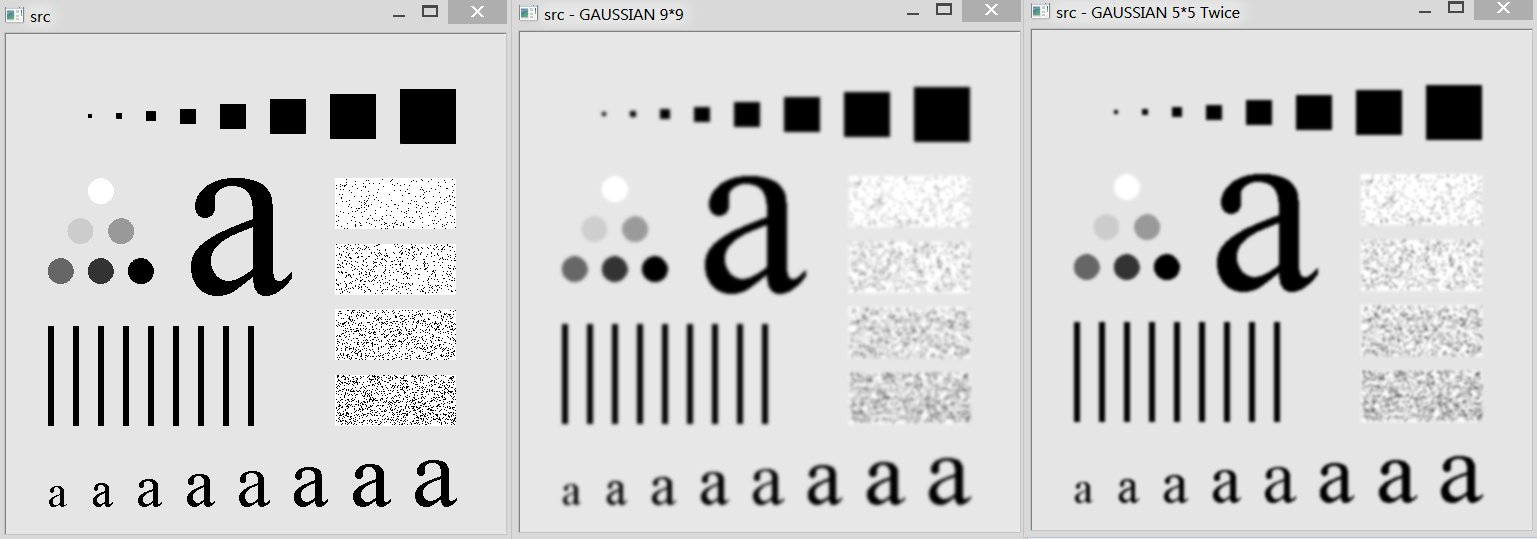
这道题是载入一幅带有有趣纹理的图像并用不同的模板(窗口,核)大小做高斯模糊(高斯平滑),然后比较用5*5大小的窗口平滑图像两次和用11*11大小的窗口平滑图像一次是否接近相同。
先说下我的做法,a部分我将每个不同的窗口大小模糊化后的图像生成后,还计算了每个模糊化后的图像与原始图像间的MSE值与PSNR值。(参见:http://zh.wikipedia.org/wiki/%E5%B3%B0%E5%80%BC%E4%BF%A1%E5%99%AA%E6%AF%94)
b部分我计算了两次5*5窗口大小的高斯模糊后的图像与一次11*11窗口大小的高斯模糊图像之间的MSE与PSNR。
代码:
 #include <opencv/highgui.h>

 #include <opencv/cv.h>

 #include <opencv_libs.h>

 #include <math.h>

 /*

  *《学习OpenCV》第五章第一题

  * 完成时间:18:37 10/13 星期日 2013

  * 作者:qdsclove@163.com

  */

 /*

  * function: calculate MSE & PSNR of two GrayScale(8-bit depth & one channel) images.

  * param: img1 -- the first image.

  * param: img2 -- the second image.

  * param: dMSE -- the MSE of two images(output)

  * param: dPSNR -- the PSNR of two images(output)

  * return: 0 -- success;  others -- failed.

  */

 int calculateGrayImgsPSNR(IplImage* img1, IplImage* img2, double& dMSE, double& dPSNR)

 {

     if( !img1 || !img2 ||

         img1->nChannels !=  ||

         img2->nChannels !=  ||

         img1->depth != img2->depth ||

         img1->width != img2->width ||

         img1->height != img2->height )

     {

         return -;

     }

     int width = img1->width;

     int height = img1->height;

     // calculate MSE of the two images

     double dSumOfSquares = ;

     for(int i = ; i < height; i++)

     {

         char* pdata1 = img1->imageData + i * img1->widthStep;

         char* pdata2 = img2->imageData + i *img2->widthStep;

         for(int j = ; j < width; j++ )

         {

             uchar value1 = *(pdata1 + j);

             uchar value2 = *(pdata2 + j);

             double square = pow( (double)(value1 - value2),  );

             dSumOfSquares += square;

         }

     }

     dMSE = dSumOfSquares / (width * height);

     // this is means the two images are strictly same.

     if(dMSE == )

     {

         dPSNR = -;

         return ;

     }

     int iDepth = img1->depth;

     int iMAX = pow( ., iDepth) - ;

     dPSNR =  * log10(iMAX / (sqrt(dMSE)));

     return ;

 }

 int main()

 {

     const char * FILE_PATH = "Fig0333(a)(test_pattern_blurring_orig).tif";

     IplImage* src = cvLoadImage(FILE_PATH, CV_LOAD_IMAGE_UNCHANGED);

     if(!src)

     {

         printf("Load image error.\n");

         return -;

     }

     // Get the source image's size

     CvSize srcSize = cvGetSize(src);

     // 3 * 3

     IplImage* dst_three_gaussian = cvCreateImage(srcSize, src->depth, src->nChannels);

     // 5 * 5

     IplImage* dst_five_gaussian = cvCreateImage(srcSize, src->depth, src->nChannels);

     // 9 * 9

     IplImage* dst_nine_gaussian = cvCreateImage(srcSize, src->depth, src->nChannels);

     // 11 * 11

     IplImage* dst_eleven_gaussian = cvCreateImage(srcSize, src->depth, src->nChannels);

     // twice 5 * 5

     IplImage* dst_twice_five_gaussian = cvCreateImage( srcSize, src->depth, src->nChannels );

     if( !dst_three_gaussian || !dst_five_gaussian ||

         !dst_nine_gaussian || !dst_eleven_gaussian ||

         !dst_twice_five_gaussian )

     {

         printf("Create image error.\n");

         return -;

     }

     cvSmooth(src, dst_three_gaussian, CV_GAUSSIAN, , );

     cvSmooth(src, dst_five_gaussian, CV_GAUSSIAN, , );

     cvSmooth(src, dst_nine_gaussian, CV_GAUSSIAN, , );

     cvSmooth(src, dst_eleven_gaussian, CV_GAUSSIAN, , );

     cvSmooth( dst_five_gaussian, dst_twice_five_gaussian, CV_GAUSSIAN, ,  );

     cvShowImage("src", src);

     cvShowImage("src - GAUSSIAN 3*3", dst_three_gaussian);

     cvShowImage("src - GAUSSIAN 5*5", dst_five_gaussian);

     cvShowImage("src - GAUSSIAN 9*9", dst_nine_gaussian);

     cvShowImage("src - GAUSSIAN 11*11", dst_eleven_gaussian);

     cvShowImage("src - GAUSSIAN 5*5 Twice", dst_twice_five_gaussian );

     // calculate the MSE and PSNR of the two images.

     double dMSE, dPSNR;

     // part a:

     calculateGrayImgsPSNR(src, dst_three_gaussian, dMSE, dPSNR);

     printf("source image & 3*3 GAUSSIAN: MSE: %f\tPSNR: %f\n", dMSE, dPSNR);

     calculateGrayImgsPSNR(src, dst_five_gaussian, dMSE, dPSNR);

     printf("source image & 5*5 GAUSSIAN: MSE: %f\tPSNR: %f\n", dMSE, dPSNR);

     calculateGrayImgsPSNR(src, dst_nine_gaussian, dMSE, dPSNR);

     printf("source image & 9*9 GAUSSIAN: MSE: %f\tPSNR: %f\n", dMSE, dPSNR);

     calculateGrayImgsPSNR(src, dst_eleven_gaussian, dMSE, dPSNR);

     printf("source image & 11*11 GAUSSIAN: MSE: %f\tPSNR: %f\n", dMSE, dPSNR);

     // part b

     puts("---------------------------\n");

     calculateGrayImgsPSNR(src, dst_eleven_gaussian, dMSE, dPSNR);

     printf("source image & eleven: MSE: %f\tPSNR: %f\n", dMSE, dPSNR);

     calculateGrayImgsPSNR(src, dst_twice_five_gaussian, dMSE, dPSNR);

     printf("source image & twice five: MSE: %f\tPSNR: %f\n", dMSE, dPSNR);

     calculateGrayImgsPSNR(dst_eleven_gaussian, dst_twice_five_gaussian, dMSE, dPSNR);

     printf("eleven & twice five: MSE: %f\tPSNR: %f\n", dMSE, dPSNR);

     cvWaitKey();

     cvReleaseImage(&src);

     cvReleaseImage(&dst_three_gaussian);

     cvReleaseImage(&dst_five_gaussian);

     cvReleaseImage(&dst_nine_gaussian);

     cvReleaseImage(&dst_eleven_gaussian);

     cvReleaseImage(&dst_twice_five_gaussian);

     cvDestroyAllWindows();

     return ;

 }
运行结果:
a部分:
3*3:
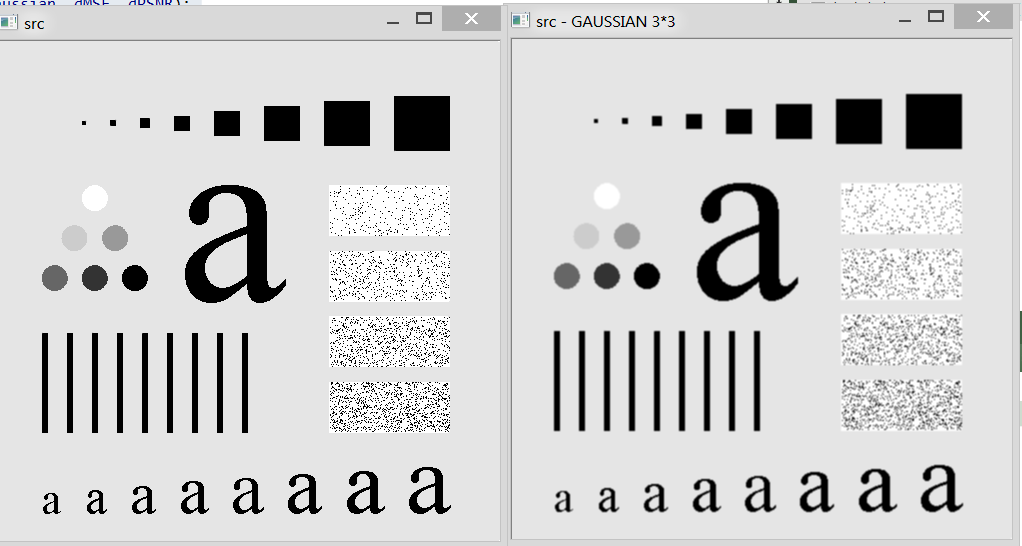
5*5:
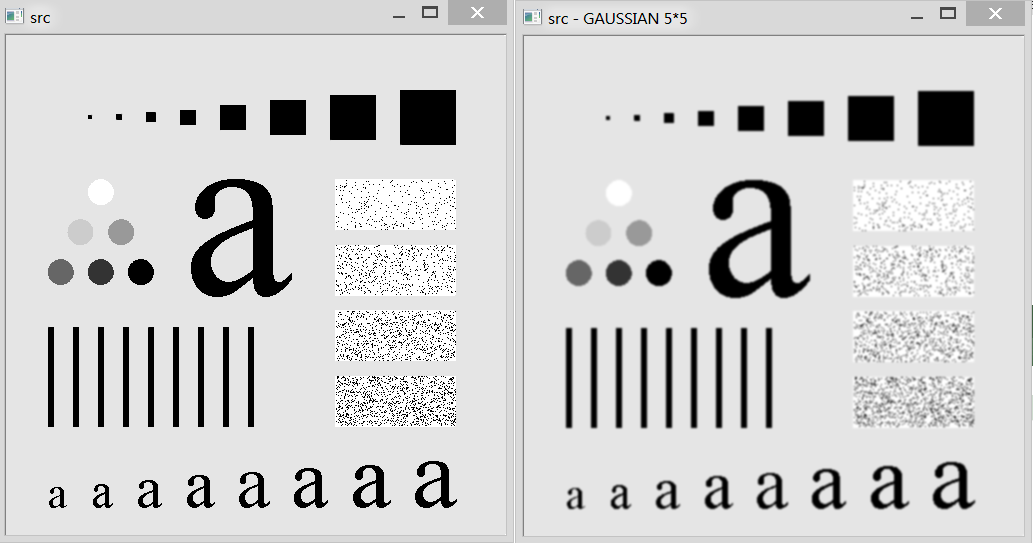
9*9:
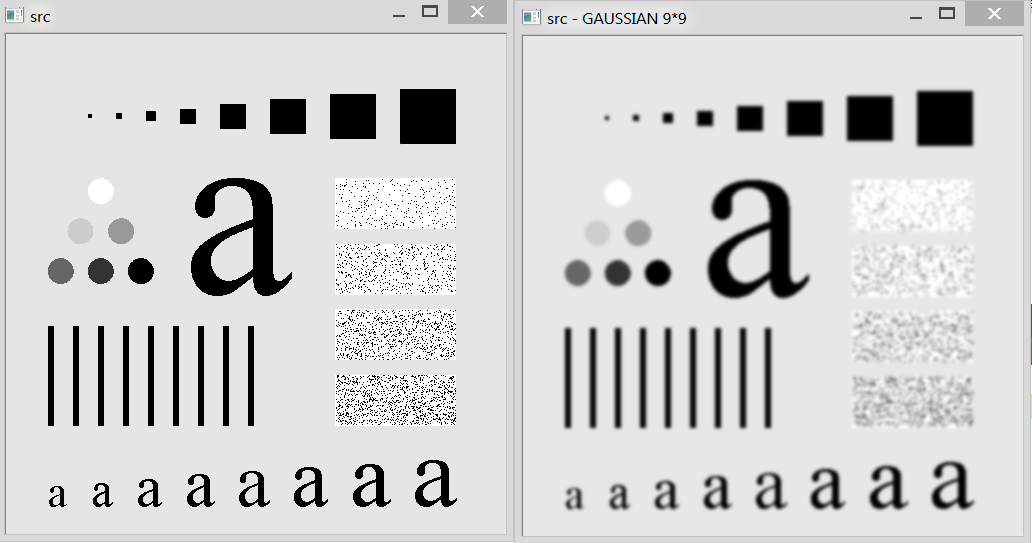
11*11:

同时各个不同的窗口大小模糊化后的图像与原始图像之间的MSE与PSNR:
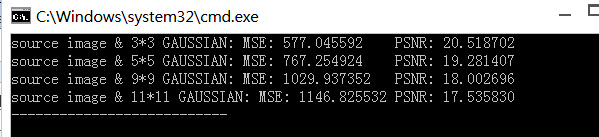
从图中可以看出,当窗口大小越大时,MSE增大,PSNR减小。
b部分:
两幅图像的PSNR与MSE:

众所周知的是在图像压缩中典型的PSNR比值在30-40dB之间,而我们这两幅平滑之后的图像PSNR为31.976534,所以这两幅图像是比较接近的。
《学习OpenCV》练习题第五章第一题ab的更多相关文章
- 《学习OpenCV》练习题第五章第二题abc
代码: #include <stdio.h> #include <opencv/highgui.h> #include <opencv/cv.h> #include ...
- 《学习OpenCV》练习题第四章第一题b&c
#include <highgui.h> #include <cv.h> #pragma comment (lib,"opencv_calib3d231d.lib&q ...
- 《学习OpenCV》练习题第四章第一题a
#include <highgui.h> #include <cv.h> #pragma comment (lib,"opencv_calib3d231d.lib&q ...
- 《学习Opencv》第五章 习题6
这是第五章 习题5.6的结合版,其中实现了摄像头抓拍功能,能够成功运行. #include "stdafx.h" #include "cv.h" #includ ...
- 《学习OpenCV》练习题第四章第二题
#include <highgui.h> #include <cv.h> #pragma comment (lib,"opencv_calib3d231d.lib&q ...
- 学习opencv中文版教程——第二章
学习opencv中文版教程——第二章 所有案例,跑起来~~~然而并没有都跑起来...我只把我能跑的都尽量跑了,毕竟看书还是很生硬,能运行能出结果,才比较好. 越着急,心越慌,越是着急,越要慢,越是陌生 ...
- Introduction to 3D Game Programming with DirectX 12 学习笔记之 --- 第五章:渲染流水线
原文:Introduction to 3D Game Programming with DirectX 12 学习笔记之 --- 第五章:渲染流水线 学习目标 了解几个用以表达真实场景的标志和2D图像 ...
- JavaScript DOM编程艺术-学习笔记(第五章、第六章)
第五章: 1.题外话:首先大声疾呼,"js无罪",有罪的是滥用js的那些人.js的father 布兰登-艾克,当初为了应付工作,10天就赶出了这个js,事后还说人家js是c语言和s ...
- C++ Primer Plus学习:第十五章
第十五章 友元.异常和其他 友元 友元类 表 0-1 class Tv { public: friend class Remote; } Remote类可以使用Tv的数据成员,Remote类在Tv类后 ...
随机推荐
- ubuntu下root用户配置
01 接着,输入su root,以root用户登录, 由于命令提示符太长,这里输入export PS1='[\u@\h \W]$'重新设置了一下提示符,然后输入 cp -p /etc/lightdm/ ...
- Volley HTTP库系列教程(1)简介及优点
Transmitting Network Data Using Volley Get started Dependencies and prerequisites Android 1.6 (API ...
- java操作office和pdf文件页面列表导出cvs,excel、pdf报表.
在平常的开发中我们常常遇到不仅仅只是导出excel报表的情况.有时候也需要导出pdf或者CSV报 表.其实原理都差不多.刚开始本来不打算也这篇博客介绍这个的.感觉这篇博客和前面的博客有点雷同.原理基本 ...
- HDU 2149 (巴什博奕) Public Sale
没什么好说的,一道水题. #include <cstdio> int main() { int n, m; ) { if(n <= m) { for(int i = n; i < ...
- LA 3971 (二分) Assemble
题意: 你有b块钱想要组装一台电脑.给出n个配件的种类,品质和价格,要求每个种类的配件各买一个总价格不超过b且“品质最差配件”的品质因子应尽量大. 这种情况下STL的map的确很好用,学习学习 这种最 ...
- HDU 1422 重温世界杯
题目中说只需按照所给顺序,不论起点,输出能连续旅游的最多的城市 就是不论起点这句,我就卡住了.. 看了别人的题解,循环个2n-1次便是把所有的起点都考虑进去了. 更详细的解释在代码的注释里. //#d ...
- 解决VS2013调试ASP.NET中无法调试的问题:当前不会命中断点。在 XXXX.dll 中找到了 XXX.cs 的副本,但是当前源代码与 XXXX.dll 中内置的版本不同。
解决思路: 一定是在某个文件夹存在了副本,结果果然不出所料. 当前日期是2016年3月10日,But C:\Windows\Microsoft.NET\Framework\v4.0.30319\Tem ...
- python处理ajax请求
先要起一个服务 server.py,可以支持python的cgi脚本. #!coding:utf8 from BaseHTTPServer import HTTPServer from CGIHTTP ...
- SQL 数据库表标识列初始化 DBCC
把ArimaIndexForecastModel这张表的标识列重置为0,前提是这张表执行过删除操作 示例: dbcc checkident('ArimaIndexForecastModel',res ...
- 插件svn简单使用
首先安装服务器Server 傻瓜式样操作.下一步下一步就这样完成了,选择的是个人版. 然后打开Server的图形化界面:VisualSVN Server Manager Repositories:资源 ...