
[转]iOS技巧之获取本机通讯录中的内容,解析通讯录源代码
一、在工程中添加AddressBook.framework和AddressBookUI.framework
二、获取通讯录
1、在infterface中定义数组并在init方法中初始化
|
1
2
3
4
5
6
|
NSMutableArray *addressBookTemp;- (id)initWithNibName:(NSString *)nibNameOrNil bundle:(NSBundle *)nibBundleOrNil{ addressBookTemp = [NSMutableArray array];} |
2、定义一个model,用来存放通讯录中的各个属性
新建一个继承自NSObject的类,在.h中
|
1
2
3
4
5
6
7
8
9
10
11
12
13
14
|
@interface TKAddressBook : NSObject { NSInteger sectionNumber; NSInteger recordID; NSString *name; NSString *email; NSString *tel;}@property NSInteger sectionNumber;@property NSInteger recordID;@property (nonatomic, retain) NSString *name;@property (nonatomic, retain) NSString *email;@property (nonatomic, retain) NSString *tel;@end |
在.m文件中进行synthesize
|
1
2
3
4
|
@implementation TKAddressBook@synthesize name, email, tel, recordID, sectionNumber;@end |
3、获取联系人
在iOS6之后,获取通讯录需要获得权限
|
1
2
3
4
5
6
7
8
9
10
11
12
13
14
15
16
17
18
19
20
21
22
23
24
25
26
27
28
29
|
//新建一个通讯录类 ABAddressBookRef addressBooks = nil; if ([[UIDevice currentDevice].systemVersion floatValue] >= 6.0) { addressBooks = ABAddressBookCreateWithOptions(NULL, NULL); //获取通讯录权限 dispatch_semaphore_t sema = dispatch_semaphore_create(0); ABAddressBookRequestAccessWithCompletion(addressBooks, ^(bool granted, CFErrorRef error){dispatch_semaphore_signal(sema);}); dispatch_semaphore_wait(sema, DISPATCH_TIME_FOREVER); dispatch_release(sema); } else { addressBooks = ABAddressBookCreate(); }//获取通讯录中的所有人CFArrayRef allPeople = ABAddressBookCopyArrayOfAllPeople(addressBooks); |
|
1
2
3
4
5
6
7
8
9
10
11
12
13
14
15
16
17
18
19
20
21
22
23
24
25
26
27
28
29
30
31
32
33
34
35
36
37
38
39
40
41
42
43
44
45
46
47
48
49
50
51
52
53
54
55
56
57
58
59
60
61
62
63
64
65
66
67
|
//通讯录中人数CFIndex nPeople = ABAddressBookGetPersonCount(addressBooks);//循环,获取每个人的个人信息for (NSInteger i = 0; i < nPeople; i++) { //新建一个addressBook model类 TKAddressBook *addressBook = [[TKAddressBook alloc] init]; //获取个人 ABRecordRef person = CFArrayGetValueAtIndex(allPeople, i); //获取个人名字 CFTypeRef abName = ABRecordCopyValue(person, kABPersonFirstNameProperty); CFTypeRef abLastName = ABRecordCopyValue(person, kABPersonLastNameProperty); CFStringRef abFullName = ABRecordCopyCompositeName(person); NSString *nameString = (__bridge NSString *)abName; NSString *lastNameString = (__bridge NSString *)abLastName; if ((__bridge id)abFullName != nil) { nameString = (__bridge NSString *)abFullName; } else { if ((__bridge id)abLastName != nil) { nameString = [NSString stringWithFormat:@"%@ %@", nameString, lastNameString]; } } addressBook.name = nameString; addressBook.recordID = (int)ABRecordGetRecordID(person);; ABPropertyID multiProperties[] = { kABPersonPhoneProperty, kABPersonEmailProperty }; NSInteger multiPropertiesTotal = sizeof(multiProperties) / sizeof(ABPropertyID); for (NSInteger j = 0; j < multiPropertiesTotal; j++) { ABPropertyID property = multiProperties[j]; ABMultiValueRef valuesRef = ABRecordCopyValue(person, property); NSInteger valuesCount = 0; if (valuesRef != nil) valuesCount = ABMultiValueGetCount(valuesRef); if (valuesCount == 0) { CFRelease(valuesRef); continue; } //获取电话号码和email for (NSInteger k = 0; k < valuesCount; k++) { CFTypeRef value = ABMultiValueCopyValueAtIndex(valuesRef, k); switch (j) { case 0: {// Phone number addressBook.tel = (__bridge NSString*)value; break; } case 1: {// Email addressBook.email = (__bridge NSString*)value; break; } } CFRelease(value); } CFRelease(valuesRef); } //将个人信息添加到数组中,循环完成后addressBookTemp中包含所有联系人的信息 [addressBookTemp addObject:addressBook]; if (abName) CFRelease(abName); if (abLastName) CFRelease(abLastName); if (abFullName) CFRelease(abFullName); } |
三、显示在table中
|
1
2
3
4
5
6
7
8
9
|
//行数- (NSInteger)numberOfSectionsInTableView:(UITableView *)tableView { return 1;}//列数- (NSInteger)tableView:(UITableView *)tableView numberOfRowsInSection:(NSInteger)section { return [addressBookTemp count];} |
|
1
2
3
4
5
6
7
8
9
10
11
12
13
14
15
16
17
18
19
|
//cell内容- (UITableViewCell *)tableView:(UITableView *)tableView cellForRowAtIndexPath:(NSIndexPath *)indexPath { NSString *cellIdentifier = @"ContactCell"; UITableViewCell *cell = [tableView dequeueReusableCellWithIdentifier:cellIdentifier]; if (cell == nil){ cell = [[UITableViewCell alloc] initWithStyle:UITableViewCellStyleSubtitle reuseIdentifier:cellIdentifier]; } TKAddressBook *book = [addressBookTemp objectAtIndex:indexPath.row]; cell.textLabel.text = book.name; cell.detailTextLabel.text = book.tel; return cell;} |
列表效果
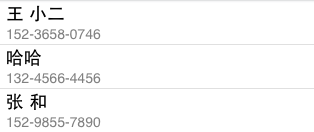
PS:通讯录中电话号码中的"-"可以在存入数组之前进行处理,属于NSString处理的范畴,解决办法有很多种,本文不多加说明
[转]iOS技巧之获取本机通讯录中的内容,解析通讯录源代码的更多相关文章
- javascript怎么获取指定url网页中的内容
javascript怎么获取指定url网页中的内容 一.总结 一句话总结:推荐jquery中ajax,简单方便. 1.js能跨域操作么? javascript出于安全机制不允许跨域操作的. 二.用ph ...
- IOS 开发之--获取真机的deviceToeken
获取真机的devicetoken的方法: #pragma mark 注册APNs成功并上报DeviceToken - (void)application:(UIApplication *)applic ...
- linux shell 脚本获取和替换文件中特定内容
1.从一串字符串中获取特定的信息 要求1:获取本机IP:menu.lst为系统镜象的IP配置文件,需要从中获取到本机IP信息(从文件获取信息) timeout title live find --se ...
- win32 获取 HotKey 控件中的内容(HKM_GETHOTKEY)
windows给我们提供了一个对话框控件HotKey非常好用,在设置热键的时候用起来很爽,但是一直百度就是没找到在win32下怎样通过消息获取这个控件里面的内容,找到的都是用MFC封装好的控件类来操作 ...
- IOS 开发之 -- 获取本机通讯录里面所有的联系人,并传到后台
项目中遇到一个需求,就是需要在入口的时候,获取通讯录的权限,并把所有的联系人,以接口参数的形式传到后台,通过网上查资料,历时3个小时,终于完成, 话不多,直接上代码: 1,导入系统库 #import ...
- [iOS]技巧集锦:UITableView自定义Cell中的控件无法完全对齐Cell的左边界和右边界
这是个很诡异的问题,由于一些特殊需求,我的TableView的Cell的背景色是透明,其中的控件会有背景色,第一个控件和最后一个控件我都用IB自动设了约束,对齐Cell的左边界和右边界,但是自动约束很 ...
- 正则获取 某段 DIV 中 的内容
string html = "<div class='aa'><div class='left'>324324<div>dsfsdf</div> ...
- 获取HttpServletRequest请求Body中的内容
在实际开发过程中,经常需要从 HttpServletRequest 中读取HTTP请求的body内容,俗话说的好”好记性不如烂笔头“,特在此将其读取方法记录一下. import java.io.Buf ...
- 以字符串形式获取excel单元格中的内容
public static String getCellValue(XSSFCell cell) { if (cell == null) { return ""; } switch ...
随机推荐
- c#(winform)中ComboBox添加Key/Value项、获取选中项、根据Key
WinForm下的ComboBox默认是以多行文本来设定显示列表的, 这通常不符合大家日常的应用, 因为大家日常应用通常是键/值对的形式去绑定它的. 参考了一些网上的例子,最终写了一个辅助类用于方便对 ...
- 【转】如何使用PhoneGap打包Web App
如何使用PhoneGap打包Web App 最近做了一款小游戏,定位是移动端访问,思来想去最后选择了jQuery mobile最为框架,制作差不多以后,是否可以打包成App,恰好以前对PhoneGap ...
- MySQL加载并执行SQL脚本文件
第一种方法: 命令行下(未连接数据库) ,输入 mysql -h localhost -u root -p123456 < C:\db.sql 第二种方法: 命令行下(已连接数据库,此时的提示符 ...
- linux下查看系统进程占用的句柄数
---查看系统默认的最大文件句柄数,系统默认是1024 # ulimit -n 1024 ----查看当前进程打开了多少句柄数 # lsof -n|awk '{print $2}'|sort|uniq ...
- Oracle中in和exists的选择
在ORACLE 11G大行其道的今天,还有很多人受早期版本的影响,记住一些既定的规则, 1.子查询结果集小,用IN 2.外表小,子查询表大,用EXISTS 摘自:http://blog.chi ...
- 单源最短路径——Floyd算法
正如我们所知道的,Floyd算法用于求最短路径.Floyd算法可以说是Warshall算法的扩展,三个for循环就可以解决问题,所以它的时间复杂度为O(n^3). Floyd算法的基本思想如下:从任意 ...
- php的函数iconv在转"utf-8"到"gb2312"时会自动截断
最近在写网站后台时候,需要用到iconv函数把前端jquery Post来过的utf-8编码内容转成gb2312, 发现只有用iconv函数把内容的数据一转码数据就会无缘无故的少了一部分. 问了我 ...
- .net EntityFramework用法探索系列 1
EntityFramework用法探索系列 (一)DatabaseFirst (二)CodeFirst (三)CodeFirst流畅API (四)Repository和UnitOfWork (五)引入 ...
- Instant Run
http://tools.android.com/tech-docs/instant-run N Developer Preview users: Instant Run is currently i ...
- Shuffle相关分析
Shuffle描述是一个过程,表现出的是多对多的依赖关系.Shuffle是连接map阶段和Reduce阶段的纽带,每个Reduce Task都会从Map Task产生的数据里读取其中的一片数据.Shu ...