
无责任Windows Azure SDK .NET开发入门篇三[使用Azure AD 管理用户信息--3.2 Create创建用户]
3.2 Create创建用户
[HttpPost, Authorize]

public async Task<ActionResult> Create(

    [Bind(Include = "UserPrincipalName,AccountEnabled,PasswordProfile,MailNickname,DisplayName,GivenName,Surname,JobTitle,Department")]

    User user)

{

    ActiveDirectoryClient client = null;

    try

    {

        client = AuthenticationHelper.GetActiveDirectoryClient();

        await client.Users.AddUserAsync(user);

    }

    catch (Exception e)

    {

        if (e.Message == "Authorization Required.")

        {

            HttpContext.GetOwinContext().Authentication.Challenge(OpenIdConnectAuthenticationDefaults.AuthenticationType);

        }

        return View();

    }

    return RedirectToAction("Index");

}
Create的代码同样很清晰,采用了Bind Include简化了View的表单提交。对应的View的代码如下
@model Microsoft.Azure.ActiveDirectory.GraphClient.User

@{

    ViewBag.Title = "CreateUser";

}

<h2>Create User</h2>

@using (Html.BeginForm("Create", "AzureActiveDirectory", null, FormMethod.Post, new { @class = "form-horizontal" }))

{

    @Html.ValidationSummary(true)

        <div class="form-group">

            @Html.LabelFor(model => model.UserPrincipalName, "用户名(英文名@域名)", new { @class = "col-sm-2 control-label" })

            <div class="col-sm-10">

                @Html.TextBoxFor(model => model.UserPrincipalName)

                @Html.ValidationMessageFor(model => model.UserPrincipalName)

            </div>

        </div>

        <div class="form-group">

            @Html.LabelFor(model => model.AccountEnabled, "账号启用", new { @class = "col-sm-2 control-label" })

            <div class="col-sm-10">

                @Html.EditorFor(model => model.AccountEnabled)

                @Html.ValidationMessageFor(model => model.AccountEnabled)

            </div>

        </div>

        <div class="form-group">

            @Html.LabelFor(model => model.PasswordProfile.Password, "密码(必须强密码)", new { @class = "col-sm-2 control-label" })

            <div class="col-sm-10">

                @Html.TextBoxFor(model => model.PasswordProfile.Password)

                @Html.ValidationMessageFor(model => model.PasswordProfile.Password)

            </div>

        </div>

        <div class="form-group">

            @Html.LabelFor(model => model.MailNickname, "别名(必须英文名)", new { @class = "col-sm-2 control-label" })

            <div class="col-sm-10">

                @Html.TextBoxFor(model => model.MailNickname)

                @Html.ValidationMessageFor(model => model.MailNickname)

            </div>

        </div>

        <div class="form-group">

            @Html.LabelFor(model => model.DisplayName, "显示名称", new { @class = "col-sm-2 control-label" })

            <div class="col-sm-10">

                @Html.TextBoxFor(model => model.DisplayName)

                @Html.ValidationMessageFor(model => model.DisplayName)

            </div>

        </div>

        <div class="form-group">

            @Html.LabelFor(model => model.GivenName, "名字", new { @class = "col-sm-2 control-label" })

            <div class="col-sm-10">

                @Html.TextBoxFor(model => model.GivenName)

                @Html.ValidationMessageFor(model => model.GivenName)

            </div>

        </div>

        <div class="form-group">

            @Html.LabelFor(model => model.Surname, "姓氏", new { @class = "col-sm-2 control-label" })

            <div class="col-sm-10">

                @Html.TextBoxFor(model => model.Surname)

                @Html.ValidationMessageFor(model => model.Surname)

            </div>

        </div>

        <div class="form-group">

            @Html.LabelFor(model => model.JobTitle, "职务", new { @class = "col-sm-2 control-label" })

            <div class="col-sm-10">

                @Html.TextBoxFor(model => model.JobTitle)

                @Html.ValidationMessageFor(model => model.JobTitle)

            </div>

        </div>

        <div class="form-group">

            @Html.LabelFor(model => model.Department, "部门", new { @class = "col-sm-2 control-label" })

            <div class="col-sm-10">

                @Html.TextBoxFor(model => model.Department)

                @Html.ValidationMessageFor(model => model.Department)

            </div>

        </div>

        <p>

            <input type="submit" value="Create" class="btn btn-primary" />

        </p>

}
执行后的结果为
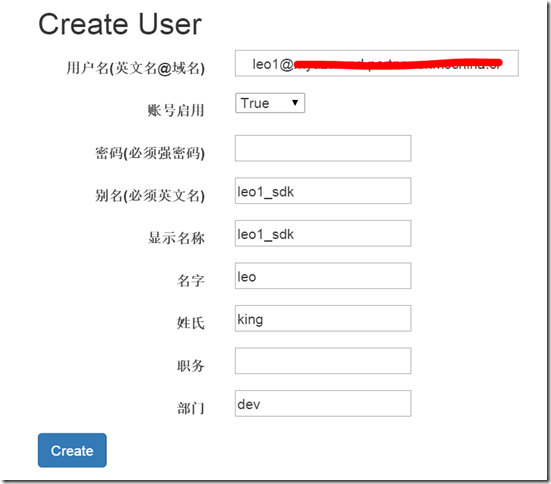
创建成功跳转到Index页面

为了让大家清楚的理解User属性对应的Azure门户管理上的提示,我在View中比较详细的做了说明,下表可以更清晰的看到对应
|
属性名 |
门户对应 |
要求 |
|
UserPrincipalName |
用户名 |
英文名@域名 |
|
AccountEnabled |
账号状态 |
|
|
Password |
密码 |
必须强密码 |
|
MailNickname |
别名 |
必须英文名 |
|
DisplayName |
显示名称 |
|
|
GivenName |
名字 |
|
|
Surname |
姓氏 |
|
|
JobTitle |
职务 |
|
|
Department |
部门 |
|
|
StreetAddress |
街道地址 |
|
|
City |
城市 |
|
|
State |
省/自治区/直辖市 |
|
|
Country |
国家或地区 |
|
|
PhysicalDeliveryOfficeName |
办公室号码 |
|
|
TelephoneNumber |
办公电话 |
|
|
PostalCode |
邮政编码 |
无责任Windows Azure SDK .NET开发入门篇三[使用Azure AD 管理用户信息--3.2 Create创建用户]的更多相关文章
- 无责任Windows Azure SDK .NET开发入门篇三[使用Azure AD 管理用户信息]
三.使用Azure AD管理用户信息 在上一章我们采用OpenID的方案和Azure AD交互进行身份验证,本章节我们继续了解如何在Azure AD中创建用户,列出用户信息,修改用户信息和删除用户信息 ...
- 无责任Windows Azure SDK .NET开发入门篇三[使用Azure AD 管理用户信息--3.4 Edit修改用户信息]
3.4 Edit修改用户信息 我们用FormCollection简化了表单提交,非常方便的进行用户信息修改. [HttpPost, Authorize] public async Task<Ac ...
- 无责任Windows Azure SDK .NET开发入门篇三[使用Azure AD 管理用户信息--3.3 Details用户详细信息]
3.3 Details用户详细信息 用户详细信息是通过objectId获取.代码如下 public async Task<ActionResult> Details(string obje ...
- 无责任Windows Azure SDK .NET开发入门篇三[使用Azure AD 管理用户信息--3.1 Index用户列表]
3.1 Index用户列表 或许当前域下的用户列表 [Authorize] public async Task<ActionResult> Index() { var userList = ...
- 无责任Windows Azure SDK .NET开发入门篇三[使用Azure AD 管理用户信息--3.5 Delete删除用户]
3.5 Delete删除用户 删除也是通过ObjectID获得对象进行删除 [Authorize] public async Task<ActionResult> Delete(strin ...
- 无责任Windows Azure SDK .NET开发入门篇二[使用Azure AD 进行身份验证-2.2身份验证开发]
2.2身份验证开发 在我们的案例中,我们是用户通过Web应用程序进行身份识别. 上面的图示说明了如下的一些概念 l Azure AD 是标识提供程序,负责对组织的目录中存在的用户和应用程序的标识进行验 ...
- 无责任Windows Azure SDK .NET开发入门篇二[使用Azure AD 进行身份验证]
二.使用Azure AD进行身份验证 之所以将Azure AD 作为开始,是应为基本上我们所有应用都需要进行安全管理.Azure Active Directory (Azure AD) 通过以下方式简 ...
- 无责任Windows Azure SDK .NET开发入门篇二[使用Azure AD 进行身份验证--2.1使用Azure AD需要了解几个概念]
2.1使用Azure AD需要了解几个概念 l Azure AD目录 当你注册 Microsoft 云服务时,便会获得一个 Azure AD 目录.你可根据需要创建更多的目录.例如,可以将第一个目录保 ...
- 无责任Windows Azure SDK .NET开发入门篇(一):开发前准备工作
Windows Azure开发前准备工作 什么是 Azure SDK for .NET?微软官方告诉我们:Azure SDK for .NET 是一套应用程序,其中包括 Visual Studio 工 ...
随机推荐
- 定时任务处理-Quartz
Quartz Scheduler,定时任务 Quartz是一个作业调度系统(a job scheduling system),负责在约定的时间到达时执行(或通知)其他软件控制.是一个Java的定时任务 ...
- Excel 之查找与替换
Excel查找与替换 1,一旦学会查找,替换就简单了. 2,查找下面有一个选项,里面有对查找的范围进行限制 3,你可以选中一个区域,然后再查找,查找只会在你选择的区域里面进行 4,查找只能找特定值,而 ...
- 扩容盘、SD卡扩容
内存卡的前世今生回想当年,大家都还在用着非智能机,由于功能单一,需要存储的数据也就是通讯录和短信.虽然那时也有手机游戏,但大多都是几十KB,并不需要太大的存储空间.但随着手机功能的多样化,尤其是音乐. ...
- Java 中带参无返回值方法的使用
有时方法的执行需要依赖于某些条件,换句话说,要想通过方法完成特定的功能,需要为其提供额外的信息才行.例如,现实生活中电饭锅可以实现“煮饭”的功能,但前提是我们必须提供食材,如果我们什么都不提供,那就真 ...
- Eclipse for PHP Developers + xamp +xdebug
php 开发环境搭建 1.安装xamp 我的版本是v3.2.1 2.安装下载“Eclipse for PHP Developers”解压即可使用 3.配置“Eclipse for PHP Develo ...
- delphi 注册表操作(读取、添加、删除、修改)完全手册
DELPHI VS PASCAL(87) 32位Delphi程序中可利用TRegistry对象来存取注册表文件中的信息. 一.创建和释放TRegistry对象 1.创建TRegistry对象.为了操 ...
- bjfu1262 优先队列
比较典型的应用优先队列的题.题目是在一个长为n的数组中,依次问m个数中的最小值.那么把值和下标做成一个结构体,放进优先队列里,每次移动窗口就把该T的T掉,剩下的最小值就是答案,复杂度nlogn,轻松a ...
- 可进行JavaScript代码测试与调试的12个网站
概述:JavaScript是网站前端开发最为重要的一门编程语言,本文收集了能够在线测试与调试JavaScript代码的12个网站 1.JS Bin JS bin是一个为JavaScript和CSS爱好 ...
- 把两个DataTable连接起来,相当于Sql的Inner Join方法
在C#中把两个DataTable连接起来,相当于Sql的Inner Join方法 作者:浪漫十一狼在下面的例子中实现了3个Join方法,其目的是把两个DataTable连接起来,相当于Sql的Inne ...
- erase() 返回的是删除此元素之后的下一个元素的迭代器 .xml
pre{ line-height:1; color:#f0caa6; background-color:#2d161d; font-size:16px;}.sysFunc{color:#e54ae9; ...