
NTLK情感分析安装与使用的两种方式 nltk-python
下载安装到实战详细步骤
NLTK下载安装
先使用pip install nltk 安装包
然后运行下面两行代码会弹出如图得GUI界面,注意下载位置,然后点击下载全部下载了大概3.5G。
import nltk

nltk.download()!
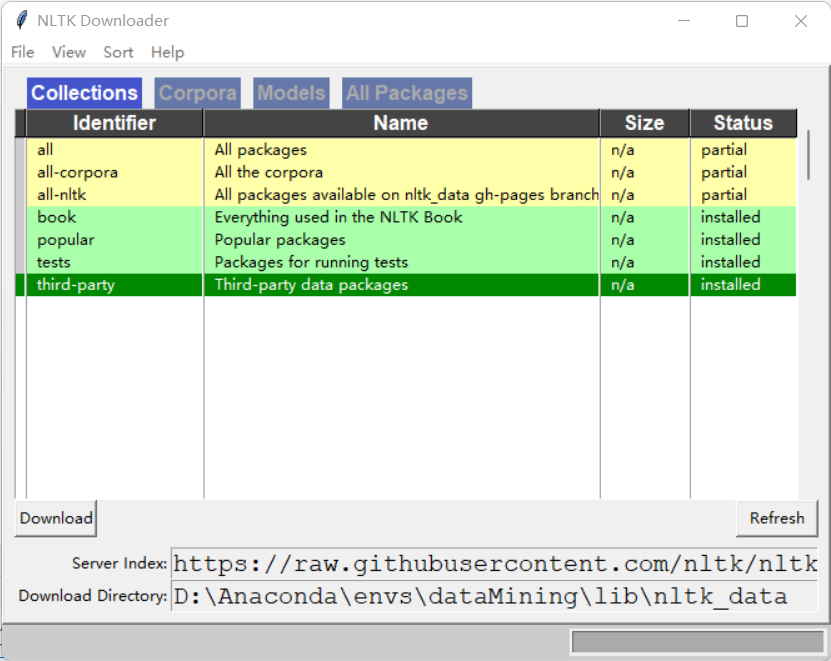
- 注意点:可能由于网络原因访问github卡顿导致,不能正常弹出GUI进行下载,可以自己去github下载
网址:https://github.com/nltk/nltk_data/tree/gh-pages/packages
下载成功后查看是否可以使用,运行下面代码看看是否可以调用brown中的词库
from nltk.corpus import brown

print(brown.categories())  # 输出brown语料库的类别

print(len(brown.sents()))  # 输出brown语料库的句子数量

print(len(brown.words()))  # 输出brown语料库的词数量

'''

结果为:

['adventure', 'belles_lettres', 'editorial', 'fiction', 'government', 'hobbies',

'humor', 'learned', 'lore', 'mystery', 'news', 'religion', 'reviews', 'romance',

'science_fiction']

57340

1161192

'''
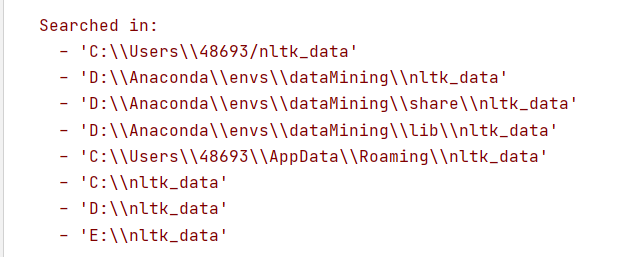
这时候有可能报错,说在下面文件夹中没有找到nltk_data
把下载好的文件解压在复制到其中一个文件夹位置即可,注意文件名,让后就能正常使用!
实战:运用自己的数据进行操作
一、使用自己的训练集训练和分析
可以看到我的训练集和代码的结构是这样的: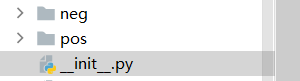 pos和neg里面是txt文本
链接:https://pan.baidu.com/s/1GrNg3ziWJGhcQIWBCr2PMg
提取码:1fb8
import nltk.classify.util

from nltk.classify import NaiveBayesClassifier

import os

from nltk.corpus import stopwords

import pandas as pd

def extract_features(word_list):

    return dict([(word, True) for word in word_list])

#停用词

stop = stopwords.words('english')

stop1 = ['!', ',' ,'.' ,'?' ,'-s' ,'-ly' ,' ', 's','...']

stop = stop1+stop

print(stop)

#读取txt文本

def readtxt(f,path):

    data1 = ['microwave']

    # 以 utf-8 的编码格式打开指定文件

    f = open(path+f, encoding="utf-8")

    # 输出读取到的数据

    #data = f.read().split()

    data = f.read().split()

    for i in range(len(data)):

        if data[i] not in stop:

            data[i] = [data[i]]

            data1 = data1+data[i]

    # 关闭文件

    f.close()

    del data1[0]

    return data1

if __name__ == '__main__':

    # 加载积极与消极评论  这些评论去掉了一些停用词,是在readtxt韩硕里处理的,

    #停用词如 i am you a this 等等在评论中是非常常见的,有可能对结果有影响,应该事先去除

    positive_fileids = os.listdir('pos')  # 积极 list类型 42条数据 每一条是一个txt文件

    print(type(positive_fileids), len(positive_fileids)) # list类型 42条数据 每一条是一个txt文件

    negative_fileids = os.listdir('neg')#消极 list类型 22条数据 每一条是一个txt文件自己找的一些数据

    print(type(negative_fileids),len(negative_fileids))

    # 将这些评论数据分成积极评论和消极评论

    # movie_reviews.words(fileids=[f])表示每一个txt文本里面的内容,结果是单词的列表:['films', 'adapted', 'from', 'comic', 'books', 'have', ...]

    # features_positive 结果为一个list

    # 结果形如:[({'shakesp: True, 'limit': True, 'mouth': True, ..., 'such': True, 'prophetic': True}, 'Positive'), ..., ({...}, 'Positive'), ...]

    path = 'pos/'

    features_positive = [(extract_features(readtxt(f,path=path)), 'Positive') for f in positive_fileids]

    path = 'neg/'

    features_negative = [(extract_features(readtxt(f,path=path)), 'Negative') for f in negative_fileids]

    # 分成训练数据集(80%)和测试数据集(20%)

    threshold_factor = 0.8

    threshold_positive = int(threshold_factor * len(features_positive))  # 800

    threshold_negative = int(threshold_factor * len(features_negative))  # 800

    # 提取特征 800个积极文本800个消极文本构成训练集  200+200构成测试文本

    features_train = features_positive[:threshold_positive] + features_negative[:threshold_negative]

    features_test = features_positive[threshold_positive:] + features_negative[threshold_negative:]

    print("\n训练数据点的数量:", len(features_train))

    print("测试数据点的数量:", len(features_test))

    # 训练朴素贝叶斯分类器

    classifier = NaiveBayesClassifier.train(features_train)

    print("\n分类器的准确性:", nltk.classify.util.accuracy(classifier, features_test))

    print("\n五大信息最丰富的单词:")

    for item in classifier.most_informative_features()[:5]:

        print(item[0])

    # 输入一些简单的评论

    input_reviews = [

        "works well with proper preparation.",

        ]

    #运行分类器,获得预测结果

    print("\n预测:")

    for review in input_reviews:

        print("\n评论:", review)

        probdist = classifier.prob_classify(extract_features(review.split()))

        pred_sentiment = probdist.max()

        # 打印输出

        print("预测情绪:", pred_sentiment)

        print("可能性:", round(probdist.prob(pred_sentiment), 2))

print("结束")
运行结果:这里的准确性有点高,这是因为我选取的一些数据是非常明显的表达积极和消极的所以处理结果比较难以相信
<class 'list'> 42

<class 'list'> 22

训练数据点的数量: 50

测试数据点的数量: 14

分类器的准确性: 1.0

五大信息最丰富的单词:

microwave

product

works

ever

service

预测:

评论: works well with proper preparation.

预测情绪: Positive

可能性: 0.77

结束
二、使用自带库分析
import pandas as pd

from nltk.sentiment.vader import SentimentIntensityAnalyzer

# 分析句子的情感:情感分析是NLP最受欢迎的应用之一。情感分析是指确定一段给定的文本是积极还是消极的过程。

# 有一些场景中,我们还会将“中性“作为第三个选项。情感分析常用于发现人们对于一个特定主题的看法。

# 定义一个用于提取特征的函数

# 输入一段文本返回形如:{'It': True, 'movie': True, 'amazing': True, 'is': True, 'an': True}

# 返回类型是一个dict

if __name__ == '__main__':

    # 输入一些简单的评论

    #data = pd.read_excel('data3/microwave1.xlsx')

    name = 'hair_dryer1'

    data = pd.read_excel('../data3/'+name+'.xlsx')

    input_reviews = data[u'review_body']

    input_reviews = input_reviews.tolist()

    input_reviews = [

        "works well with proper preparation.",

        "i hate that opening the door moves the microwave towards you and out of its place. thats my only complaint.",

        "piece of junk. got two years of use and it died. customer service says too bad. whirlpool dishwasher died a few months ago. whirlpool is dead to me.",

        "am very happy with  this"

        ]

    #运行分类器,获得预测结果

    for sentence in input_reviews:

        sid = SentimentIntensityAnalyzer()

        ss = sid.polarity_scores(sentence)

        print("句子:"+sentence)

        for k in sorted(ss):

            print('{0}: {1}, '.format(k, ss[k]), end='')

        print()

print("结束")
结果:
句子:works well with proper preparation.

compound: 0.2732, neg: 0.0, neu: 0.656, pos: 0.344,

句子:i hate that opening the door moves the microwave towards you and out of its place. thats my only complaint.

compound: -0.7096, neg: 0.258, neu: 0.742, pos: 0.0,

句子:piece of junk. got two years of use and it died. customer service says too bad. whirlpool dishwasher died a few months ago. whirlpool is dead to me.

compound: -0.9432, neg: 0.395, neu: 0.605, pos: 0.0,

句子:am very happy with  this

compound: 0.6115, neg: 0.0, neu: 0.5, pos: 0.5,

结束
结果解释:
compound就相当于一个综合评价,主要和消极和积极的可能性有关
neg:消极可能性
pos:积极可能性
neu:中性可能性
NTLK情感分析安装与使用的两种方式 nltk-python的更多相关文章
- eclipse里安装SVN插件的两种方式
eclipse里安装SVN插件,一般来说,有两种方式: 直接下载SVN插件,将其解压到eclipse的对应目录里 使用eclipse 里Help菜单的“Install New Software”,通过 ...
- Ubuntu 16.04安装JDK7/JDK8的两种方式
ubuntu 安装jdk 的两种方式:1:通过ppa(源) 方式安装. 2:通过官网下载安装包安装. 这里推荐第1种,因为可以通过 apt-get upgrade 方式方便获得jdk的升级 使用ppa ...
- python安装第三方包的两种方式
最近研究QQ空间.微博的(爬虫)模拟登录,发现都涉及RSA算法.于是需要下一个RSA包(第三方包).折腾了很久,主要是感觉网上很多文章对具体要在哪里操作写得不清楚.这里做个总结,以免自己哪天又忘了. ...
- Python通过pip方式安装第三方模块的两种方式
一:环境 python3.6 windows 10 二:常用命令 如果直接执行pip命令报错,说明pip不在path环境变量中 解决方法: python -m pip list 以下默认可直接使用pi ...
- Eclipse安装fat jar的两种方式
help >software updates >add/remove software>add>>add site填写name 和urlname:Fat Jarurl:h ...
- Wps 2013 拼音标注两种方式分析
Wps 2013 拼音标注两种方式分析 太阳火神的漂亮人生 (http://blog.csdn.net/opengl_es) 本文遵循"署名-非商业用途-保持一致"创作公用协议 转 ...
- linux内核分析作业4:使用库函数API和C代码中嵌入汇编代码两种方式使用同一个系统调用
系统调用:库函数封装了系统调用,通过库函数和系统调用打交道 用户态:低级别执行状态,代码的掌控范围会受到限制. 内核态:高执行级别,代码可移植性特权指令,访问任意物理地址 为什么划分级别:如果全部特权 ...
- ubuntu 安装JAVA jdk的两种方法:
ubuntu 安装jdk 的两种方式: 1:通过ppa(源) 方式安装. 2:通过官网下载安装包安装. 这里推荐第1种,因为可以通过 apt-get upgrade 方式方便获得jdk的升级 使用pp ...
- 【转】eclipse安装SVN插件的两种方法
转载地址:http://welcome66.iteye.com/blog/1845176 eclipse里安装SVN插件,一般来说,有两种方式: 直接下载SVN插件,将其解压到eclipse的对应目录 ...
随机推荐
- 【get√】golang中实现从腾讯云CVM查询网卡流量的两种方法
公众号文章链接 主要参考了以下位置的资料: 云服务器监控接口 腾讯云go-sdk example 方法一:使用腾讯云go-sdk go.mod文件中增加这样一行: github.com/tencent ...
- gin中的文件上传
1. 单文件上传 package main import ( "fmt" "github.com/gin-gonic/gin" "log" ...
- Ubuntu 14.04更换内核
1:查看当前安装的内核 dpkg -l|grep linux-image 2:查看可以更新的内核版本: sudo apt-cache search linux-image 3:安装新内核 sudo a ...
- python中True和False
python中只有0代表False,只有1代表True,注意只有!! if x: print('True') 只要x是非零数值.非空字符串.非空list等,就判断为True,否则为False.
- 读取数据库Blob类型的文本数据
开发一个查询功能时,遇到了一个ORM的问题:数据库字段是 Blob 类型,里面实际存储的是文本数据,Java 后端代码中用字符串 String 类型去接收这个字段的数据时,报错,提示没有对应的sett ...
- JAVA多线程学习九-原子性操作类的应用
当程序更新一个变量时,如果多线程同时更新这个变量,可能得到期望之外的值,比如变量i=1,A线程更新i+1,B线程也更新i+1,经过两个线程操作之后可能i不等于3,而是等于2.因为A和B线程在更新变量i ...
- JAVA多线程学习八-多个线程之间共享数据的方式
多个线程访问共享对象和数据的方式 如果每个线程执行的代码相同,可以使用同一个Runnable对象,这个Runnable对象中有那个共享数据,例如,买票系统就可以这么做. 如果每个线程执行的代码不同,这 ...
- 开源项目(asyncHttpClient) get post 方式提交
get方式: 1 public static void requestNetForGetLogin(final Context context,final Handler handler ,final ...
- SpringAOP/切面编程示例
原创:转载需注明原创地址 https://www.cnblogs.com/fanerwei222/p/11833954.html Spring AOP/切面编程实例和一些注意事项, 主要是利用注解来实 ...
- 【HDU6647】Bracket Sequences on Tree(树Hash 树上Dp)
题目链接 大意 给出一颗树,按下列方式生成一个括号序列. function dfs(int cur, int parent): print('(') for all nxt that cur is a ...