
Python使用ConfigParser模块读取配置文件(config.ini)以及写入配置文件
前言
使用配置文件来灵活的配置一些参数是一件很常见的事情,配置文件的解析并不复杂,在python里更是如此,在官方发布的库中就包含有做这件事情的库,那就是configParser。configParser解析的配置文件的格式比较象ini的配置文件格式,就是文件中由多个section构成,每个section下又有多个配置项。括号“[ ]”内包含的为section。紧接着section 为类似于key-value 的options 的配置内容。
比如,我的目录如下,在test_config下有一个config.ini配置文件
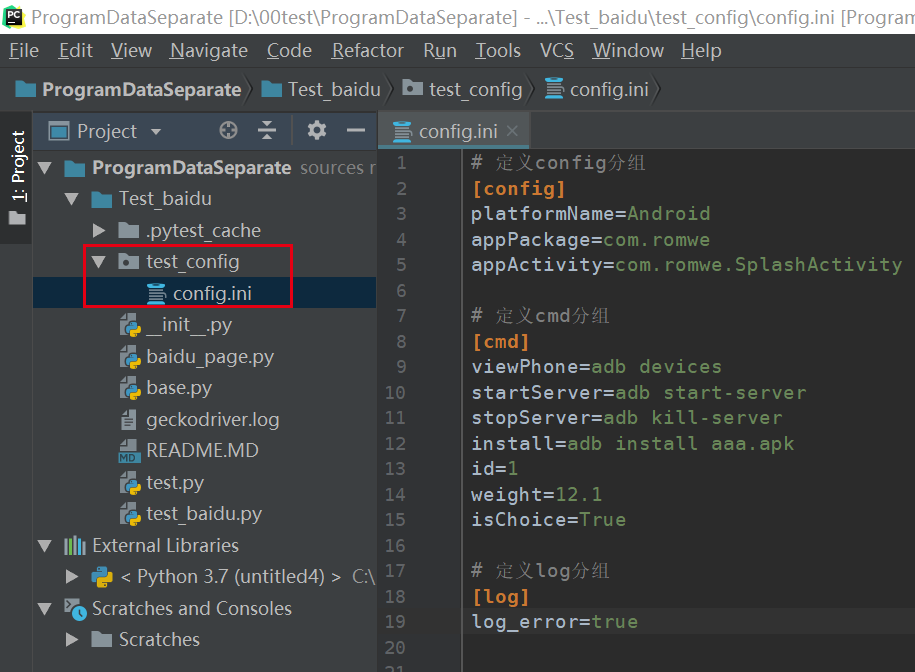
一、ConfigParser简介
ConfigParser 是用来读取配置文件的包。配置文件的格式如下:中括号“[ ]”内包含的为section。section 下面为类似于key-value 的配置内容。括号“[ ]”内包含的为section。紧接着section 为类似于key-value 的options 的配置内容。
# 定义config分组

[config]

platformName=Android

appPackage=com.romwe

appActivity=com.romwe.SplashActivity

# 定义cmd分组

[cmd]

viewPhone=adb devices

startServer=adb start-server

stopServer=adb kill-server

install=adb install aaa.apk

id=1

weight=12.1

isChoice=True

# 定义log分组

[log]

log_error=true
二、ConfigParser 初始化对象
使用ConfigParser 首选需要初始化实例,并读取配置文件:
PS:python3里面自带configparser模块来读取ini文件,敲黑板:python2的版本是Configparser
# python3

import configParser

config = configparser.ConfigParser()

config.read("config_ini", encoding="utf-8")
三、ConfigParser 常用方法
1、获取所用的section节点
# 获取所用的section节点

import configparser

config = configparser.ConfigParser()

config.read("config_ini", encoding="utf-8")

print(config.sections())

#运行结果

# ['config', 'cmd', 'log']
2、获取指定section 的options。即将配置文件某个section 内key 读取到列表中:
import configparser

config = configparser.ConfigParser()

config.read("config_ini", encoding="utf-8")

r = config.options("config")

print(r)

#运行结果

# ['platformName', 'appPackage', 'appActivity']
3、获取指点section下指点option的值
import configparser

config = configparser.ConfigParser()

config.read("config.ini", encoding="utf-8")

r = config.get("config", "platformName")

# r1 = config.getint("db", "k1") #将获取到值转换为int型
# r2 = config.getboolean("db", "k2" ) #将获取到值转换为bool型
# r3 = config.getfloat("db", "k3" ) #将获取到值转换为浮点型

print(r)

#运行结果 # Android
4、获取指点section的所用配置信息
import configparser

config = configparser.ConfigParser()

config.read("config.ini", encoding="utf-8")

r = config.items("platformName")

print(r)

#运行结果

#[('platformName', 'Android'), ('appPackage', 'com.romwe'), ('appActivity', 'com.romwe.SplashActivity')]
5、修改某个option的值,如果不存在则会出创建
# 修改某个option的值,如果不存在该option 则会创建

import configparser

config = configparser.ConfigParser()

config.read("config_ini", encoding="utf-8")

config.set("config", "platformName", "ios")  #修改platformName的值为ios

config.write(open("config.ini", "w"))
# 运行结果

# 定义config分组

[config]

platformName=ios

appPackage=com.romwe

appActivity=com.romwe.SplashActivity

# 定义cmd分组

[cmd]

viewPhone=adb devices

startServer=adb start-server

stopServer=adb kill-server

install=adb install aaa.apk

id=1

weight=12.1

isChoice=True

# 定义log分组

[log]

log_error=true
6、检查section或option是否存在,bool值
import configparser

config = configparser.ConfigParser()

config.has_section("config") #是否存在该section

config.has_option("config", "platformName")  #是否存在该option
7、添加section 和 option
import configparser

config = configparser.ConfigParser()

config.read("config.ini", encoding="utf-8")

if not config.has_section("brand"):  # 检查是否存在section

    config.add_section("brand")

if not config.has_option("brand", "China"):  # 检查是否存在该option

    config.set("brand", "China", "xiaomi")

config.write(open("config.ini", "w"))
# 运行结果

# 定义config分组

[config]

platformName=Android

appPackage=com.romwe

appActivity=com.romwe.SplashActivity

# 定义cmd分组

[cmd]

viewPhone=adb devices

startServer=adb start-server

stopServer=adb kill-server

install=adb install aaa.apk

id=1

weight=12.1

isChoice=True

# 定义log分组

[log]

log_error=true

[brand]

China=xiaomi
8、删除section 和 option
import configparser

config = configparser.ConfigParser()

config.read("config.ini", encoding="utf-8")

config.remove_section("brand") #整个section下的所有内容都将删除

config.write(open("config.ini", "w"))
# 定义config分组

[config]

platformName=Android

appPackage=com.romwe

appActivity=com.romwe.SplashActivity

# 定义cmd分组

[cmd]

viewPhone=adb devices

startServer=adb start-server

stopServer=adb kill-server

install=adb install aaa.apk

id=1

weight=12.1

isChoice=True

# 定义log分组

[log]

log_error=true
9、写入文件
以下的几行代码只是将文件内容读取到内存中,进过一系列操作之后必须写回文件,才能生效。
import configparser

config = configparser.ConfigParser()

config.read("comfig.ini", encoding="utf-8")
写回文件的方式如下:(使用configparser的write方法)
config.write(open("config.ini", "w"))
Python使用ConfigParser模块读取配置文件(config.ini)以及写入配置文件的更多相关文章
- python中configparser模块读取ini文件
python中configparser模块读取ini文件 ConfigParser模块在python中用来读取配置文件,配置文件的格式跟windows下的ini配置文件相似,可以包含一个或多个节(se ...
- python-通过configparser模块读取后缀为 .ini 的配置文件信息
前言 一般为了方便会将路径,连接信息等写到配置文件(通常会将这些信息写到yaml,ini....配置文件)中,configparser模块读取后缀为 .ini 的配置文件信息 配置文件格式 #存在 c ...
- Python的ConfigParser模块读取ini配置文件 报错(持续更新总结)
1.ConfigParser.MissingSection什么的错误巴拉巴拉一堆,其实根本上就是没有读到配置文件,然后我去检查了一遍路径,发现没有问题,我是将文件的路径作为一个字符串拼接好传到另一个专 ...
- python封装configparser模块获取conf.ini值
configparser模块是python自带的从文件中获取固定格式参数的模块,因为是python只带的,大家用的应该很多,我觉得这个参数模块比较灵活,添加参数.修改参数.读取参数等都有对应的参数供用 ...
- python封装configparser模块获取conf.ini值(优化版)
昨天晚上封装了configparser模块,是根据keyname获取的value.python封装configparser模块获取conf.ini值 我原本是想通过config.ini文件中的sect ...
- python中confIgparser模块学习
python中configparser模块学习 ConfigParser模块在python中用来读取配置文件,配置文件的格式跟windows下的ini配置文件相似,可以包含一个或多个节(section ...
- python 的ConfigParser模块
Python 之ConfigParser模块 一.ConfigParser简介 ConfigParser 是用来读取配置文件的包.配置文件的格式如下:中括号“[ ]”内包含的为section.sect ...
- python中configparser模块
python中的configparse模块的使用 主要用来解析一些常用的配置,比如数据配置等. 例如:有一个dbconfig.ini的文件 [section_db1] db = test_db1 ho ...
- Python中ConfigParser模块应用
Python中ConfigParser模块应用 Python的ConfigParser模块定义了3个对INI文件进行操作的类 RawConfigParser.ConfigParser和SafeConf ...
随机推荐
- 手把手教你 Docker搭建nacos单机版
Docker搭建nacos单机版步骤 一.使用 docker pull nacos/nacos-server 拉取nacos镜像 我这里没有指定版本所以是拉取latest,你也可以使用 docker ...
- P6880-[JOI 2020 Final]オリンピックバス【最短路】
正题 题目链接:https://www.luogu.com.cn/problem/P6880 题目大意 给出\(n\)个点\(m\)条边的有向图,边有边权和一个翻转权值. 翻转至多一条边使得\(1-& ...
- CF848E-Days of Floral Colours【dp,分治NTT】
正题 题目链接:https://www.luogu.com.cn/problem/CF848E 题目大意 \(2n\)个花排成一个圆环,\(n\)种颜色每种两个,要求两个相同颜色之间最小距离为\(1, ...
- 关于国密HTTPS 的那些事(一)
关于国密HTTPS 的那些事(一) 随着<密码法>密码法的颁布与实施,国密的应用及推广终于有法可依.而对于应用国密其中的一个重要组成部分----国密HTTPS通信也应运而生.为了大家更好的 ...
- 10.8 location
创建一个前台站点 server { listen 80; server_name www.nginx.com; locaiton / { root /var/www/html/www; } } 创建一 ...
- Centos7 配置JDK 提示 /lib/ld-linux.so.2: bad ELF interpreter: No such file or direct
解决办法:yum install glibc.i686
- Serverless 的价值
作者 | 许晓斌 阿里云高级技术专家 本文整理自<Serverless 技术公开课>,关注"Serverless"公众号,回复 入门 ,即可获取 Serverless ...
- 2021.5.22 vj补题
A - Marks CodeForces - 152A 题意:给出一个学生人数n,每个学生的m个学科成绩(成绩从1到9)没有空格排列给出.在每科中都有成绩最好的人或者并列,求出最好成绩的人数 思路:求 ...
- 后台管理系统使用vue-element-admin搭建
近期在搞一个会议健康申报系统时,要搞一个后台,用到了vue-element-admin模板,使用的是PanJianChen(源码地址:https://github.com/PanJiaChen/vue ...
- 设置elementUI的table组件滚动条位置
1.设置table的ref为tableList 2.设置滚动至顶部 this.$refs.tableList.bodyWrapper.scrollTop =0; 3.设置滚动至底部 this.$ref ...