
AES对称加密算法实现:Java,C#,Golang,Python
高级加密标准(Advanced Encryption Standard,简写AES),是一种用来替代DES的对称加密算法,相比DES,AES安全性更高,加密速度更快,因此被广泛使用。
理论上看,AES可被破解,但是就目前的硬件性能来看,目前AES还是安全的,在开发工程中,如果要使用对称加密算法,应该首选AES。
下面使用介绍各语言中的DES加密解密实现:
声明
    1、加密解密过程分别使用比较多的ECB和CBC两种方式来实现,ECB性能更快,但是安全性没有CBC好,所以目前CBC用的比较多

    2、加密解密填充方式采用PKCS7,或者PKCS5,这两者在这里的加密解密过程中的结果可以认为是一样的
    3、CBC模式需要秘钥及初始向量,而ECB模式只需要秘钥即可,所以为了方便,下面封装的方法或者函数将通过判断是否存在初始向量来决定是使用CBC模式还是使用ECB模式
Java
首先,做一个封装:


    import java.security.Key;

    import javax.crypto.Cipher;

    import javax.crypto.spec.IvParameterSpec;

    import javax.crypto.spec.SecretKeySpec;

    public class AesUtil {

        /**

        * DES加密

        *

        * @param value

        *            待机加密明文

        * @param secretKey

        *            秘钥

        * @param iv

        *            初始向量,如果未空,则将采用ECB模式,否则采用CBC模式

        *

        * @return 密文

        */

        public static String aesEncrypt(String value, String secretKey, String iv)

                throws Exception {

            if (value == null || value.length() == 0)

                return "";

            Cipher cipher = initCipher(Cipher.ENCRYPT_MODE, secretKey, iv);

            byte[] buffer = cipher.doFinal(value.getBytes("utf-8"));

            // 使用hex格式数据输出

            StringBuffer result = new StringBuffer();

            for (int i = 0; i < buffer.length; i++) {

                result.append(String.format("%02x", buffer[i]));

            }

            return result.toString();

        }

        /**

        * DES解密

        *

        * @param value

        *            密文

        * @param secretKey

        *            秘钥

        * @param iv

        *            初始向量,如果未空,则将采用ECB模式,否则采用CBC模式

        *

        * @return 解密后的明文

        */

        public static String aesDecrypt(String value, String secretKey, String iv)

                throws Exception {

            if (value == null || value.length() == 0)

                return "";

            // 转换hex格式数据未byte数组

            int length = value.length();

            byte[] buffer = new byte[length / 2];

            for (int i = 0; i < buffer.length; i++) {

                buffer[i] = (byte) Integer.parseInt(

                        value.substring(i * 2, i * 2 + 2), 16);

            }

            Cipher cipher = initCipher(Cipher.DECRYPT_MODE, secretKey, iv);

            buffer = cipher.doFinal(buffer);

            return new String(buffer, "utf-8");

        }

        private static Cipher initCipher(int mode, String secretKey, String iv)

                throws Exception {

            try {

                // 获取秘钥数组

                byte[] secretBytes = secretKey.getBytes("utf-8");

                byte[] keyBytes = new byte[16];

                System.arraycopy(secretBytes, 0, keyBytes, 0,

                        Math.min(secretBytes.length, keyBytes.length));

                Key key = new SecretKeySpec(keyBytes, "AES");

                if (iv == null || iv.length() == 0) {

                    Cipher cipher = Cipher.getInstance("AES/ECB/PKCS5Padding");// 采用ECB方式

                    cipher.init(mode, key);

                    return cipher;

                } else {

                    // 初始向量数组

                    byte[] ivBytes = iv.getBytes("utf-8");

                    byte[] ivKeyBytes = new byte[16];

                    System.arraycopy(ivBytes, 0, ivKeyBytes, 0,

                            Math.min(ivBytes.length, ivKeyBytes.length));

                    IvParameterSpec ivp = new IvParameterSpec(ivKeyBytes);

                    Cipher cipher = Cipher.getInstance("AES/CBC/PKCS5Padding");// 采用CBC方式

                    cipher.init(mode, key, ivp);

                    return cipher;

                }

            } catch (Exception e) {

                e.printStackTrace();

                throw e;

            }

        }

    }
AesUtil
然后测试调用:
    public static void main(String[] args) {

        String text = "上山打老虎";

        String key = "123456";

        String iv = "abcdefg";

        try {

            String encryptText1 = AesUtil.aesEncrypt(text, key, iv);

            System.out.printf("【%s】经过【AES-CBC】加密后:%s\n", text, encryptText1);

            String decryptText1 = AesUtil.aesDecrypt(encryptText1, key, iv);

            System.out.printf("【%s】经过【AES-CBC】解密后:%s\n", encryptText1,

                    decryptText1);

            String encryptText2 = AesUtil.aesEncrypt(text, key, null);

            System.out.printf("【%s】经过【AES-ECB】加密后:%s\n", text, encryptText2);

            String decryptText2 = AesUtil.aesDecrypt(encryptText2, key, null);

            System.out.printf("【%s】经过【AES-ECB】解密后:%s\n", encryptText2,

                    decryptText2);

        } catch (Exception e) {

            // TODO Auto-generated catch block

            e.printStackTrace();

        }

    }
执行结果:

C#
同样先做一个封装类:
    using System;

    using System.Collections.Generic;

    using System.Security.Cryptography;

    using System.Text;

    namespace ConsoleApp1

    {

        public class AesHelper

        {

            #region AES

            /// <summary>

            /// 创建算法操作对象

            /// </summary>

            /// <param name="secretKey"></param>

            /// <param name="iv"></param>

            /// <returns></returns>

            private static RijndaelManaged CreateRijndaelManaged(string secretKey, string iv)

            {

                RijndaelManaged rijndaelManaged = new RijndaelManaged();

                rijndaelManaged.Padding = PaddingMode.PKCS7;

                rijndaelManaged.KeySize = 128;

                rijndaelManaged.BlockSize = 128;

                rijndaelManaged.Mode = CipherMode.CBC;

                byte[] secretBytes = Encoding.UTF8.GetBytes(secretKey);

                byte[] keyBytes = new byte[16];

                Array.Copy(secretBytes, keyBytes, Math.Min(secretBytes.Length, keyBytes.Length));

                rijndaelManaged.Key = keyBytes;

                if (string.IsNullOrEmpty(iv))

                {

                    rijndaelManaged.Mode = CipherMode.ECB;

                }

                else

                {

                    rijndaelManaged.Mode = CipherMode.CBC;

                    byte[] array = Encoding.UTF8.GetBytes(iv);

                    byte[] ivBytes = new byte[keyBytes.Length];

                    Array.Copy(array, ivBytes, Math.Min(array.Length, ivBytes.Length));

                    rijndaelManaged.IV = ivBytes;

                }

                return rijndaelManaged;

            }

            /// <summary>

            /// Aes加密

            /// </summary>

            /// <param name="value"></param>

            /// <param name="secretKey"></param>

            /// <param name="iv"></param>

            /// <returns></returns>

            public static string AesEncrypt(string value, string secretKey, string iv)

            {

                if (string.IsNullOrEmpty(value)) return string.Empty;

                using (RijndaelManaged rijndaelManaged = CreateRijndaelManaged(secretKey, iv))

                {

                    using (ICryptoTransform iCryptoTransform = rijndaelManaged.CreateEncryptor())

                    {

                        byte[] buffer = Encoding.UTF8.GetBytes(value);

                        buffer = iCryptoTransform.TransformFinalBlock(buffer, 0, buffer.Length);

                        //使用hex格式输出数据

                        StringBuilder result = new StringBuilder();

                        foreach (byte b in buffer)

                        {

                            result.AppendFormat("{0:x2}", b);

                        }

                        return result.ToString();

                        //或者使用下面的输出

                        //return BitConverter.ToString(buffer).Replace("-", "").ToLower();

                    }

                }

            }

            /// <summary>

            /// Aes解密

            /// </summary>

            /// <param name="value"></param>

            /// <param name="secretKey"></param>

            /// <param name="iv"></param>

            /// <returns></returns>

            public static string AesDecrypt(string value, string secretKey, string iv)

            {

                if (string.IsNullOrEmpty(value)) return string.Empty;

                using (RijndaelManaged rijndaelManaged = CreateRijndaelManaged(secretKey, iv))

                {

                    using (ICryptoTransform iCryptoTransform = rijndaelManaged.CreateDecryptor())

                    {

                        //转换hex格式数据为byte数组

                        byte[] buffer = new byte[value.Length / 2];

                        for (var i = 0; i < buffer.Length; i++)

                        {

                            buffer[i] = (byte)Convert.ToInt32(value.Substring(i * 2, 2), 16);

                        }

                        buffer = iCryptoTransform.TransformFinalBlock(buffer, 0, buffer.Length);

                        return Encoding.UTF8.GetString(buffer);

                    }

                }

            }

            #endregion

        }

    }
AesHelper
测试代码:
    static void Main(string[] args)

    {

        string text = "上山打老虎";

        string key = "123456";

        string iv = "abcdefg";

        string encryptText1 = AesHelper.AesEncrypt(text, key, iv);

        Console.WriteLine($"【{text}】经过【AES-CBC】加密后:{encryptText1}");

        string decryptText1 = AesHelper.AesDecrypt(encryptText1, key, iv);

        Console.WriteLine($"【{encryptText1}】经过【AES-CBC】解密后:{decryptText1}");

        string encryptText2 = AesHelper.AesEncrypt(text, key, null);

        Console.WriteLine($"【{text}】经过【AES-ECB】加密后:{encryptText2}");

        string decryptText2 = AesHelper.AesDecrypt(encryptText2, key, null);

        Console.WriteLine($"【{encryptText2}】经过【AES-ECB】解密后:{decryptText2}");

    }
执行结果:

Golang
加密解密函数如下:
package main

import (

    "bytes"

    "crypto/aes"

    "crypto/cipher"

    "fmt"

    "strconv"

)

//AES加密

//iv为空则采用ECB模式,否则采用CBC模式

func AesEncrypt(value, secretKey, iv string) (string, error) {

    if value == "" {

        return "", nil

    }

    //根据秘钥生成16位的秘钥切片

    keyBytes := make([]byte, aes.BlockSize)

    copy(keyBytes, []byte(secretKey))

    //获取block

    block, err := aes.NewCipher(keyBytes)

    if err != nil {

        return "", err

    }

    blocksize := block.BlockSize()

    valueBytes := []byte(value)

    //填充

    fillsize := blocksize - len(valueBytes)%blocksize

    repeat := bytes.Repeat([]byte{byte(fillsize)}, fillsize)

    valueBytes = append(valueBytes, repeat...)

    result := make([]byte, len(valueBytes))

    //加密

    if iv == "" {

        temp := result

        for len(valueBytes) > 0 {

            block.Encrypt(temp, valueBytes[:blocksize])

            valueBytes = valueBytes[blocksize:]

            temp = temp[blocksize:]

        }

    } else {

        //向量切片

        ivBytes := make([]byte, aes.BlockSize)

        copy(ivBytes, []byte(iv))

        encrypter := cipher.NewCBCEncrypter(block, ivBytes)

        encrypter.CryptBlocks(result, valueBytes)

    }

    //以hex格式数值输出

    encryptText := fmt.Sprintf("%x", result)

    return encryptText, nil

}

//AES解密

//iv为空则采用ECB模式,否则采用CBC模式

func AesDecrypt(value, secretKey, iv string) (string, error) {

    if value == "" {

        return "", nil

    }

    //根据秘钥生成8位的秘钥切片

    keyBytes := make([]byte, aes.BlockSize)

    copy(keyBytes, []byte(secretKey))

    //获取block

    block, err := aes.NewCipher(keyBytes)

    if err != nil {

        return "", err

    }

    //将hex格式数据转换为byte切片

    valueBytes := []byte(value)

    var encryptedData = make([]byte, len(valueBytes)/2)

    for i := 0; i < len(encryptedData); i++ {

        b, err := strconv.ParseInt(value[i*2:i*2+2], 16, 10)

        if err != nil {

            return "", err

        }

        encryptedData[i] = byte(b)

    }

    result := make([]byte, len(encryptedData))

    if iv == "" {

        blocksize := block.BlockSize()

        temp := result

        for len(encryptedData) > 0 {

            block.Decrypt(temp, encryptedData[:blocksize])

            encryptedData = encryptedData[blocksize:]

            temp = temp[blocksize:]

        }

    } else {

        //向量切片

        ivBytes := make([]byte, aes.BlockSize)

        copy(ivBytes, []byte(iv))

        //解密

        blockMode := cipher.NewCBCDecrypter(block, ivBytes)

        blockMode.CryptBlocks(result, encryptedData)

    }

    //取消填充

    unpadding := int(result[len(result)-1])

    result = result[:(len(result) - unpadding)]

    return string(result), nil

}
aesutil
单元测试:
package main

import (

    "fmt"

    "testing"

)

func TestAes(t *testing.T)  {

    text := "上山打老虎"

    key := "123456"

    iv := "abcdefg"

    encryptText1, _ := AesEncrypt(text, key, iv)

    fmt.Printf("【%s】经过【AES-CBC】加密后:%s\n", text, encryptText1)

    decryptText1, _ := AesDecrypt(encryptText1, key, iv)

    fmt.Printf("【%s】经过【AES-CBC】解密后:%s\n", encryptText1, decryptText1)

    encryptText2, _ := AesEncrypt(text, key, "")

    fmt.Printf("【%s】经过【AES-ECB】加密后:%s\n", text, encryptText2)

    decryptText2, _ := AesDecrypt(encryptText2, key, "")

    fmt.Printf("【%s】经过【AES-ECB】解密后:%s\n", encryptText2, decryptText2)

}
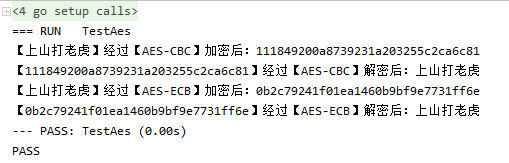
测试结果:
Python
python的AES加密相对简单,同样的,需要安装pycrypto,可以使用pip安装:pip install pycryptodome(如果安装不了,先卸载旧版本再安装:pip uninstall pycrypto)。
直接上代码:
# 需要安装pycrypto,可以使用pip安装:pip install pycryptodome
from Crypto.Cipher import AES

BLOCK_SIZE = 16

def init_cipher(secret_key, iv_key):

    secret_bytes = secret_key.encode(encoding='utf-8')

    key_bytes = []

    if len(secret_bytes) >= BLOCK_SIZE:

        key_bytes = secret_bytes[:BLOCK_SIZE]

    else:

        key_bytes.extend(secret_bytes)

        key_bytes.extend([0 for x in range(0, BLOCK_SIZE - len(secret_bytes))])

    if iv_key is None or len(iv_key) == 0:

        cipher = AES.new(bytes(key_bytes), AES.MODE_ECB)

        return cipher

    else:

        iv_bytes = iv_key.encode(encoding='utf-8')

        iv_key_bytes = []

        if len(iv_bytes) >= BLOCK_SIZE:

            iv_key_bytes = iv_bytes[:BLOCK_SIZE]

        else:

            iv_key_bytes.extend(iv_bytes)

            iv_key_bytes.extend([0 for x in range(0, BLOCK_SIZE - len(iv_bytes))])

        cipher = AES.new(bytes(key_bytes), AES.MODE_CBC, bytes(iv_key_bytes))

        return cipher

def aes_encrypt(value, secret_key, iv_key):

    cipher = init_cipher(secret_key, iv_key)

    buffer = value.encode(encoding="utf-8")

    bufferList = list(buffer)

    # 数据进行 PKCS5Padding 的填充

    padding = BLOCK_SIZE - len(bufferList) % BLOCK_SIZE

    bufferList.extend([padding for x in range(0, padding)])

    buffer = cipher.encrypt(bytes(bufferList))

    return buffer.hex()  # 使用hex格式输出

def aes_decrypt(value, secret_key, iv_key):

    cipher = init_cipher(secret_key, iv_key)

    buffer = bytes.fromhex(value)  # 读取hex格式数据

    buffer = cipher.decrypt(buffer)

    result = buffer.decode("utf-8")

    # 去掉 PKCS5Padding 的填充

    return result[:-ord(result[len(result) - 1:])]

text = "上山打老虎"

key = "123456"

iv = "abcdefg"

encryptText1 = aes_encrypt(text, key, iv)

print("【", text, "】经过【AES-CBC】加密后:", encryptText1)

decryptText1 = aes_decrypt(encryptText1, key, iv)

print("【", encryptText1, "】经过【AES-CBC】解密后:", decryptText1)

encryptText2 = aes_encrypt(text, key, None)

print("【", text, "】经过【AES-ECB】加密后:", encryptText2)

decryptText2 = aes_decrypt(encryptText2, key, None)

print("【", encryptText2, "】经过【AES-ECB】解密后:", decryptText2)
执行结果:

AES对称加密算法实现:Java,C#,Golang,Python的更多相关文章
- Java 加密 AES 对称加密算法
版权声明:本文为博主原创文章,未经博主允许不得转载. [AES] 一种对称加密算法,DES的取代者. 加密相关文章见:Java 加密解密 对称加密算法 非对称加密算法 MD5 BASE64 AES R ...
- JAVA中AES对称加密和解密以及与Python兼容
引言:本文主要解决Java中用AES加密及解密,同时可通过Python脚本对Java加密后的字符进行解密的操作. 由于近期工作中用到需要使用Java对一串密钥进行加密,并且后台通过Python语言读取 ...
- Java实现AES对称加密算法
Java代码实现 import java.security.SecureRandom; import javax.crypto.Cipher; import javax.crypto.KeyGener ...
- AES对称加密算法原理
原著:James McCaffrey 翻译:小刀人 原文出处:MSDN Magazine November 2003 (Encrypt It) 本文的代码下载:msdnmag200311AES.exe ...
- AES对称加密算法原理(转载)
出处:http://www.2cto.com/Article/201112/113465.html 原著:James McCaffrey 翻译:小刀人 原文出处:MSDN Magazine Novem ...
- AES对称加密算法
package cn.jsonlu.passguard.utils; import org.apache.commons.codec.binary.Base64; import javax.crypt ...
- DES对称加密算法实现:Java,C#,Golang,Python
数据加密标准(DES,Data Encryption Standard,简写DES)是一种采用块密码加密的对称密钥算法,加密分组长度为64位,其中8.16.24.32.40.48.56.64 等8位是 ...
- Java 加密解密 对称加密算法 非对称加密算法 MD5 BASE64 AES RSA
版权声明:本文为博主原创文章,未经博主允许不得转载. [前言] 本文简单的介绍了加密技术相关概念,最后总结了java中现有的加密技术以及使用方法和例子 [最简单的加密] 1.简单的概念 明文:加密前的 ...
- 常用加密算法的Java实现总结(二) ——对称加密算法DES、3DES和AES
1.对称加密算法 1.1 定义 对称加密算法是应用较早的加密算法,技术成熟.在对称加密算法中,数据发信方将明文(原始数据)和加密密钥(mi yue)一起经过特殊加密算法处理后,使其变成复杂的加密密文发 ...
随机推荐
- When does compiler create default and copy constructors in C++?
In C++, compiler creates a default constructor if we don't define our own constructor (See this). Co ...
- oracle中分组中的ROLLUP和CUBE选项
在进行多列分组统计时,如果直接使用GROUP BY子句指定分组列,则只能生成基于所有分组列的统计结果.如果在GROUP BY子句中使用ROLLUP语句或CUBE语句,除了生成基于所有指定列的分组统计外 ...
- 运维笔记之yum,rpm,挂载,磁盘管理和raid详解
yum 与 rpm centos6,7 主要有rpm和yum这两种包管理软件,两种包的管理各有用处,其中最主要区别是: yum使用简单但需要联网,yum会去网上的yum包源去获取所需要的软件包.而r ...
- Oracle SQL中join方式总结
在ORACLE数据库中,表与表之间的SQL JOIN方式有多种(不仅表与表,还可以表与视图.物化视图等联结).SQL JOIN其实是一个逻辑概念,像NEST LOOP JOIN. HASH JOIN等 ...
- 【Java 基础】Java Map中的Value值如何做到可以为任意类型的值
Occasionally the average developer runs into a situation where he has to map values of arbitrary typ ...
- Linux 性能优化笔记:应用监控
指标监控 跟系统监控一样,在构建应用程序的监控系统之前,首先也需要确定,到底需要监控哪些指标.特别是要清楚,有哪些指标可以用来快速确认应用程序的性能问题. 对系统资源的监控,USE 法简单有效,却不代 ...
- shiro免认证的路径配置
– ?:匹配一个字符,如/admin? 将匹配/admin1,但不匹配/admin 或/admin/:– *:匹配零个或多个字符串,如/admin 将匹配/admin./admin123,但不匹配/a ...
- 【01】SpringBoot2核心技术-基础入门
SpringBoot 2 1. SpringBoot2核心技术-基础入门 01 Spring与SpringBoot 1.Spring 能做什么 1.1 Spring的能力 微服务:将一个应用的所有功能 ...
- 对QuerySet的理解
1. 如何通过Django的Model操作数据库? 在Django的Model中,QuerySet是一个很重要的概念.因为我们同数据库的所有查询以及更新交互都是通过它来完成的. 2. Django的M ...
- java 数据类型:枚举类enum、对比方法compreTo()、获取名字.name()、获取对应值的枚举类Enum.valueOf()、包含构造方法和抽象方法的enum;实现接口;
问题引入 为了将某一数据类型的值限定在可选的合理范围内,比如季节只有四个:春夏秋冬. 什么是枚举类 Java5之后新增了enum关键字(他与class,interface关键字地位相同)用来定义枚举类 ...