
spring 定时任务?
一、什么是定时任务?
我们在项目中遇到的需求: 需要定时送异步请求。
二、怎么实现?
2.1 mvc中启用定时任务。
<?xml version="1.0" encoding="UTF-8"?>
<beans xmlns="http://www.springframework.org/schema/beans"
xmlns:xsi="http://www.w3.org/2001/XMLSchema-instance"
xmlns:context="http://www.springframework.org/schema/context"
xmlns:aop="http://www.springframework.org/schema/aop"
xmlns:mvc="http://www.springframework.org/schema/mvc" xmlns:task="http://www.springframework.org/schema/task"
xsi:schemaLocation="http://www.springframework.org/schema/beans http://www.springframework.org/schema/beans/spring-beans.xsd
http://www.springframework.org/schema/context
http://www.springframework.org/schema/context/spring-context.xsd http://www.springframework.org/schema/mvc http://www.springframework.org/schema/mvc/spring-mvc.xsd http://www.springframework.org/schema/aop http://www.springframework.org/schema/aop/spring-aop.xsd http://www.springframework.org/schema/task http://www.springframework.org/schema/task/spring-task.xsd"> <!--spring mvc的配置文件-->
<!--开启mvc的注解-->
<mvc:annotation-driven conversion-service="conversionService" >
<!--配置转换器 转换日期的格式。-->
<mvc:message-converters>
<bean class="org.springframework.http.converter.json.MappingJackson2HttpMessageConverter">
<property name="objectMapper">
<bean class="com.fasterxml.jackson.databind.ObjectMapper">
<property name="dateFormat">
<bean class="java.text.SimpleDateFormat">
<constructor-arg type="java.lang.String" value="yyyy-MM-dd"/>
</bean>
</property>
</bean>
</property>
</bean>
</mvc:message-converters>
</mvc:annotation-driven> <!--配置日期转换器-->
<bean id="conversionService" class="org.springframework.format.support.FormattingConversionServiceFactoryBean">
<property name="converters">
<set>
<bean class="com.aaa.controller.DateConverter"/>
</set>
</property>
</bean> <mvc:default-servlet-handler/> <!--扫描器:扫描控制器的注解-->
<context:component-scan base-package="com.aaa.controller"/> <!--4.静态资源注解-->
<mvc:default-servlet-handler/>
<!--<mvc:resource mapping="/static/**" location="/static/"/>--> <!--3.视图解析器:进行视图解析
prefix+ 视图名字+suffix
-->
<!--5.文件上传的解析器 可以设置相关的属性。-->
<bean id="multipartResolver" class="org.springframework.web.multipart.commons.CommonsMultipartResolver">
<property name="defaultEncoding" value="utf-8"/>
<!--文件上传的大小:单位:字节-->
<property name="maxUploadSize" value="#{10*1024*1024}"/>
</bean> <!--<!– 异常处理 1. 配置解析器 –>-->
<!--<bean class="org.springframework.web.servlet.handler.SimpleMappingExceptionResolver">-->
<!--<!–1.1默认的错误视图 发生异常时, 跳转到的页面–>-->
<!--<property name="defaultErrorView" value="error"/>-->
<!--<!–1.2 异常的属性 捕获到的错误信息。–>-->
<!--<property name="exceptionAttribute" value="ex"/>--> <!--<!–1.3exceptionMappings –>-->
<!--<property name="exceptionMappings">-->
<!--<props>-->
<!--<prop key="异常类型1">-->
<!--error1-->
<!--</prop>-->
<!--<prop key="异常类型2">-->
<!--error2-->
<!--</prop>-->
<!--</props>-->
<!--</property>-->
<!--</bean>--> <!--6. 配置一个拦截器 -->
<mvc:interceptors>
<!--<mvc:interceptor>-->
<!--<!– 拦截的路径 –>-->
<!--<mvc:mapping path="/**"/>-->
<!--<!– 配置拦截器的bean –>-->
<!--<!– 放行路径 –>-->
<!--<mvc:exclude-mapping path="/user/login"/>-->
<!--<bean class="com.aaa.interceptors.MyIntercept"/>-->
<!--</mvc:interceptor>-->
<mvc:interceptor>
<mvc:mapping path="/**"/>
<bean class="com.aaa.interceptors.Demo02"/>
</mvc:interceptor> </mvc:interceptors> <bean class="org.springframework.web.servlet.view.InternalResourceViewResolver">
<property name="viewClass" value="org.springframework.web.servlet.view.JstlView"/>
<property name="prefix" value="/"/> <!--视图前缀-->
<property name="suffix" value=".jsp"/> <!--视图后缀-->
</bean> <!--授权 -->
<aop:config ></aop:config> <!--启用定时任务。 导包 spring frame word. org/schema/task-->
<task:annotation-driven></task:annotation-driven> </beans>
2.2 控制层中创建SchController
package com.aaa.controller;

import org.springframework.scheduling.annotation.Scheduled;

import org.springframework.stereotype.Controller;

import java.text.SimpleDateFormat;

import java.util.Date;

/*

*     定时任务?

    需求:

    1.定时发送异步请求

    2.使用java计时器,自启动的servlet中,线程(Thread,Thread sleep)

    使用  Schedule组件:

    1.配置注解。

    1.1  mvc中 启用定时任务。

    1.2  导包  【spring frame word. org/schema/task】

    1.3  创建控制器  加入 schedule的注解。

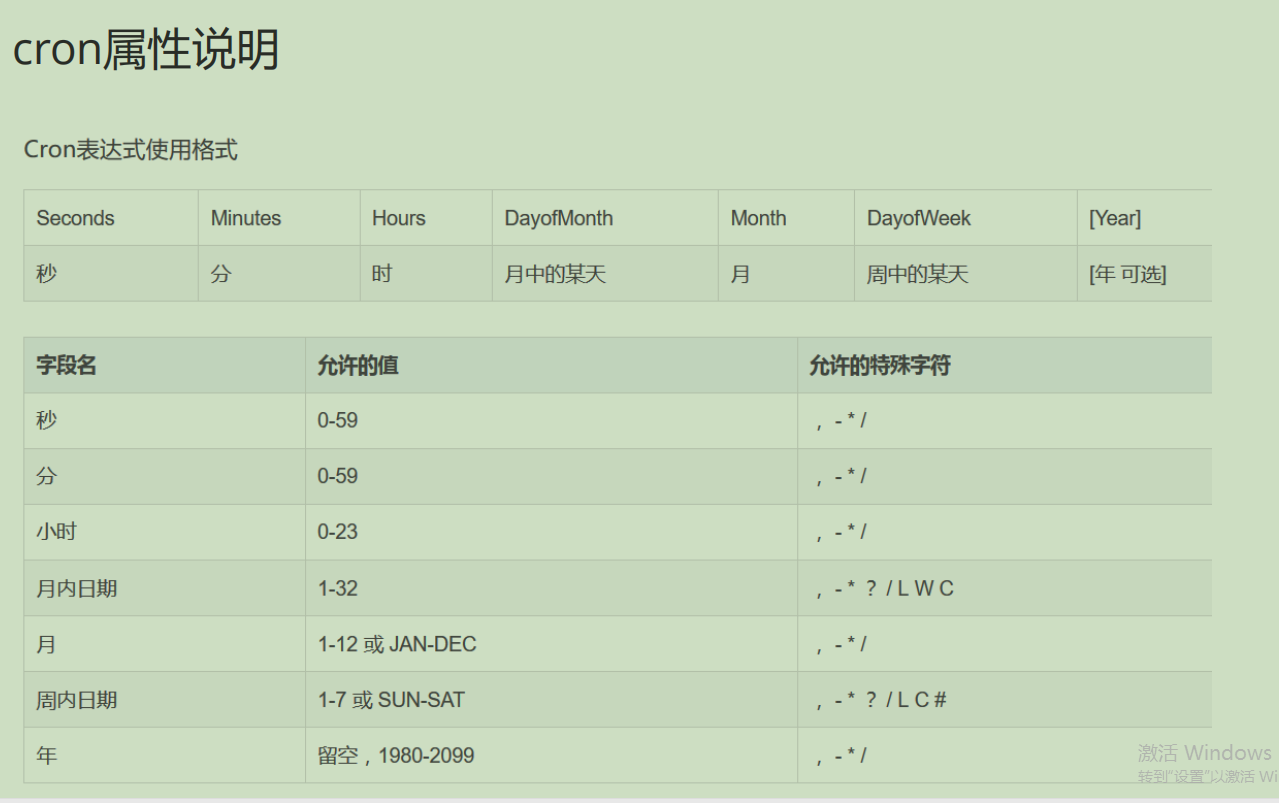
    1.4  秒分时日月年。  / 代表 每的意思

    “0/5 * * * * *”  就是每五秒执行一次。

*

* */

@Controller

public class SchController {

    @Scheduled(cron = "0/3 * * * * ?")

    public void task1(){

        //日期格式的转换。

        SimpleDateFormat sdf = new SimpleDateFormat("yyyy-MM-dd hh:mm:ss");

        Date date = new Date();

        String nowTime = sdf.format(date);

        System.out.println("每三秒执行一次, 你好世界!"+nowTime);

    }

}
2.3 属性说明。
2.4 字符含义

2.5 演示

spring 定时任务?的更多相关文章
- 摆脱Spring 定时任务的@Scheduled cron表达式的困扰
一.背景 最近因为需要,需要适用Spring的task定时任务进行跑定时任务,以前也接触过,但是因为懒没有好好地理解@Scheduled的cron表达式,这次便对它做了一个全方位的了解和任务,记录下来 ...
- spring定时任务注解@Scheduled的记录
spring 定时任务@Scheduled 转自https://www.cnblogs.com/0201zcr/p/5995779.html 1.配置文件 <?xml version=" ...
- spring定时任务(@Scheduled注解)
(一)在xml里加入task的命名空间 xmlns:task="http://www.springframework.org/schema/task" http://www.spr ...
- Spring3.0.6定时任务task:scheduled
<?xml version="1.0" encoding="UTF-8"?> <beans xmlns="http://www.sp ...
- Spring 定时任务之 @Scheduled cron表达式
一个基于Spring boot的一个demo: Java配置中开户对Scheduled的支持 import org.springframework.context.annotation.Configu ...
- spring定时任务(@Scheduled注解)cron表达式详解
cron表达式详解: 一个cron表达式有至少6个(也可能7个)有空格分隔的时间元素. 按顺序依次为 秒(~) 分钟(~) 小时(~) 天(~) 月(~) 星期(~ =SUN 或 SUN,MON,TU ...
- java中实现定时任务 task 或quartz
转载大神的 https://www.cnblogs.com/hafiz/p/6159106.html https://www.cnblogs.com/luchangyou/p/6856725.html ...
- spring定时任务详解(@Scheduled注解)( 转 李秀才的博客 )
在springMVC里使用spring的定时任务非常的简单,如下: (一)在xml里加入task的命名空间 xmlns:task="http://www.springframework.or ...
- spring定时任务轮询(spring Task)
定时任务轮询比如任务自服务器启动就开始运行,并且每隔5秒执行一次. 以下用spring注解配置定时任务.1.添加相应的schema xmlns:task=" xsi:schemaLocati ...
- spring计划任务,springMvc计划任务,Spring@Scheduled,spring定时任务
spring计划任务,springMvc计划任务,Spring@Scheduled,spring定时任务 >>>>>>>>>>>> ...
随机推荐
- GCD - Extreme (II)(UVA11426)
思路:欧拉函数: 欧拉函数,然后用下等差数列公式就行了. 1 #include<stdio.h> 2 #include<algorithm> 3 #include<ios ...
- Grids
Grids Time Limit: 10000/5000 MS (Java/Others) Memory Limit: 65535/65535 K (Java/Others)Total Subm ...
- How Many Sets I(zoj3556)
How Many Sets I Time Limit: 2 Seconds Memory Limit: 65536 KB Give a set S, |S| = n, then how ma ...
- 更快的Maven来了,我的天,速度提升了8倍!
周末被 maven-mvnd 刷屏了,于是我也下载了一个 mvnd 体验了一把.虽然测试的数据都是基于我本地项目,不具备普适性和权威性,但也足以说明问题.它的测试结果远远超出我的预期,下面一起来看. ...
- Sufficient Statistic (充分统计量)
目录 定义 充分统计量的判定 最小统计量 例子 Poisson Normal 指数分布 Gamma Sufficient statistic - Wikipedia Sufficient statis ...
- 取代 Maven?这款项目构建工具性能提升 300%
在 GitHub 上闲逛的时候,发现了一个新的项目:maven-mvnd,持续霸占 GitHub trending 榜单好几天了. maven-mvnd,可以读作 Maven Daemon,译作 Ma ...
- Typec转HDMI+VGA+PD3.0+USB3.0扩展坞四合一芯片方案|CS5268替代AG9321
CS5268是一种高度集成的单芯片,适用于多个细分市场和显示应用,如拓展坞.扩展底座等. 2.CS5268参数说明 总则 USB Type-C规范1.2 HDMI规范v2.0b兼容发射机,数据速率高达 ...
- JavaScript交互式网页设计 • 【第8章 jQuery动画与特效】
全部章节 >>>> 本章目录 8.1 显示隐藏动画效果 8.1.1 show() 方法与hide() 方法 8.1.2 toggle()方法 8.1.3 实践练习 8.2 ...
- jquery控制元素的隐藏和显示的几种方法
使用jquery控制div的显示与隐藏,一句话就能搞定,例如: 方法一 显示: $("#id").show()表示为display:block, 隐藏: $("#id&q ...
- SpringBoot读取外部配置文件的方法
SpringBoot读取外部配置文件的方法 Spring高级之注解@PropertySource详解(超详细) 1.@PropertySource(value = {"classpath:c ...