
Netty之二进制文件传输
传输会话简要
客户端发起一个文本请求给服务器端, 服务器端解析里面文本, 返回文件给客户端, 客户端解析文件
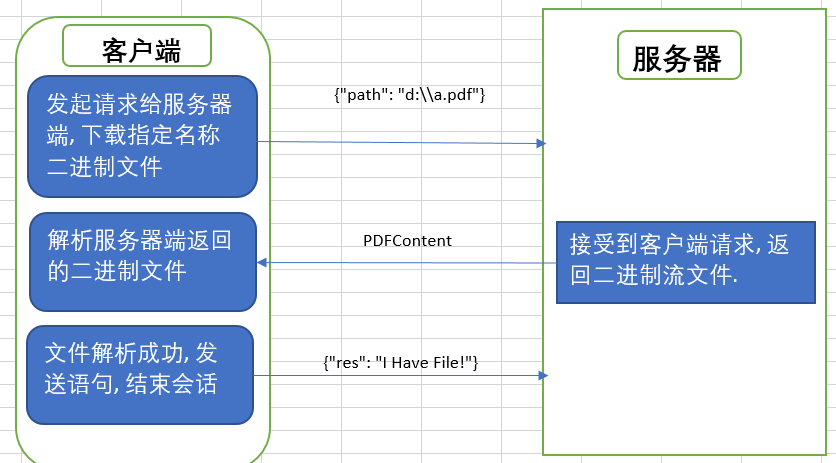
服务器端
因为示例文件比较小, 所以没有做分段传输, 而是直接一次性把整个文件byte[]都发给客户端了.
如果需要传输大文件, 则需要做粘包拆包, 参考另外一篇博文 Netty之粘包分包
需要三个ChannelPipeline
                             // 解析客户端发送的文本json

                             pipeline.addLast(new StringDecoder());

                             // 二进制文件加密传输

                             pipeline.addLast(new ObjectEncoder());

                             // 业务逻辑

                             pipeline.addLast(new FileServerHandler());
FileServerHandler业务逻辑
            // 获取到客户端请求, 解析path, 返回二进制文件

            JSONObject jo = new JSONObject(msg.toString());

            if (StringUtils.isNotEmpty(jo.optString("path"))) {

                PDFContent pdf = new PDFContent();

                byte[] content = com.fr.general.IOUtils.inputStream2Bytes(new FileInputStream(jo.optString("path")));

                pdf.setContent(content);

                ctx.writeAndFlush(pdf);

            } else {

                System.out.println(jo.optString("res"));

            }
客户端
跟服务器端对应的三个ChannelPipeline
                             // 传输文本给服务器端

                             p.addLast(new StringEncoder());

                             // 二进制文件获取解析

                             p.addLast(new ObjectDecoder(ClassResolvers.cacheDisabled(this

                                     .getClass().getClassLoader())));

                             // 客户端业务代码

                             p.addLast(new FileClientHandler());
FileClientHandler业务逻辑
         @Override

         public void channelActive(ChannelHandlerContext ctx) {

             try {

                 // 将要获取的pdf路径发送给服务器端

                 JSONObject jo = JSONObject.create().put("path", "d:\\a.pdf");

                 ctx.writeAndFlush(jo.toString());

             } catch (JSONException e) {

                 e.printStackTrace();

             }

         }

         @Override

         public void channelRead(ChannelHandlerContext ctx, Object msg) {

             PDFContent content = (PDFContent) msg;

             // 从服务器端获取的二进制文件存到本地

             String fileName = UUID.randomUUID().toString() + ".pdf";

             File file = new File("D:\\" + fileName);

             try {

                 FileOutputStream out = new FileOutputStream(file);

                 IOUtils.copyBinaryTo(new ByteArrayInputStream(content.getContent()), out);

                 out.close();

             } catch (FileNotFoundException e) {

                 e.printStackTrace();

             } catch (IOException e) {

                 e.printStackTrace();

             }

             try {

                 JSONObject jo = JSONObject.create().put("res", "Thank You, I Have The File!");

                 ctx.writeAndFlush(jo.toString());

                 ctx.close();

             } catch (JSONException e) {

                 e.printStackTrace();

             }

         }
完整的代码如下
FileClient & FileClientHandler
 package test;

 import com.fr.general.IOUtils;

 import com.fr.json.JSONException;

 import com.fr.json.JSONObject;

 import com.fr.stable.core.UUID;

 import io.netty.bootstrap.Bootstrap;

 import io.netty.channel.ChannelFuture;

 import io.netty.channel.ChannelHandlerContext;

 import io.netty.channel.ChannelInboundHandlerAdapter;

 import io.netty.channel.ChannelInitializer;

 import io.netty.channel.ChannelPipeline;

 import io.netty.channel.EventLoopGroup;

 import io.netty.channel.nio.NioEventLoopGroup;

 import io.netty.channel.socket.SocketChannel;

 import io.netty.channel.socket.nio.NioSocketChannel;

 import io.netty.handler.codec.serialization.ClassResolvers;

 import io.netty.handler.codec.serialization.ObjectDecoder;

 import io.netty.handler.codec.string.StringEncoder;

 import java.io.ByteArrayInputStream;

 import java.io.File;

 import java.io.FileNotFoundException;

 import java.io.FileOutputStream;

 import java.io.IOException;

 public class FileClient {

     public FileClient(){

     }

     public void start() {

         EventLoopGroup group = new NioEventLoopGroup();

         try {

             Bootstrap bootstrap = new Bootstrap();

             bootstrap.group(group)

                     .channel(NioSocketChannel.class)

                     .handler(new ChannelInitializer<SocketChannel>() {

                         @Override

                         protected void initChannel(SocketChannel s) throws Exception {

                             ChannelPipeline p = s.pipeline();

                             // 传输文本给服务器端

                             p.addLast(new StringEncoder());

                             // 二进制文件获取解析

                             p.addLast(new ObjectDecoder(ClassResolvers.cacheDisabled(this

                                     .getClass().getClassLoader())));

                             // 客户端业务代码

                             p.addLast(new FileClientHandler());

                         }

                     });

             ChannelFuture future = bootstrap.connect("localhost", 7766).sync();

             future.channel().closeFuture().sync();

         } catch (InterruptedException e) {

             e.printStackTrace();

         } finally {

             group.shutdownGracefully();

         }

     }

     public static void main(String[] args) throws InterruptedException {

         new FileClient().start();

     }

     private static class FileClientHandler extends ChannelInboundHandlerAdapter {

         @Override

         public void channelActive(ChannelHandlerContext ctx) {

             try {

                 // 将要获取的pdf路径发送给服务器端

                 JSONObject jo = JSONObject.create().put("path", "d:\\a.pdf");

                 ctx.writeAndFlush(jo.toString());

             } catch (JSONException e) {

                 e.printStackTrace();

             }

         }

         @Override

         public void channelRead(ChannelHandlerContext ctx, Object msg) {

             PDFContent content = (PDFContent) msg;

             // 从服务器端获取的二进制文件存到本地

             String fileName = UUID.randomUUID().toString() + ".pdf";

             File file = new File("D:\\" + fileName);

             try {

                 FileOutputStream out = new FileOutputStream(file);

                 IOUtils.copyBinaryTo(new ByteArrayInputStream(content.getContent()), out);

                 out.close();

             } catch (FileNotFoundException e) {

                 e.printStackTrace();

             } catch (IOException e) {

                 e.printStackTrace();

             }

             try {

                 JSONObject jo = JSONObject.create().put("res", "Thank You, I Have The File!");

                 ctx.writeAndFlush(jo.toString());

                 ctx.close();

             } catch (JSONException e) {

                 e.printStackTrace();

             }

         }

         @Override

         public void exceptionCaught(ChannelHandlerContext ctx, Throwable cause) {

             cause.printStackTrace();

             ctx.close();

         }

     }

 }
FileServer & FileServerHandler
 package test;

 import com.fr.json.JSONObject;

 import com.fr.stable.StringUtils;

 import io.netty.bootstrap.ServerBootstrap;

 import io.netty.channel.ChannelFuture;

 import io.netty.channel.ChannelHandlerContext;

 import io.netty.channel.ChannelInboundHandlerAdapter;

 import io.netty.channel.ChannelInitializer;

 import io.netty.channel.ChannelOption;

 import io.netty.channel.ChannelPipeline;

 import io.netty.channel.EventLoopGroup;

 import io.netty.channel.nio.NioEventLoopGroup;

 import io.netty.channel.socket.SocketChannel;

 import io.netty.channel.socket.nio.NioServerSocketChannel;

 import io.netty.handler.codec.serialization.ObjectEncoder;

 import io.netty.handler.codec.string.StringDecoder;

 import io.netty.handler.logging.LogLevel;

 import io.netty.handler.logging.LoggingHandler;

 import java.io.FileInputStream;

 public class FileServer {

     private FileServer() {

         startServer();

     }

     private void startServer() {

         EventLoopGroup bossGroup = new NioEventLoopGroup(1);

         EventLoopGroup workerGroup = new NioEventLoopGroup();

         try{

             ServerBootstrap bootstrap = new ServerBootstrap();

             bootstrap.group(bossGroup, workerGroup)

                     .channel(NioServerSocketChannel.class)

                     .option(ChannelOption.SO_BACKLOG, 100)

                     .handler(new LoggingHandler(LogLevel.INFO))

                     .childHandler(new ChannelInitializer<SocketChannel>() {

                         @Override

                         protected void initChannel(SocketChannel ch) throws Exception {

                             ChannelPipeline pipeline = ch.pipeline();

                             // 解析客户端发送的文本json

                             pipeline.addLast(new StringDecoder());

                             // 二进制文件加密传输

                             pipeline.addLast(new ObjectEncoder());

                             // 业务逻辑

                             pipeline.addLast(new FileServerHandler());

                         }

                     });

             ChannelFuture future = bootstrap.bind("localhost", 7766).sync();

             future.channel().closeFuture().sync();

         } catch (InterruptedException e) {

             e.printStackTrace();

         } finally {

             bossGroup.shutdownGracefully();

             workerGroup.shutdownGracefully();

         }

     }

     private class FileServerHandler extends ChannelInboundHandlerAdapter {

         @Override

         public void channelRead(ChannelHandlerContext ctx, Object msg) throws Exception {

             // 获取到客户端请求, 解析path, 返回二进制文件

             JSONObject jo = new JSONObject(msg.toString());

             if (StringUtils.isNotEmpty(jo.optString("path"))) {

                 PDFContent pdf = new PDFContent();

                 byte[] content = com.fr.general.IOUtils.inputStream2Bytes(new FileInputStream(jo.optString("path")));

                 pdf.setContent(content);

                 ctx.writeAndFlush(pdf);

             } else {

                 System.out.println(jo.optString("res"));

             }

         }

         @Override

         public void exceptionCaught(ChannelHandlerContext ctx, Throwable cause) throws Exception {

             cause.printStackTrace();

             ctx.close();

         }

     }

     public static void main(String[] args){

         // 启动Server

         new FileServer();

     }

 }
PDFContent
 package test;

 import java.io.Serializable;

 /**

  * 文件的封装

  */

 public class PDFContent implements Serializable{

     private byte[] content;

     public byte[] getContent() {

         return content;

     }

     public void setContent(byte[] content) {

         this.content = content;

     }

 }
Netty之二进制文件传输的更多相关文章
- [netty4][netty-transport]netty之nio传输层
[netty4][netty-transport]netty之nio传输层 nio基本处理逻辑 查看这里 Selector的处理 Selector实例构建 NioEventLoop.openSelec ...
- WebService之Axis2(4):二进制文件传输
在<WebService大讲堂之Axis2(2):复合类型数据的传递>中讲过,如果要传递二进制文件(如图像.音频文件等),可以使用byte[]作为数据类型进行传递,然后客户端使用RPC方式 ...
- netty中的传输
终于在课设的闲时间把netty实战的四五章给解决了 这里来记录一下第四章里面所讲的IO 首先说到IO,我想,必须要先了解阻塞,非阻塞,同步和异步这四个词 看到一个讲的很易懂的例子:https://ww ...
- Netty 框架学习 —— 传输
概述 流经网络的数据总是具有相同的类型:字节,这些字节如何传输主要取决于我们所说的网络传输.用户并不关心传输的细节,只在乎字节是否被可靠地发送和接收 如果使用 Java 网络编程,你会发现,某些时候当 ...
- netty的对象传输
pom <!-- https://mvnrepository.com/artifact/io.netty/netty-all --> <dependency> <grou ...
- netty 对象序列化传输示例
package object.server.impl; import io.netty.bootstrap.ServerBootstrap; import io.netty.channel.Chann ...
- Netty进行文件传输
本次是利用TCP在客户端发送文件流,服务端就接收流,写入相应的文件. 实验的源文件是一个图片,假设地址是D:\\Koala.jpg,接收保存后的图片为D:\\test.jpg 原理就是将文件读取成by ...
- 快来体验快速通道,netty中epoll传输协议详解
目录 简介 epoll的详细使用 EpollEventLoopGroup EpollEventLoop EpollServerSocketChannel EpollSocketChannel 总结 简 ...
- 【Netty】Netty传输
一.前言 在简单学习了Netty中的组件后,接着学习Netty中数据的传输细节. 二.传输 2.1 传输示例 Netty中的数据传输都是使用的字节类型,下面通过一个实例进行说明,该实例中服务器接受请求 ...
随机推荐
- C#设计模式之十一外观模式(Facade)【结构型】
一.引言 快12点半了,要开始今天的写作了.很快,转眼设计模式已经写了十个了,今天我们要讲[结构型]设计模式的第五个模式,该模式是[外观模式],英文名称是:Facade Pattern.我们先从名字上 ...
- Building roads
Building roads Time Limit: 10000/1000 MS (Java/Others) Memory Limit: 32768/32768 K (Java/Others) Tot ...
- Brave Game(裸的巴什博弈)
Brave Game Time Limit: 1000/1000 MS (Java/Others) Memory Limit: 32768/32768 K (Java/Others) Total Su ...
- transform的影响
http://www.cnblogs.com/chuangweili/p/5167986.html transform 各种影响 1.提升元素的z-index层级,下面这个例子会让前面的图片显示在上面 ...
- HTML5 Geolocation API工作原理[转载]
大家都知道,HTML5 Geolocation 可以使用 IP 地址.基于 Web 的数据库.无线网络连接和三角测量或 GPS 技术来确定经度和纬度. 问题: 在一个基于地理位置服务的个人业余项目(小 ...
- 浅谈Jquery中的bind(),live(),delegate(),on()绑定事件方式 [转载]
前言 因为项目中经常会有利用jquery操作dom元素的增删操作,所以会涉及到dom元素的绑定事件方式,简单的归纳一下bind,live,delegate,on的区别,以便以后查阅,也希望该文章日后能 ...
- 修改oracle服务器端字符集
----设置字符集步聚------- conn /as sysdba; shutdown immediate; startup mount; alter system enable restricte ...
- Java_数据交换_fastJSON_01_用法入门
一.用法 1.序列化—将Object转为Json对象 Object data=JSON.toJSON( MyObject ); 注:本文的Object可以是Map.List.javaBean等 需求: ...
- padding-使用必记
前言 说起了padding可谓是盒子模型中最常用的一个属性,你真的了解padding吗?那我请问您设置padding会影响盒子的宽度与高度吗?也许好多人会回答padding会影响到盒子的宽度与高度.在 ...
- c#读取并分析sql Server2005数据库日志
用过logExplorer的朋友都会被他强悍的功能吸引,我写过一篇详细的操作文档可以参考http://blog.csdn.net/jinjazz/archive/2008/05/19/2459692. ...