
spring MVC 环境搭建
绿色版Spring MVC(单纯的springMVC)
一、导包,为了获取请求数据多添加一个 包
包
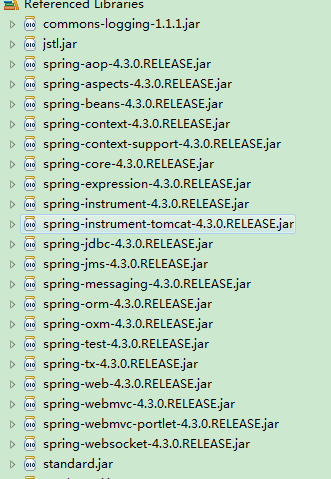
二、web.xml配置
<?xml version="1.0" encoding="UTF-8"?>

<web-app xmlns:xsi="http://www.w3.org/2001/XMLSchema-instance"

         xmlns="http://java.sun.com/xml/ns/javaee"

         xsi:schemaLocation="http://java.sun.com/xml/ns/javaee http://java.sun.com/xml/ns/javaee/web-app_2_5.xsd"

         id="WebApp_ID" version="2.5">

  <!-- 这就是一个名字 -->

  <display-name>webSpringMVC</display-name>

  <!-- 加载spring容器 -->

  <!-- 初始化参数-->

  <context-param>

    <param-name>contextConfigLocation</param-name>

    <param-value>/WEB-INF/classes/applicationContext.xml</param-value>

  </context-param>

  <!-- 监听 -->

  <listener>

    <listener-class>

            org.springframework.web.context.ContextLoaderListener

        </listener-class>

  </listener>

  <!-- springmvc前端控制器 -->

  <servlet>

    <servlet-name>dispatcherServlet</servlet-name>

    <servlet-class>

            org.springframework.web.servlet.DispatcherServlet

        </servlet-class>

    <init-param>

      <param-name>contextConfigLocation</param-name>

      <param-value>/WEB-INF/classes/springMvc.xml</param-value>

    </init-param>

    <load-on-startup></load-on-startup>

  </servlet>

  <servlet-mapping>

    <servlet-name>dispatcherServlet</servlet-name>

    <url-pattern>*.action</url-pattern>

  </servlet-mapping>

  <!-- 配置过滤器 -->

  <!-- post乱码过虑器 -->

  <filter>

    <filter-name>CharacterEncodingFilter</filter-name>

    <filter-class>

            org.springframework.web.filter.CharacterEncodingFilter

        </filter-class>

    <init-param>

      <param-name>encoding</param-name>

      <param-value>utf-</param-value>

    </init-param>

    <init-param>

      <param-name>forceEncoding</param-name>

      <param-value>true</param-value>

    </init-param>

  </filter>

  <filter-mapping>

    <filter-name>CharacterEncodingFilter</filter-name>

    <url-pattern>/*</url-pattern>

  </filter-mapping>

  <!-- 首页 -->

  <welcome-file-list>

    <welcome-file>index.jsp</welcome-file>

  </welcome-file-list>

  <!-- session超时 -->

  <!--分钟为单位

      设置为0,-1 表示永不超时 -->

  <session-config>

    <session-timeout>30</session-timeout>

  </session-config>

</web-app>
三、springMvc.xml配置
<?xml version="1.0" encoding="UTF-8"?>

<beans xmlns="http://www.springframework.org/schema/beans"

       xmlns:xsi="http://www.w3.org/2001/XMLSchema-instance"

       xmlns:mvc="http://www.springframework.org/schema/mvc"

       xmlns:p="http://www.springframework.org/schema/p"

       xmlns:context="http://www.springframework.org/schema/context"

       xmlns:aop="http://www.springframework.org/schema/aop"

       xmlns:tx="http://www.springframework.org/schema/tx"

       xsi:schemaLocation="http://www.springframework.org/schema/beans

            http://www.springframework.org/schema/beans/spring-beans-3.0.xsd

            http://www.springframework.org/schema/context

            http://www.springframework.org/schema/context/spring-context-3.0.xsd

            http://www.springframework.org/schema/aop

            http://www.springframework.org/schema/aop/spring-aop-3.0.xsd

            http://www.springframework.org/schema/tx

            http://www.springframework.org/schema/tx/spring-tx-3.0.xsd

            http://www.springframework.org/schema/mvc

            http://www.springframework.org/schema/mvc/spring-mvc-3.0.xsd

            http://www.springframework.org/schema/context

            http://www.springframework.org/schema/context/spring-context-3.0.xsd">

<!-- 启用 spring 注解 -->

<context:component-scan base-package="test" />

<bean class="org.springframework.web.servlet.mvc.annotation.AnnotationMethodHandlerAdapter"/>

<!-- prefix和suffix:查找视图页面的前缀和后缀(前缀[逻辑视图名]后缀)

    比如传进来的逻辑视图名为hello,则该该jsp视图页面应该存放在“WEB-INF/jsp/hello.jsp” -->

<bean

    class="org.springframework.web.servlet.view.InternalResourceViewResolver">

    <property name="prefix" value="/jsp/" />

    <property name="suffix" value=".jsp" />

</bean>

</beans>
四、applicationContext.xml
即使没有内容也要配置,否则不能运行。
<?xml version="1.0" encoding="UTF-8"?>

<beans xmlns="http://www.springframework.org/schema/beans"

       xmlns:xsi="http://www.w3.org/2001/XMLSchema-instance"

       xmlns:mvc="http://www.springframework.org/schema/mvc"

       xmlns:p="http://www.springframework.org/schema/p"

       xmlns:context="http://www.springframework.org/schema/context"

       xmlns:aop="http://www.springframework.org/schema/aop"

       xmlns:tx="http://www.springframework.org/schema/tx"

       xsi:schemaLocation="http://www.springframework.org/schema/beans

            http://www.springframework.org/schema/beans/spring-beans-3.0.xsd

            http://www.springframework.org/schema/context

            http://www.springframework.org/schema/context/spring-context-3.0.xsd

            http://www.springframework.org/schema/aop

            http://www.springframework.org/schema/aop/spring-aop-3.0.xsd

            http://www.springframework.org/schema/tx

            http://www.springframework.org/schema/tx/spring-tx-3.0.xsd

            http://www.springframework.org/schema/mvc

            http://www.springframework.org/schema/mvc/spring-mvc-3.0.xsd

            http://www.springframework.org/schema/context

            http://www.springframework.org/schema/context/spring-context-3.0.xsd">

</beans>
四、hello.jsp
<%@ page language="java" pageEncoding="UTF-8"%>

<html>

<head>

<title>SpringMVC</title>

</head>

<body>

您好,${user }!

</body>

</html>
五、Controller
package test;

import java.util.Date;

import javax.servlet.http.HttpServletRequest;

import javax.servlet.http.HttpServletResponse;

import org.springframework.stereotype.Controller;

import org.springframework.web.bind.annotation.RequestMapping;

import org.springframework.web.servlet.ModelAndView;

@Controller

//可以配置也可以不配 多一级目录

//@RequestMapping("/hello")

public class HelloController{

    @SuppressWarnings("deprecation")

    public ModelAndView handleRequest(HttpServletRequest request,

            HttpServletResponse response) {

        ModelAndView mv = new ModelAndView();

        // 添加模型数据 可以是任意的POJO对象

        mv.addObject("user", request.getParameter("user") + "-->" + new Date().toLocaleString());

        // 设置逻辑视图名,视图解析器会根据该名字解析到具体的视图页面

        mv.setViewName("hello");

        return mv;

    }

    @SuppressWarnings("deprecation")

    @RequestMapping("/hello")

    public String hello(HttpServletRequest request,HttpServletResponse response){

        request.setAttribute("user", request.getParameter("user") + "-->" + new Date().toLocaleString());

        return "hello";

    }

}
六、tomcat部署好后访问地址
 http://localhost:8080/springMvc/hello.action?user=SpringMMM

 代码见 https://github.com/fangxiongwei007/springMvc
spring MVC 环境搭建的更多相关文章
- Spring MVC 环境搭建(二)
在Spring MVC 环境搭建(一)中我们知道 spring 的配置是通过 urlmapping 映射到控制器,然后通过实现Controller接口的handlerequest方法转向页面. 但这存 ...
- Spring MVC 环境搭建(一)
一.建立 JavaWeb 项目 1.建立一个 Java 项目. 2.在项目下新建一个文件夹 webapp (命名可自取,这个目录即是网站根目录),再在该文件夹下新建一个 WEB-INF 文件夹(命名固 ...
- Spring MVC 环境搭建(maven+SpringMVC+mybatis+Freemarker)
Spring MVC 环境搭建(maven+SpringMVC+mybatis+Freemarker) 一.准备工作 1.Eclipse Java EE IDE(4.4.1) 2.JDK 3.Tomc ...
- Java学习笔记之:Spring MVC 环境搭建
一.创建项目 1.新建java动态项目 2.在web-inf/lib文件夹下导入jar 3.创建所需要的包和文件 二.搭建SpringMVC 1.配置web.xml(WEB-INF下) <?xm ...
- [Spring MVC] - Spring MVC环境搭建
1) 复制Spring所需要的lib包 (这是SSH所需要的lib包,如果只使用spring,可以移除一些包) 2) 配置web.xml <?xml version=" ...
- spring MVC环境搭建
1.新建web项目,并在web.xml加入spring mvc的servlet <!-- spring mvc容器和servlet的定义 --> <servlet> <s ...
- Spring MVC环境搭建和配置
1. 创建Dynamic web project 2. 修改WEB-INF/web.xml,内容如下: <?xml version="1.0" encoding=" ...
- Spring MVC: 环境搭建并实现简易的HelloWorld
第一步:使用配置Tomcat服务器的Eclipse新建一个名为“TestSpringMVC”的web项目 第二步:将所使用的jar包复制到WEB-INF/lib目录下 第三步:在web.xml中配置D ...
- spring mvc 框架搭建及详解
现 在主流的Web MVC框架除了Struts这个主力 外,其次就是Spring MVC了,因此这也是作为一名程序员需要掌握的主流框架,框架选择多了,应对多变的需求和业务时,可实行的方案自然就多了.不 ...
随机推荐
- 201521123102 《Java程序设计》第12周学习总结
1.本周学习总结 1.1 以你喜欢的方式(思维导图或其他)归纳总结多流与文件相关内容. 2.书面作业 将Student对象(属性:int id, String name,int age,double ...
- MUI如何调取相册的方法
第一种是HTML方法 <label> <input style="opacity: 0;" type="file" accept=" ...
- 移动商城第八篇【添加商品之基本属性和大字段数据(FCK文本编辑器)】
添加商品 修改对应的超链接url,controller转发到对应的JSP页面 <a href="${path}/item/toAddItem.do" class=" ...
- Struts2第十一篇【简单UI标签、数据回显】
Struts2UI标签 Sturts2为了简化我们的开发,也为我们提供了UI标签-也就是显示页面的标签-.. 但是呢,Struts2是服务端的框架,因此使用页面的标签是需要在服务器端解析然后再被浏览器 ...
- 05浏览器-02-操作DOM
1.DOM操作梗概 本篇内容实际上在另一篇笔记<从JS和jQuery浅谈DOM操作>已经提到了重点的地方,可以戳链接另外进行阅读. 以前提到过,实际上HTML在被浏览器加载以后,会变成 & ...
- 关于在jsp页面中使用/struts-tags标签库的迭代器时,从ValueStack获取参数使用EL的问题
情况复原下: 通过valuestack存了个user,然后页面里可以${user.sex}拿到男.${user.sex=='男'}拿到ture 但是在使用 <s:if text="${ ...
- Coder的好伙伴Github
网络越来越发达,各式各样的网盘.云存储也走进日常生活, 在老师的指导下,我第一次接触了GitHub. 什么是Github? Github是一个基于git的代码托管平台,付费用户可以建私人仓库,我们一 ...
- 教育,创新,提升:Indiegogo和Kickstarter上受中国用户支持的10个众筹项目
中国的经济正在迅速发展,已成为世界第二大经济体.中国家庭随着经济水平的提高,越来越多父母愿意将自己的子女送到海外留学. 家长们希望自己的子女可以有机会接受国外大学优质的教育, 以便他们将来可以学成归来 ...
- CentOS 7安装squid代理服务器
Squid,一个高性能的代理缓存服务器,支持FTP.gopher.HTTP协议. Squid,一个缓存Internet 数据的软件,其接收用户的下载申请(作为代理服务器),并自动处理所下载的数据,并返 ...
- uva12519
The Farnsworth Parabox Professor Farnsworth, a renowned scientist that lives in year 3000 working at ...