
gsoap创建webservice服务简单教程
版权声明:本文为博主原创文章,未经博主允许不得转载。
WebService、soap、gsoap
soap:简单对象访问协议,是一种轻量的、简单的、基于 XML 的协议,它被设计成在WEB
上交换结构化的和固化的信息。从这里的概念可以看得出来,soap是一个基于xml格式的web交互协议,而webservice是一种使用web方式实现的功能。就好像是网络视频服务器和http的关系,就是这里的webservice服务器和soap的关系。其实从历史上来说,先有的soap这种协议,然后微软用基于这种协议制作了webservice这种服务。
gsoap:是一种能够把C/C++语言的接口转换成基于soap协议的webservice服务的工具。
使用gsoap创建webservice服务
下载gsop
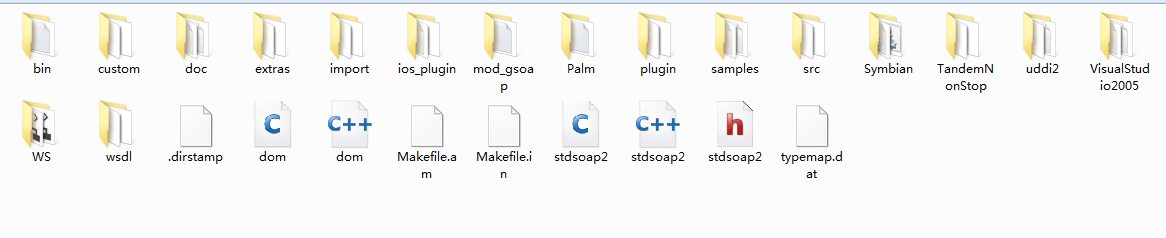
准备待导出的服务接口定义文件(比如gservice.h)
//gsoap ns service name: gservice
//gsoap ns service style: rpc
int ns__add(int num1, int num2, int* result );
int ns__sub(int num1, int num2, int* result );
int ns__mult( int num1, int num2, int *result);
int ns__divid( int num1, int num2, int *result);
新建webservice服务器端(gServer)
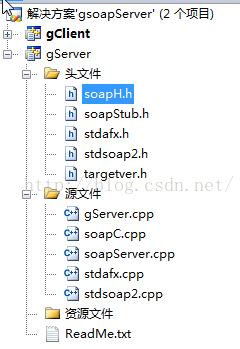
"stdio.h"
#include "soapH.h"
#include "gservice.nsmap"
main(int argc,char **argv)
{
int nPort = 8080;
struct soap fun_soap;
soap_init(&fun_soap);
int nMaster = (int)soap_bind(&fun_soap, NULL, nPort, 100);
if (nMaster < 0)
{
soap_print_fault(&fun_soap, stderr);
exit(-1);
}
{
int nSlave = (int)soap_accept(&fun_soap);
if (nSlave < 0)
{
soap_print_fault(&fun_soap, stderr);
exit(-1);
}
fprintf(stderr, "Socket connection successful : slave socket = %d\n", nSlave);
soap_serve(&fun_soap);
soap_end(&fun_soap);
}
return 0;
}
int ns__add(struct soap *soap, int num1, int num2, int* result )
{
if (NULL == result)
{
printf("Error:The third argument should not be NULL!\n");
return SOAP_ERR;
}
else
{
(*result) = num1 + num2;
return SOAP_OK;
}
return SOAP_OK;
}
/*减法的具体实现*/
int ns__sub(struct soap *soap,int num1, int num2, int* result )
{
if (NULL == result)
{
printf("Error:The third argument should not be NULL!\n");
return SOAP_ERR;
}
else
{
(*result) = num1 - num2;
return SOAP_OK;
}
return SOAP_OK;
}
/*乘法的具体实现*/
int ns__mult(struct soap *soap, int num1, int num2, int *result)
{
if (NULL == result)
{
printf("Error:The third argument should not be NULL!\n");
return SOAP_ERR;
}
else
{
(*result) = num1 * num2;
return SOAP_OK;
}
return SOAP_OK;
}
int ns__divid(struct soap *soap, int num1, int num2, int *result)
{
if (NULL == result || 0 == num2)
{
printf("Error:The second argument is 0 or The third argument is NULL!\n");
return SOAP_ERR;
}
else
{
(*result) = num1 / num2;
return SOAP_OK;
}
return SOAP_OK;
}
如能看到如下信息,说明服务器运行正常:
Source Code
新建webservice客户端(gClient)

#include "gservice.nsmap"
int main( int argc, char *argv[])
{
printf("The Client is runing...\n");
int num1 = 110;
int num2 = 11;
int result = 0;
struct soap *CalculateSoap = soap_new();
//soap_init(CalculateSoap);
char * server_addr = "http://localhost:8080";
int iRet = soap_call_ns__add(CalculateSoap,server_addr,"",num1,num2,&result);
if ( iRet == SOAP_ERR)
{
printf("Error while calling the soap_call_ns__add");
}
else
{
printf("Calling the soap_call_ns__add success。\n");
printf("%d + %d = %d\n",num1,num2,result);
}
iRet = soap_call_ns__sub(CalculateSoap,server_addr,"",num1,num2,&result);
if ( iRet == SOAP_ERR)
{
printf("Error while calling the soap_call_ns__sub");
}
else
{
printf("Calling the soap_call_ns__sub success。\n");
printf("%d - %d = %d\n",num1,num2,result);
}
iRet = soap_call_ns__mult(CalculateSoap,server_addr,"",num1,num2,&result);
if ( iRet == SOAP_ERR)
{
printf("Error while calling the soap_call_ns__mult");
}
else
{
printf("Calling the soap_call_ns__mult success。\n");
printf("%d * %d = %d\n",num1,num2,result);
}
iRet = soap_call_ns__divid(CalculateSoap,server_addr,"",num1,num2,&result);
if ( iRet == SOAP_ERR)
{
printf("Error while calling the soap_call_ns__divid");
}
else
{
printf("Calling the soap_call_ns__divid success。\n");
printf("%d / %d = %d\n",num1,num2,result);
}
soap_end(CalculateSoap);
soap_done(CalculateSoap);
free(CalculateSoap);
}
测试服务
启动服务器端gServer程序:


gsoap创建webservice服务简单教程的更多相关文章
- .NET C# 创建WebService服务简单的例子
Web service是一个基于可编程的web的应用程序,用于开发分布式的互操作的应用程序,也是一种web服务 WebService的特性有以下几点: 1.使用XML(标准通用标记语言)来作为数据交互 ...
- .NET创建WebService服务简单的例子
Web service是一个基于可编程的web的应用程序,用于开发分布式的互操作的应用程序,也是一种web服务 WebService的特性有以下几点: 1.使用XML(标准通用标记语言)来作为数据交互 ...
- webService服务简单实现
首先写一个简单的webservice服务 package com.service.impl; import java.util.Date; import javax.jws.WebService; i ...
- 根据wsdl文件用soapUi快速创建webService服务(有图有真相)
最近公司业务上使用webservice 频繁.由于之前都是自己搭建webservice 自己定义提供给别人服务,现在则相反需求都是根据人家提供的wsdl 文件来生成 我们平台需要提供的接口.刚开始不知 ...
- eclipse使用CXF3.1.*创建webservice服务端客户端以及客户端手机APP(二)
eclipse使用CXF3.1.*创建webservice服务端客户端以及客户端手机APP(二) 接上篇博客,本篇博客主要包含两个内容: 4.使用Android studio创建webservice客 ...
- eclipse使用CXF3.1.*创建webservice服务端客户端以及客户端手机APP(一)
eclipse使用CXF3.1.*创建webservice服务端客户端以及客户端手机APP(一) 本篇博客主要包含五个内容: 1.CXF换将搭建以及eclipse配置CXF. 2.eclipse创建w ...
- [转载]Java创建WebService服务及客户端实现
Java创建WebService服务及客户端实现 Java创建WebService服务及客户端实现
- VS2010使用c++、gSOAP创建WebService 图文教程
VS2010使用c++.gSOAP创建的WebService 图文教程 环境 操作系统:Windows 7gsoap版本:2.8.32C++编译器/开发环境:Visual Studio 2010 gS ...
- Java创建WebService服务及客户端实现(转)
简介 WebService是一种服务的提供方式,通过WebService,不同应用间相互间调用变的很方便,网络上有很多常用的WebService服务,如:http://developer.51cto. ...
随机推荐
- sass 与 less 的区别与学习
一直使用的都是sass,公司提出新需求要用less,看了一下less的官方文档,感觉记不住.在这我想用与sass的比较学习,加深印象.也希望可以帮助到一些人. 一.安装sass与less sass基于 ...
- ListView的性能优化
@Override public View getView(int position, View convertView, ViewGroup parent) { ViewHolder viewHol ...
- iOS开发之通知机制
1.通知中心 每一个应用程序都有一个通知中心(NSNotificationCenter)实例,专门负责协助不同对象之间的消息通信 任何一个对象都可以向通知中心发布通知(NSNotification), ...
- iOS开发之自定义UITableView的cell
系统默认的UITableViewCell的每行都有横线(分隔符),就算没有数据也是如此,有时候我们想只在有数据的地方有下划线,可以去除下划线,然后在awarkFromNid方法中使用addsubvie ...
- Unix环境编程基础下
Unix出错处理 当UNIX系统的函数出错时,通常会返回一个负值.我们判断函数的返回值小于0表示出错了,注意我们并不知道为什么出错.例如我们open一个文件,返回值-1表示打开失败,但是为什么打开失败 ...
- windows下搭建tensorflow的环境
这年头,不会点人工智能和神经网络,都不好意思跟人打招呼了.之前搞了一下sklearn,今天觉得应该要了解一下google这个传说中的人工智能开源神器. 最近终于有时间了,凡事从hello world开 ...
- 老李分享:QTP的录制原理以及实现
老李分享:QTP的录制原理以及实现 poptest是国内唯一一家培养测试开发工程师的培训机构,以学员能胜任自动化测试,性能测试,测试工具开发等工作为目标.如果对课程感兴趣,请大家咨询qq:9088 ...
- jQ伪类选择器
<!DOCTYPE html><html> <head> <meta charset="UTF-8"> <title>& ...
- 学习HTML5的第二周
---恢复内容开始--- 这是我学习H5的第二周,在本周,我独立完成了一个网站的首页和一个二级页,虽然在做网页的时候我遇到了许多问题,但我自己想办法解决了其中的大部分,只留下了一小部分没有头绪的问题等 ...
- 2017携程Web前端实习生招聘笔试题总结
考察encodeURI encodeURI(), decodeURI()它们都是Global对象的方法. encodeURI()通过将某些字符的每个实例替换代表字符的UTF-8编码的一个或多个转义字符 ...