
【SpringCloud】 第十篇: 高可用的服务注册中心
前言:
必需学会SpringBoot基础知识
简介:
spring cloud 为开发人员提供了快速构建分布式系统的一些工具,包括配置管理、服务发现、断路器、路由、微代理、事件总线、全局锁、决策竞选、分布式会话等等。它运行环境简单,可以在开发人员的电脑上跑。
工具:
JDK8
apache-maven-3.5.2
IntelliJ IDEA 2017.3 x64
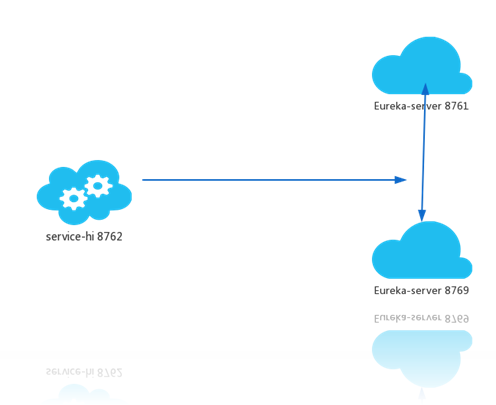
文章 SpringCloud 教程 第一篇: 服务的注册与发现(Eureka) 介绍了服务注册与发现,其中服务注册中心Eureka Server,是一个实例,当成千上万个服务向它注册的时候,它的负载是非常高的,这在生产环境上是不太合适的,这篇文章主要介绍怎么将Eureka Server集群化。
一、准备工作
创建三个实例:
- eureka-server-peer1
- eureka-server-peer2
- eureka-server-peer3
二、Code.View
2.0 peer*
<?xml version="1.0" encoding="UTF-8"?>

<project xmlns="http://maven.apache.org/POM/4.0.0" xmlns:xsi="http://www.w3.org/2001/XMLSchema-instance"

         xsi:schemaLocation="http://maven.apache.org/POM/4.0.0 http://maven.apache.org/xsd/maven-4.0.0.xsd">

    <modelVersion>4.0.0</modelVersion>

    <groupId>com.lwc</groupId>

    <artifactId>eureka-server-peer1</artifactId>

    <version>0.0.1-SNAPSHOT</version>

    <packaging>jar</packaging>

    <name>eureka-server-peer1</name>

    <description>Demo project for Spring Boot</description>

    <parent>

        <groupId>org.springframework.boot</groupId>

        <artifactId>spring-boot-starter-parent</artifactId>

        <version>1.5.10.RELEASE</version>

        <relativePath/> <!-- lookup parent from repository -->

    </parent>

    <properties>

        <project.build.sourceEncoding>UTF-8</project.build.sourceEncoding>

        <project.reporting.outputEncoding>UTF-8</project.reporting.outputEncoding>

        <java.version>1.8</java.version>

        <spring-cloud.version>Edgware.SR3</spring-cloud.version>

    </properties>

    <dependencies>

        <dependency>

            <groupId>org.springframework.cloud</groupId>

            <artifactId>spring-cloud-starter-eureka-server</artifactId>

        </dependency>

        <dependency>

            <groupId>org.springframework.boot</groupId>

            <artifactId>spring-boot-starter-test</artifactId>

            <scope>test</scope>

        </dependency>

    </dependencies>

    <dependencyManagement>

        <dependencies>

            <dependency>

                <groupId>org.springframework.cloud</groupId>

                <artifactId>spring-cloud-dependencies</artifactId>

                <version>${spring-cloud.version}</version>

                <type>pom</type>

                <scope>import</scope>

            </dependency>

        </dependencies>

    </dependencyManagement>

    <build>

        <plugins>

            <plugin>

                <groupId>org.springframework.boot</groupId>

                <artifactId>spring-boot-maven-plugin</artifactId>

            </plugin>

        </plugins>

    </build>

</project>
2.1 peer1
package com.lwc;

import org.springframework.boot.SpringApplication;

import org.springframework.boot.autoconfigure.SpringBootApplication;

import org.springframework.cloud.netflix.eureka.server.EnableEurekaServer;

/**

 * @author Eddie

 */

@EnableEurekaServer

@SpringBootApplication

public class EurekaServerPeer1Application {

    public static void main(String[] args) {

        SpringApplication.run(EurekaServerPeer1Application.class, args);

    }

}
server:

  port: 8861

spring:

  application:

      name: eureka-server-peer1

  profiles:

    active: peer1

eureka:

  instance:

    hostname: eureka-server-peer1

  client:

    registerWithEureka: false

    fetchRegistry: false

    serviceUrl:

      defaultZone: http://eureka-server-peer2:8862/eureka/,http://eureka-server-peer3:8863/eureka/
2.2 peer2
package com.lwc;

import org.springframework.boot.SpringApplication;

import org.springframework.boot.autoconfigure.SpringBootApplication;

import org.springframework.cloud.netflix.eureka.server.EnableEurekaServer;

/**

 * @author Eddie

 */

@EnableEurekaServer

@SpringBootApplication

public class EurekaServerPeer2Application {

    public static void main(String[] args) {

        SpringApplication.run(EurekaServerPeer2Application.class, args);

    }

}
server:

  port: 8862

spring:

  application:

      name: eureka-server-peer2

  profiles:

    active: peer2

eureka:

  instance:

    hostname: eureka-server-peer2

  client:

    registerWithEureka: false

    fetchRegistry: false

    serviceUrl:

      defaultZone: http://eureka-server-peer2:8861/eureka/,http://eureka-server-peer3:8863/eureka/
2.3 peer3
package com.lwc;

import org.springframework.boot.SpringApplication;

import org.springframework.boot.autoconfigure.SpringBootApplication;

import org.springframework.cloud.netflix.eureka.server.EnableEurekaServer;

/**

 * @author Eddie

 */

@EnableEurekaServer

@SpringBootApplication

public class EurekaServerPeer3Application {

    public static void main(String[] args) {

        SpringApplication.run(EurekaServerPeer3Application.class, args);

    }

}
server:

  port: 8863

spring:

  application:

      name: eureka-server-peer3

  profiles:

    active: peer3

eureka:

  instance:

    hostname: eureka-server-peer3

  client:

    registerWithEureka: false

    fetchRegistry: false

    serviceUrl:

      defaultZone: http://eureka-server-peer2:8862/eureka/,http://eureka-server-peer3:8861/eureka/
2.4 改造 eureka-client
package com.lwc.controller;

import org.springframework.beans.factory.annotation.Autowired;

import org.springframework.cloud.client.ServiceInstance;

import org.springframework.cloud.client.discovery.DiscoveryClient;

import org.springframework.web.bind.annotation.GetMapping;

import org.springframework.web.bind.annotation.RequestMapping;

import org.springframework.web.bind.annotation.RequestParam;

import org.springframework.web.bind.annotation.RestController;

import java.util.ArrayList;

import java.util.HashMap;

import java.util.List;

import java.util.Map;

/**

 * @author eddie.lee

 * @Package com.lwc.controller

 * @ClassName EurekaClientController

 * @description

 * @date created in 2018-03-26 17:19

 * @modified by

 */

@RestController

@RequestMapping("/eureka")

public class EurekaClientController {

    @Autowired

    private DiscoveryClient discoveryClient;

    @GetMapping("/client")

    public String home(@RequestParam String name) {

        List<Map<String, Object>> list = new ArrayList<>();

        Map<String, Object> map = new HashMap<>(16);

        List<String> stringList = discoveryClient.getServices();

        stringList.forEach(str -> {

            List<ServiceInstance> serviceInstances = discoveryClient.getInstances(str);

            serviceInstances.forEach(ins -> {

                map.put("host", ins.getHost());

                map.put("port", ins.getPort());

                map.put("serviceId", ins.getServiceId());

                map.put("uri", ins.getUri());

                list.add(map);

            });

        });

        String url = null;

        for (Map<String, Object> m : list) {

            for (String k : m.keySet()) {

                System.out.println(k + " : " + m.get(k));

                url = "欢迎点击:  "+m.get("uri") + "/eureka/client?name=" + name;

            }

        }

        return url;

    }

}
eureka:

  client:

    serviceUrl:

      #defaultZone: http://localhost:8761/eureka/

      defaultZone: http://eureka-server-peer1:8861/eureka/

server:

  port: 8762
三、测试
启动:
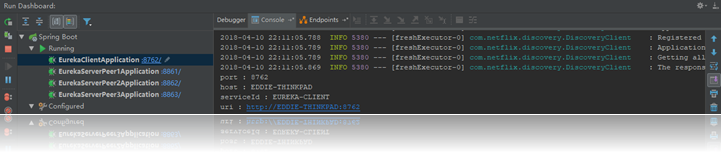
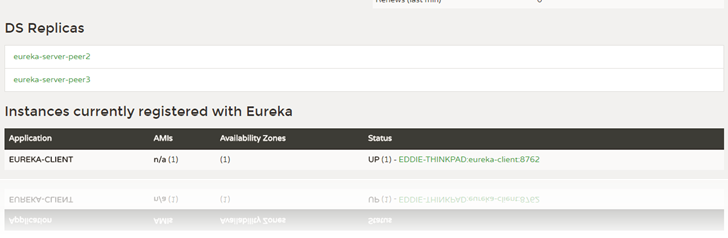
最后改造 client 是为了让大家学习一下获取信息,访问: http://localhost:8762/eureka/client?name=eddie
欢迎点击: http://EDDIE-THINKPAD:8762/eureka/client?name=eddie
题外话:
也可以通过原来第一篇的项目结构, 修改配置文件的端口达到效果;
1. 通过Maven打包之后
2. CMD下运行:
java -jar eureka-server-0.0.1-SNAPSHOT.jar - -spring.profiles.active=peer1
java -jar eureka-server-0.0.1-SNAPSHOT.jar - -spring.profiles.active=peer2
3. 在运行:
java -jar eureka-client-0.0.1-SNAPSHOT.jar
技巧:
eureka.instance.preferIpAddress=true是通过设置ip让eureka让其他服务注册它。也许能通过去改变去通过改变host的方式。
原理:
peer1 8861,peer2 8862,peer2 8863 相互感应,当有服务注册时,两个Eureka-server是对等的,它们都存有相同的信息,这就是通过服务器的冗余来增加可靠性,当有一台服务器宕机了,服务并不会终止,因为另一台服务存有相同的数据。
三、源码下载
标签 10-1
https://github.com/eddie-code/SpringCloudDemo
【SpringCloud】 第十篇: 高可用的服务注册中心的更多相关文章
- 史上最简单的SpringCloud教程 | 第十篇: 高可用的服务注册中心(Finchley版本)
转载请标明出处: 原文首发于 https://www.fangzhipeng.com/springcloud/2018/08/30/sc-f10-eureka/ 本文出自方志朋的博客 文章 史上最简单 ...
- SpringCloud教程 | 第十篇: 高可用的服务注册中心
版权声明:本文为博主原创文章,欢迎转载,转载请注明作者.原文超链接 ,博主地址:http://blog.csdn.net/forezp. http://blog.csdn.net/forezp/art ...
- 微服务配置内容《网上copy》=========》如何创建一个高可用的服务注册中心
前言:首先要知道什么是一个高可用的服务注册中心,基于spring boot建成的服务注册中心是一个单节点的服务注册中心,这样一旦发生了故障,那么整个服务就会瘫痪,所以我们需要一个高可用的服务注册中心, ...
- SpringCloud 教程 (三)高可用的服务注册中心
一.准备工作 Eureka can be made even more resilient and available by running multiple instances and asking ...
- springcloud 高可用的服务注册中心
https://blog.csdn.net/forezp/article/details/81041101 上面是方老师的博客,看liuyan也有好多同学不是很清楚,这里自己也记录一下具体的做法. 1 ...
- 搭建高可用的Eureka注册中心
搭建高可用的Eureka注册中心 一.搭建高可用的Eureka的作用 当服务器因种种原因导致Eureka注册中心(后面简称Eureka)服务当机(服务器跪了,异常关闭停止服务).这样就会影响到整个业务 ...
- 【SpringCloud】第七篇: 高可用的分布式配置中心(Spring Cloud Config)
前言: 必需学会SpringBoot基础知识 简介: spring cloud 为开发人员提供了快速构建分布式系统的一些工具,包括配置管理.服务发现.断路器.路由.微代理.事件总线.全局锁.决策竞选. ...
- SpringCloud教程 | 第七篇: 高可用的分布式配置中心(Spring Cloud Config)(Finchley版本)
上一篇文章讲述了一个服务如何从配置中心读取文件,配置中心如何从远程git读取配置文件,当服务实例很多时,都从配置中心读取文件,这时可以考虑将配置中心做成一个微服务,将其集群化,从而达到高可用,架构图如 ...
- SpringCloud教程 | 第七篇: 高可用的分布式配置中心(Spring Cloud Config)
版权声明:本文为博主原创文章,欢迎转载,转载请注明作者.原文超链接 ,博主地址:http://blog.csdn.net/forezp. http://blog.csdn.net/forezp/art ...
随机推荐
- 【转】计算Java List中的重复项出现次数
本文演示如何使用Collections.frequency和Map来计算重复项出现的次数.(Collections.frequency在JDK 1.5版本以后支持) package com.qiyad ...
- usb入门学习
1.学习资源: usb org.http://www.beyondlogic.org/usbnutshell/usb3.shtml http://wenku.baidu.com/view/028231 ...
- Epub 阅读器 - iOS
因项目需求接触的 EPub 阅读器,前前后后尝试了很多库,最后找到了个相对兼容不错的展开了调试;其中对解压缩和数据加载方面进行了改造优化,使其更加的完美; 其大概原理是首先将 epub 文件解压后得到 ...
- Spring知识点小结(四)
一.JdbcTemplate(jdbc模版--抽取的工具) web阶段DBUtils: QueryRunner runner = new QueryRunner(dataSource); ...
- chromium之message_pump_win之一
写了22篇博文,终于到这里了———— MessagePumpWin!!! MessagePumpWin这个类还是挺复杂的,可以分成好几部分.接下来分块分析 从介绍看,MessagePumpWin 是M ...
- Mysql基于Linux上的安装
MySQL 在Linux/Unix安装 所有平台的 MySQL 下载地址为: MySQL 下载 . 挑选需要的 MySQL Community Server 版本及对应的平台. 注意:安装过程需要通过 ...
- node的安装和配置
一 . 直接安装node 1. http://nodejs.cn/download/ 根据自己的电脑选择适合的安装包 2.安装 , 无脑下一步 , 可以选择安装路径 , 但是一定要记住 . 3.命令行 ...
- TinyMCE:下载、安装、配置
第一步:下载 官网下载:https://www.tiny.cloud/download/ TinyMCE从4.0开始,不再支持直接下载,而是直接使用提供免费的CDN,让用户免除安装过程,可以在网站中使 ...
- 用Head方法获得百度搜索结果的真实地址
用Head方法获得百度搜索结果的真实地址 在百度中搜索"Java",第一条结果的链接为: https://www.baidu.com/link?url=HBOOMbhPKH4SfI ...
- Python系列之入门篇——pytables及其客户端
pytables及其客户端查看 pytables # ubuntu sudo apt-get install python-tables pip install flask flask-httpaut ...