
python中正则表达式re模块详解
正则表达式是处理字符串的强大工具,它有自己特定的语法结构,有了它,实现字符串的检索,替换,匹配验证都不在话下。
当然,对于爬虫来说,有了它,从HTML里提取想要的信息就非常方便了。
先看一下常用的匹配规则:
\w:匹配字母、数字及下划线
\W:匹配不是字母、数字及下划线
\s:匹配任意空白字符,等价于[\t\n\r\f]
\S:匹配任意非空字符
\d:匹配任意数字,等价于[0-9]
\D:匹配任意飞数字的字符
\A:匹配字符串开头
\Z:匹配字符串结尾,如果存在换行,只匹配到换行前得结束字字符串
\z:匹配字符串结尾,如果存在换行,同时还会匹配换行符
\G:匹配最后匹配完成的位置
\n:匹配一个换行符
\t:匹配一个制表符
^ 匹配一行字符串的开头
$ 匹配一行字符串的结尾
. 匹配任意字符,除了换行符
[...]:用来表示一组字符,单独列出,比如[amk]匹配a,m或k
[^...]:不在[]的字符,比如[^abc]匹配除了a,b,c的字符
*:匹配0个或多个表达式
+:匹配1个或多个表达式
?:匹配0个或一个前面的正则表达式定义的片段,非贪婪方式
{n}:精确匹配n个前面的表达式
{n:m}:匹配n到m次由前面正则表达式定义的片段,贪婪方式
a|b:匹配a或b
(): 匹配括号内的表达式,也表示一个组
python中的re模块主要有五种方法re.match(),re.search(),re.finall(),re.sub(),re.compile()
re.match():从字符串的起始位置匹配正则表达式,如果匹配,就返回匹配成功的结果
re.search():匹配时扫描整个字符串,然后返回第一个成功匹配的字符
re.findall():获取匹配正则表达式的所有内容
re.sub():修改字符串的文本
re.compile():可以将正则字符串编译成正则表达式对象
下面我们来具体看一些例子
re.match()的详细用法:
import re

con='Hello 123 4567 World_This is a Regex Demo'

print(len(con))

result=re.match('^Hello\s\d\d\d\s\d{4}\s\w{10}',con)

print(result)

print(result.group())

print(result.span())

result=re.match('^Hello\s(\d+)\s(\d+)\sWorld',con)

print(result)

print(result.group())

print(result.group(1),result.group(2))

print(result.span())

result=re.match('^Hello.*Demo',con)

print(result)

print(result.group())

print(result.span())

result=re.match('^He.*?(\d+).*Demo',con)

print(result)

print(result.group(1))

con1='http://weibo.com/comment/ltf'

result1=re.match('^http.*?comment/(.*?)',con1)

result2=re.match('^http.*?comment/(.*)',con1)

print(result1.group(1))

print(result2.group(1))

con2='''Hello 123 4567 World_This

is a Regex Demo'

'''

result=re.match('Hell.*?(\d+).*?Demo',con2,re.S)

print(result)

print(result.group(1))

con3='(百度)www.baidu.com'

result=re.match('\(百度\)www\..*?\..*',con3)

print(result)

print(result.group())
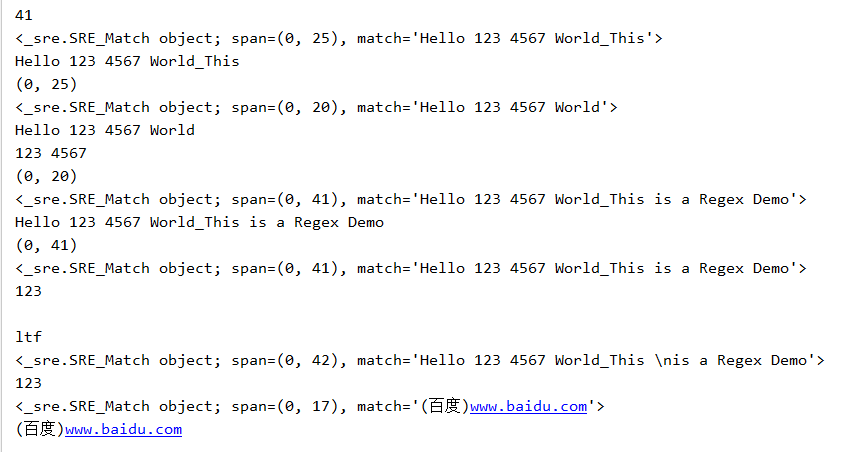
运行结果如下:
re的search,findall,sub,compile用法:
代码如下:
import re

con='EXO hero Hello 123 4567 World_This is a Regex Demo'

result=re.search('Hell.*?Demo',con)

print(result)

print(result.group())

html=''''

<li>

<input type="checkbox" value="9762@" name="Url" class="check">

<span class="songNum ">24.</span>

<a target="_1" href="/play/9762.htm" class="songName ">一生有你 </a>

</li>

<li>

<input type="checkbox" value="2247@" name="Url" class="check">

<span class="songNum ">25.</span>

<a target="_1" href="/play/2247.htm" class="songName ">红豆 </a>

</li>

<li>

<input type="checkbox" value="671@" name="Url" class="check">

<span class="songNum ">26.</span>

<a target="_1" href="/play/671.htm" class="songName ">真的爱你 </a>

</li>

<li>

<input type="checkbox" value="22985@" name="Url" class="check">

<span class="songNum ">27.</span>

<a target="_1" href="/play/22985.htm" class="songName ">容易受伤的女人 </a>

</li>

<li>

<input type="checkbox" value="649@" name="Url" class="check">

<span class="songNum ">28.</span>

<a target="_1" href="/play/649.htm" class="songName ">海阔天空 </a>

</li>

<li>

<input type="checkbox" value="1545@" name="Url" class="check">

<span class="songNum ">29.</span>

<a target="_1" href="/play/1545.htm" class="songName cRed">同桌的你 </a>

</li>

'''

result=re.search('li.*?songNum ">(.*?)</span>.*?>(.*?)</a>',html,re.S)

#print(result)

#print(result.group())

print(result.group(1))

print(result.group(2))

results=re.findall('li.*?songNum ">(.*?)</span>.*?>(.*?)</a>',html,re.S)

print(results)

print(results[0])

conte='ahfgi123ahfuo358bjhif134'

conten=re.sub('\d+',' afanti ',conte)

print(conten)

content1='2015-9-12 12:00'

content2='2016-12-22 13:55'

content3='2017-10-1 11:40'

pattern=re.compile('\d{2}:\d{2}')

print(pattern)

result1=re.sub(pattern,'',content1)

result2=re.sub(pattern,'',content2)

result3=re.sub(pattern,'',content3)

print(result1,result2,result3)
运行结果:

以上就是python中的正则表达式的详细用法了。
python中正则表达式re模块详解的更多相关文章
- Python Deque 模块使用详解,python中yield的用法详解
Deque模块是Python标准库collections中的一项. 它提供了两端都可以操作的序列, 这意味着, 你可以在序列前后都执行添加或删除. https://blog.csdn.net/qq_3 ...
- Python中的高级数据结构详解
这篇文章主要介绍了Python中的高级数据结构详解,本文讲解了Collection.Array.Heapq.Bisect.Weakref.Copy以及Pprint这些数据结构的用法,需要的朋友可以参考 ...
- Python 单向队列Queue模块详解
Python 单向队列Queue模块详解 单向队列Queue,先进先出 '''A multi-producer, multi-consumer queue.''' try: import thread ...
- Kali linux 2016.2(Rolling)中的payloads模块详解
不多说,直接上干货! 前期博客 Kali linux 2016.2(Rolling)中的Exploits模块详解 payloads模块,也就是shellcode,就是在漏洞利用成功后所要做的事情.在M ...
- Python中格式化format()方法详解
Python中格式化format()方法详解 Python中格式化输出字符串使用format()函数, 字符串即类, 可以使用方法; Python是完全面向对象的语言, 任何东西都是对象; 字符串的参 ...
- python中的tcp示例详解
python中的tcp示例详解 目录 TCP简介 TCP介绍 TCP特点 TCP与UDP的不同点 udp通信模型 tcp客户端 tcp服务器 tcp注意点 TCP简介 TCP介绍 TCP协议 ...
- (转)python之os,sys模块详解
python之sys模块详解 原文:http://www.cnblogs.com/cherishry/p/5725184.html sys模块功能多,我们这里介绍一些比较实用的功能,相信你会喜欢的,和 ...
- python中的 zip函数详解
python中zip()函数用法举例 定义:zip([iterable, ...]) zip()是Python的一个内建函数,它接受一系列可迭代的对象作为参数,将对象中对应的元素打包成一个个tuple ...
- python中的buildin函数详解(第一篇)
这会是很长的一个帖子,因为我打算从python最基础的东西开始,尝试去完全的掌握它,buildin中有一些常用的函数比如 abs, open, setattr, getattr, 大家都很了解他们的用 ...
随机推荐
- 使用DIDatepicker
使用DIDatepicker https://github.com/noxt/DIDatepicker 效果: #import "DIViewController.h" #impo ...
- lua的面向对象实现
百度搜索一下,给出出的解决方案和学习帖子很多,可是我还是有很多的问题! (1)什么是面向对象? (2)lua中怎么实现面向对象? (3)什么样的实现既简单又能完成我的功能? (4)一定要按照c++的方 ...
- mongodb 启动
>mongod.exe --dbpath C:\Environ\mongodb-3.0.6\data\db >mongod.exe --logpath "C:\Environ\ ...
- docker commit 显示“invalid reference format”
docker commit的时候一直显示invalid reference format,改了几次也不行,后来发现是因为docker镜像的名字中不能包含大写字母,改成小写后就行了
- linux命令整理
Linux系统命令 1. ls 查看某个 目录下 所有文件的大小总和 ls -lR| awk 'BEGIN{size=0;} /^[-l]/{size+=$5;print $0;} END{print ...
- python StringIO&BytesIO
StringIO StringIO就是在内存中读写str 要把str写入StringIO,先创建一个StringIO >>> from io import StringIO>& ...
- 修改virtual box中ubuntu lubuntu 的分辨率
Step1 先用xrandr命令查看能够支持的分辨率 Step2 xrandr --output VGA-1 --size 1280x800 Step3 重启电脑
- easyui学习笔记1—增删改操作
最近公司要用easyui,这里自己看了官网几篇文章,遇到些问题,大多数的问题都是敲代码的时候笔误,其他有些地方确实需要注意一下,这里做些笔记. 1.在mysql中建好表之后修改id字段为递增字段,发现 ...
- 【剑指offer】字符串的组合
版权声明:本文为博主原创文章,未经博主同意不得转载. https://blog.csdn.net/mmc_maodun/article/details/26405471 转载请注明出处:http:// ...
- UVa 1635 - Irrelevant Elements(二项式系数 + 唯一分解定理)
链接: https://uva.onlinejudge.org/index.php?option=com_onlinejudge&Itemid=8&page=show_problem& ...