
实现一个可以实时提示的textarea组件
该组件输入、换行、变换光标可以实时给出提示
效果:
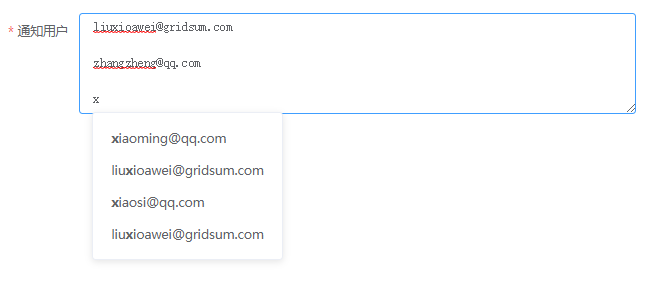
textarea.vue
<template>

  <div>

    <el-input

      id="user-input"

      type="textarea"

      placeholder="请换行输入不同的通知用户"

      :autosize="{minRows: 2, maxRows: 10}"

      v-model="inputValue"

      @blur="closeHint"

      @input="settingHint"

      @click.native="settingHint"

      @keyup.native="disposeKey">

    </el-input>

    <input-hint

      :all-items="hintItems"

      :position = 'hintPosition'

      @select = "replaceStr"

    ></input-hint>

  </div>

</template>

<script lang="ts">

import { Vue, Component, Prop } from "vue-property-decorator";

import InputHint from "./inputHint.vue";

import $ from "jquery";

@Component({

  components: {

    InputHint

  }

})

export default class AdvancedTextarea extends Vue {

  inputValue: string = '';

  Seprator = "\n";

  allUsers: string[] = [];

  hintItems: string[] = []; //传入提示框的项,可以是html字符串;为空则表示不显示提示框

  initPosition = { //输入框的信息,用于计算提示框位置

    left: 15,

    top: 5,

    rowHeight: 20,  //一行的高度

    fontSize: 7  //一个字的宽度

  }

  hintPosition = {

    left: this.initPosition.left,

    top: this.initPosition.top

  }

  //按上下左右键时,重置提示框

  disposeKey(e) {

    if (e.keyCode === 37 || e.keyCode === 38 || e.keyCode === 39 || e.keyCode === 40) {

      this.settingHint();

    }

  }

  settingHint(val?) {

    let cursorLocation = $('#user-input').caret(); //光标位置

    let newStr = this.inputValue.slice(0, cursorLocation);  //输入框光标前的字符

    let newArr = newStr.split(this.Seprator);

    let searchKey = newArr.length === 0 ? "" : newArr[newArr.length - 1];

    let regExp = new RegExp(searchKey, 'ig');

    this.hintItems = searchKey ?

      this.allUsers.filter(item => item.indexOf(searchKey) !== -1).map(item => item.replace(regExp, `<strong>${searchKey}</strong>`)) :

      this.allUsers;

    this.hintPosition.left = this.initPosition.left + this.initPosition.fontSize * (searchKey.length > 0 ? searchKey.length - 1 : 0);

    this.hintPosition.top = this.initPosition.top + this.initPosition.rowHeight * (newArr.length > 10 ? 10 : newArr.length);

  }

  closeHint() {

    //延后关闭是因为立即关闭的话,点击提示框内容就无法触发点击事件

    window.setTimeout(() => {

      this.hintItems = null;

      window.clearTimeout();

    }, 200);

  }

  //将光标当前值替换为选中值

  replaceStr(val) {

    let cursorLocation = $('#user-input').caret(); //光标位置

    let newStr = this.inputValue.slice(0, cursorLocation);  //输入框光标前的字符

    let row = newStr.split(this.Seprator).length - 1;  //光标所在行

    let oriArr = this.inputValue.split(this.Seprator);

    oriArr[row] = val;

    this.inputValue = oriArr.join(this.Seprator);

    $('#user-input').focus();

  }

  getAllUsers() {

    this.allUsers = [

      'xiaoming@qq.com',

      'daming@163.com',

      'liuxioawei@gridsum.com',

      '432454354@qq.com',

      'zhangzheng@qq.com',

      'mostlove@163.com',

      'wangweihao@gridsum.com',

      '67900332@qq.com',

      'xiaosi@qq.com',

      'loveshuang@163.com',

      'liuxioawei@gridsum.com',

      '87456563@qq.com',

      'yaru@qq.com',

      'wuyuetian@163.com',

      'junjun@gridsum.com',

      '67576889@qq.com',

      'shuanger@qq.com',

      'she@163.com',

      'ruiji@gridsum.com',

      '45454334@qq.com',

    ]

  }

  mounted() {

    if (this.allUsers.length === 0) {

      this.getAllUsers();

    }

  }

}

</script>
inputHint.vue
<template>

  <div v-show="allItems&&allItems.length!==0">

    <ul class="el-dropdown-menu el-popper max-height new-scoll-bar" :style="{left: position.left+'px', top: position.top+'px'}">

        <li class="el-dropdown-menu__item" v-for="(item,index) in allItems" :key="index" v-html="item" @click="selectItem(item)"></li>

    </ul>

  </div>

</template>

<style lang="postcss" scoped>

.max-height {

  max-height: 250px;

  overflow-y: auto;

}

</style>

<script lang="ts">

import { Vue, Component } from "vue-property-decorator";

@Component({

  props: {

    allItems: {

      type: Array,

      default: []

    },

    position: {

      type: Object,

      default: {

        left: 0,

        top: 0

      }

    }

  }

})

export default class InputHint extends Vue {

  allItems = this.allItems;

  selectItem(item: string) {

    let regExp = /<strong>|<\/strong>/g;

    let str = item.replace(regExp, '');

    this.$emit('select', str)

  }

}

</script>
实现一个可以实时提示的textarea组件的更多相关文章
- 写一个可插入自定义标签的 Textarea 组件
- “插入自定义标签是什么鬼?” - “比如你要插入一个<wise></wise>的标签...” - “什么情况下会有这种需求?” - “得罪了产品的情况下...” 一.需求背 ...
- Vue父组件向子组件传递一个动态的值,子组件如何保持实时更新实时更新?
原文:https://blog.csdn.net/zhouweixue_vivi/article/details/78550738 2017年11月16日 14:22:50 zhouweixue_vi ...
- uni-app中textarea组件
textarea组件,官方给出的监听事件有以下事件: 其中一定要注意,当使用 v-model 对表单内容进行双向绑定的时候,@input 事件是在绑定变量变化前触发的,所以如果在input事件内打印绑 ...
- jquery的实时触发事件(textarea实时获取中文个数)
jquery的实时触发事件(textarea实时获取中文个数) (2014-09-16 11:49:50) 转载▼ 标签: 实时触发事件 中文个数 onpropertychange oninput o ...
- 使用SignalR ASP.NET Core来简单实现一个后台实时推送数据给Echarts展示图表的功能
什么是 SignalR ASP.NET Core ASP.NET Core SignalR 是一种开放源代码库,可简化将实时 web 功能添加到应用程序的功能. 实时 web 功能使服务器端代码可以立 ...
- 微信小程序input组件抖动及textarea组件光标错位解决方案
问题一: 使用微信小程序input组件时,在移动端唤起focus或blur事件时,因光标占位导致内容出现叠影及抖动现象. 解决方案: 用<textarea>组件代替了<input/& ...
- artDialog是一个基于javascript编写的对话框组件,它拥有精致的界面与友好的接口
artDialog是一个基于javascript编写的对话框组件,它拥有精致的界面与友好的接口 自适应内容 artDialog的特殊UI框架能够适应内容变化,甚至连外部程序动态插入的内容它仍然能自适应 ...
- Puer是一个可以实时编辑刷新的前端服务器
##Puer是一个可以实时编辑刷新的前端服务器 确保你安装了nodejs(现在还有没nodejs环境的前端? 拖出去喂狗吧) 使用npm全局安装puer命令 npm install puer -g 输 ...
- JStorm 是一个分布式实时计算引擎
alibaba/jstorm JStorm 是一个分布式实时计算引擎. JStorm 是一个类似Hadoop MapReduce的系统, 用户按照指定的接口实现一个任务,然后将这个任务递交给JStor ...
随机推荐
- JavaWeb——升级赛-学生成绩管理系统(1)jsp---19.01.03
add.jsp <%@ page language="java" contentType="text/html; charset=UTF-8" pa ...
- 滑雪_KEY
滑雪 ( skiing.pas/c/cpp) [题目描述] MM 参加一个滑雪比赛,滑雪场是一个 N×M 的矩形, MM 要从起点( 1, 1)滑到( N,M).矩形中每个单位格子有一个海拔高度值 h ...
- Hive窗口函数之LAG、LEAD、FIRST_VALUE、LAST_VALUE的用法
一.创建表: create table windows_ss ( polno string, eff_date string, userno string ) ROW FORMAT DELIMITED ...
- java nio之Buffer
一.JAVA NIO 是在和channel交互的时候使用的.Channel将数据读入缓冲区,然后我们又从缓冲区访问数据.写数据时,首先将要发送的数据按顺序填入缓冲区.基本上,缓冲区只是一个列表,它的所 ...
- springboot之redis的应用
1.redis是一个key-value存储系统.和Memcached类似,它支持存储的value类型相对更多,包括string(字符串).list(链表).set(集合).zset(sorted se ...
- 网易云易盾与A10 Networks达成战略合作 携手打造抗DDoS攻击的解决方案
欢迎访问网易云社区,了解更多网易技术产品运营经验. 2018年9月,网易云易盾宣布,与智能和自动化网络安全解决方案提供商A10 Networks结成战略合作伙伴关系.双方将在抗DDoS攻击领域展开深入 ...
- mysql数据库目录存放位置更改
http://haowen.blog.51cto.com/3486731/1274721 mysql数据库存储路径更改 使用了VPS一段时间之后发现磁盘空间快满了.本人的VPS在购买的时候买了500g ...
- 从零学习安全测试,从XSS漏洞攻击和防御开始
WeTest 导读 本篇包含了XSS漏洞攻击及防御详细介绍,包括漏洞基础.XSS基础.编码基础.XSS Payload.XSS攻击防御. 第一部分:漏洞攻防基础知识 XSS属于漏洞攻防,我们要研究 ...
- 「专题训练」k-Tree(CodeForces Round #247 Div.2 C)
题意与分析(Codeforces-431C) 题意是这样的:给出K-Tree--一个无限增长的树,它的每个结点都恰有\(K\)个孩子,每个节点到它\(K\)个孩子的\(K\)条边的权重各为\(1,2, ...
- 「日常训练」Jin Yong’s Wukong Ranking List(HihoCoder-1870)
题意与分析 2018ICPC北京站A题. 题意是这样的,给定若干人的武力值大小(A B的意思是A比B厉害),问到第几行会出现矛盾. 这题不能出现思维定势,看到矛盾就是矛盾并查集--A>B.A&g ...