
java连接elastic search 9300
java连接elastic search
导入jar包:https://www.elastic.co/guide/en/elasticsearch/client/java-api/5.5/_maven_repository.html
注意,使用的jar包版本尽量与所连的els版本一致
创建连接:https://www.elastic.co/guide/en/elasticsearch/client/java-api/5.5/transport-client.html
查询:https://www.elastic.co/guide/en/elasticsearch/client/java-api/5.5/java-search.html
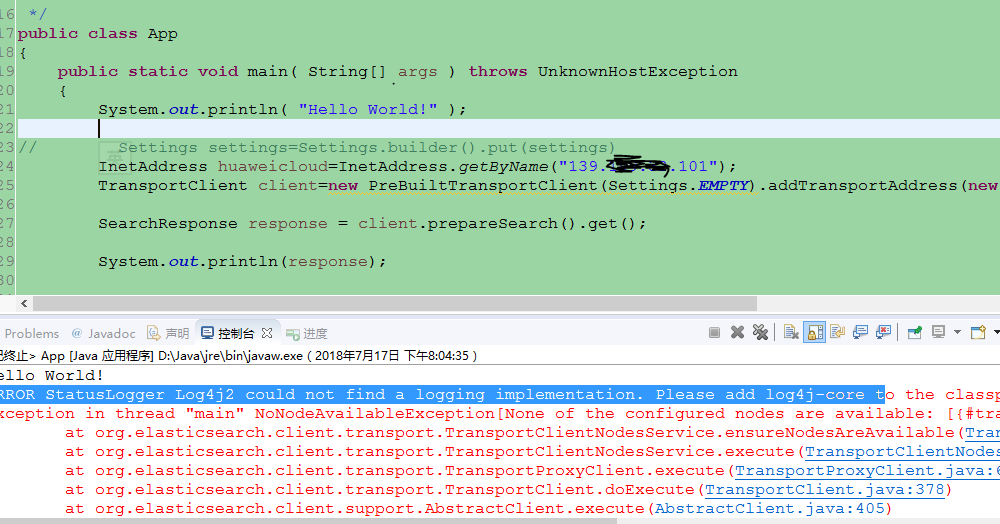
发现两个错误:
ERROR StatusLogger Log4j2 could not find a logging implementation. Please add log4j-core to the classpath. Using SimpleLogger to log to the console...
错误原因:java连接els用到了log4j2,所以需要log4j2-core的依赖
解决办法:添加log4j2-core依赖
https://www.elastic.co/guide/en/elasticsearch/client/java-api/5.5/_log4j_2_logger.html
NoNodeAvailableException[None of the configured nodes are available: [{#
错误原因:创建连接时需要配置cluster_name。
elasticsearch服务器的cluster_name可以在#els_home#/config/elasticsearch.yml文件中配置。

然后在java客户端程序中将
TransportClient client=new PreBuiltTransportClient(Settings.EMPTY).addTransportAddress(new InetSocketTransportAddress(InetAddress.getByName("139.199.32.101"),9300));
改为
Settings settings=Settings.builder().put("cluster.name","production").build();
TransportClient client=new PreBuiltTransportClient(settings).addTransportAddress(new InetSocketTransportAddress(InetAddress.getByName("139.199.32.101"),9300));
JAVA客户端代码:
package com.tpot.DataDownload;

import java.net.InetAddress;

import java.net.UnknownHostException;

//import org.elasticsearch.action.bulk.BulkRequestBuilder;

import org.elasticsearch.action.search.SearchResponse;

import org.elasticsearch.client.Client;

import org.elasticsearch.client.transport.TransportClient;

import org.elasticsearch.common.settings.Settings;

//import org.elasticsearch.common.transport.TransportAddress;

import org.elasticsearch.common.transport.InetSocketTransportAddress;

import org.elasticsearch.transport.client.PreBuiltTransportClient;

/**

 * Hello world!

 *

 */

public class App

{

    public static void main( String[] args ) throws UnknownHostException

    {

        System.out.println( "Hello World!" );

        //连接+配置

        Settings settings=Settings.builder().put("cluster.name","production").build();

        TransportClient client=new PreBuiltTransportClient(settings).addTransportAddress(new InetSocketTransportAddress(InetAddress.getByName("139.xxx.xxx.101"),9300));

        //查询

        SearchResponse response = client.prepareSearch().get();

        System.out.println(response);

        //关闭连接

        client.close();

    }

}
pom.xml文件中添加的依赖:
  <dependency>
      <groupId>org.elasticsearch.client</groupId>
      <artifactId>transport</artifactId>
      <version>5.5.3</version>
  </dependency>

<dependency>
  <groupId>org.apache.logging.log4j</groupId>
  <artifactId>log4j-core</artifactId>
  <version>2.8.2</version>
</dependency>
java连接elastic search 9300的更多相关文章
- elastic search&logstash&kibana 学习历程(一)es基础环境的搭建
elastic search 6.1.x 常用框架: 1.Lucene Apache下面的一个开源项目,高性能的.可扩展的工具库,提供搜索的基本架构: 如果开发人员需用使用的话,需用自己进行开发,成本 ...
- elastic search book [ ElasticSearch book es book]
谁在使用ELK 维基百科, github都使用 ELK (ElasticSearch es book) ElasticSearch入门 Elasticsearch入门,这一篇就够了==>http ...
- elastic search远程测试
elastic search远程测试 推荐:elastic官方教程:https://www.elastic.co/guide/en/elasticsearch/reference/6.2/index. ...
- elastic search安装与本地测试
elastic search安装与本地测试 elastic search是一个全文搜索引擎 教程: 综合:http://www.ruanyifeng.com/blog/2017/08/elastics ...
- Elastic Search快速上手(2):将数据存入ES
前言 在上手使用前,需要先了解一些基本的概念. 推荐 可以到 https://www.elastic.co/guide/cn/elasticsearch/guide/current/index.htm ...
- Elastic Search快速上手(1):简介及安装配置
前言 最近开始尝试学习Elastic Search,因此决定做一些简单的整理,以供后续参考,快速上手使用ES. 简介 ElasticSearch是一个基于Lucene的搜索服务器.它提供了一个分布式多 ...
- SpringMVC项目使用elastic search搜索
项目需要,引入了elastic search(后续简称es),后面将介绍本地对es的安装,使用以及java连接es查询的整个过程. 1.es索引字段建立与修改,以curl新增一个索引字段示例 curl ...
- 教你用Elastic Search:运行第一条Hello World搜索命令
摘要:Elastic Search可实时对数据库进行全文检索.处理同义词.从同样的数据中生成分析和聚合数据. 本文分享自华为云社区<Elastic Search入门(一): 简介,安装,运行第一 ...
- docker安装elastic search和kibana
安装目标 使用docker安装elastic search和kibana,版本均为7.17.1 安装es 1. docker pull 去dockerhub看具体版本,这里用7.17.1 docker ...
随机推荐
- 最全面的 Sublime Text 使用指南
最全面的 Sublime Text 使用指南 摘要(Abstract) 本文系统全面的介绍了Sublime Text,旨在成为最优秀的Sublime Text中文教程. 前言(Prologue) ...
- Decoration1:Spring-boot基础实现
前段时间发布的Traveller项目,花费了不少精力,但是效果并不如意,根源在于瀑布式的开发思想不适合这种独立的学习项目.在项目初始就规划一个全面的web系统,,因为预设了一个前景,在心理上会想尽快看 ...
- Post+Get方式接口测试代码编写
详细代码如下 package testproject; import java.io.BufferedReader; import java.io.IOException; import java.i ...
- SqlServer2005删除实例
控制面板->选中“SQL Server 2005”卸载,卸载的时候可以选择实例.
- 如何使用VMWare共享Win7中的文件夹,对应Linux中的哪个目录下面?
访问 /mnt/hgfs/你设置的共享名,如果找不到这个hgfs这个文件夹,那说明你还没正确安装好 install VMware tools
- PHP——上传头像(2)
<!DOCTYPE html PUBLIC "-//W3C//DTD XHTML 1.0 Transitional//EN" "http://www.w3.org/ ...
- 线程池 (thread pool) 的类型与实现方式
在许多应用中需要频繁的创建许多生命周期很短的线程,如果用传统方法的话就会造成大量的资源了浪费,java的设计者们考虑到了这点在java中加入了线程池这个特性,它负责管理大量的线程的创建销毁等操作. 首 ...
- codeforces 825F F. String Compression dp+kmp找字符串的最小循环节
/** 题目:F. String Compression 链接:http://codeforces.com/problemset/problem/825/F 题意:压缩字符串后求最小长度. 思路: d ...
- 同学帮帮移动 H5 弹出层类组件:txbb-pop
Txbb.Pop 同学帮帮弹出层类组件,简洁.无依赖,使用 CSS3 实现动画效果. 为什么要再造一遍轮子 弹出层是常见的业务场景,而且弹出层的业务场景很简单,没必要使用大而全的库,并且,我们经常会有 ...
- JS动态增加删除UL节点LI及相关内容示例
<ul id="ul"> <li id=1>11111111111111111<a href="javascript:del(1);&quo ...