
[Swift A] - 实战-豆瓣电台总结
最近在学Swift,也是刚刚开始。这里对自己最近所学做个简单的总结:视频和代码都在下面
http://pan.baidu.com/s/1sjHd5qX
1.String和NSString的不同
 Swift的String类型是值类型。如果你创建了一个新的字符串值,那么当其进行常量、变量赋值操作或在函数/方法中传递时,会进行值拷贝。

 在不同的情况下,都会对已有字符串值创建新的副本,并对该新副本进行传递或赋值。

 这和OC中的NSString不同,当您在OC创建了一个NSString实例,并将其传递给一个函数/方法,或者赋给一个变量,您永远都是传递或赋值同一个NSString实例的一个引用。

 除非您特别要求其进行值拷贝,否则字符串不会进行赋值新副本操作。
2.异步获取数据
  NSURLConnection.sendAsynchronousRequest(request, queue: NSOperationQueue.mainQueue(), completionHandler:{(response:NSURLResponse!, data:NSData!, error:NSError!)->Void in

             var jsonResult:NSDictionary = NSJSONSerialization.JSONObjectWithData(data!, options: NSJSONReadingOptions.MutableContainers, error: nil) as NSDictionary

             //why just miss an excalmatory mark, the code isn't compile

             //self.delegate?.didRecieveResults(jsonResult)

         })
3.UI焦点的易操作
在UI的界面种可以直接在View上点击鼠标右键,并拖入相应的Controller的代码中,且生成@IBOutlet和@IBAction。代码都不用手写了,很方便。
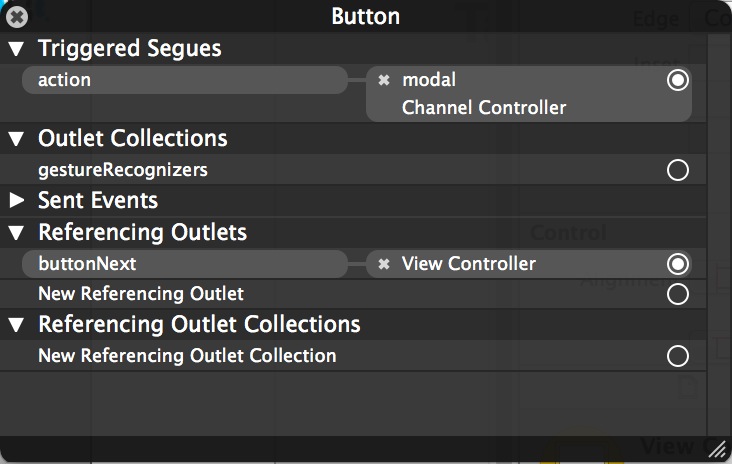
4.视图之间的跳转,传参,回跳
 //页面跳转时,将数据传过去

     override func prepareForSegue(segue: UIStoryboardSegue!, sender: AnyObject!) {

         var channelC:ChannelController = segue.destinationViewController as ChannelController

         channelC.delegate = self// What TODO

         channelC.channelData = self.channelData

     }
 //点击事件

     func tableView(tableView:UITableView!, didSelectRowAtIndexPath indexPath:NSIndexPath!) {

         //what is do this

         var rowData:NSDictionary = self.channelData[indexPath.row] as NSDictionary

         let channelId:AnyObject = rowData["channel_id"] as AnyObject

         let channel:String = "channel=\(channelId)"

         delegate?.onChangeChannel(channel)

         self.dismissViewControllerAnimated(true, completion: nil)

     }
5.MP3在线播放
 //定义一个播放器

     var audioPlayer:MPMoviePlayerController = MPMoviePlayerController()

 //设置音乐

     func onSetAudio(url:String) {

         timer?.invalidate()

         timeLabel.text = "00:00"

         self.audioPlayer.stop()

         self.audioPlayer.contentURL = NSURL(string:url)

         self.audioPlayer.play()

         timer = NSTimer.scheduledTimerWithTimeInterval(0.4 , target : self, selector : "onUpdate", userInfo: nil, repeats :true)

         playBtn.removeGestureRecognizer(tap)

         logo.addGestureRecognizer(tap)

         playBtn.hidden = true

     }
6.TableView列表Item的出现动画
 func tableView(tableView: UITableView!, willDisplayCell cell: UITableViewCell!, forRowAtIndexPath indexPath: NSIndexPath!) {

         cell.layer.transform = CATransform3DMakeScale(0.1, 0.1, 1)

         UIView.animateWithDuration(0.25, animations:{cell.layer.transform=CATransform3DMakeScale(1, 1, 1)})

     }
7.UI控件汇总
 UIViewController

 UITableViewDataSource

 UITableViewDelegate

 UIImageView

 UILabel

 UIButton

 UIProgressView

 UITableView

 UITapGestureRecognizer

 UIImage

 MediaPlayer
8.最后把代码贴出来以供学习
 import UIKit

 import MediaPlayer

 import QuartzCore

 class ViewController: UIViewController ,UITableViewDataSource, UITableViewDelegate, HttpProtocol, ChannelProtocol{

     @IBOutlet var logo: UIImageView

     @IBOutlet var timeLabel: UILabel

     @IBOutlet var buttonNext: UIButton

     @IBOutlet var progressBar: UIProgressView

     @IBOutlet var itemLayout: UITableView

     //开始点击事件

     @IBOutlet var tap: UITapGestureRecognizer = nil //这里必须为空,否则报错

     @IBOutlet var playBtn: UIImageView

     //to cache the picture of songs

     var imageCache = Dictionary<String, UIImage>()

     var eHttp:HttpController = HttpController()

     //主界面

     var tableData:NSArray =  NSArray()

     //频道列表

     var channelData:NSArray = NSArray()

     //定义一个播放器

     var audioPlayer:MPMoviePlayerController = MPMoviePlayerController()

     var timer:NSTimer?

     @IBAction func onTap(sender: UITapGestureRecognizer) {

         if sender.view == playBtn {

             playBtn.hidden = true

             audioPlayer.play()

             playBtn.removeGestureRecognizer(tap)

             logo.addGestureRecognizer(tap)

         } else if sender.view == logo{

             playBtn.hidden = false

             audioPlayer.pause()

             playBtn.addGestureRecognizer(tap)

             logo.removeGestureRecognizer(tap)

         }

     }

     override func viewDidLoad() {

         super.viewDidLoad()

         //视图加载完之后,获取数据

         eHttp.delegate = self

         eHttp.onSearch("http://www.douban.com/j/app/radio/channels")

         eHttp.onSearch("http://douban.fm/j/mine/playlist?channel=0")

         progressBar.progress = 0.0

         logo.addGestureRecognizer(tap)

     }

     override func didReceiveMemoryWarning() {

         super.didReceiveMemoryWarning()

         // Dispose of any resources that can be recreated.

     }

     func tableView(tableView: UITableView!, willDisplayCell cell: UITableViewCell!, forRowAtIndexPath indexPath: NSIndexPath!) {

         cell.layer.transform = CATransform3DMakeScale(0.1, 0.1, 1)

         UIView.animateWithDuration(0.25, animations:{cell.layer.transform=CATransform3DMakeScale(1, 1, 1)})

     }

     //TODO

     override func prepareForSegue(segue: UIStoryboardSegue!, sender: AnyObject!) {

         var channelC:ChannelController = segue.destinationViewController as ChannelController

         channelC.delegate = self// What TODO

         channelC.channelData = self.channelData

     }

     func onChangeChannel(channelId:String) {

         let url:String = "http://douban.fm/j/mine/playlist?\(channelId)"

         eHttp.onSearch(url)

     }

     func tableView(tableView: UITableView!, numberOfRowsInSection section: Int) -> Int {

         return tableData.count

     }

     //列表展示

     func tableView(tableView: UITableView!, cellForRowAtIndexPath indexPath: NSIndexPath!) -> UITableViewCell! {

         let cell = UITableViewCell(style: UITableViewCellStyle.Subtitle, reuseIdentifier: "songs")

         let rowData:NSDictionary = self.tableData[indexPath.row] as NSDictionary

         cell.text = rowData["title"] as String

         cell.detailTextLabel.text = rowData["artist"] as String

         //默认图片

         cell.image = UIImage(named:"detail.jpg")

         //缩略图

         let url = rowData["picture"] as String

         let image = self.imageCache[url] as? UIImage

         if !image?{// why do this

             let imgURL:NSURL = NSURL(string:url)

             let request:NSURLRequest = NSURLRequest(URL:imgURL)

             NSURLConnection.sendAsynchronousRequest(request, queue: NSOperationQueue.mainQueue(), completionHandler: {(response:NSURLResponse!, data:NSData!, error:NSError!) -> Void in

                 let img = UIImage(data:data)

                 cell.image = img

                 //缓存图片

                 self.imageCache[url] = img

                 })

         } else {// if no this else, the item will be default image

             cell.image = image

         }

         return cell

     }

     func didRecieveResults(results:NSDictionary) {

         //println(results);

         if(results["channels"]) {

             self.channelData = results["channels"] as NSArray

             //self.itemLayout.reloadData()

         } else if(results["song"]) {

             self.tableData = results["song"] as NSArray

             self.itemLayout.reloadData()

             let firDict:NSDictionary = self.tableData[0] as NSDictionary

             let audioUrl:String = firDict["url"] as String

             onSetAudio(audioUrl)

             let imgUrl:String = firDict["picture"] as String

             onSetImage(imgUrl)

         }

     }

     func tableView(tableView:UITableView!, didSelectRowAtIndexPath indexPath:NSIndexPath!) {

         let rowData:NSDictionary = self.tableData[indexPath.row] as NSDictionary

         let audioUrl:String = rowData["url"] as String

         onSetAudio(audioUrl)

         let imgUrl:String = rowData["picture"] as String

         onSetImage(imgUrl)

     }

     //设置音乐

     func onSetAudio(url:String) {

         timer?.invalidate()

         timeLabel.text = "00:00"

         self.audioPlayer.stop()

         self.audioPlayer.contentURL = NSURL(string:url)

         self.audioPlayer.play()

         timer = NSTimer.scheduledTimerWithTimeInterval(0.4 , target : self, selector : "onUpdate", userInfo: nil, repeats :true)

         playBtn.removeGestureRecognizer(tap)

         logo.addGestureRecognizer(tap)

         playBtn.hidden = true

     }

     func onUpdate() {

         let c = audioPlayer.currentPlaybackTime

         if c > 0.0 {

             let t = audioPlayer.duration

             let p:CFloat=CFloat(c/t)

             progressBar.setProgress(p, animated: true)

             let allSecond:Int = Int(c)

             let s:Int = allSecond%60

             let m:Int = Int(allSecond/60)

             var time:String = ""

             if(m < 10) {

                 time = "0\(m)"

             } else {

                 time = "\(m)"

             }

             if(s < 10) {

                 time += ":0\(s)"

             } else {

                 time += ":\(s)"

             }

             timeLabel.text = time

         }

     }

     //设置图片

     func onSetImage(url:String) {

         let image = self.imageCache[url] as? UIImage

         if !image?{// why do this

             let imgURL:NSURL = NSURL(string:url)

             let request:NSURLRequest = NSURLRequest(URL:imgURL)

             NSURLConnection.sendAsynchronousRequest(request, queue: NSOperationQueue.mainQueue(), completionHandler: {(response:NSURLResponse!, data:NSData!, error:NSError!) -> Void in

                 let img = UIImage(data:data)

                 self.logo.image = img

                 //缓存图片

                 self.imageCache[url] = img

                 })

         } else {// if no this else, the item will be default image

             self.logo.image = image

         }

     }

 }
 import UIKit

 protocol HttpProtocol {

     func didRecieveResults(results:NSDictionary)

 }

 class HttpController : NSObject {

     var delegate:HttpProtocol?

     func onSearch(url:String) {

         var nsUrl:NSURL = NSURL(string:url)

         var request:NSURLRequest = NSURLRequest(URL:nsUrl)

         //1.Closure Expression Syntax

         //2.异步获取数据

         NSURLConnection.sendAsynchronousRequest(request, queue: NSOperationQueue.mainQueue(), completionHandler:{(response:NSURLResponse!, data:NSData!, error:NSError!)->Void in

             var jsonResult:NSDictionary = NSJSONSerialization.JSONObjectWithData(data!, options: NSJSONReadingOptions.MutableContainers, error: nil) as NSDictionary

             //why just miss an excalmatory mark, the code isn't compile

             //self.delegate?.didRecieveResults(jsonResult)

         })

     }

 }
 import UIKit

 import QuartzCore

 protocol ChannelProtocol {

     func onChangeChannel(channelId:String)// why is String, is not NSString

 }

 class ChannelController: UIViewController, UITableViewDataSource, UITableViewDelegate {

     @IBOutlet var listLayout: UITableView

     var channelData:NSArray = NSArray()

     var delegate:ChannelProtocol?

     override func viewDidLoad() {

         super.viewDidLoad()

         // Do any additional setup after loading the view, typically from a nib.

     }

     override func didReceiveMemoryWarning() {

         super.didReceiveMemoryWarning()

         // Dispose of any resources that can be recreated.

     }

    func tableView(tableView: UITableView!, numberOfRowsInSection section: Int) -> Int {

         return 10

     }

     func tableView(tableView: UITableView!, willDisplayCell cell: UITableViewCell!, forRowAtIndexPath indexPath: NSIndexPath!) {

         cell.layer.transform = CATransform3DMakeScale(0.1, 0.1, 1)

         UIView.animateWithDuration(0.25, animations:{cell.layer.transform=CATransform3DMakeScale(1, 1, 1)})

     }

     func tableView(tableView: UITableView!, cellForRowAtIndexPath indexPath: NSIndexPath!) -> UITableViewCell! {

         let cell = UITableViewCell(style: UITableViewCellStyle.Subtitle, reuseIdentifier: "channel")

         let rowData:NSDictionary = self.channelData[indexPath.row] as NSDictionary

         cell.text = rowData["name"] as String

         return cell

     }

     func tableView(tableView:UITableView!, didSelectRowAtIndexPath indexPath:NSIndexPath!) {

         //what is do this

         var rowData:NSDictionary = self.channelData[indexPath.row] as NSDictionary

         let channelId:AnyObject = rowData["channel_id"] as AnyObject

         let channel:String = "channel=\(channelId)"

         delegate?.onChangeChannel(channel)

         self.dismissViewControllerAnimated(true, completion: nil)

     }

 }
[Swift A] - 实战-豆瓣电台总结的更多相关文章
- Swift实战-豆瓣电台(九)简单手势控制暂停播放(全文完)
Swift实战-豆瓣电台(九)简单手势控制暂停播放 全屏清晰观看地址:http://www.tudou.com/programs/view/tANnovvxR8U/ 这节我们主要讲UITapGestu ...
- Swift实战-豆瓣电台(八)播放进度与时间
视频观看地址:http://www.tudou.com/programs/view/4mEtz8S72k0/?resourceId=399000367_06_02_99 这节主要内容是NSTimer, ...
- Swift实战-豆瓣电台(七)显示动画
youku观看地址http://v.youku.com/v_show/id_XNzMxODQzNDIw.html 这是一个很酷的动画效果.特别是数据多的时候 知识点 在单元格(Cell)显示方法中设置 ...
- Swift实战-豆瓣电台(六)视图跳转,传参及回跳
youku观看地址:http://v.youku.com/v_show/id_XNzMxMzQ3MDcy.html 要点 在ChannelController里面声明一个代理 这个代理遵循我们自定义的 ...
- Swift实战-豆瓣电台(五)播放音乐
观看地址 http://v.youku.com/v_show/id_XNzMwODM0MzI0.html 在这节里面,我们简单学习了一下MediaPlayer的使用 引入媒体框架 import Med ...
- Swift实战-豆瓣电台(四)歌曲列表的展现
观看地址 http://v.youku.com/v_show/id_XNzMwNDE0OTA4.html 这节的主要内容是如何利用cell展现获取到的数据. 首先申明两个数组来储存我们获取到的数据 v ...
- Swift实战-豆瓣电台(三)获取网络数据
观看地址:http://v.youku.com/v_show/id_XNzMwMzQxMzky.html 这节内容,我们先说了怎么将storyboard中的组件在类中进行绑定.然后写了一个类用来获取网 ...
- Swift实战-豆瓣电台(一)准备
一 准备 我们现在看看我们要做一个什么样的东西 观看地址:http://v.youku.com/v_show/id_XNzI4ODY2Mjky.html 布局 通过上面这张图我们可以看出整个demo有 ...
- Swift实战-豆瓣电台(二)界面布局
观看地址 http://v.youku.com/v_show/id_XNzMwMDg4NzAw.html 这节的内容主要是storyboard的操作. 有以下几个知识点 1 TableView的Dat ...
随机推荐
- 使用html+css实现三角标示符号
我们平常打开某个网站的时候,常常会发现网页上很多导航或者指示条会使用一个三角符号去指向内容,效果简洁美观,甚至很多前端面试中也会提及如何在网页上实现一个三角符号,这里给出一个很简单使用的实现方式. 首 ...
- Line Reflection -- LeetCode
Given n points on a 2D plane, find if there is such a line parallel to y-axis that reflect the given ...
- luogu P1440 求m区间内的最小值
题目描述 一个含有n项的数列(n<=2000000),求出每一项前的m个数到它这个区间内的最小值.若前面的数不足m项则从第1个数开始,若前面没有数则输出0. 输入输出格式 输入格式: 第一行两个 ...
- [P4064][JXOI2017]加法(贪心+树状数组+堆)
题目描述 可怜有一个长度为 n 的正整数序列 A,但是她觉得 A 中的数字太小了,这让她很不开心. 于是她选择了 m 个区间 [li, ri] 和两个正整数 a, k.她打算从这 m 个区间里选出恰好 ...
- Codeforces 961E 主席树
题意: 给出一个n个数的序列,求有几对(i,j)满足a[i]>=j&&a[j]>=i,(i,j)和(j,i)只能算一对. 考虑第i个数会有几个j(j<i)满足条件,首 ...
- BZOJ 2296【POJ Challenge】随机种子(构造)
[题目链接] http://www.lydsy.com/JudgeOnline/problem.php?id=2296 [题目大意] 给出一个数x,求一个10的16次以内的数使得其被x整除并且数字包含 ...
- 1.1(SQL学习笔记)SQL基础
一.SELECT 建表及数据填充语句下载:链接: https://pan.baidu.com/s/1WHYafwqKJEKq1kDwCH_Zlg 提取码: 3wy4 SELECT用于指定检索返回的结果 ...
- Problem C: 指针:有n个整数,使其前面各数顺序向后移m个位置,最后m个数变成最前面m个数
#include<stdio.h> int move(int *x,int n,int m) { ]; int i; //int *p;指针循环变量p ;i<n;i++) t[i]= ...
- dump备份mysql表
Auth: Jin Date: 20140403 Content: #!/bin/bash - ### auth: Jin ### ### Desc: 备份输入库里的所有表,清理指定天前的备份文件 # ...
- Inno Setup入门(十六)——Inno Setup类参考(2)
Inno Setup入门(十六)——Inno Setup类参考(2) http://379910987.blog.163.com/blog/static/33523797201112755641236 ...