
DSP28335的上手试用LED灯闪烁-第一篇
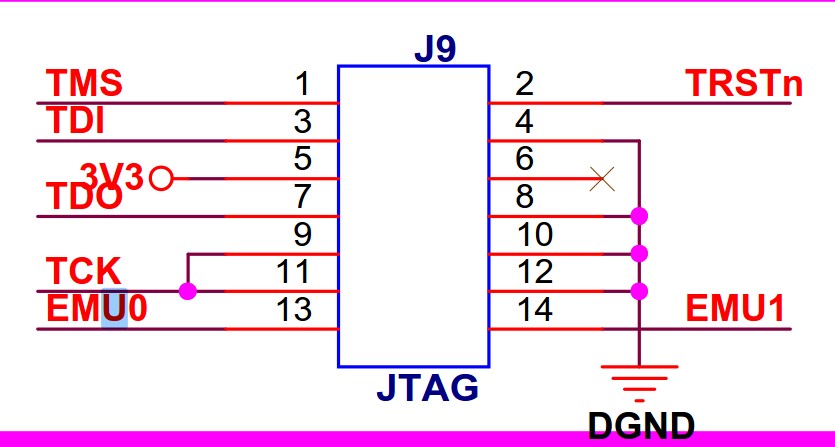
1. 本次以三兄弟的DSP28335开发板为例,看下JTAG接口,EMU0,EMU1的用途,不是很懂,不深入研究,用到再说
EMU0/1是TI芯片的JTAG才有的信号,本身不属于JTAG标准里的信号,有两个作用。
(1)设定芯片是仿真模式(上拉)还是边界扫描模式(下拉)。
(2)用做高速实时数据交换RTDX及TRACE等功能时。这个一般用户可能用不到。
所以这两个信号是双向的,这个信号一般来说不需加要buffer,直接连起来就好了,不用管他是单向还是双向。
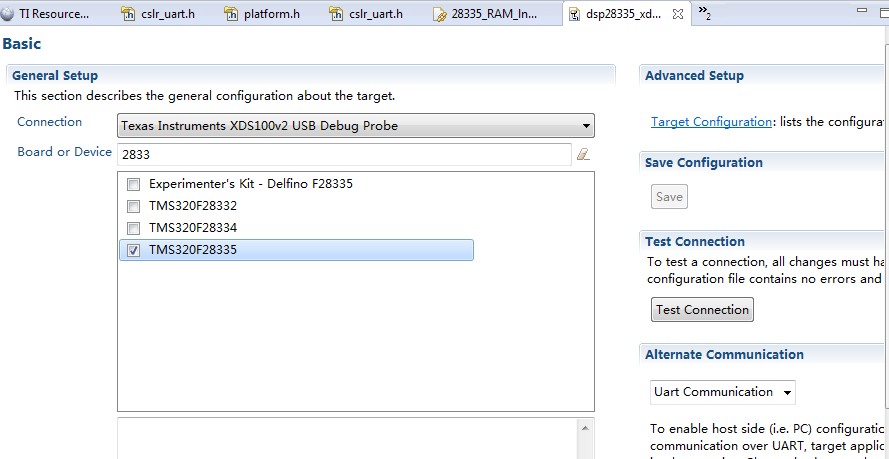
2. 打开工程,E:\dsp\SXD_C28335\SXD28335_PRO_1_V2\Example_2833x_LEDBlink,建立一个CCXML文件,编译一下工程
3. 看下引脚原理图,28335有3组GPIO,每组GPIO最多有32个引脚,但是28335是16位的,所以每组GPIO有高低寄存器

4. GPIO寄存器

5. 代码研究一下,看了一下底层用的是C2000WARE里面的库函数。
 #include "DSP28x_Project.h"     // Device Headerfile and Examples Include File

 // Prototype statements for functions found within this file.

 interrupt void cpu_timer0_isr(void);

 void main(void)

 {

 // Step 1. Initialize System Control:

 // PLL, WatchDog, enable Peripheral Clocks

 // This example function is found in the DSP2833x_SysCtrl.c file.

    InitSysCtrl();

 // Step 2. Initalize GPIO:

 // This example function is found in the DSP2833x_Gpio.c file and

 // illustrates how to set the GPIO to it's default state.

 // InitGpio();  // Skipped for this example

 // Step 3. Clear all interrupts and initialize PIE vector table:

 // Disable CPU interrupts

    DINT;

 // Initialize the PIE control registers to their default state.

 // The default state is all PIE interrupts disabled and flags

 // are cleared.

 // This function is found in the DSP2833x_PieCtrl.c file.

    InitPieCtrl();

 // Disable CPU interrupts and clear all CPU interrupt flags:

    IER = 0x0000;

    IFR = 0x0000;

 // Initialize the PIE vector table with pointers to the shell Interrupt

 // Service Routines (ISR).

 // This will populate the entire table, even if the interrupt

 // is not used in this example.  This is useful for debug purposes.

 // The shell ISR routines are found in DSP2833x_DefaultIsr.c.

 // This function is found in DSP2833x_PieVect.c.

    InitPieVectTable();

 // Interrupts that are used in this example are re-mapped to

 // ISR functions found within this file.

    EALLOW;  // This is needed to write to EALLOW protected registers

    PieVectTable.TINT0 = &cpu_timer0_isr;

    EDIS;    // This is needed to disable write to EALLOW protected registers

 // Step 4. Initialize the Device Peripheral. This function can be

 //         found in DSP2833x_CpuTimers.c

    InitCpuTimers();   // For this example, only initialize the Cpu Timers

 #if (CPU_FRQ_150MHZ)

 // Configure CPU-Timer 0 to interrupt every 500 milliseconds:

 // 150MHz CPU Freq, 50 millisecond Period (in uSeconds)

    ConfigCpuTimer(&CpuTimer0, , );

 #endif

 #if (CPU_FRQ_100MHZ)

 // Configure CPU-Timer 0 to interrupt every 500 milliseconds:

 // 100MHz CPU Freq, 50 millisecond Period (in uSeconds)

    ConfigCpuTimer(&CpuTimer0, , );

 #endif

 // To ensure precise timing, use write-only instructions to write to the entire register. Therefore, if any

 // of the configuration bits are changed in ConfigCpuTimer and InitCpuTimers (in DSP2833x_CpuTimers.h), the

 // below settings must also be updated.

    CpuTimer0Regs.TCR.all = 0x4001; // Use write-only instruction to set TSS bit = 0

 // Step 5. User specific code, enable interrupts:

 // Configure GPIO32 as a GPIO output pin

    EALLOW;

    GpioCtrlRegs.GPBMUX2.bit.GPIO53 = ;

    GpioCtrlRegs.GPBDIR.bit.GPIO53 = ;

    GpioCtrlRegs.GPAMUX1.bit.GPIO0 = ;

    GpioCtrlRegs.GPADIR.bit.GPIO0 = ;

    EDIS;

 // Enable CPU INT1 which is connected to CPU-Timer 0:

    IER |= M_INT1;

 // Enable TINT0 in the PIE: Group 1 interrupt 7

    PieCtrlRegs.PIEIER1.bit.INTx7 = ;

 // Enable global Interrupts and higher priority real-time debug events:

    EINT;   // Enable Global interrupt INTM

    ERTM;   // Enable Global realtime interrupt DBGM

 // Step 6. IDLE loop. Just sit and loop forever (optional):

    for(;;);

 }

 interrupt void cpu_timer0_isr(void)

 {

    CpuTimer0.InterruptCount++;

    GpioDataRegs.GPBTOGGLE.all = 0x40000004; // Toggle GPIO32 once per 500 milliseconds

    GpioDataRegs.GPBTOGGLE.bit.GPIO53 = ;

    GpioDataRegs.GPATOGGLE.bit.GPIO0 = ;

    // Acknowledge this interrupt to receive more interrupts from group 1

    PieCtrlRegs.PIEACK.all = PIEACK_GROUP1;

 }
6. 看下GPIO的全局变量volatile struct GPIO_CTRL_REGS GpioCtrlRegs;,volatile 确保本条指令不会被编译器优化,从下面看的出来,函数库将GPIOA,GPIOB,GPIOC,的控制寄存器全部写在一起了。数据寄存器也是一样的GpioDataRegs.GPATOGGLE.bit.GPIO0 = 1;
 struct GPIO_CTRL_REGS {

    union  GPACTRL_REG  GPACTRL;   // GPIO A Control Register (GPIO0 to 31)

    union  GPA1_REG     GPAQSEL1;  // GPIO A Qualifier Select 1 Register (GPIO0 to 15)

    union  GPA2_REG     GPAQSEL2;  // GPIO A Qualifier Select 2 Register (GPIO16 to 31)

    union  GPA1_REG     GPAMUX1;   // GPIO A Mux 1 Register (GPIO0 to 15)

    union  GPA2_REG     GPAMUX2;   // GPIO A Mux 2 Register (GPIO16 to 31)

    union  GPADAT_REG   GPADIR;    // GPIO A Direction Register (GPIO0 to 31)

    union  GPADAT_REG   GPAPUD;    // GPIO A Pull Up Disable Register (GPIO0 to 31)

    Uint32              rsvd1;

    union  GPBCTRL_REG  GPBCTRL;   // GPIO B Control Register (GPIO32 to 63)

    union  GPB1_REG     GPBQSEL1;  // GPIO B Qualifier Select 1 Register (GPIO32 to 47)

    union  GPB2_REG     GPBQSEL2;  // GPIO B Qualifier Select 2 Register (GPIO48 to 63)

    union  GPB1_REG     GPBMUX1;   // GPIO B Mux 1 Register (GPIO32 to 47)

    union  GPB2_REG     GPBMUX2;   // GPIO B Mux 2 Register (GPIO48 to 63)

    union  GPBDAT_REG   GPBDIR;    // GPIO B Direction Register (GPIO32 to 63)

    union  GPBDAT_REG   GPBPUD;    // GPIO B Pull Up Disable Register (GPIO32 to 63)

    Uint16              rsvd2[];

    union  GPC1_REG     GPCMUX1;   // GPIO C Mux 1 Register (GPIO64 to 79)

    union  GPC2_REG     GPCMUX2;   // GPIO C Mux 2 Register (GPIO80 to 95)

    union  GPCDAT_REG   GPCDIR;    // GPIO C Direction Register (GPIO64 to 95)

    union  GPCDAT_REG   GPCPUD;    // GPIO C Pull Up Disable Register (GPIO64 to 95)

 };
7. 还有一些汇编指令,以后再研究吧
 #define  EINT   asm(" clrc INTM")

 #define  DINT   asm(" setc INTM")

 #define  ERTM   asm(" clrc DBGM")

 #define  DRTM   asm(" setc DBGM")

 #define  EALLOW asm(" EALLOW")

 #define  EDIS   asm(" EDIS")

 #define  ESTOP0 asm(" ESTOP0")
DSP28335的上手试用LED灯闪烁-第一篇的更多相关文章
- Arduino 翻译系列 - LED 灯闪烁
原文地址 - https://www.arduino.cc/en/Tutorial/Blink 闪烁 这个例子展示了你能拿 Arduino / Genuino 板子来干的最简单的事:使开发板上的 LE ...
- 树莓派开机运行Python脚本 控制LED灯闪烁
一.新建一个开机运行文件 在 /home/pi/.config 下创建一个文件夹,名称为 autostart,并在该文件夹下创建一个led.desktop文件(文件名以.desktop结尾) 编辑le ...
- 1个LED灯闪烁的Arduino控制
控制任务和要求 让一个LED灯闪烁 接线 程序设计 1 int half_cycle=1000; // define the cycle time of LED blink 2 int LED_pin ...
- recovery 升级过程LED灯闪烁
Android设备在进入recovery升级的过程,我们在屏幕上面可以看到升级的机器人动画,以及升级的进度显示.这仅限于有屏幕的设备,比如平板PAD,电视TV等,对与没有屏幕的盒子BOX,那么在不接入 ...
- 使用uart串口接收模块接收信号,控制led灯闪烁
功能描述: 使用遵循uart协议的接收模块接收控制信号,用来控制led的闪烁. 设计输入: 1.uart输入信号 2.时钟信号 3.复位信号 4.led信号 设计思路: 总体上:前面已经写了串口接收模 ...
- 创龙DSP6748开发板LED闪烁-第一篇
1. 首先看下DSP6748的GPIO寄存器的文档,先看下框图,有这个框图,一目了然,输入和输出很清楚 2. 看下寄存器部分,对应上面的图,问题在于,DSP6748有多少个GPIO?最多144个,下一 ...
- STM32通用定时器实现LED灯闪烁
刚才看了一下STM32通用定时器的教程,其实和51的定时器使用差不多.只是因为32的时钟更复杂,可操控的寄存器更多,所以写的时候可能更复杂. 使用通用定时器中断的一般步骤:1.使能定时器时钟 这个需要 ...
- 第7章 使用寄存器点亮LED灯
第7章 使用寄存器点亮LED灯 全套200集视频教程和1000页PDF教程请到秉火论坛下载:www.firebbs.cn 野火视频教程优酷观看网址:http://i.youku.com/fir ...
- 第7章 使用寄存器点亮LED灯—零死角玩转STM32-F429系列
第7章 使用寄存器点亮LED灯 全套200集视频教程和1000页PDF教程请到秉火论坛下载:www.firebbs.cn 野火视频教程优酷观看网址:http://i.youku.com/fir ...
随机推荐
- 【[SHOI2015]超能粒子炮·改】
就是运用\(Lucas\)推一个柿子 首先是前置芝士\(Lucas\)定理 \[C_{n}^{m}\%p=C_{n/p}^{m/p}*C_{n\%p}^{m\%p}\%p\] 至于证明 我建议去问一下 ...
- [USACO07DEC]Sightseeing Cows
嘟嘟嘟 这题好像属于01分数规划问题,叫什么最优比率生成环. 题目概括一下,就是求一个环,满足∑v[i] / ∑c[i]最大. 我们可以堆上面的式子变个型:令 x = ∑v[i] / ∑c[i],则x ...
- FreeMarker之根据模型生成HTML代码
FreeMarker之根据模型生成HTML代码与FreeMarker根据模型生成Java代码,本质上是一样的,关于生成Java代码可以参考我的这篇文章:FreeMarker之根据模板生成Java代码 ...
- 关于JWT.NET
1.JWT的概念: JWT全称是Json Web Token,是一种用于双方之间传递安全信息的简洁的.URL安全的表述性声明规范.JWT作为一个开放的标准( RFC 7519 ),定义了一种简洁的,自 ...
- [转]Asp.Net url中文乱码
一般有3种方法: 1.设置web.config文件 2.传递中文之前,将要传递的中文参数进行编码,在接收时再进行解码. 传递 string Name = "中文参数"; Resp ...
- (CodeForces - 5C)Longest Regular Bracket Sequence(dp+栈)(最长连续括号模板)
(CodeForces - 5C)Longest Regular Bracket Sequence time limit per test:2 seconds memory limit per tes ...
- UITableView控件didSelectRow和didDeselectRow方法注意事项
UITableView控件didSelectRow和didDeselectRow方法注意事项 1. 因Xcode强大的自动补全功能,在使用UITableView如下两个方法时,务必特别小心,避免出错: ...
- Web打印连续的表格,自动根据行高分页
拿到这个需求,我已经蛋碎了一地,经过N天的攻克,终于是把它搞定了,只是不知道会不会在某种情况下出现BUG.表示我心虚没有敢做太多的测试.... ---------------------------- ...
- NodeJs——入门
关于NPM: npm 是 nodejs 的包管理和分发工具.它可以让 javascript 开发者能够更加轻松的共享代码和共用代码片段,并且通过 npm 管理你分享的代码也很方便快捷和简单. 一 No ...
- WSO2 API Manager 替换mysql作为数据库,解决AuthorizationUtils Could not set authorizations for the root问题
按照wso2官网(https://docs.wso2.com/display/ADMIN44x/Changing+to+MySQL)配置AM的数据库,想从H2换成Mysql5.7,费了将近一天的时间, ...