
(Oracle)自定义调用AWR
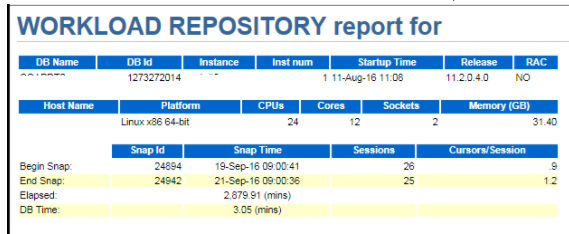

spool &report_name;

select output from table(dbms_workload_repository.&fn_name( :dbid,

                                                            :inst_num,

                                                            :bid, :eid,

                                                            :rpt_options ));

spool off;

select output from table(dbms_workload_repository.&fn_name( :dbid,:inst_num,:bid, :eid,:rpt_options ));

&fn_name->类型名称如awr_report_html和awr_report_text

:dbid->数据库id号

:inst_num->实例名

:bid->snap开始id

:eid->snap结束id

:rpt_options->控制显示ADDM
--conn / as sysdba;

set echo off;

set veri off;

set feedback off;

set termout on;

set heading off;

variable rpt_options number;

define NO_OPTIONS = 0;

define ENABLE_ADDM = 8;

-- according to your needs, the value can be 'text' or 'html'

define report_type='html';

begin

:rpt_options := &NO_OPTIONS;

end;

/

variable dbid number;

variable inst_num number;

variable bid number;

variable eid number;

variable dbname varchar2(9);

variable btime number;

variable etime number;

begin

select dbid into :dbid  from v$database;

select instance_number into :inst_num from v$instance;

select max(snap_id)-24 into :bid from dba_hist_snapshot where DBID=:dbid;--生成的awr 快照开始时间可以自定义。注意如果中间有重启数据库,会导致获取awr报告失败。

select max(snap_id) into :eid from dba_hist_snapshot where DBID=:dbid;

select lower(NAME) into :dbname  from v$database;

select to_char(end_interval_time,'YYYYMMDDHH24') into :btime from dba_hist_snapshot  where snap_id=:bid;

select to_char(end_interval_time,'DDHH24')  into :etime from dba_hist_snapshot  where snap_id=:eid;

end;

/

column ext new_value ext noprint

column fn_name new_value fn_name noprint;

column lnsz new_value lnsz noprint;

--select 'txt' ext from dual where lower('&report_type') = 'text';

select 'html' ext from dual where lower('&report_type') = 'html';

--select 'awr_report_text' fn_name from dual where lower('&report_type') = 'text';

select 'awr_report_html' fn_name from dual where lower('&report_type') = 'html';

--select '80' lnsz from dual where lower('&report_type') = 'text';

select '' lnsz from dual where lower('&report_type') = 'html';

select :dbname||'_'||:btime||'to'||:etime||'.'||'&ext' report_name from dual;

set linesize &lnsz;

-- print the AWR results into the report_name file using the spool command:

column report_name new_value report_name noprint;

select :dbname||'_'||:btime||'to'||:etime||'.'||'&ext' report_name from dual;

set termout off;

spool &report_name;

select output from table(dbms_workload_repository.&fn_name(:dbid, :inst_num,:bid, :eid,:rpt_options ));

spool off;

set termout on;

clear columns sql;

ttitle off;

btitle off;

repfooter off;

undefine report_name

undefine report_type

undefine fn_name

undefine lnsz

undefine NO_OPTIONS

exit
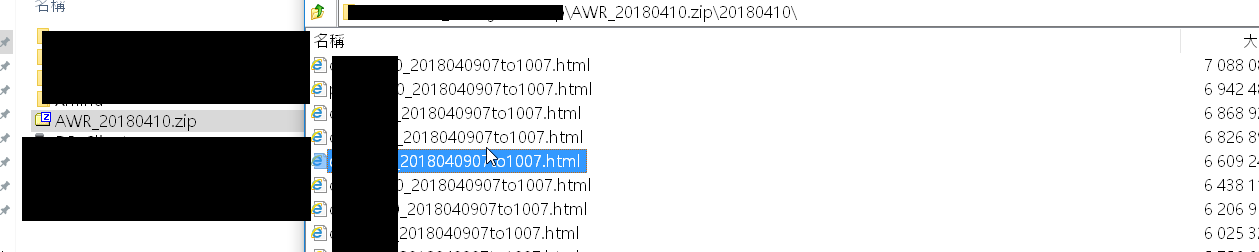
设定shell脚本定时执行并发送邮件。
Script:

[oracle@ ~]$ cat /opt/app/oracle/ora_auto/oracle_auto_awr.sh

#!/bin/bash

# auto gather awrrpt.sql

#

# parameters:

# $ -> SID

#

# The whole package includes  files;

#   oracle_auto_awr.sh(this file)

#   ora_auto_awrrpt.sql

#

#引用oracle数据库环境变量
. /home/oracle/.bash_profile ->(注意加上oracle环境变量,不然crontab排程运行时不能正常执行sql脚本). /home/oracle/.bash_profile

PATH=$PATH:$HOME/bin:/sbin:/usr/bin:/usr/sbin

ORACLE_BASE=/opt/app/oracle;export ORACLE_BASE

ORACLE_HOME=$ORACLE_BASE/product/11.2./dbhome_1;export ORACLE_HOME

ORA_AUTO_PATH='/opt/app/oracle/ora_auto'

#自定义awr脚本的SQL语句

ORACLE_SQL=$ORA_AUTO_PATH/ora_auto_awrrpt.sql

DAY_TIME=`date +"%Y%m%d"`

AWR_ZIP=AWR_$DAY_TIME.zip

cd $ORA_AUTO_PATH

echo "Dear Sir:">mail.log

echo "  This is oracle database Awr.">>mail.log

mkdir -p $ORA_AUTO_PATH/$DAY_TIME


#脚本后跟上多个数据库名,用于集合

array_1=$@

for sid in ${array_1[@]}

do

sleep

tnschk=`tnsping $sid`

tnschk2=` echo  $tnschk | grep -c OK`

if [ ${tnschk2} -eq  ] ; then

echo "   $sid start gather." >>mail.log


###连接数据库字符串,注意连接数据库的账户是否有权限执行awr

ORACLE_CONN='xxx/xxxx@'$sid

$ORACLE_HOME/bin/sqlplus -s $ORACLE_CONN @$ORACLE_SQL  >sqlplus_$sid_output.log

soput="`cat $ORA_AUTO_PATH/sqlplus_$sid_output.log|grep html`"

        if [ -f $soput ]; thenecho "   mv  $soput $ORA_AUTO_PATH/$DAY_TIME">>mail.log

        mv $soput $ORA_AUTO_PATH/$DAY_TIME

        fi

else

        echo "  No TNS Listener on $sid" >>mail.log

fi

done

echo "  zip -r  $AWR_ZIP $DAY_TIME" >>mail.log

#`/bin/tar -zcf $AWR_ZIP  $DAY_TIME` 将awr报表进行压缩,减少邮件传输的流量

`/usr/bin/zip -r $AWR_ZIP $DAY_TIME`

echo " Thanks!">>mail.log

   mutt -s "[xxxx][DATABASE][AWR]:  time: `date '+%y%m%d-%H%M'`" "接受邮件地址" -a $ORA_AUTO_PATH/$AWR_ZIP < $ORA_AUTO_PATH/mail.log

rm -rf $DAY_TIME

设定排程[xxx.xxx.xx.x]

  * * * /xxx/app/oracle/ora_auto/oracle_auto_awr.sh oracle01 oracle02 oracle03

(Oracle)自定义调用AWR的更多相关文章
- (Oracle)自定义调用AWR&ADDM
Oracle->自定义调用AWR&ADDM 需求描述: 前面设定每天自动生成AWR用于提供前一天的数据库状态信息,但因数据库和信息过多不利于直观检查.此次新增ADDM诊断. ADDM诊断 ...
- Mybatis下配置调用Oracle自定义函数返回的游标结果集
在ibatis和Mybatis对存储过程和函数函数的调用的配置Xml是不一样的,以下是针对Mybatis 3.2的环境进行操作的. 第一步配置Mapper的xml内容 <mapper names ...
- Oracle中的AWR,全称为Automatic Workload Repository
Oracle中的AWR,全称为Automatic Workload Repository,自动负载信息库.它收集关于特定数据库的操作统计信息和其他统计信息,Oracle以固定的时间间隔(默认为1个小时 ...
- Oracle自定义数据类型 1
原文 oracle 自定义类型 type / create type 一 Oracle中的类型 类型有很多种,主要可以分为以下几类: 1.字符串类型.如:char.nchar.varchar2.nva ...
- Oracle自定义函数和存储过程示例,自定义函数与存储过程区别
参考资料:http://www.newbooks.com.cn/info/60861.html oracle自定义函数学习和连接运算符(||) 贴一段中文文档示例,应该就可以开始工作了: --过程(P ...
- Oracle自定义聚集函数
今天工作中看见别人写的自定义聚集函数,所以一门心思的想搞懂,就在网上找资料了. 自定义聚集函数 自定义聚集函数接口简介 Oracle提供了很多预定义好的聚集函数,比如Max(), Sum(), AVG ...
- oracle 存储过程调用 执行
oracle 存储过程调用 博客分类: 数据库相关 oracle存储过程 2011年02月11日 星期五 14:47 SQL中调用存储过程语句: call procedure_name(); 调用 ...
- ORACLE存储过程调用Web Service
1. 概述 最近在ESB项目中,客户在各个系统之间的服务调用大多都是在oracle存储过程中进行的,本文就oracle存储过程调用web service来进行说明.其他主流数据库,比如mysql和sq ...
- .NET易忘备留 ORACLE存储过程调用
1.Oracle存储过程调用[返回信息,单体或者列表] public IResult FundBuild(string partnerId,string userId, DateTime beginD ...
随机推荐
- UNIX/Linux系统管理技术手册(2)----bash脚本编程
1. 一个简单的例子: $ vim readname.sh #file:readname.sh#!/bin/bash echo -n "Enter your name: " rea ...
- sqlite 时间函数及时间处理
SQLite分页显示:Select * From news order by id desc Limit 10 Offset 10这篇文章是根据 SQLite 官方 WIKI 里的内容翻译,如果有什么 ...
- unity中Animation与Animator的区别
Animation:单一动画,一般使用在单一动画播放.占用资源小. Animator:多个动画,可用控制器切换多个动画播放.占用资源大.
- ES6入门——数值的扩展
1.二进制和八进制表示法 ES6提供了二进制和八进制数值的新的写法,分别用前缀0b或0B和0o或0O表示. 2.Number.isFinite(),Number.isNaN() ES6在Number对 ...
- angularJS web应用SEO
javascript给网站带来丰富的用户体验,越来越多的网站开始应用angularjs/emberjs这类MVC来开发web应用,可以说能够使用native方式来看法的手机app基本都可以使用替代的j ...
- Skip List & Bloom Filter
Skip List | Set 1 (Introduction) Can we search in a sorted linked list in better than O(n) time?Th ...
- 【Leetcode】【Medium】Permutations
Given a collection of numbers, return all possible permutations. For example,[1,2,3] have the follow ...
- python IO 文件读写
IO 由于CPU和内存的速度远远高于外设的速度,所以,在IO编程中,就存在速度严重不匹配的问题. 如要把100M的数据写入磁盘,CPU输出100M的数据只需要0.01秒,可是磁盘要接收这100M数据可 ...
- 电脑断电后Everything部分文件搜索不到的解决办法
常规检查:查看选项→索引→NTFS,确认所有分区都[包含到数据库],确认后,再删除数据库文件,点击[强制重建] 下面方法是亲身经历,是断电造成的,费了不少时间才解决,现分享出来: 断电后,Everyt ...
- API 网关
使用 API 网关 链接:https://github.com/oopsguy/microservices-from-design-to-deployment-chinese译者:Oopsguy ...