
springboot集成websocket点对点推送、广播推送
一、什么都不用说,导入个依赖先
<dependency>

  <groupId>org.springframework.boot</groupId>

  <artifactId>spring-boot-starter-websocket</artifactId>

</dependency>
二、推送到前端的消息实体类
import lombok.AllArgsConstructor;

import lombok.Builder;

import lombok.Data;

import lombok.NoArgsConstructor;

import java.io.Serializable;

@Data

@Builder

@NoArgsConstructor

@AllArgsConstructor

public class NotifyBean<T> implements Serializable {

    private static final long serialVersionUID = 1L;

    private int type;

    private String message;

    private T data;

}
三、因为要实现点对点的推送,所以需要创建一个监听器来获取到websocket的session,如下:
import org.springframework.beans.factory.annotation.Autowired;

import org.springframework.context.ApplicationListener;

import org.springframework.messaging.simp.stomp.StompHeaderAccessor;

import org.springframework.web.socket.messaging.SessionConnectEvent;

public class STOMPConnectEventListener implements ApplicationListener<SessionConnectEvent> {

    @Autowired

    private RedisHelper redisHelper;

    @Override

    public void onApplicationEvent(SessionConnectEvent event) {

        StompHeaderAccessor sha = StompHeaderAccessor.wrap(event.getMessage());

        //login get from browser

        if(sha.getNativeHeader("userid")==null){

            return;

        }

        String userid = sha.getNativeHeader("userid").get(0);

        String sessionId = sha.getSessionId();

        redisHelper.redisTemplate.opsForValue().set("websocket:"+userid,sessionId);

    }

}
四、最重要的配置类
import lombok.extern.slf4j.Slf4j;

import org.springframework.context.annotation.Bean;

import org.springframework.context.annotation.Configuration;

import org.springframework.messaging.Message;

import org.springframework.messaging.MessageChannel;

import org.springframework.messaging.simp.config.ChannelRegistration;

import org.springframework.messaging.simp.config.MessageBrokerRegistry;

import org.springframework.messaging.simp.stomp.StompCommand;

import org.springframework.messaging.simp.stomp.StompHeaderAccessor;

import org.springframework.messaging.support.ChannelInterceptorAdapter;

import org.springframework.messaging.support.MessageHeaderAccessor;

import org.springframework.web.socket.config.annotation.*;

@Configuration

@EnableWebSocketMessageBroker

@Slf4j

public class WebSocketConfig extends AbstractWebSocketMessageBrokerConfigurer {

    //STOMP监听类

    @Bean

    public STOMPConnectEventListener applicationStartListener(){

        return new STOMPConnectEventListener();

    }

    @Override

    public void registerStompEndpoints(StompEndpointRegistry stompEndpointRegistry) {

        //建立连接端点,注册一个STOMP的协议节点,并指定使用SockJS协议

        stompEndpointRegistry.addEndpoint("/nmpSocketWeb")

                .setAllowedOrigins("*")

                .withSockJS();

    }

    @Override

    public void configureMessageBroker(MessageBrokerRegistry messageBrokerRegistry) {

        //配置消息代理(MessageBroker)。

        messageBrokerRegistry.enableSimpleBroker("/topic");// 推送消息前缀

        messageBrokerRegistry.setApplicationDestinationPrefixes("/app");// 应用请求前缀,前端发过来的消息将会带有“/app”前缀。

    }

    @Override

    public void configureClientInboundChannel(ChannelRegistration registration) {

        //token认证

        registration.setInterceptors(new ChannelInterceptorAdapter() {

            @Override

            public Message<?> preSend(Message<?> message, MessageChannel channel) {

                StompHeaderAccessor accessor = MessageHeaderAccessor.getAccessor(message, StompHeaderAccessor.class);

                if (StompCommand.CONNECT.equals(accessor.getCommand()) || StompCommand.SEND.equals(accessor.getCommand())) {

                    String token = accessor.getFirstNativeHeader("token");

                    try {

                        tokenValidate(token);

                    } catch (Exception e) {

                        log.error(e.toString());

                        return null;

                    }

                }

                return message;

            }

        });

    }

    public boolean tokenValidate(String token) throws Exception {

        if (token == null || token.isEmpty()) {

            throw new Exception("webSocket:token为空!");

        }

        if (JwtUtil.validateToken(token)==null) {

            throw new Exception("webSoc:token无效!");

        }

        return true;

    }

}
代码中有详细的解释,认真看可以看明白的。
五、controller
import io.swagger.annotations.Api;

import io.swagger.annotations.ApiOperation;

import org.springframework.beans.factory.annotation.Autowired;

import org.springframework.messaging.MessageHeaders;

import org.springframework.messaging.handler.annotation.MessageMapping;

import org.springframework.messaging.handler.annotation.SendTo;

import org.springframework.messaging.simp.SimpMessageHeaderAccessor;

import org.springframework.messaging.simp.SimpMessageType;

import org.springframework.messaging.simp.SimpMessagingTemplate;

import org.springframework.stereotype.Controller;

import org.springframework.web.bind.annotation.RequestMapping;

import org.springframework.web.bind.annotation.ResponseBody;

@Api(tags="WebSocket控制器",description="WebSocket控制器")

@Controller

@RequestMapping(value = "/webSocket")

public class WebSocketController extends BaseController {

    @Autowired

    private SimpMessagingTemplate simpMessagingTemplate;

    @Autowired

    private RedisHelper redisHelper;

    @ApiOperation(value = "测试主动发送消息", notes = "测试主动发送消息", httpMethod = "GET")

    @RequestMapping(value = "/sendMsg")

    @ResponseBody

    public void sendMsg(){

        System.out.println("测试主动发送消息");

        NotifyBean notifyBean = NotifyBean.builder().message("服务器给你发消息啦!").build();

        simpMessagingTemplate.convertAndSend(WebConstant.WEB_SC_TOPIC_NOTIFY,notifyBean);

    }

    @MessageMapping("/test") //当浏览器向服务端发送请求时,通过@MessageMapping映射/welcome这个地址,类似于@ResponseMapping

    @SendTo(WebConstant.WEB_SC_TOPIC_NOTIFY)//当服务器有消息时,会对订阅了@SendTo中的路径的浏览器发送消息

    public NotifyBean test(UserVo userVo) {

        try {

            //睡眠1秒

            Thread.sleep(1000);

        } catch (InterruptedException e) {

            e.printStackTrace();

        }

        NotifyBean notifyBean = NotifyBean.builder().message("welcome!"+ userVo.getName()).build();

        return notifyBean;

    }

    /**

     * 点对点发送消息demo

     * 根据用户key发送消息

     * @param userVo

     * @return

     * @throws Exception

     */

    @MessageMapping("/test/toOne")

    public void toOne(UserVo userVo) throws Exception {

        String sessionId=(String)redisHelper.redisTemplate.opsForValue().get("websocket:"+userVo.getId());

        NotifyBean notifyBean = NotifyBean.builder().message("welcome!"+ userVo.getName()).build();

        //convertAndSendToUser该方法会在订阅路径前拼接"/user",所以前端订阅的路径全路径是"/user/topic/notify"

        simpMessagingTemplate.convertAndSendToUser(sessionId, WebConstant.WEB_SC_TOPIC_NOTIFY,notifyBean,createHeaders(sessionId));

    }

    private MessageHeaders createHeaders(String sessionId) {

        SimpMessageHeaderAccessor headerAccessor = SimpMessageHeaderAccessor.create(SimpMessageType.MESSAGE);

        headerAccessor.setSessionId(sessionId);

        headerAccessor.setLeaveMutable(true);

        return headerAccessor.getMessageHeaders();

    }

}
六、前端页面
<!DOCTYPE html>

<html xmlns:th="http://www.thymeleaf.org">

<link lang="en" xmlns:th="http://www.w3.org/1999/xhtml"></link>

<link href="/webjars/bootstrap/3.3.7/css/bootstrap.min.css" rel="stylesheet"></link>

<head>

    <script th:src="@{sockjs.min.js}"></script>

    <script th:src="@{stomp.min.js}"></script>

    <script th:src="@{jquery-1.11.3.min.js}"></script>

</head>

<body>

<blockquote class="layui-elem-quote">/user/topic-message</blockquote>

<div id="main-content" class="container">

    <div class="row">

        <div class="col-md-6">

            <form class="form-inline">

                <div class="form-group">

                    <label for="connect">WebSocket connection:</label>

                    <button id="connect" class="btn btn-default" type="submit">Connect</button>

                    <button id="disconnect" class="btn btn-default" type="submit" disabled="disabled">Disconnect

                    </button>

                </div>

            </form>

        </div>

        <div class="col-md-6">

            <form class="form-inline">

                <div class="form-group">

                    <label for="name">What is your name?</label>

                    <input type="text" id="name" class="form-control" placeholder="Your name here..."></input>

                </div>

                <button id="send" class="btn btn-default" type="submit">Send</button>

            </form>

        </div>

    </div>

    <div class="row">

        <div class="col-md-12">

            <table id="conversation" class="table table-striped">

                <thead>

                <tr>

                    <th>Greetings</th>

                </tr>

                </thead>

                <tbody id="greetings">

                </tbody>

            </table>

        </div>

        <div id="message"></div>

    </div>

</div>

<script>

    //  /msg/sendcommuser

    var stompClient = null;

    //传递用户key值

    var login = "ricky";

    function setConnected(connected) {

        $("#connect").prop("disabled", connected);

        $("#disconnect").prop("disabled", !connected);

        if (connected) {

            $("#conversation").show();

        }

        else {

            $("#conversation").hide();

        }

        $("#greetings").html("");

    }

    function connect() {

        var socket = new SockJS('/nmpSocketWeb');

        stompClient = Stomp.over(socket);

        stompClient.connect({login:login}, function (frame) {

            setConnected(true);

            console.log('Connected: ' + frame);

            stompClient.subscribe('/user/topic/greetings', function (greeting) {

                setMessageInnerHTML(JSON.parse(greeting.body).message);

                console.log(JSON.parse(greeting.body).message)

            });

        });

    }

    function disconnect() {

        if (stompClient != null) {

            stompClient.disconnect();

        }

        setConnected(false);

        console.log("Disconnected");

    }

    function sendName() {

        stompClient.send("/app/test/toOne", {}, JSON.stringify({'name': $("#name").val(),'id':'ricky'}));

    }

    function showGreeting(message) {

        $("#greetings").append("<tr><td>" + message + "</td></tr>");

    }

    $(function () {

        $("form").on('submit', function (e) {

            e.preventDefault();

        });

        $( "#connect" ).click(function() { connect(); });

        $( "#disconnect" ).click(function() { disconnect(); });

        $( "#send" ).click(function() { sendName(); });

    });

    //将消息显示在网页上

    function setMessageInnerHTML(innerHTML){

        console.log(innerHTML);

        document.getElementById('message').innerHTML += innerHTML + '<br/>';

    }

</script>

</body>

</html>
最好,来试试点对点推送。
第一个页面:

第二个页面:
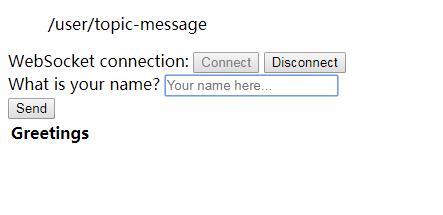
可以看到,后台推送的消息只有一个页面接收到,完事!
springboot集成websocket点对点推送、广播推送的更多相关文章
- springboot集成websocket的两种实现方式
WebSocket跟常规的http协议的区别和优缺点这里大概描述一下 一.websocket与http http协议是用在应用层的协议,他是基于tcp协议的,http协议建立链接也必须要有三次握手才能 ...
- springboot集成websocket实现向前端浏览器发送一个对象,发送消息操作手动触发
工作中有这样一个需示,我们把项目中用到代码缓存到前端浏览器IndexedDB里面,当系统管理员在后台对代码进行变动操作时我们要更新前端缓存中的代码怎么做开始用想用版本方式来处理,但这样的话每次使用代码 ...
- SpringBoot集成WebSocket【基于STOMP协议】进行点对点[一对一]和广播[一对多]实时推送
原文详细地址,有点对点,还有广播的推送:https://blog.csdn.net/ouyzc/article/details/79884688 下面是自己处理的一些小bug 参考原文demo,结合工 ...
- SpringBoot集成WebSocket【基于纯H5】进行点对点[一对一]和广播[一对多]实时推送
代码全部复制,仅供自己学习用 1.环境搭建 因为在上一篇基于STOMP协议实现的WebSocket里已经有大概介绍过Web的基本情况了,所以在这篇就不多说了,我们直接进入正题吧,在SpringBoot ...
- springboot集成websocket实现大文件分块上传
遇到一个上传文件的问题,老大说使用http太慢了,因为http包含大量的请求头,刚好项目本身又集成了websocket,想着就用websocket来做文件上传. 相关技术 springboot web ...
- SpringBoot集成websocket发送后台日志到前台页面
业务需求 后台为一个采集系统,需要将采集过程中产生的日志实时发送到前台页面展示,以便了解采集过程. 技能点 SpringBoot 2.x websocket logback thymeleaf Rab ...
- SpringBoot整合WebSocket实现前后端互推消息
小编写这篇文章是为了记录实现WebSocket的过程,受不了啰嗦的同学可以直接看代码. 前段时间做项目时设计了一个广播的场景,具体业务不再赘述,最终要实现的效果就是平台接收到的信息实时发布给所有的用户 ...
- SpringBoot集成websocket(java注解方式)
第一种:SpringBoot官网提供了一种websocket的集成方式 第二种:javax.websocket中提供了元注解的方式 下面讲解简单的第二种 添加依赖 <dependency> ...
- Springboot集成WebSocket通信全部代码,即扣即用。
websocket通信主要来自两个类以及一个测试的html页面. MyHandler 和 WebSocketH5Config,下面全部代码 MyHandler类全部代码: package com.un ...
随机推荐
- Codeforces Round #549 (Div. 2)C. Queen
C. Queen time limit per test 1 second memory limit per test 256 megabytes input standard input outpu ...
- bzoj1801中国象棋
题目链接 很裸的$dp+$组合计数 注意 注意 注意 $BZOJ$不要用玄学优化 $CE$不管$qwq$ /********************************************** ...
- ajax的两个重要参数contentType 和dataType
contentType 是入参!!!!!! 是传递给后端参数的格式: contentType : 'application/json;charset=UTF-8', contentType : 'te ...
- MySQL5.7 mysql.user创建用户
mysql -uroot -proot MySQL5.7 mysql.user表没有password字段改 authentication_string: 一. 创建用户: 命令:CREATE USER ...
- iOS核心动画之蒙版
应用场景 想让一些古卷文字慢慢渐变成背景色,而不是一个突兀的边界 layer的边框不是圆角,而是有星形框架的图片 方法 设置mask属性.这个属性也是一个layer属性,但只有alpha属性有效果.即 ...
- loj #6515. 「雅礼集训 2018 Day10」贪玩蓝月
\(\color{#0066ff}{输入样例}\) 0 11 10 QU 0 0 QU 1 9 IG 14 7 IF 3 5 QU 0 9 IG 1 8 DF QU 0 4 IF 1 2 DG QU ...
- 洛谷 P4307 [JSOI2009]球队收益 / 球队预算(最小费用最大流)
题面 luogu 题解 最小费用最大流 先假设剩下\(m\)场比赛,双方全输. 考虑\(i\)赢一局的贡献 \(C_i*(a_i+1)^2+D_i*(b_i-1)^2-C_i*a_i^2-D_i*b_ ...
- C#集合之位数组
如果需要处理的数字有许多位,就可以使用BitArray类和BitVector32结构.BitArray类位于System.Collection,BitVector32结构位于System.Collec ...
- 2019年华南理工大学程序设计竞赛(春季赛) K Parco_Love_String(后缀自动机)找两个串的相同字串有多少
https://ac.nowcoder.com/acm/contest/625/K 题意: 给出Q 个询问 i , 求 s[0..i-1] 与 s[i...len-1] 有多少相同的字串 分析: 给出 ...
- golang (2) package
综述 golang package是基本的管理单元,package是golang最基本的分发单位和工程管理中依赖关系的体现. 每个golang源代码文件开头都拥有一个package声明,表示该gola ...