
c#winform图表控件使用示例
公司有个需求,需要做嵌入式开发,跟硬件通信,把数据实时展示到winform中,网上查了资料,先写下个demo备用,到时候接入socket通信就完成了,具体效果如图
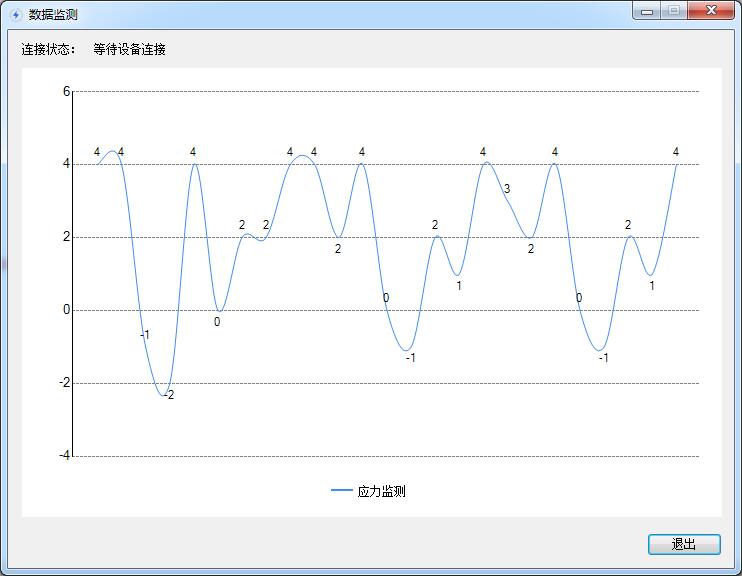
实现的原理是把最开始的数据去掉,加入新的数据,接着不停的绑定曲线数据,就能达到曲线实时展示的效果了
public partial class Form1 : Form

    {

        public Form1()

        {

            InitializeComponent();

        }

        private void Form1_Load(object sender, EventArgs e)

        {

            lb_shebei.Text = "等待设备连接";

            c1.ChartAreas[].Axes[].MajorGrid.Enabled = false;//X轴上网格

            c1.ChartAreas[].Axes[].MajorGrid.LineDashStyle = ChartDashStyle.Dash;   //y轴网格类型 短横线

            c1.ChartAreas[].Axes[].MajorGrid.LineColor = Color.Gray;//Y轴网格线颜色

            c1.ChartAreas[].Axes[].MajorTickMark.Enabled = false;//  x轴上突出的小点

            c1.ChartAreas[].AxisX.Enabled = AxisEnabled.False;//设置x轴不显示

            c1.ChartAreas[].Axes[].MajorTickMark.Enabled = false;//y轴上突出的小点

            c1.ChartAreas[].Axes[].IsInterlaced = false;  //显示交错带

            //c1.ChartAreas[0].Axes[0].LabelStyle.Format = "#年";                      //设置X轴显示样式

            c1.Series[].IsValueShownAsLabel = true;//曲线点是否显示值

            c1.Legends[].Docking = Docking.Bottom;//调整图例位置

            c1.Legends[].Alignment = StringAlignment.Center;//调整图例位置

            c1.Series[].ChartType = SeriesChartType.Spline;//图表类型

            c1.Series[].MarkerStyle = MarkerStyle.None;  //标记点类型

            c1.Series[].XValueType = ChartValueType.Time;//x轴坐标类型

            c1.Series[].Name = "应力监测";

            //c1.Series[0].IsValueShownAsLabel = true;//显示数值

            Thread t1 = new Thread(MyLine);

            t1.IsBackground = true;

            t1.Start();

        }

        List<DateTime> xlist = new List<DateTime>();

        List<int> ylist = new List<int>();

        void BindData()

        {

            Random rd = new Random();

            DateTime dt = DateTime.Now;

            ylist.Add(rd.Next(-, ));

            xlist.Add(dt);

            if (xlist.Count > )

            {

                ylist.Remove(ylist[]);

                xlist.Remove(xlist[]);

            }

        }

        public void MyLine()

        {

            while (true)

            {

                BindData();

                BindZp(xlist, ylist);

                Thread.Sleep();

            }

        }

        delegate void SetXCallback(List<DateTime> x, List<int> y);

        void BindZp(List<DateTime> x, List<int> y)

        {

            if (c1.InvokeRequired)

            {

                SetXCallback d = new SetXCallback(BindZp);

                this.Invoke(d, new object[] { x, y });

            }

            else

            {

                c1.Series[].Points.DataBindXY(x, y);//绑定数据

            }

        }

        private void btn_out_Click(object sender, EventArgs e)

        {

            DialogResult dr = MessageBox.Show("正在数据传输,确定要退出吗?", "系统提示", MessageBoxButtons.OKCancel, MessageBoxIcon.Question);

            if (dr == DialogResult.OK)

            {

                Application.Exit();

                this.Dispose();

                this.Close();

            }

        }

    }
c#winform图表控件使用示例的更多相关文章
- asp.net微软图表控件使用示例
<configuration> <system.webServer> <handlers> <remove name="ChartImageHand ...
- 二十六、【开源框架】EFW框架Winform前端开发之Grid++Report报表、条形码、Excel导出、图表控件
回<[开源]EFW框架系列文章索引> EFW框架源代码下载V1.2:http://pan.baidu.com/s/1hcnuA EFW框架实例源代码下载:http://pan ...
- .net chart(图表)控件的使用-System.Windows.Forms.DataVisualization.dll
这个案例指在介绍微软这套免费又功能强大的图表控件Microsoft Chart Controls for Microsoft .NET Framework 3.5,通过它,可让您的项目及报表,轻松套用 ...
- 微软Charting图表控件 System.Web.UI.DataVisuliztion.Charting
一.概述 基于.NET Framework 3.5 SP1的图表控件--Chart,可在WinForm和WebForm下使用!需要引入System.Web.DataVisualization.dll ...
- 问题:MSChart.exe;结果:微软图表控件MsChart使用方法及各种插件下载地址
微软图表控件MsChart使用方法及各种插件下载地址 (2012-08-10 17:32:33) 转载▼ 标签: 图表 控件 下载地址 kernel32 微软 it 分类: C# 昨天在网上看到了微软 ...
- ASP.NET Core MVC TagHelper实践HighchartsNET快速图表控件-开源
ASP.NET Core MVC TagHelper最佳实践HighchartsNET快速图表控件支持ASP.NET Core. 曾经在WebForms上写过 HighchartsNET快速图表控件- ...
- 图表控件的学习===》hightChart 和 Chartjs的使用
hightChart : 比较旧的图表控件 商业需要授权 Chartjs 免费开源 刚开始使用了下 hightchart 然后参考示例 建了对应的参数配置的类, 也顺利的集合到后台动态传输. 后 ...
- .net CHARTING图表控件下载地址
.net CHARTING是一款功能强大的图表控件,利用.NET framework和GDI+为工作于ASP.NET和Winform的C#和VB.NET开发人员提供可托管的图表解决方案,提供了多种2D ...
- echart图表控件配置入门(一)
现在主流的web图表控件主要有hightchart.fusionchart.echart: echart作为百度前端部门近期推出的一个基于html5的免费图表控件,以其丰富图表类型和良好的兼容性速度得 ...
随机推荐
- Binder机制-简单用法(一)
Binder算是android里面比较难懂的部分了,但是非常重要,基本上,当我们深入到进程交互的阶段,Binder都是一个绕不开的槛,所以我也希望帮助大家更浅显地了解到这个知识点.笔者想通过3篇博文简 ...
- 一位交易巨匠的十年心得:如何使用MACD判断后期趋势,把握买卖点
高手与散户的区别在哪里? 高手与散户的区别在哪里,从宏观上讲:一流高手用境界,二流高手用趋势,三流高手用技术,普通散户用迷糊.最高境界的人在讲心境如何,什么也不看,只用感觉就能炒好股赚钱.我说一流高手 ...
- 分享:JAVA各种对象
PO:持久对象 (persistent object),po(persistent object)就是在Object/Relation Mapping框架中的Entity,po的每个属性基本上都对应数 ...
- angularjs实现星星评分
angularjs实现星星评分 自定义指令 app.directive('myStars', function () { return { require : '?ngModel', // ?ngMo ...
- 去除掉myeclipse2017页面右上角的图片
图标如下所示,这是方便测试用的,但是有时候也很碍人. 在servers中进行关闭,操作如下所示: 点击图中的CodeLive就可以使图标消失,再次点击图标会再次出现.
- java-给微信推送消息 利用企业微信
目的:给关注用户推送消息 场景:自动化测试,运维监控,接口访问等报错预警.例如线上接口报错,发送提醒消息 准备工作: 1:注册企业号(为什么不用公众号呢?) 企业号注册 2:常用参数介绍: 1:COR ...
- 负载均衡之DNS域名解析
转载请说明出处:http://blog.csdn.net/cywosp/article/details/38017027 在上一篇文章(http://blog.csdn.net/cywosp/arti ...
- C# 运行时替换方法(需要unsafe编译)
/* https://stackoverflow.com/questions/7299097/dynamically-replace-the-contents-of-a-c-sharp-method ...
- MySQL连接中出现大量的 init 状态问题
最怕的就是睡一觉醒来,系统出了问题. 大早系统无法登陆,以前没有经验的同学code的代码,竟然 try catch 没有记录异常日志信息. 查的问题一点头绪都没有,一直锁定在公司公共网关接口出了问题. ...
- 命令行创建db2数据库
在cmd界面执行db2cmd命令 然后在db2cmd界面执行db2命令 然后执行 CREATE DATABASE UIBS命令 创建完成之后可以使用CONNECT TO UIBS命令连接数据库